One Little Bad Sector

gregrocker

New member
Guru
Local time
2:49 AM
Messages
50,634
Resinstalled 7 on Dell Inspiron 1545 which had just passed Dell Diagnostics run from partition, which I saved on HD.

OS runs fine but I wanted to confirm Diagnostics still ran from F12 so booted in to run it while I went out. Upon return I find dell diagnostics error code 8146 MSg Error code 2000-0146 which research shows could be a false positive when choosing AHCI mode instead of SATA (as I did) - some users got same error after replacing drive, but didn't after reinstalling in SATA.

But to be sure I ran HD Diagnostics boot scan. Since it's Samsung HD there's no OEM diagnostics for it so I ran Partition Wizard boot CD Surface scan and it found one lone bad sector in the middle of the HD. :huh:

Here's my question: Since I only did a quick format during install on the C partition (having deleted SysReserved, Recovery and C to recreate C and SysReserved) just to be sure the sector is quarantined should I reformat it with Diskpart full Format so I know the bad sector is quarantined? Any other suggestions of precautions?

Thanks in advance.
 
I`ve found that with a bad sector ( I have 2 1TB drives each with 1 bad sector ) no more data has been written to those areas and it`s never been a problem and they`ve been running for 2 years. If it`s for a company and they want to pay to get the drives replaced, then they should. I will look into seeing if formatting does anyhting, but I highly doubt it. A bad sector is a bad sector.
 

My Computer

Computer type
PC/Desktop
Computer Manufacturer/Model Number
Skylake Special #666
OS
Windows 10 Pro x64
CPU
Intel Core i7 6700K
Motherboard
Asus Sabertooth Z170 Mark 1
Memory
GSkill TridentZ RGB 16GB 3600 16-16-16-36
Graphics Card(s)
EVGA GTX 980 Ti SC x2
Sound Card
Realtek High Definition
Monitor(s) Displays
AOC G2460PG
Screen Resolution
1920 x 1080 144Hz
Hard Drives
Samsung 860 Pro 256GB, Seagate Barracuda 4TB x2
PSU
EVGA 1000 P2, EVGA White Custom Braided Cables
Case
Corsair Vengeance C70 Gunmetal Black
Cooling
Corsair H100i v2, Corsair ML120 x2, Thermal Grizzly Kryonaut
Keyboard
Logitech G910 Orion Spectrum
Mouse
Logitech G700s
Internet Speed
Verizon Fios Quantum Gateway 75/75
Antivirus
Windows Defender, Malwarebytes Free 3.8.3
Browser
Chrome
Other Info
Corsair SP120 x4, LG Blu-ray Drive, Durabrand HT-395 100 Watt Dolby Digital Amp, Corsair H2100 Wireless 7.1 Headset
I have a hard time believing the Quick Format done during install is really quarantining all the bad sectors as a full format is supposed to do. I'd rather be safe than sorry unless there's really no reason to bother.
 
Usually chkdsk will mark a bad sector so that it will no longer be used as well.

It's really nothing to worry about unless you start getting bad sectors often, or get a message from S.M.A.R.T..
 

My Computer

Computer type
PC/Desktop
Computer Manufacturer/Model Number
Self built custom
OS
64-bit Windows 11 Pro for Workstations
CPU
Intel i7-8700K OC'd to 5 GHz
Motherboard
ASUS ROG Maximus XI Formula Z390
Memory
64 GB (4x16GB) G.SKILL TridentZ RGB DDR4 3600 MHz
Graphics Card(s)
ASUS ROG-STRIX-GTX1080TI-O11G-GAMING
Sound Card
Integrated
Monitor(s) Displays
2 x Samsung Odyssey G7 27"
Screen Resolution
2560x1440
Hard Drives
1TB Samsung 990 PRO M.2,
4TB Samsung 990 PRO PRO M.2,
TerraMaster F8 SSD Plus NAS
PSU
Seasonic Prime Titanium 850W
Case
Thermaltake Core P3
Cooling
Corsair Hydro H115i
Keyboard
Logitech wireless K800
Mouse
Logitech MX Master 4
Internet Speed
2 Gb/s Download and 100 Mb/s Upload
Antivirus
Malwarebyte Anti-Malware Premium
Browser
Google Chrome
Other Info
Logitech Z625 speaker system,
Logitech BRIO 4K Pro webcam,
HP Color LaserJet Pro MFP M477fdn,
APC SMART-UPS RT 1000 XL - SURT1000XLI,
Galaxy S23 Plus phone
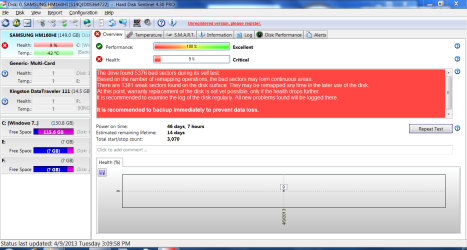
Thanks, Shawn. How about these results:

Capture.PNG.

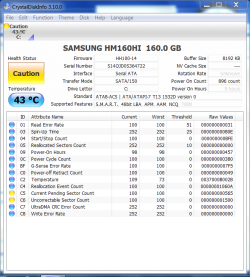
I'm a bit wary of HD Sentinel trial because it always seems to report bad sectors so I wonder if it's not a sales ploy. So I cross-check it with this:

Capture2.PNG

Running full Disk Check again
 
Perhaps you could give a try to HDD Regenerator 2011 . The version up there is made for repairing one sector only unless you buy. But at least it does the job for One.

I've used it successfully on a IDE Drive early 2011.

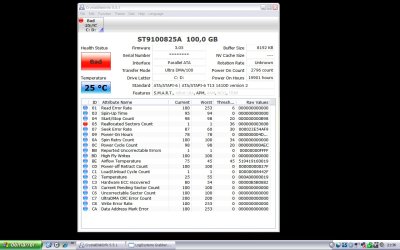
This is what it tells me now and since it had never annoyed me really.
 

Attachments

  • GRAB0000.jpg
    GRAB0000.jpg
    112.4 KB · Views: 15
Last edited:

My Computer

Computer type
PC/Desktop
Computer Manufacturer/Model Number
Custom Build
OS
Windows 7 Professional SP1 - x64 [Non-UEFI Boot]
CPU
Ivy Bridge Core i5 3570K (Delidded)
Motherboard
Asus P8Z77-V LE PLUS
Memory
G.Skill "Ares" DDR3 PC3-12800 - 1600MHz (16Gb)
Graphics Card(s)
Asus Dual-RX480-O4G
Sound Card
Creative Sound Blaster Z w/5.1 sound system
Monitor(s) Displays
Asus IPS 23"
Screen Resolution
16/9
Hard Drives
Internal:
500Go Sata 6Gb/s (x2)
500Go Sata 3Gb/s (x2)
SSD 60Go Sata 6Gb/s
PSU
In Win C 900W Series 80+ Platinum
Case
Thermaltake Chaser A71
Cooling
Custom Water Cooling Loop
Keyboard
Cooler Master QuickFire XTi
Mouse
Razer Imperator 2012 (4G)
Antivirus
MSE
Browser
IE 11.0.xxx Rtm
Other Info
"Raid0" with Intel Smart Response Technology (HDD/SSD)
Greg, Samsung was bought out by Seagate so I suspect seatools will run fine on it. I think I would run chkdsk on it. As shawn says, that will usually mark any bad sectors so the drive des not use them. I honestly would not be concerned with 1 bad sector, although I would be sure to do regular backups, as I know you do already. I seriously doubt dell would replace the drive unless it failed their diagnostic test. And, I still have the Samsung diagnostic test, EStool. I could zip it up and send it if you like.
 

My Computers

System One System Two

  • Computer type
    PC/Desktop
    Computer Manufacturer/Model Number
    ALWAYS UNDER CONSTRUCTION
    OS
    Windows 11 Pro
    CPU
    Ryzen 9 5900X
    Motherboard
    Asus X570 Crosshair Viii Hero
    Memory
    32GB G Skill DDR4-3600
    Graphics Card(s)
    EVGA RTX 3080 FTW 3 Ultra
    Sound Card
    On Board/Sennheiser PC37X Headset
    Monitor(s) Displays
    3 X Asus 27"
    Screen Resolution
    2560x1440
    Hard Drives
    2 X 1 TB NVME drives
    PSU
    EVGA 850
    Case
    Phanteks Eclipse P400A
    Cooling
    EVGA 280 AIO
    Keyboard
    Logitech G510s/ Logitech G13
    Mouse
    Logitech G502
    Internet Speed
    24/1
    Antivirus
    ESET/MBAM Pro/SAS Pro
    Browser
    Chrome/ Firefox/ Edge
  • Computer type
    Laptop
    System Manufacturer/Model Number
    Dell 16 Plus
    OS
    Windows 11 Pro
    CPU
    Intel Ultra 9 288V
    Memory
    32 GB LPDDR5X 8533
    Monitor(s) Displays
    16" Mini-LED HDR600 Touch 90 Hz
    Screen Resolution
    2560X1600
    Hard Drives
    1 TB NVME
Thanks. Running Seatools now.

I'm also running HDD Regenerator on my test box from flash.

Will see if Seatools will do the same job first.

Would love to have Samsung utility which I've never come across, Steve! :p Can it be made bootable which surely is required to fix sectors?
 

My Computers

System One System Two

  • Computer type
    PC/Desktop
    Computer Manufacturer/Model Number
    ALWAYS UNDER CONSTRUCTION
    OS
    Windows 11 Pro
    CPU
    Ryzen 9 5900X
    Motherboard
    Asus X570 Crosshair Viii Hero
    Memory
    32GB G Skill DDR4-3600
    Graphics Card(s)
    EVGA RTX 3080 FTW 3 Ultra
    Sound Card
    On Board/Sennheiser PC37X Headset
    Monitor(s) Displays
    3 X Asus 27"
    Screen Resolution
    2560x1440
    Hard Drives
    2 X 1 TB NVME drives
    PSU
    EVGA 850
    Case
    Phanteks Eclipse P400A
    Cooling
    EVGA 280 AIO
    Keyboard
    Logitech G510s/ Logitech G13
    Mouse
    Logitech G502
    Internet Speed
    24/1
    Antivirus
    ESET/MBAM Pro/SAS Pro
    Browser
    Chrome/ Firefox/ Edge
  • Computer type
    Laptop
    System Manufacturer/Model Number
    Dell 16 Plus
    OS
    Windows 11 Pro
    CPU
    Intel Ultra 9 288V
    Memory
    32 GB LPDDR5X 8533
    Monitor(s) Displays
    16" Mini-LED HDR600 Touch 90 Hz
    Screen Resolution
    2560X1600
    Hard Drives
    1 TB NVME
Greg,

9% isn't so bad, but I would keep backups of the drive to be safe.

I'd also keep an eye on the drive to make sure it's not getting worse.
 

My Computer

Computer type
PC/Desktop
Computer Manufacturer/Model Number
Self built custom
OS
64-bit Windows 11 Pro for Workstations
CPU
Intel i7-8700K OC'd to 5 GHz
Motherboard
ASUS ROG Maximus XI Formula Z390
Memory
64 GB (4x16GB) G.SKILL TridentZ RGB DDR4 3600 MHz
Graphics Card(s)
ASUS ROG-STRIX-GTX1080TI-O11G-GAMING
Sound Card
Integrated
Monitor(s) Displays
2 x Samsung Odyssey G7 27"
Screen Resolution
2560x1440
Hard Drives
1TB Samsung 990 PRO M.2,
4TB Samsung 990 PRO PRO M.2,
TerraMaster F8 SSD Plus NAS
PSU
Seasonic Prime Titanium 850W
Case
Thermaltake Core P3
Cooling
Corsair Hydro H115i
Keyboard
Logitech wireless K800
Mouse
Logitech MX Master 4
Internet Speed
2 Gb/s Download and 100 Mb/s Upload
Antivirus
Malwarebyte Anti-Malware Premium
Browser
Google Chrome
Other Info
Logitech Z625 speaker system,
Logitech BRIO 4K Pro webcam,
HP Color LaserJet Pro MFP M477fdn,
APC SMART-UPS RT 1000 XL - SURT1000XLI,
Galaxy S23 Plus phone
My rule is: one bad sector is too many. That does not mean it has to be thrown out, but it is suspect. And not to be trusted with sensitive/important data. If any additional bad sectors start popping up then that is the end (at least for me).

That said, sometimes bad sectors happen for other reasons than a bad disk drive. What I will do is do a complete wipe of the drive (writing all zeros or all ones) using Diskpart or PW. This is very different than a format, as it actually writes data to every sector. If the bad sector goes away after a wipe then it is just an anomaly. But if it stays, and in the same place, then start digging the hole.
 

My Computer

Computer type
PC/Desktop
Computer Manufacturer/Model Number
Home Built - Jan 2013
OS
Windows 7 64 Bit Home Premium SP1
CPU
i7-3820
Motherboard
Asus P9X79-PRO - Bios 4608
Memory
GSkill F3-14900CL9Q - 16GB
Graphics Card(s)
EVGA GeForce GTX660 - Driver 352.86
Sound Card
On board Realtek ALC898
Monitor(s) Displays
Acer S271HL
Screen Resolution
1920 x 1080
Hard Drives
#1- Samsung 840 Pro Series
#2- Western Digital WD1002FAEX Sata3 Black
#3- Western Digital WD1002FAEX Sata3 Black
PSU
Corsair CMPSU-850TX-V2 - 850 watt (by Seasonic)
Case
Corsair Obsidian 550D
Cooling
Standard 3 120mm case fans, Cooler Master Hyper 212 EVO
Keyboard
MS KC-0405
Mouse
Intellimouse 5-button
Internet Speed
56 Mbits/Sec (on a good day)
Antivirus
Avast & Malwarebytes
Browser
Firefox
Other Info
Asus DVD - DRW-24B1ST 24X
I hadn't heard that zeroing the drive could recoup bad sectors, just formatting to quarantine them from having data written there. I didn't even Clean the drive since as I said in first post I wanted to preserved the bootable OEM Diagnostics partition. However this seems important enough that I'd like to test it by running Clean All on the drive now and reinstalling.
 
Can you image that OEM Partition?

Also: this procedure will not fix a truly bad sector. It will only recover it if it was an anomaly.
 

My Computer

Computer type
PC/Desktop
Computer Manufacturer/Model Number
Home Built - Jan 2013
OS
Windows 7 64 Bit Home Premium SP1
CPU
i7-3820
Motherboard
Asus P9X79-PRO - Bios 4608
Memory
GSkill F3-14900CL9Q - 16GB
Graphics Card(s)
EVGA GeForce GTX660 - Driver 352.86
Sound Card
On board Realtek ALC898
Monitor(s) Displays
Acer S271HL
Screen Resolution
1920 x 1080
Hard Drives
#1- Samsung 840 Pro Series
#2- Western Digital WD1002FAEX Sata3 Black
#3- Western Digital WD1002FAEX Sata3 Black
PSU
Corsair CMPSU-850TX-V2 - 850 watt (by Seasonic)
Case
Corsair Obsidian 550D
Cooling
Standard 3 120mm case fans, Cooler Master Hyper 212 EVO
Keyboard
MS KC-0405
Mouse
Intellimouse 5-button
Internet Speed
56 Mbits/Sec (on a good day)
Antivirus
Avast & Malwarebytes
Browser
Firefox
Other Info
Asus DVD - DRW-24B1ST 24X
My rule is: one bad sector is too many. That does not mean it has to be thrown out, but it is suspect. And not to be trusted with sensitive/important data. If any additional bad sectors start popping up then that is the end (at least for me).

That is my philosophy as well, if an HDD starts having bad sectors then it's getting replaced and the data cloned out ASAP! I've so far had around 3~4 HDDs of mine develop bad sectors over the years, but I've never experienced data loss because I always replace/clone at the first sight of bad sectors.

I recently had one of my WD Caviar Black 1TB internal SATA HDDs develop bad sectors and a whole buttload of "pending" sectors (aka "weak" sectors) such that the SMART value for "Current Pending Sector Count" was an eye-popping 1 out of 200. Needless to say I had an "oshi--" moment and that was replaced and cloned the very next day which was the earliest I could procure a replacement HDD.

With ~5400 bad sectors and ~1400 pending sectors on your drive, I'd just grab a replacement HDD if the choice is available to you and clone the data off to deal with it once and for all.
 

My Computer

Computer type
PC/Desktop
Computer Manufacturer/Model Number
N/A (custom-built)
OS
Windows 7 Ultimate x64 SP1
CPU
Intel Core i7 2700K @ 3.5GHz (TurboBoost disabled)
Motherboard
ASUS P8Z68-V/GEN3
Memory
16GB (4x4GB) Kingston HyperX DDR3 1600MHz @ 1333MHz
Graphics Card(s)
Nvidia EVGA GeForce GTX 1060 6GB
Sound Card
Realtek High Definition Audio (motherboard integrated)
Monitor(s) Displays
NEC Multisync EX231W
Screen Resolution
1920x1080 @ 60Hz via DVI-D
Hard Drives
2x Western Digital 1TB SATA3 Caviar Black Internal HDD // 1x WD 500GB USB 3.0 "My Passport Essential" External HDD // 1x WD 1TB USB 3.0 "My Passport Essential" External HDD // 2x WD 2TB USB 3.0 "My Passport Essential" External HDD
PSU
Corsair Professional Series Gold AX850
Case
Antec 300
Cooling
Air-cooling
Keyboard
Steelseries 6Gv2
Mouse
Steelseries Sensei RAW Glossy, Logitech M500
Internet Speed
DSL (AT&T)
Antivirus
Microsoft Security Essentials
Browser
Pale Moon, Mozilla Firefox 12, Opera 12, Chromium, IE9
Other Info
Virtual Machines (VirtualBox):
* Japanese Windows XP Professional SP3
* Japanese Windows 7 Professional SP1
The combination of Clean All and full format via Diskpart should give me everything that can be done prior to reinstall, right? Doing that now. I'll then run the SMART tools again. Do you trust HDD Sentinel? Seems it always report bad sectors quarantined in trial version.

This is a reinstall I'm doing for a friend who doesn't have anything on it he cares about losing. It was given to him with Dell BIOS locked which took a good part of yesterday to get past, to find the HD also locked, then a Windows password.
 
Yikes! That sounds like a "fun" project!

I only trust the major HDD diagnostic Utilities. I have more faith in ChkDsk than a lot of anything else. And I have found that Seatools works pretty well with almost any brand of HDD.
 

My Computer

Computer type
PC/Desktop
Computer Manufacturer/Model Number
Home Built - Jan 2013
OS
Windows 7 64 Bit Home Premium SP1
CPU
i7-3820
Motherboard
Asus P9X79-PRO - Bios 4608
Memory
GSkill F3-14900CL9Q - 16GB
Graphics Card(s)
EVGA GeForce GTX660 - Driver 352.86
Sound Card
On board Realtek ALC898
Monitor(s) Displays
Acer S271HL
Screen Resolution
1920 x 1080
Hard Drives
#1- Samsung 840 Pro Series
#2- Western Digital WD1002FAEX Sata3 Black
#3- Western Digital WD1002FAEX Sata3 Black
PSU
Corsair CMPSU-850TX-V2 - 850 watt (by Seasonic)
Case
Corsair Obsidian 550D
Cooling
Standard 3 120mm case fans, Cooler Master Hyper 212 EVO
Keyboard
MS KC-0405
Mouse
Intellimouse 5-button
Internet Speed
56 Mbits/Sec (on a good day)
Antivirus
Avast & Malwarebytes
Browser
Firefox
Other Info
Asus DVD - DRW-24B1ST 24X
Check Disk came back clean twice.

Seatools Long Test said One Bad Sector.

Seatools Short Test then said not a Seagate HD.
 
The combination of Clean All and full format via Diskpart should give me everything that can be done prior to reinstall, right? Doing that now. I'll then run the SMART tools again. Do you trust HDD Sentinel? Seems it always report bad sectors quarantined in trial version.

This is a reinstall I'm doing for a friend who doesn't have anything on it he cares about losing. It was given to him with Dell BIOS locked which took a good part of yesterday to get past, to find the HD also locked, then a Windows password.

I think he should take whoever gave it to him off his Christmas card list.
 

My Computers

System One System Two

  • Computer type
    PC/Desktop
    Computer Manufacturer/Model Number
    ALWAYS UNDER CONSTRUCTION
    OS
    Windows 11 Pro
    CPU
    Ryzen 9 5900X
    Motherboard
    Asus X570 Crosshair Viii Hero
    Memory
    32GB G Skill DDR4-3600
    Graphics Card(s)
    EVGA RTX 3080 FTW 3 Ultra
    Sound Card
    On Board/Sennheiser PC37X Headset
    Monitor(s) Displays
    3 X Asus 27"
    Screen Resolution
    2560x1440
    Hard Drives
    2 X 1 TB NVME drives
    PSU
    EVGA 850
    Case
    Phanteks Eclipse P400A
    Cooling
    EVGA 280 AIO
    Keyboard
    Logitech G510s/ Logitech G13
    Mouse
    Logitech G502
    Internet Speed
    24/1
    Antivirus
    ESET/MBAM Pro/SAS Pro
    Browser
    Chrome/ Firefox/ Edge
  • Computer type
    Laptop
    System Manufacturer/Model Number
    Dell 16 Plus
    OS
    Windows 11 Pro
    CPU
    Intel Ultra 9 288V
    Memory
    32 GB LPDDR5X 8533
    Monitor(s) Displays
    16" Mini-LED HDR600 Touch 90 Hz
    Screen Resolution
    2560X1600
    Hard Drives
    1 TB NVME
just formatting to quarantine them from having data written there

Greg,

If the bad sector/s are contiguous, could you not created an unallocated space across these sectors, sitting between two partitions, preventing data being written to them?

In other words, create a partition eitherside of the bade sctors?

Regards,
Golden
 

My Computer

Computer type
PC/Desktop
Computer Manufacturer/Model Number
Golden Mk. I.4
OS
Windows 10 Pro x64 ; Xubuntu x64
CPU
Intel i7 860 @ 2.80 GHz O/C'ed to 4.0GHz
Motherboard
Gigabyte P55A-UD3R Rev.1. Award BIOS F13
Memory
16GB Corsair Vengance DDR3 @ 661 MHz Dual Channel (9-9-9-24)
Graphics Card(s)
EVGA NVidia GTX 560 1024MB
Sound Card
Realtek Integrated
Monitor(s) Displays
Dual Samsung SyncMaster 2494HS
Screen Resolution
1920*1080 and 1920*1080
Hard Drives
1*Samsung 840 EVO 120GB SSD;
1*OCZ Vertex 2 60GB SSD;
2*Samsung F3 SpinPoint 1TB in RAID0;
1*Samsung F1 SpinPoint 1TB;
2*Western Digital 1TB External USB 3.0
1*Western Digital 500GB External USB 3.0
1*Seagate 500GB External USB 2.0
PSU
Thermaltake ToughPower QFan 750W
Case
Thermaltake Element S VK60001W2Z
Cooling
Corsair H60 Water Cooling, 2*230mm and 2*80mm case fans
Keyboard
Logitech G110
Mouse
Logitech MX518
Just finished writing zeroes and full format.

Same readings as before. I'll warn the owner.
 
Back
Top