One Little Bad Sector

Hi,

This seems like a good thread to comment now.

I have this friend's PC. It's an old laptop. It has a single drive, a Hitachi DK23FA. It's IDE, 80GB.

I formatted the drive with NTFS, installed WinXP, and then created another partition. When aligning there was an error:

279052d1375289847-installing-two-systems-sam_0001.jpg


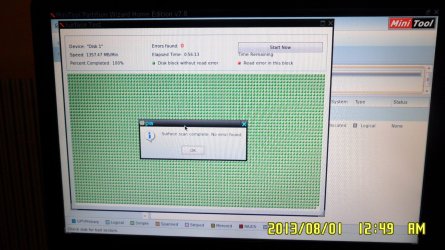
Then I did a surface scan with Partition Wizard and found ONE bad sector:

279053d1375289847-installing-two-systems-sam_0002.jpg


I tried finding Hitachi tools with a link provided but it seems there are not since it's old.

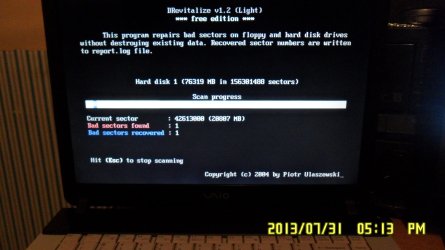
So right now I'm running DRevitalize (attached image). I will let it finish, but I believe there will be just that one bad sector.

Should I tell my friend to replace the drive?
It won't be used for any personal or valuable information, just the OS.
I used to believe that once there's one bad sector I should replace the drive. If it were MINE I'd replace it, since I store valuable info. But this is not the case.
It also made a strange noise randomly when writing data.


Any opinion?
Thanks in advance.
 

Attachments
  • SAM_0002.JPG
    SAM_0002.JPG
    165.7 KB · Views: 3

My Computer My Computer

Computer type
PC/Desktop
OS
Windows 7 Ultimate x64
CPU
AMD Sempron 145, 2800 MHz (14 x 200)
Motherboard
ASRock N68-VS3 FX (nVIDIA nForce 7025-630a, AMD K10)
Memory
6 GB Kingston
Graphics Card(s)
NVIDIA GeForce 7025 / NVIDIA nForce 630a (256 MB)
Sound Card
VIA VT1705 @ nVIDIA nForce 7025-630a (MCP68SE)
Monitor(s) Displays
LG E1941 (Analog) [18.5" LCD] (21112731)
Screen Resolution
1366x768
Hard Drives
* SAMSUNG HD161HJ SCSI Disk Device
* Toshiba Canvio 3.0 USB
Keyboard
Microsoft Wireless Desktop 800 keyboard
Mouse
Microsoft Wireless Desktop 800 mouse
Internet Speed
12mbps
Antivirus
avast!
Browser
Google Chrome
I use the maker's Hard Drive Diagnostic Procedure extended CD scan to determine with certainty the condition of the HD.

Then http://www.sevenforums.com/tutorials/433-disk-check.html will determine the condition of the file system residing on the HD.

The two tests should be considered determinative. However with the HD noise you report in your other thread I think that needs to be considered in spite of only one bad sector.

Glad you found this thread as I'd forgotten it.
 
Hi,

Thank you for replying.
Didn't realize it was you! :)

Well, after running the tool I said, it looks like a happy ending.
I even finished installing Win7! That's right, not XP, 7. And it's working smoothly (as smooth as it can go with this old PC, which is quite good).

Now I can run the tool you suggested, inside of Windows.

One way or another, I might be buying a small IDE drive and give it as a present. This computer belongs to someone I owe many favors to, that's why I'm doing this.
So I think I'll just finish installing Win7 and run the HD tool. Tomorrow I'll clone the disk with DriveImage XML to the new one and that will be it.


Thanks a lot for your help.


Now I don't even know what happened to that bad sector, but I'm curious. So I'll be learning about that and storage in the next few days.
 

Attachments

  • SAM_0003.JPG
    SAM_0003.JPG
    336.1 KB · Views: 4

My Computer My Computer

Computer type
PC/Desktop
OS
Windows 7 Ultimate x64
CPU
AMD Sempron 145, 2800 MHz (14 x 200)
Motherboard
ASRock N68-VS3 FX (nVIDIA nForce 7025-630a, AMD K10)
Memory
6 GB Kingston
Graphics Card(s)
NVIDIA GeForce 7025 / NVIDIA nForce 630a (256 MB)
Sound Card
VIA VT1705 @ nVIDIA nForce 7025-630a (MCP68SE)
Monitor(s) Displays
LG E1941 (Analog) [18.5" LCD] (21112731)
Screen Resolution
1366x768
Hard Drives
* SAMSUNG HD161HJ SCSI Disk Device
* Toshiba Canvio 3.0 USB
Keyboard
Microsoft Wireless Desktop 800 keyboard
Mouse
Microsoft Wireless Desktop 800 mouse
Internet Speed
12mbps
Antivirus
avast!
Browser
Google Chrome
I don't really know WHY a wipe works when it does. In my experience testing old hard drives it works to correct bad sectors about one out every 5 hard drives that have only one, two, or three bad sectors.
Some guesses would be:

  • a spec of dust or grit that moves (blows away) eventually
  • an electrical glitch during a write process
  • an electrical glitch during a disk check
Once a system marks a sector as bad it will stay that way until the file system is reset. So if the sectors gets marked bad due to some random anomaly it could be revived.


There is also the real possibility that the anomaly is in the testing software (Partition Wizard). It is possible that it misreads a bad sector the first time but not the second.

That's why it is always a good idea to check the drives with the manufacturer's drive diagnostic.
 

My Computer My Computer

Computer type
PC/Desktop
Computer Manufacturer/Model Number
Home Built - Jan 2013
OS
Windows 7 64 Bit Home Premium SP1
CPU
i7-3820
Motherboard
Asus P9X79-PRO - Bios 4608
Memory
GSkill F3-14900CL9Q - 16GB
Graphics Card(s)
EVGA GeForce GTX660 - Driver 352.86
Sound Card
On board Realtek ALC898
Monitor(s) Displays
Acer S271HL
Screen Resolution
1920 x 1080
Hard Drives
#1- Samsung 840 Pro Series
#2- Western Digital WD1002FAEX Sata3 Black
#3- Western Digital WD1002FAEX Sata3 Black
PSU
Corsair CMPSU-850TX-V2 - 850 watt (by Seasonic)
Case
Corsair Obsidian 550D
Cooling
Standard 3 120mm case fans, Cooler Master Hyper 212 EVO
Keyboard
MS KC-0405
Mouse
Intellimouse 5-button
Internet Speed
56 Mbits/Sec (on a good day)
Antivirus
Avast & Malwarebytes
Browser
Firefox
Other Info
Asus DVD - DRW-24B1ST 24X
As the theory goes, the HDD controller is continuously monitoring for soft bad sectors and remaps any to one in the reserved category. ( The Windows check disk does the same but on user command). So in theory one should not see any bad sectors. If it is seen then what it means is that all reserved sectors are already exhausted and the ones seen have no place to go.

The HDD controller does not always do a good job and it may so happen that it may decide the reserved sectors are already exhausted a little prematurely even when a few are left. By contrast the manufacturer's diagnostic Utility is more precise. That would explain why in one of five cases it successfully remaps a few leftovers by the HDD Controller.

But as far as the user is concerned, even if one bad sector is seen, it is a red flag. It can only mean the beginning of the end of the hard drive. Soon more and more bad sectors will crop up with no place to go. In rare cases where all of a sudden massive bad sectors are created, the controller may write-protect the HDD. (This is seen more often in flash drives because of the limited capacity and limited number of reserved sectors.)
 

My Computer My Computer

OS
Windows 7 Home Premium 32 bit
Hi RonAshman. Does the hard drive still make the noise?
 

My Computer My Computer

Computer type
PC/Desktop
Computer Manufacturer/Model Number
Home made Desktop
OS
Windows 10 Pro. 64/ version 1709 Windows 7 Pro/64
CPU
Intel i7-6800K @ 4.3
Motherboard
ASUS X-99 Deluxe II
Memory
Corsair Platinum 16 gig @2400
Graphics Card(s)
EVGA GTX 1070 OC
Monitor(s) Displays
Asus 27" LED LCD/VE278Q
Screen Resolution
1920-1080 or 1280-720 HDMI
Hard Drives
INTEL SSD 730-240 Gb Sata 3.0/
PSU
EVGA Platium 1200W
Case
Phanteks Luxe Tempered Glass 8 fans/ one radiator
Cooling
XSPC/ Water Cooled CPU
Keyboard
Das 4 Professional
Mouse
Logitech M705/MX Anywhere 2-S
Internet Speed
100 mbits
Antivirus
Microsoft Security Essentials/ Malwarebytes Premium 3.0/ SAS
Browser
I.E. 11 default/Firefox/ ISP Time Warner Cable/Spectrum
Other Info
LG BluRay Burner/
Sound system-KLipsch-THX/
Icy Dock ssd Hot Swap bays.
As the theory goes, the HDD controller is continuously monitoring for soft bad sectors and remaps any to one in the reserved category. ( The Windows check disk does the same but on user command). So in theory one should not see any bad sectors. If it is seen then what it means is that all reserved sectors are already exhausted and the ones seen have no place to go.

The HDD controller does not always do a good job and it may so happen that it may decide the reserved sectors are already exhausted a little prematurely even when a few are left. By contrast the manufacturer's diagnostic Utility is more precise. That would explain why in one of five cases it successfully remaps a few leftovers by the HDD Controller.

But as far as the user is concerned, even if one bad sector is seen, it is a red flag. It can only mean the beginning of the end of the hard drive. Soon more and more bad sectors will crop up with no place to go. In rare cases where all of a sudden massive bad sectors are created, the controller may write-protect the HDD. (This is seen more often in flash drives because of the limited capacity and limited number of reserved sectors.)

Thanks for that explanation jumanji. Very helpful.
I'd give you more rep, but I gotta spread some more love around first!
 

My Computer My Computer

Computer type
PC/Desktop
Computer Manufacturer/Model Number
Home Built - Jan 2013
OS
Windows 7 64 Bit Home Premium SP1
CPU
i7-3820
Motherboard
Asus P9X79-PRO - Bios 4608
Memory
GSkill F3-14900CL9Q - 16GB
Graphics Card(s)
EVGA GeForce GTX660 - Driver 352.86
Sound Card
On board Realtek ALC898
Monitor(s) Displays
Acer S271HL
Screen Resolution
1920 x 1080
Hard Drives
#1- Samsung 840 Pro Series
#2- Western Digital WD1002FAEX Sata3 Black
#3- Western Digital WD1002FAEX Sata3 Black
PSU
Corsair CMPSU-850TX-V2 - 850 watt (by Seasonic)
Case
Corsair Obsidian 550D
Cooling
Standard 3 120mm case fans, Cooler Master Hyper 212 EVO
Keyboard
MS KC-0405
Mouse
Intellimouse 5-button
Internet Speed
56 Mbits/Sec (on a good day)
Antivirus
Avast & Malwarebytes
Browser
Firefox
Other Info
Asus DVD - DRW-24B1ST 24X
TVeblen: Well, taking into account what I read in the last few days I could say you couldn't be more right about this. It could have been a temporary anomaly, but I've already got another drive just in case.


jumanji: Well that's what I was afraid of, and I don't want this PC back so I replaced the disk.


Layback Bear: Apparently it does not. I haven't heard it anymore and I used the PC to play music and install software (MS Office and accounting software) and just normal noise, not the weird thing from the other day.
 

My Computer My Computer

Computer type
PC/Desktop
OS
Windows 7 Ultimate x64
CPU
AMD Sempron 145, 2800 MHz (14 x 200)
Motherboard
ASRock N68-VS3 FX (nVIDIA nForce 7025-630a, AMD K10)
Memory
6 GB Kingston
Graphics Card(s)
NVIDIA GeForce 7025 / NVIDIA nForce 630a (256 MB)
Sound Card
VIA VT1705 @ nVIDIA nForce 7025-630a (MCP68SE)
Monitor(s) Displays
LG E1941 (Analog) [18.5" LCD] (21112731)
Screen Resolution
1366x768
Hard Drives
* SAMSUNG HD161HJ SCSI Disk Device
* Toshiba Canvio 3.0 USB
Keyboard
Microsoft Wireless Desktop 800 keyboard
Mouse
Microsoft Wireless Desktop 800 mouse
Internet Speed
12mbps
Antivirus
avast!
Browser
Google Chrome
I'm not sure how scanning a hard drive can fix a mechanical sounding noise.
I would be very watchful of a hard drive that these noises come and go.
 

My Computer My Computer

Computer type
PC/Desktop
Computer Manufacturer/Model Number
Home made Desktop
OS
Windows 10 Pro. 64/ version 1709 Windows 7 Pro/64
CPU
Intel i7-6800K @ 4.3
Motherboard
ASUS X-99 Deluxe II
Memory
Corsair Platinum 16 gig @2400
Graphics Card(s)
EVGA GTX 1070 OC
Monitor(s) Displays
Asus 27" LED LCD/VE278Q
Screen Resolution
1920-1080 or 1280-720 HDMI
Hard Drives
INTEL SSD 730-240 Gb Sata 3.0/
PSU
EVGA Platium 1200W
Case
Phanteks Luxe Tempered Glass 8 fans/ one radiator
Cooling
XSPC/ Water Cooled CPU
Keyboard
Das 4 Professional
Mouse
Logitech M705/MX Anywhere 2-S
Internet Speed
100 mbits
Antivirus
Microsoft Security Essentials/ Malwarebytes Premium 3.0/ SAS
Browser
I.E. 11 default/Firefox/ ISP Time Warner Cable/Spectrum
Other Info
LG BluRay Burner/
Sound system-KLipsch-THX/
Icy Dock ssd Hot Swap bays.
I don't understand either.
One way or another after trying 2 used discs I had it replaced.

I didn't get any new one. Only second hand discs.
Laptop IDE discs really scarce.
 

My Computer My Computer

Computer type
PC/Desktop
OS
Windows 7 Ultimate x64
CPU
AMD Sempron 145, 2800 MHz (14 x 200)
Motherboard
ASRock N68-VS3 FX (nVIDIA nForce 7025-630a, AMD K10)
Memory
6 GB Kingston
Graphics Card(s)
NVIDIA GeForce 7025 / NVIDIA nForce 630a (256 MB)
Sound Card
VIA VT1705 @ nVIDIA nForce 7025-630a (MCP68SE)
Monitor(s) Displays
LG E1941 (Analog) [18.5" LCD] (21112731)
Screen Resolution
1366x768
Hard Drives
* SAMSUNG HD161HJ SCSI Disk Device
* Toshiba Canvio 3.0 USB
Keyboard
Microsoft Wireless Desktop 800 keyboard
Mouse
Microsoft Wireless Desktop 800 mouse
Internet Speed
12mbps
Antivirus
avast!
Browser
Google Chrome
Back
Top