Only 100 megahertz???

Rockrz

New member
Local time
8:30 AM
Messages
242
I just got a new PC running Win 7 64 bit and the mobo is ASUSTeK COMPUTER INC. P8Z77-V LK Rev X.0x... but the Bus Clock is only 100 megahertz

It's got the 3.30 gigahertz Intel Core i5-2500K processor and 16gigs of DDR3 RAM, eventually to be upgraded to 32 gigs of RAM.

I've noticed my second computer (runs XP on purpose) that I just had rebuilt at a local computer shop (new mobo, quad 4 3.2 AMD processor) has a Bus Clock of 200 megahertz

My question is this... on my first computer, is there any way to increase the Bus Clock Speed to 200 megahertz?

Also, is there any advantage to enable hyper-threading?
I noticed both PCs have this disabled by default.

I use both for business purposes where I get busy running numerous applications at the same time.
 

My Computer

OS
Windows 7 64bit
2 Different chip types and 2 types of Tech

default fsb is 100 mhz intel AMD 200mhz


usually intel will be Oc'ed Multi same with amd but you can use a combination of fsb/multi

intel just multi from what i seen but not to sure havn't ran one in a while

Amd multi /fsb just depends on your target
 

My Computer

Computer type
PC/Desktop
Computer Manufacturer/Model Number
CoreI7-6700K MrFingerIII Special Builds
OS
Windows 10 Home Premium 64bit sp1
CPU
Intel I7-6700K @ 4.6 Ghz 1.344 volts everyday OC
Motherboard
Asrock Fatality K6 Z170 Socket 1151
Memory
32GB G-Skill TridentZ 3200mhz 16-18-18-38 DDR4
Graphics Card(s)
Sli Gigabyte Windforce GTX 980 G1
Sound Card
AC97 Creative Rage Tactic 3D Headphones Bluetooth
Monitor(s) Displays
27" Asus ROG Swift PG278Q G-Sync 48" Vizio Smart HD TV
Screen Resolution
2560x1440p 27"- 48" Currently Gaming at 2560x1440p Res 2K
Hard Drives
250GB Samsung Evo840SSD Seagate baracuda 500 GB WD Mybook 500Gb 1TB Seagate Barracuda
PSU
HX1050w Corsair Silver 80plus certified crosfire/sli
Case
Enthod Pro Full Tower
Cooling
Corsair H110i GT 280 mm High Performance WaterBlock
Keyboard
Logitech wireless keyboard
Mouse
Logitech wireless mouse
Internet Speed
Cox Cable 100+ mb
Antivirus
WebRoot Spysweeper with Antivirus
Browser
IE-10, Chrome, Opera
Other Info
My Other Rig is a AMD FX8320E @4.6Ghz 16GB Ballistic Sport Ram
Mobo Asrock Fatality 990FX 120GB OCZ SSD 1TB Seagate Barracuda Corsair H75 Cooling PSU Corsair CX750
GPU GTX Gigabyte 970G1
OK, so with Intel processors having 100 FSB is normal?

I was just wanting to make sure I was not missing out on a teak that could be made to get better performance.

Increasing the Ram from 16 to 32 oughtta help increase performance, right?
 

My Computer

OS
Windows 7 64bit
increasing ram only increases performance if your computer uses all the ram you got allready, if not then its up to you, enabling hyper threading will increase performance by quite a bit, cant recall but i think it it 20% to 30%. all the current sandy/ ivy bridge have the bus clock of 100. you can increase it to a about 106-107 after that most of the time ur pc wont boot and you have to reset cmos
 

My Computer

Computer Manufacturer/Model Number
Packard Bell iMedia 2218 -- Has Been Running For Almost 7 Years!
OS
Windows 7 Ultimate x86
CPU
Intel Pentium D 925 @ 3.00GHz
Motherboard
Socket 775 MCP73VT-PM
Memory
1GB DDR2 667MHz
Graphics Card(s)
Overclocked Asus ATI Radeon X1600 Pro 512MB
Sound Card
Sound Blaster Audigy 570
Monitor(s) Displays
19" LCD Monitor; MW19E-AAA
Screen Resolution
1440 x 900
Hard Drives
500gb 7200rpm (Windows 7) ---
160gb 7200rpm (Backup) ---
1TB Iomega External Drive (7200rpm)
PSU
250w Packard Bell Standard
Case
Packard Bell standard
Cooling
Intel Socket 775 Air Cooler
Keyboard
Wired PS/2 Keyboard
Mouse
Dell Wireless USB Mouse
Internet Speed
Wireles --- Download - 6.63 Mbps Upload - 0.38 Mbps
Other Info
Currently Planning To Build New Computer --- Also Got A Samsung Galaxy Ace II (Plays All Games You Throw At It)
First off, the 2500K does NOT support hyperthreading.......you have 4 cores/threads. Leave Hyperthreading alone.

BCLK is 100MHz by default.....fiddling around with this number without knowing what it does is a recipe for disaster.

Here is a direct quote from a Z77 Overclocking Guide on BCLK:

BCLK Frequency: This function becomes available if X.M.P or Ai Overclock Tuner “Manual”
are selected. The base BCLK frequency is 100MHz. The CPU core frequency is derived via
multiplication with the Turbo Ratio setting (final frequency is displayed at the top-left of the Ai
Tweaker menu). BCLK also adjusts memory operating frequency in association with the
applied memory ratio (Memory Frequency and CPU bus speed: DRAM speed ratio mode
settings below).
Bear in mind that the adjustment margin for this setting is not large - most processors have a
range of 7 MHz +/- the base frequency, although there are some processor samples that can
exceed this.
I would generally leave this alone unless you absolutely know what you are doing. If you want to bump up performance of your CPU, it is unlocked.......you can change the multiplier and get a higher clock speed. I would hoever, read up on overclocking so you have an overall better experience.

If you would like a copy of the Z77 OC'ing guide, PM me and I will send it to you.

I would ditch the RAM upgrade and go with a nice SSD if you don't already have one in that machine. You will see a 0% gain with 32GB of ram more than likely. With an SSD, you will see an increase in performance every time you open up a program, install programs/applications, and starting up/rebooting. Single best upgrade there is, in my opinion.
 

My Computer

Computer type
PC/Desktop
Computer Manufacturer/Model Number
Custom Built
OS
Windows 7 Professional 64bit SP1
CPU
Intel Core i5-3570K @ 4.5GHz
Motherboard
Asus Sabertooth Z77
Memory
Corsair Vengeance 16GB (4x4) @1866MHz CL 9-9-9-24 1T
Graphics Card(s)
EVGA GTX 750 Ti FTW
Sound Card
Onboard Audio
Monitor(s) Displays
Dell S2309W
Screen Resolution
1920x1080
Hard Drives
Samsung 830 128GB SSD - OS
(4) Seagate 5TB HDD
(1) Seagate 2TB HDD
PSU
Seasonic X750 80+ Gold Full Modular
Case
Antec Eleven Hundred Super Mid Tower
Cooling
Intel Liquid Cooler
Keyboard
Max Nighthawk X8 Mechanical keyboard
Mouse
Mionix Naos 7000
Internet Speed
50 Mbps Down / 10 Mbps Up
Antivirus
Microsoft Security Essentials/Malwarebytes Anti-Malware
Browser
Chrome/Firefox
Other Info
Klipsch ProMedia 2.1's
Asus RT-N66R Wireless Router
agree with kbrady, i wasnt sure but i think only the i3 and extreme i7s have hyper threading is that correct?, also on socket 2011 it gives 100/166/266mhz fsb option + unlocked multiplier
 

My Computer

Computer Manufacturer/Model Number
Packard Bell iMedia 2218 -- Has Been Running For Almost 7 Years!
OS
Windows 7 Ultimate x86
CPU
Intel Pentium D 925 @ 3.00GHz
Motherboard
Socket 775 MCP73VT-PM
Memory
1GB DDR2 667MHz
Graphics Card(s)
Overclocked Asus ATI Radeon X1600 Pro 512MB
Sound Card
Sound Blaster Audigy 570
Monitor(s) Displays
19" LCD Monitor; MW19E-AAA
Screen Resolution
1440 x 900
Hard Drives
500gb 7200rpm (Windows 7) ---
160gb 7200rpm (Backup) ---
1TB Iomega External Drive (7200rpm)
PSU
250w Packard Bell Standard
Case
Packard Bell standard
Cooling
Intel Socket 775 Air Cooler
Keyboard
Wired PS/2 Keyboard
Mouse
Dell Wireless USB Mouse
Internet Speed
Wireles --- Download - 6.63 Mbps Upload - 0.38 Mbps
Other Info
Currently Planning To Build New Computer --- Also Got A Samsung Galaxy Ace II (Plays All Games You Throw At It)
I bought my new PC from Velocity Micro and they say it is a "3.30 gigahertz Intel Core i5-2500K processor Hyperclocked to 4.0 GHz"

Anyway to verify it is "Hyperclocked" to 4.0 GHz?
Is hyperclocking the same as overclocking?

I'm not looking to blow up my computer... I just want to get the best performance.
 

My Computer

OS
Windows 7 64bit
The 100mhz is the Base clock ratio.
This is the base clock speed EVERYTHING runs off of. The Chipset, PCI, etc ....

So by changing this, you not only increase the CPU clock speed, but the memory speed, PCI Speed, and so on. Everything connected to it goes up.
This is why everything can fall apart quickly when Overclocking here. Some systems can not handle it.

So, on the Intel to OC you use the CPU Multiplier to OC the CPU. Cpu multi * BCLK = Clock speed. I/E x44 * 100 = 4.4Ghz Cpu speed.
Everything else remains at default values.
For the RAm, its speed can be changed by directly setting its clock speed to 1333,1600,1866 etc. This will not effect CPU speed, chipset speed,or and other speeds. Only RAM.


Now, on Socket 2011, it works slightly different. Messing with the base clock still cause the same issue here as well, but the implemented the star which only effects the CPU/RAM together leaving the rest alone.


So the same formula applies, CPU Multi * base clock setting you are using. You may need to use lower multipliers. BUT, it also has a impact on the Memory speed, not just the CPU.

So lets say your CPU has a x35 multiplier, and you have the Memory set to run at DDR3 1600. Without making anyother changes, only changing the BLCK to 125 it would be:
RAM= DDR3 2000 CPU=4.38ghz

You need to be careful with this, and be sure you have the hardware to handle it.

Everything else runs at its default speed.
Im probably not describing it corrently but hopefully it makes sense.


In short ... Leave the BLCK alone. Use CPU multi, and direct RAM speed setting to OC.

For the record if you have RAm that runs at 1600-1866 or even 2133 .... Ocing it will not really make much of a difference. Just run it at its rated speed.
If you want to OC, just use the CPU multi only, and increase the CPU clock speed.
 

My Computer

Computer Manufacturer/Model Number
Custom (Self Build)
OS
Windows 7 Home Premium 64bit
CPU
Intel Core i7 2700k
Motherboard
eVGA P67 SLI
Memory
8GB Mushkin Redline Ridgebacks @1866
Graphics Card(s)
EVGA GTX570 SC
Sound Card
XiFi Titanium HD
Monitor(s) Displays
LG W2453V
Screen Resolution
1920x1080
Hard Drives
Intel 320 80GB -- Intel X25-V 40GB --WD Black 1TB x2 -- WD Blue 640GB
PSU
Seasonic x750
Case
Corsair 600T SE White
Cooling
eVGA Superclocked CPU Cooler
Keyboard
Saitek Cyborg
Antivirus
Kaspersky
Browser
IE
Other Info
LG BD/DVD

My Computer

Computer type
PC/Desktop
Computer Manufacturer/Model Number
Custom Built
OS
Windows 7 Professional 64bit SP1
CPU
Intel Core i5-3570K @ 4.5GHz
Motherboard
Asus Sabertooth Z77
Memory
Corsair Vengeance 16GB (4x4) @1866MHz CL 9-9-9-24 1T
Graphics Card(s)
EVGA GTX 750 Ti FTW
Sound Card
Onboard Audio
Monitor(s) Displays
Dell S2309W
Screen Resolution
1920x1080
Hard Drives
Samsung 830 128GB SSD - OS
(4) Seagate 5TB HDD
(1) Seagate 2TB HDD
PSU
Seasonic X750 80+ Gold Full Modular
Case
Antec Eleven Hundred Super Mid Tower
Cooling
Intel Liquid Cooler
Keyboard
Max Nighthawk X8 Mechanical keyboard
Mouse
Mionix Naos 7000
Internet Speed
50 Mbps Down / 10 Mbps Up
Antivirus
Microsoft Security Essentials/Malwarebytes Anti-Malware
Browser
Chrome/Firefox
Other Info
Klipsch ProMedia 2.1's
Asus RT-N66R Wireless Router
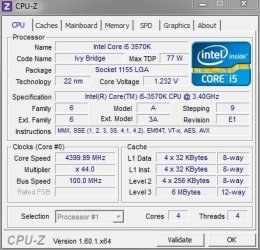
Ok, I need you to put the CPU under load so I can see what the clock speed is.....you don't have to validate it, just use Win7 snipping tool and post it here.

Go here Fossil Free Online CPU Load or Stress Test. and click on 100% and THEN run cpu-z. I'll post mine here to give you an idea of what I need.

CPU-Z Example.JPG
 

My Computer

Computer type
PC/Desktop
Computer Manufacturer/Model Number
Custom Built
OS
Windows 7 Professional 64bit SP1
CPU
Intel Core i5-3570K @ 4.5GHz
Motherboard
Asus Sabertooth Z77
Memory
Corsair Vengeance 16GB (4x4) @1866MHz CL 9-9-9-24 1T
Graphics Card(s)
EVGA GTX 750 Ti FTW
Sound Card
Onboard Audio
Monitor(s) Displays
Dell S2309W
Screen Resolution
1920x1080
Hard Drives
Samsung 830 128GB SSD - OS
(4) Seagate 5TB HDD
(1) Seagate 2TB HDD
PSU
Seasonic X750 80+ Gold Full Modular
Case
Antec Eleven Hundred Super Mid Tower
Cooling
Intel Liquid Cooler
Keyboard
Max Nighthawk X8 Mechanical keyboard
Mouse
Mionix Naos 7000
Internet Speed
50 Mbps Down / 10 Mbps Up
Antivirus
Microsoft Security Essentials/Malwarebytes Anti-Malware
Browser
Chrome/Firefox
Other Info
Klipsch ProMedia 2.1's
Asus RT-N66R Wireless Router
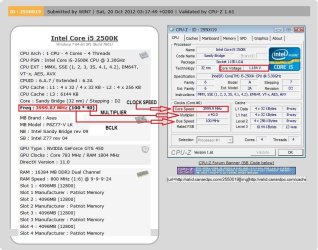
That's what I needed to see, good job. It looks like the people who sold you the PC have already Overclocked it to 4.0GHz. I will re-post your pic and show you what some of the numbers mean.

View attachment 237453
 

Attachments

  • 2500K CPU-Z.JPG
    2500K CPU-Z.JPG
    117.8 KB · Views: 27
Last edited:

My Computer

Computer type
PC/Desktop
Computer Manufacturer/Model Number
Custom Built
OS
Windows 7 Professional 64bit SP1
CPU
Intel Core i5-3570K @ 4.5GHz
Motherboard
Asus Sabertooth Z77
Memory
Corsair Vengeance 16GB (4x4) @1866MHz CL 9-9-9-24 1T
Graphics Card(s)
EVGA GTX 750 Ti FTW
Sound Card
Onboard Audio
Monitor(s) Displays
Dell S2309W
Screen Resolution
1920x1080
Hard Drives
Samsung 830 128GB SSD - OS
(4) Seagate 5TB HDD
(1) Seagate 2TB HDD
PSU
Seasonic X750 80+ Gold Full Modular
Case
Antec Eleven Hundred Super Mid Tower
Cooling
Intel Liquid Cooler
Keyboard
Max Nighthawk X8 Mechanical keyboard
Mouse
Mionix Naos 7000
Internet Speed
50 Mbps Down / 10 Mbps Up
Antivirus
Microsoft Security Essentials/Malwarebytes Anti-Malware
Browser
Chrome/Firefox
Other Info
Klipsch ProMedia 2.1's
Asus RT-N66R Wireless Router
That's what I needed to see, good job. It looks like the people who sold you the PC have already Overclocked it to 4.0GHz. I will re-post your pic and show you what some of the numbers mean.

Cool... when I saw that option that's what I was thinking it meant which is why I got that.

So, would there be any benefit to increasing the memory speed?

I heard there is pre-configured RAM that can do this just by installing it.
 

My Computer

OS
Windows 7 64bit
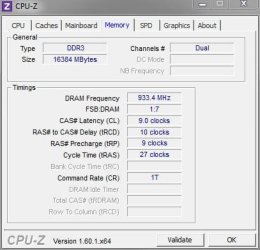
On CPU-Z, click on the Memory Tab and take a snippet and post it here.........This is the stuff I need to see...
CPU-Z Memory.JPG
 

My Computer

Computer type
PC/Desktop
Computer Manufacturer/Model Number
Custom Built
OS
Windows 7 Professional 64bit SP1
CPU
Intel Core i5-3570K @ 4.5GHz
Motherboard
Asus Sabertooth Z77
Memory
Corsair Vengeance 16GB (4x4) @1866MHz CL 9-9-9-24 1T
Graphics Card(s)
EVGA GTX 750 Ti FTW
Sound Card
Onboard Audio
Monitor(s) Displays
Dell S2309W
Screen Resolution
1920x1080
Hard Drives
Samsung 830 128GB SSD - OS
(4) Seagate 5TB HDD
(1) Seagate 2TB HDD
PSU
Seasonic X750 80+ Gold Full Modular
Case
Antec Eleven Hundred Super Mid Tower
Cooling
Intel Liquid Cooler
Keyboard
Max Nighthawk X8 Mechanical keyboard
Mouse
Mionix Naos 7000
Internet Speed
50 Mbps Down / 10 Mbps Up
Antivirus
Microsoft Security Essentials/Malwarebytes Anti-Malware
Browser
Chrome/Firefox
Other Info
Klipsch ProMedia 2.1's
Asus RT-N66R Wireless Router
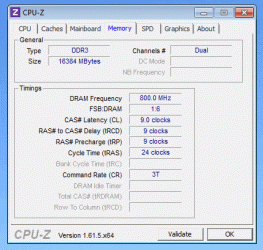
Don't know how to post a pic, but here is a .gif attachment...Pic_1_GIF.gif
 

My Computer

OS
Windows 7 64bit
I'd stick with that RAM, although I would try changing your Command Rate(CR) to 1T in the BIOS.
 

My Computer

Computer type
PC/Desktop
Computer Manufacturer/Model Number
Custom Built
OS
Windows 7 Professional 64bit SP1
CPU
Intel Core i5-3570K @ 4.5GHz
Motherboard
Asus Sabertooth Z77
Memory
Corsair Vengeance 16GB (4x4) @1866MHz CL 9-9-9-24 1T
Graphics Card(s)
EVGA GTX 750 Ti FTW
Sound Card
Onboard Audio
Monitor(s) Displays
Dell S2309W
Screen Resolution
1920x1080
Hard Drives
Samsung 830 128GB SSD - OS
(4) Seagate 5TB HDD
(1) Seagate 2TB HDD
PSU
Seasonic X750 80+ Gold Full Modular
Case
Antec Eleven Hundred Super Mid Tower
Cooling
Intel Liquid Cooler
Keyboard
Max Nighthawk X8 Mechanical keyboard
Mouse
Mionix Naos 7000
Internet Speed
50 Mbps Down / 10 Mbps Up
Antivirus
Microsoft Security Essentials/Malwarebytes Anti-Malware
Browser
Chrome/Firefox
Other Info
Klipsch ProMedia 2.1's
Asus RT-N66R Wireless Router
I have that same kit, only in 16GB and the BIOS initially recognizes it as 1333MHz and you have to set it to 1866MHz manually. Your RAM is MORE than enough, I'd just set the CR to 1T. You won't see any difference, except in benchmarking, going faster than the RAM you currently have. You have a great mix of capacity/frequency and unless you are doing crazy video/picture rendering, you will never need more RAM, or a higher frequency RAM.

Just curious, are you running an SSD in that system?
 

My Computer

Computer type
PC/Desktop
Computer Manufacturer/Model Number
Custom Built
OS
Windows 7 Professional 64bit SP1
CPU
Intel Core i5-3570K @ 4.5GHz
Motherboard
Asus Sabertooth Z77
Memory
Corsair Vengeance 16GB (4x4) @1866MHz CL 9-9-9-24 1T
Graphics Card(s)
EVGA GTX 750 Ti FTW
Sound Card
Onboard Audio
Monitor(s) Displays
Dell S2309W
Screen Resolution
1920x1080
Hard Drives
Samsung 830 128GB SSD - OS
(4) Seagate 5TB HDD
(1) Seagate 2TB HDD
PSU
Seasonic X750 80+ Gold Full Modular
Case
Antec Eleven Hundred Super Mid Tower
Cooling
Intel Liquid Cooler
Keyboard
Max Nighthawk X8 Mechanical keyboard
Mouse
Mionix Naos 7000
Internet Speed
50 Mbps Down / 10 Mbps Up
Antivirus
Microsoft Security Essentials/Malwarebytes Anti-Malware
Browser
Chrome/Firefox
Other Info
Klipsch ProMedia 2.1's
Asus RT-N66R Wireless Router
I have that same kit, only in 16GB and the BIOS initially recognizes it as 1333MHz and you have to set it to 1866MHz manually. Your RAM is MORE than enough, I'd just set the CR to 1T. You won't see any difference, except in benchmarking, going faster than the RAM you currently have. You have a great mix of capacity/frequency and unless you are doing crazy video/picture rendering, you will never need more RAM, or a higher frequency RAM.

Just curious, are you running an SSD in that system?

C'mon man... for once in my life I can write this off my taxes as this is for business use! :p

I've heard other say they didn't have to do anything in the BIOS, that their machine increased on it's own to 1866MHz

I'm probably going to get that 32gig kit anyway, unless you guys think it'll slow something down.

No, I have the latest Western Digital 10,000 RPM drive where the little thingy never touches the disc... it's very quiet.

I'd just set the CR to 1T
OK, so how do I do that... and if I went ahead and got the 32 gig kit, does this adjustment stay the same?
 

My Computer

OS
Windows 7 64bit
Back
Top