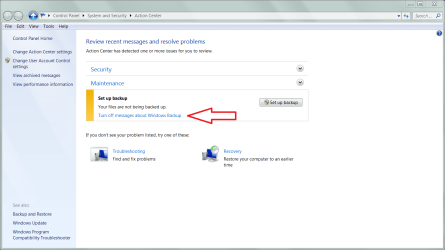
"Open Action Center" dialog box won't clear

erkme73

New member
Local time
9:06 AM
Messages
12
It is so incredibly annoying. When it pops up (i.e. to remind me to backup my system), I can't clear the box. It stays on top of everything until a reboot. Even an end-task on explorer.exe won't get rid of it.

It's happened now on two different PC's running x64 ultimate - so I assume this is a known bug?
 

My Computer My Computer

OS
windows 7 ultimate x64
What does this do?
.
 

Attachments

  • Capture.PNG
    Capture.PNG
    65 KB · Views: 728

My Computer My Computer

Computer Manufacturer/Model Number
Asus P5B
OS
Windows 7 Ultimate
CPU
Intel Q9550
Motherboard
Asus P5B
Memory
4x2GB HyperX
Graphics Card(s)
ATI HD3850 512
Sound Card
Creative X-Fi Platinum
Monitor(s) Displays
Samsung 50 / Samsung 24
Screen Resolution
1920*1080 / 1920*1200
Hard Drives
Multiple RAID volumes
PSU
ThermalTake ToughPower
Case
Armor
Cooling
Liquid
Keyboard
$6 2.4 gHz desktop
Internet Speed
Just this side of fast enough.
Action Center

Windows 7 Action Center is a special window located under the Control Panel, where the system gives the user a lot of useful information regarding security, problems, troubleshootings, maintenance etc. When a message gets a “Normal Priority” status, it is queued in the Action Center itself. But when a message gets a ” Important Priority” status it is sent to the Notification Area, on the desktop taskbar, so that the user will be able to see it right away, indipendently from what he is doing. Here is a simple tricks to turn off, disable and prevent these icons from appearing on the Notification Area. This first trick lets you turn-off and remove the Alert center System Icon.

  1. Click Start.
  2. Click Control Panel.
  3. Click on the All Control Panel Items link.
  4. Now open System Icons.
  5. Under Alert Center, click on the Behaviour drop down menu and select Off.
  6. Click OK for the change to take effect.
This second trick lets you turn off the Alert center icons from the Notification Area.

  1. Click on the arrow located on the Notification Area (previously known as system tray).
  2. A small window containing all the hidden icons should appear. Inside it, click Customize.
  3. Look for Action Center and select Hide icon and notifications.
  4. Untick Always show all icons and notifications on the taskbar located at the end of the window.
  5. Click OK.
I hope this helps!

Brett M,
windows Outreach Team
 

My Computer My Computer

OS
Windows7
I know how to turn the messages off (i.e. keep them from coming back) but, my point is that once it has popped up, I can't clear it. It seems to be a bug in Win7.
 

My Computer My Computer

OS
windows 7 ultimate x64
It is so incredibly annoying. When it pops up (i.e. to remind me to backup my system), I can't clear the box. It stays on top of everything until a reboot. Even an end-task on explorer.exe won't get rid of it.

It's happened now on two different PC's running x64 ultimate - so I assume this is a known bug?
If you perform a back up does it then turn off?
 

My Computer My Computer

Computer type
PC/Desktop
OS
Microsoft Windows 7 Home Premium 64-bit 7601 Multiprocessor Free Service Pack 1
CPU
Intel(R) Core(TM) i7-3770 CPU @ 3.40GHz
Motherboard
ASUSTeK COMPUTER INC. P8H77-M
Memory
8.00 GB
Graphics Card(s)
Intel(R) HD Graphics 4000
Sound Card
On Board
Monitor(s) Displays
Dell 24"
Screen Resolution
1920 x 1080
Hard Drives
(1) INTEL SSDSC2CT180A3 ATA Device (2) ST500DM002-1BD142 ATA Device (3) WDC WD3200AAKS-75L9A0 ATA Device (4) Generic- Compact Flash USB Device (5) Generic- MS/MS-Pro USB Device (6) Generic- SD/MMC USB Device (7) Generic- SM/xD-Picture USB
PSU
500w Corsair
Case
Cooler Master
Cooling
3 Fans
Keyboard
Logitech MK300
Mouse
Logitech WOM
Internet Speed
75Mb
Antivirus
Norton 360
Browser
Firefox, Opera, IE
Back
Top