Trident1
New member
- Local time
- 3:07 PM
- Messages
- 117
It's been awhile since making changes to a computer.
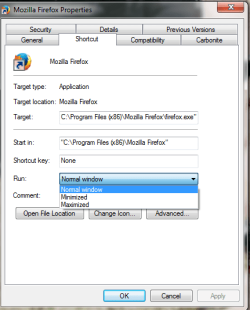
Ordered a computer ( generic machine) set it up, but whenever I open either IE or FF browser they open in a small page, I click on the the top right square to increase the size. Also, I'm trying to find the Performance Options - the page showing Visual Effects, Advanced, Data Execution Prevention tabs.
It has been quite some time since working on computers and I guess my memory is backing up on me.
Ordered a computer ( generic machine) set it up, but whenever I open either IE or FF browser they open in a small page, I click on the the top right square to increase the size. Also, I'm trying to find the Performance Options - the page showing Visual Effects, Advanced, Data Execution Prevention tabs.
It has been quite some time since working on computers and I guess my memory is backing up on me.
My Computer
At a glance
Windows 7 Professional, 32bitintel Core i5, i5 3570 3.4GHZ, 6MB Quad Core4GB, (2x2GB) 240 Pin DDR3, 1333Mhzon board
- Computer type
- PC/Desktop
- Computer Manufacturer/Model Number
- Custom
- OS
- Windows 7 Professional, 32bit
- CPU
- intel Core i5, i5 3570 3.4GHZ, 6MB Quad Core
- Motherboard
- Asus P8B75-V, LGA 1155
- Memory
- 4GB, (2x2GB) 240 Pin DDR3, 1333Mhz
- Graphics Card(s)
- on board
- Sound Card
- Audigy
- Monitor(s) Displays
- Samsung 21"
- Hard Drives
- WD 500GB 7200 RPM, 16NB Cache SATA
- PSU
- Corsair 600W
- Case
- Cooler Master Storm Scout
- Keyboard
- MS
- Mouse
- MS Optical
- Antivirus
- MS Security Essentials
- Browser
- IE 10, and Firefox ver. 24