Solved Start CMD Window in Full Screen If Not Then Maximized

Magnakai

New member
Member
VIP
Local time
1:25 AM
Messages
160
Hi, i wonder if there is a way to start command prompt in full screen every time. Since this is windows 7 if not full screen then maximized?

i was thinking by way of some registry hack; ie. if possible i don't want to use a separate utility to do this.
this refers : i posted the thread below 2 years ago, and we have a solution for notepad, so i was wondering if we could do the same for command prompt :-

Start notepad & similar programs in full screen Win7

Thanks.

EDIT

well to maximize i realize now i can do the right-click>properties>maximize on start. still no way to start it in full screen.

however, this is no longer important to me as i realize the DEFAULT size & positioning of this window (unless forced to maximized by properties above) is PRESET. it always opens at some preset co-ord about top-left portion of your screen, in a default size.
 
Last edited:

My Computer My Computer

Computer type
PC/Desktop
OS
Windows 7 Ultimate x64
You can set its default within the prompt setting font, screen size colour etc which will open like that every time
 

My Computer My Computer

Computer type
PC/Desktop
OS
win 8 32 bit
You can set its default within the prompt setting font, screen size colour etc which will open like that every time

that actually magnifies the window as well as everything else inside it. i was wanting the window size to stretch full screen. but it does not matter if it can't be done. the cmd window in normal mode is preset anyway, so it's cool (like eg. disk mgmt/device manager)
 

My Computer My Computer

Computer type
PC/Desktop
OS
Windows 7 Ultimate x64
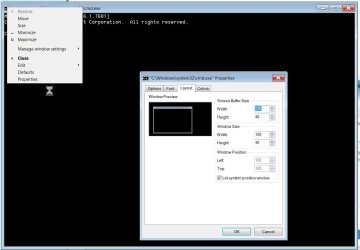
Open a cmd window and right-click on the upper left as in the pic. Then for properties and defaults you can adjust the layout. By doing a little math using your resolution and font size (there's a font tab in addition to the layout tab) you can adjust the height/width/position so the default cmd window exactly matches the size of your screen. Only issue is it won't be maximized in reality, but it will be the same size as a maximized window and will take up your whole screen. I am unaware as to how to make the window truly maximized other than clicking the maximize icon on the upper right.
 

Attachments

  • re.jpg
    re.jpg
    56.2 KB · Views: 1

My Computer My Computer

Computer type
PC/Desktop
Computer Manufacturer/Model Number
diy
OS
Win7 pro x64
CPU
stock i7 7700k
Motherboard
Gigabyte Z270N-WIFI mini-ITX
Memory
Corsair Vengeance LPX 16GB (2x8GB) DDR4 @ 3200MHz
Graphics Card(s)
integrated Intel HD 630
Sound Card
onboard Realtek ALC1220
Monitor(s) Displays
two vertically mounted samsung 55" 4k un55mu8000
Screen Resolution
1920x1280
Hard Drives
256GB Samsung EVO 960 M.2 pci-e NVMe SSD
PSU
SilverStone Nightjar ST45NF 450Watt Fanless
Case
No case. Motherboard is mounted directly onto power supply
Cooling
Evercool low profile 815EP with Panaflow 12L fan at 7v
Keyboard
Ortek MCK-86 mini
Mouse
Belkin 5-button USB
Internet Speed
spectrum 400mbps
great i will give it a try. since you can see the full rounded edges of the window that must be truly full screen, to me that's even better than maximized, thanks.
 

My Computer My Computer

Computer type
PC/Desktop
OS
Windows 7 Ultimate x64
Back
Top