
AddictivKaos
New member
- Local time
- 8:46 PM
- Messages
- 1
Hello and this is my First Post
Can you help me with an annoying dialog that pops up when running shortcuts please?
I have (portable) applications located on E:
I can run those applications directly from E: without a problem - i.e. I don't get any warnings.
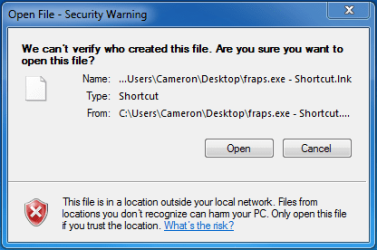
However if I create a shortcut to one of these applications and place the shortcut on the desktop ( on C: ), then running the shortcut causes an open file security warning (see attachment). The warning dialog claims it can't determine who created the file, because it comes from "a location outside your local network". Which is really strange because it is a locally installed hard drive.
The only explanation I have is I've used E: with a previous windows 7 installation on the same hardware, then I reformatted & reinstalled my Windows 7 partition, but kept E: untouched.
Couple of things I've tried are:
1) there is no "Unblock" button on the shortcut's properties dialog
2) Group policy editor changed to not preserve zone information
3) I couldn't find an exact match for this particular open file security warning when searching here and other forums
Can you help me with an annoying dialog that pops up when running shortcuts please?
I have (portable) applications located on E:
I can run those applications directly from E: without a problem - i.e. I don't get any warnings.
However if I create a shortcut to one of these applications and place the shortcut on the desktop ( on C: ), then running the shortcut causes an open file security warning (see attachment). The warning dialog claims it can't determine who created the file, because it comes from "a location outside your local network". Which is really strange because it is a locally installed hard drive.
The only explanation I have is I've used E: with a previous windows 7 installation on the same hardware, then I reformatted & reinstalled my Windows 7 partition, but kept E: untouched.
Couple of things I've tried are:
1) there is no "Unblock" button on the shortcut's properties dialog
2) Group policy editor changed to not preserve zone information
3) I couldn't find an exact match for this particular open file security warning when searching here and other forums
Attachments
My Computer
At a glance
Windows 7 Ultimate x64Intel Core i7 9206GB OCZ DDR3 1600NVIDIA Geforce GTX 295
- Computer type
- PC/Desktop
- Computer Manufacturer/Model Number
- custom build
- OS
- Windows 7 Ultimate x64
- CPU
- Intel Core i7 920
- Motherboard
- ASUS P6T Deluxe
- Memory
- 6GB OCZ DDR3 1600
- Graphics Card(s)
- NVIDIA Geforce GTX 295
- Hard Drives
- 256GB OCZ Vertex 3 SSD
1TB WD Black
2TB Seagate Barracuda Green
- Antivirus
- MSSE
- Browser
- Chrome
