Open in New Process - Add or Remove from Context Menu

How to Add or Remove "Open in new process" from Context Menu in Windows 7 and Windows 8

   Information
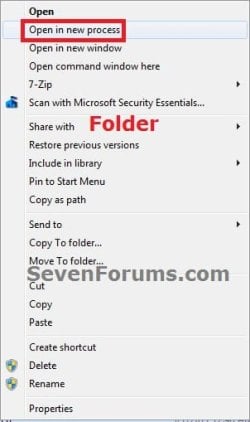
This will show you how to add or remove Open in new process from the context menu for all users when you press and hold the shift key and right click on folders and drives in Windows 7 and Windows 8.

You must be logged in as an administrator to be able to do the steps in this tutorial.


EXAMPLE: "Open in new process" in the Context Menu
Drive.jpgFolder.jpg


Here's How:
1. To Add "Open in new process" to the Context Menu
NOTE: This is the default setting.
A) Click/tap on the Download button below to download the file below, and go to step 3 below.
Add_Open_in_New_Process.reg

Download


2. To Remove "Open in new process" from the Context Menu
A) Click/tap on the Download button below to download the file below, and go to step 3 below.
Remove_Open_in_New_Process.reg

Download


3. Save the .reg file to the desktop.

4. Double click/tap on the downloaded .reg file to merge it.

5. Click/tap on Run, Yes (UAC), Yes, and OK when prompted.

6. If open, close and reopen Windows Explorer to see the change.

7. When done, you can delete the downloaded .reg file if you like.
That's it,
Shawn


Attachments

Last edited:
Meh...I thought this would work for opening applications in a separate process, but the context menu option only appears when shift-right-clicking drives and folders.
 

My Computer

Computer Manufacturer/Model Number
Custom-build
OS
Windows 7 x64 Ultimate SP1
CPU
i7980x
Motherboard
Asus P6X58D-E
Memory
Kingston HyperX KHX1600C9D3T1K3/6GX (3x2GB) DDR3
Graphics Card(s)
ASUS GeForce GTX 470 1280MB with Zalman VF3000F Dual Fan VGA
Sound Card
Realtek (onboard)
Monitor(s) Displays
2 x ASUS VE248H 24" Widescreen LED Monitor
Hard Drives
Patriot Inferno 60GB SandForce SSD, 4 x Western Digital RE4 500GB WD5003ABYX, Western Digital Green 2TB WD20EARX, Western Digital VelociRaptor 600GB WD6000HLHX
PSU
Antec CP-1000 Power Supply
Case
Antec P183 Case
Cooling
Noctua NH-D14 CPU Cooler
Hello Mqueitzs, and welcome to Seven Forums.

Sorry, but no. That's the default action of this as outlined in the green info box at the top of the tutorial. :(
 

My Computer

Computer type
PC/Desktop
Computer Manufacturer/Model Number
Self built custom
OS
64-bit Windows 11 Pro for Workstations
CPU
Intel i7-8700K OC'd to 5 GHz
Motherboard
ASUS ROG Maximus XI Formula Z390
Memory
64 GB (4x16GB) G.SKILL TridentZ RGB DDR4 3600 MHz
Graphics Card(s)
ASUS ROG-STRIX-GTX1080TI-O11G-GAMING
Sound Card
Integrated
Monitor(s) Displays
2 x Samsung Odyssey G7 27"
Screen Resolution
2560x1440
Hard Drives
1TB Samsung 990 PRO M.2,
4TB Samsung 990 PRO PRO M.2,
TerraMaster F8 SSD Plus NAS
PSU
Seasonic Prime Titanium 850W
Case
Thermaltake Core P3
Cooling
Corsair Hydro H115i
Keyboard
Logitech wireless K800
Mouse
Logitech MX Master 4
Internet Speed
2 Gb/s Download and 100 Mb/s Upload
Antivirus
Malwarebyte Anti-Malware Premium
Browser
Google Chrome
Other Info
Logitech Z625 speaker system,
Logitech BRIO 4K Pro webcam,
HP Color LaserJet Pro MFP M477fdn,
APC SMART-UPS RT 1000 XL - SURT1000XLI,
Galaxy S23 Plus phone
Thanks Brink. Perhaps the green box text can be amended to indicate that the reg tweak is only for opening drives and folders in a new process.
 

My Computer

Computer Manufacturer/Model Number
Custom-build
OS
Windows 7 x64 Ultimate SP1
CPU
i7980x
Motherboard
Asus P6X58D-E
Memory
Kingston HyperX KHX1600C9D3T1K3/6GX (3x2GB) DDR3
Graphics Card(s)
ASUS GeForce GTX 470 1280MB with Zalman VF3000F Dual Fan VGA
Sound Card
Realtek (onboard)
Monitor(s) Displays
2 x ASUS VE248H 24" Widescreen LED Monitor
Hard Drives
Patriot Inferno 60GB SandForce SSD, 4 x Western Digital RE4 500GB WD5003ABYX, Western Digital Green 2TB WD20EARX, Western Digital VelociRaptor 600GB WD6000HLHX
PSU
Antec CP-1000 Power Supply
Case
Antec P183 Case
Cooling
Noctua NH-D14 CPU Cooler
LOL, that's what it always had in it. :p
 

My Computer

Computer type
PC/Desktop
Computer Manufacturer/Model Number
Self built custom
OS
64-bit Windows 11 Pro for Workstations
CPU
Intel i7-8700K OC'd to 5 GHz
Motherboard
ASUS ROG Maximus XI Formula Z390
Memory
64 GB (4x16GB) G.SKILL TridentZ RGB DDR4 3600 MHz
Graphics Card(s)
ASUS ROG-STRIX-GTX1080TI-O11G-GAMING
Sound Card
Integrated
Monitor(s) Displays
2 x Samsung Odyssey G7 27"
Screen Resolution
2560x1440
Hard Drives
1TB Samsung 990 PRO M.2,
4TB Samsung 990 PRO PRO M.2,
TerraMaster F8 SSD Plus NAS
PSU
Seasonic Prime Titanium 850W
Case
Thermaltake Core P3
Cooling
Corsair Hydro H115i
Keyboard
Logitech wireless K800
Mouse
Logitech MX Master 4
Internet Speed
2 Gb/s Download and 100 Mb/s Upload
Antivirus
Malwarebyte Anti-Malware Premium
Browser
Google Chrome
Other Info
Logitech Z625 speaker system,
Logitech BRIO 4K Pro webcam,
HP Color LaserJet Pro MFP M477fdn,
APC SMART-UPS RT 1000 XL - SURT1000XLI,
Galaxy S23 Plus phone
Me: <fail/> apologies!
 

My Computer

Computer Manufacturer/Model Number
Custom-build
OS
Windows 7 x64 Ultimate SP1
CPU
i7980x
Motherboard
Asus P6X58D-E
Memory
Kingston HyperX KHX1600C9D3T1K3/6GX (3x2GB) DDR3
Graphics Card(s)
ASUS GeForce GTX 470 1280MB with Zalman VF3000F Dual Fan VGA
Sound Card
Realtek (onboard)
Monitor(s) Displays
2 x ASUS VE248H 24" Widescreen LED Monitor
Hard Drives
Patriot Inferno 60GB SandForce SSD, 4 x Western Digital RE4 500GB WD5003ABYX, Western Digital Green 2TB WD20EARX, Western Digital VelociRaptor 600GB WD6000HLHX
PSU
Antec CP-1000 Power Supply
Case
Antec P183 Case
Cooling
Noctua NH-D14 CPU Cooler
Back
Top