open office not working

edd78

New member
Local time
5:54 AM
Messages
23
hi there
when i click to save as in open office i get the option on which i want to use to open the file so i used the default option odf text document (odt) (*odt) when i double click on the saved file it opens kingsoft writer can't seem to figure out how to get the file to open with open office. but when i go into my admin account it works ok so looking for some advice
 

My Computer

Computer type
Laptop
Computer Manufacturer/Model Number
dell
OS
windows home premium 64 bit
Antivirus
norton
You have to change the file association here: Control Panel\Programs\Default Programs\Set Associations

Just double click on the .odt filetype and navigate to the OO Writer. If it does not show up in the next window, you have to look for it in Program files x86 (via BROWSE on the bottom of that page) and double click on the .exe of Writer.
 

My Computer

Computer Manufacturer/Model Number
HP, Dell, Gateway, Toshiba - 4 laptops and 2 desktops
OS
Vista, Windows7, Mint Mate, Zorin, Windows 8
CPU
from 1.6GHz Duo to i7
Monitor(s) Displays
2x HP w2207
Hard Drives
5x HDD, 7x SSD, 12x Externals
Keyboard
with trackball - no mices
Mouse
Trackball mice
Internet Speed
DSL 6000
hi
i looked open office in the default settings but can't find it there
 

My Computer

Computer type
Laptop
Computer Manufacturer/Model Number
dell
OS
windows home premium 64 bit
Antivirus
norton
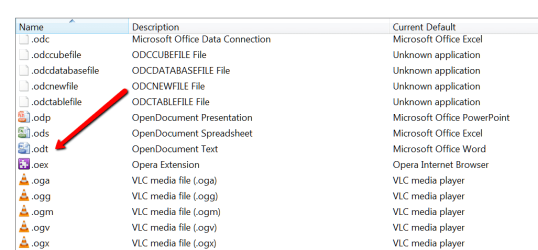
Did you see .odt in the associations - like this:

Note, I don't have Open Office that's why it is associated tp Microsoft Office Word.
 

Attachments

  • 2014-04-17_1840.png
    2014-04-17_1840.png
    14.5 KB · Views: 0

My Computer

Computer Manufacturer/Model Number
HP, Dell, Gateway, Toshiba - 4 laptops and 2 desktops
OS
Vista, Windows7, Mint Mate, Zorin, Windows 8
CPU
from 1.6GHz Duo to i7
Monitor(s) Displays
2x HP w2207
Hard Drives
5x HDD, 7x SSD, 12x Externals
Keyboard
with trackball - no mices
Mouse
Trackball mice
Internet Speed
DSL 6000
h
i see the odt in the associations page and it' got kingsoft writer as current default
 

My Computer

Computer type
Laptop
Computer Manufacturer/Model Number
dell
OS
windows home premium 64 bit
Antivirus
norton
hi
i double clicked on the odt file type and it's not on the first list of programs then i clicked on the other programs
and i can't see it there either
 

My Computer

Computer type
Laptop
Computer Manufacturer/Model Number
dell
OS
windows home premium 64 bit
Antivirus
norton
hi
i clicked on browse button at the bottom of the page but don't know where to look to find the file
 

My Computer

Computer type
Laptop
Computer Manufacturer/Model Number
dell
OS
windows home premium 64 bit
Antivirus
norton
i found the program files x86 i then saw open office in there is that what i should double click on
 

My Computer

Computer type
Laptop
Computer Manufacturer/Model Number
dell
OS
windows home premium 64 bit
Antivirus
norton
Yes, you have to double click on the .exe of Writer.
 

My Computer

Computer Manufacturer/Model Number
HP, Dell, Gateway, Toshiba - 4 laptops and 2 desktops
OS
Vista, Windows7, Mint Mate, Zorin, Windows 8
CPU
from 1.6GHz Duo to i7
Monitor(s) Displays
2x HP w2207
Hard Drives
5x HDD, 7x SSD, 12x Externals
Keyboard
with trackball - no mices
Mouse
Trackball mice
Internet Speed
DSL 6000
i double clicked on open office and i have got 5 options

help
presets
program
readmes
share
 

My Computer

Computer type
Laptop
Computer Manufacturer/Model Number
dell
OS
windows home premium 64 bit
Antivirus
norton
I assume those are folders. The .exe is probably in 'program'.
 

My Computer

Computer Manufacturer/Model Number
HP, Dell, Gateway, Toshiba - 4 laptops and 2 desktops
OS
Vista, Windows7, Mint Mate, Zorin, Windows 8
CPU
from 1.6GHz Duo to i7
Monitor(s) Displays
2x HP w2207
Hard Drives
5x HDD, 7x SSD, 12x Externals
Keyboard
with trackball - no mices
Mouse
Trackball mice
Internet Speed
DSL 6000
yes i think there folders
i found a application called soffice.exe is that the one i should be looking for
 

My Computer

Computer type
Laptop
Computer Manufacturer/Model Number
dell
OS
windows home premium 64 bit
Antivirus
norton
That is definitely an open office .exe. Whether that applies specifically to Writer I do not know. I don't have open office in Windows (only in Linux where that works differently).

Why don't you try that soffice.exe and see what happens.
 

My Computer

Computer Manufacturer/Model Number
HP, Dell, Gateway, Toshiba - 4 laptops and 2 desktops
OS
Vista, Windows7, Mint Mate, Zorin, Windows 8
CPU
from 1.6GHz Duo to i7
Monitor(s) Displays
2x HP w2207
Hard Drives
5x HDD, 7x SSD, 12x Externals
Keyboard
with trackball - no mices
Mouse
Trackball mice
Internet Speed
DSL 6000
i tried the open soffice.exe and it opens open office
 

My Computer

Computer type
Laptop
Computer Manufacturer/Model Number
dell
OS
windows home premium 64 bit
Antivirus
norton
Back
Top