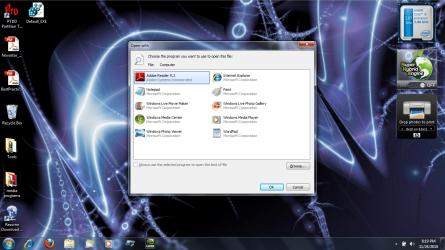
"open with" dialog at windows startup

terrytech

New member
Local time
2:31 PM
Messages
6
Location
Grand Rapids Michigan
Greetings.
I am having an odd problem with Windows 7 Home Premium. When Windows starts, an "open with" dialog pops up asking me what program I want to open "computer" with. I have not been able to resolve this issue. Computer works properly once Windows has loaded. I ran msconfig and there are no unusual startup services, last virus scan came back clean (ESET Nod32). I did just remove a trial of Novabackup. I also disconnected a network drive I do not use anymore. But I was having the issue before I made these changes.
Thank you for your time.
 

My Computer My Computer

At a glance

Windows 7 home premium 64bitIntel core i5 2.4Ghz HT (2.67ghz ready boost)4GB DDR3nvidia Geforce 310m/Intel HD Graphics
Computer Manufacturer/Model Number
ASUS K52JC
OS
Windows 7 home premium 64bit
CPU
Intel core i5 2.4Ghz HT (2.67ghz ready boost)
Motherboard
~
Memory
4GB DDR3
Graphics Card(s)
nvidia Geforce 310m/Intel HD Graphics
Sound Card
Conaxent CX20671
Monitor(s) Displays
~
Hard Drives
500GB Seagate
PSU
~
Case
~
Cooling
~
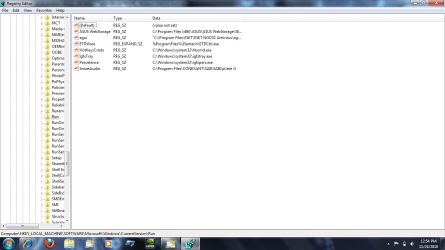
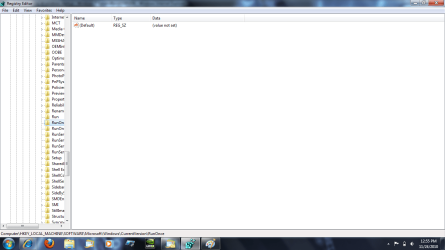
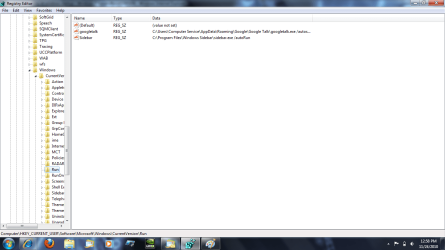
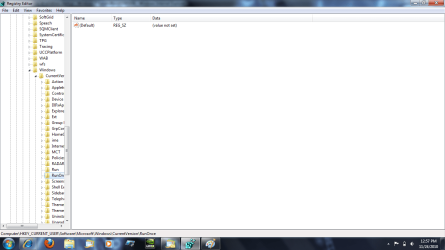
Can you post a screenshot of the following registry locations:

HKEY_LOCAL_MACHINE\Software\Microsoft\Windows\CurrentVersion\Run
HKEY_CURRENT_USER\Software\Microsoft\Windows\CurrentVersion\Run
HKEY_LOCAL_MACHINE\Software\Microsoft\Windows\CurrentVersion\RunOnce
HKEY_CURRENT_USER\Software\Microsoft\Windows\CurrentVersion\RunOnce
 

My Computer My Computer

At a glance

XP / Win7 x64 ProIntel Quad-Core Q9450 @ 3.2GHz2x2GB GSkill DDR2NVIDIA GeForce 8600 GTS (EVGA)
OS
XP / Win7 x64 Pro
CPU
Intel Quad-Core Q9450 @ 3.2GHz
Motherboard
Asus P5-E
Memory
2x2GB GSkill DDR2
Graphics Card(s)
NVIDIA GeForce 8600 GTS (EVGA)
Monitor(s) Displays
Dell 2408WFP
Screen Resolution
1920x1200
As requested:
 

Attachments

  • regedit screen shot 1.png
    regedit screen shot 1.png
    46.8 KB · Views: 113
  • regedit screen shot 2.png
    regedit screen shot 2.png
    43 KB · Views: 64
  • regedit screen shot 3.png
    regedit screen shot 3.png
    46 KB · Views: 57
  • regedit screen shot 4.png
    regedit screen shot 4.png
    44.2 KB · Views: 47

My Computer My Computer

At a glance

Windows 7 home premium 64bitIntel core i5 2.4Ghz HT (2.67ghz ready boost)4GB DDR3nvidia Geforce 310m/Intel HD Graphics
Computer Manufacturer/Model Number
ASUS K52JC
OS
Windows 7 home premium 64bit
CPU
Intel core i5 2.4Ghz HT (2.67ghz ready boost)
Motherboard
~
Memory
4GB DDR3
Graphics Card(s)
nvidia Geforce 310m/Intel HD Graphics
Sound Card
Conaxent CX20671
Monitor(s) Displays
~
Hard Drives
500GB Seagate
PSU
~
Case
~
Cooling
~
What's the rest of the line for the ASUS web storage?
 

My Computer My Computer

At a glance

XP / Win7 x64 ProIntel Quad-Core Q9450 @ 3.2GHz2x2GB GSkill DDR2NVIDIA GeForce 8600 GTS (EVGA)
OS
XP / Win7 x64 Pro
CPU
Intel Quad-Core Q9450 @ 3.2GHz
Motherboard
Asus P5-E
Memory
2x2GB GSkill DDR2
Graphics Card(s)
NVIDIA GeForce 8600 GTS (EVGA)
Monitor(s) Displays
Dell 2408WFP
Screen Resolution
1920x1200
C:\Program Files (x86)\ASUS\ASUS WebStorage\SERVICE\AsusWSService.exe

That utility was running long before the problem started.
 

My Computer My Computer

At a glance

Windows 7 home premium 64bitIntel core i5 2.4Ghz HT (2.67ghz ready boost)4GB DDR3nvidia Geforce 310m/Intel HD Graphics
Computer Manufacturer/Model Number
ASUS K52JC
OS
Windows 7 home premium 64bit
CPU
Intel core i5 2.4Ghz HT (2.67ghz ready boost)
Motherboard
~
Memory
4GB DDR3
Graphics Card(s)
nvidia Geforce 310m/Intel HD Graphics
Sound Card
Conaxent CX20671
Monitor(s) Displays
~
Hard Drives
500GB Seagate
PSU
~
Case
~
Cooling
~
Hi, welcome to the forums :)

Sounds like your .exe associations may be messed up.

You might want to look Here

Also, is there anything in your 'Startup' folder? Have a look in c:\users\[you]\appdata\roaming\microsoft\windows\start menu\programs\startup or click Start -> All Programs -> Startup

   Note
You will need hidden files/folders/drives enabled


OS
 

My Computer My Computer

At a glance

Windows 7 Ultimate x64AMD Sempron Dual Core3GBNVIDIA GeForce 6150SE nForce 430
Computer Manufacturer/Model Number
Compaq Desktop
OS
Windows 7 Ultimate x64
CPU
AMD Sempron Dual Core
Memory
3GB
Graphics Card(s)
NVIDIA GeForce 6150SE nForce 430
Screen Resolution
1024x768
Hard Drives
150GB Sata
The only thing in startup is desktop.ini
Repairing the .exe file associations did not solve the problem. I did find a thread on the Microsoft forum describing a similar issue. A Microsoft certified technician stated that the problem could be solved by starting in safe mode then rebooting. Needless to say that did not work either. Thanks again for the help. More suggestions are welcome. If I figure it out, I will post the fix.
 
Last edited:

My Computer My Computer

At a glance

Windows 7 home premium 64bitIntel core i5 2.4Ghz HT (2.67ghz ready boost)4GB DDR3nvidia Geforce 310m/Intel HD Graphics
Computer Manufacturer/Model Number
ASUS K52JC
OS
Windows 7 home premium 64bit
CPU
Intel core i5 2.4Ghz HT (2.67ghz ready boost)
Motherboard
~
Memory
4GB DDR3
Graphics Card(s)
nvidia Geforce 310m/Intel HD Graphics
Sound Card
Conaxent CX20671
Monitor(s) Displays
~
Hard Drives
500GB Seagate
PSU
~
Case
~
Cooling
~
Can we get a screenshot of this error?
 

My Computer My Computer

At a glance

XP / Win7 x64 ProIntel Quad-Core Q9450 @ 3.2GHz2x2GB GSkill DDR2NVIDIA GeForce 8600 GTS (EVGA)
OS
XP / Win7 x64 Pro
CPU
Intel Quad-Core Q9450 @ 3.2GHz
Motherboard
Asus P5-E
Memory
2x2GB GSkill DDR2
Graphics Card(s)
NVIDIA GeForce 8600 GTS (EVGA)
Monitor(s) Displays
Dell 2408WFP
Screen Resolution
1920x1200
Screenshot of the error:
 

Attachments

  • openwith error.png
    openwith error.png
    353.5 KB · Views: 204

My Computer My Computer

At a glance

Windows 7 home premium 64bitIntel core i5 2.4Ghz HT (2.67ghz ready boost)4GB DDR3nvidia Geforce 310m/Intel HD Graphics
Computer Manufacturer/Model Number
ASUS K52JC
OS
Windows 7 home premium 64bit
CPU
Intel core i5 2.4Ghz HT (2.67ghz ready boost)
Motherboard
~
Memory
4GB DDR3
Graphics Card(s)
nvidia Geforce 310m/Intel HD Graphics
Sound Card
Conaxent CX20671
Monitor(s) Displays
~
Hard Drives
500GB Seagate
PSU
~
Case
~
Cooling
~
  1. Open Regedit
  2. Navigate to "HKEY_LOCAL_MACHINE\SOFTWARE\Microsoft\Windows NT\CurrentVersion\Winlogon"
  3. What is the "shell" value? It should be "explorer.exe" (without the quotes) as shown below:
Image1.jpg

DO NOT CHANGE ANY REGISTRY VALUES AT ALL OTHER THAN THOSE WE MENTION HERE. Making inappropriate changes to the "HKEY_LOCAL_MACHINE\SOFTWARE\Microsoft\Windows NT\CurrentVersion\Winlogon" settings in the registry could result in an unbootable system that won't even allow you into safe mode....
 

My Computer My Computer

At a glance

Windows 7 Professional 32-bit SP1AMD A4/A63.00GB EDOVMware SVGA 3D
Computer type
PC/Desktop
Computer Manufacturer/Model Number
Virtual Machine
OS
Windows 7 Professional 32-bit SP1
CPU
AMD A4/A6
Motherboard
Intel Corporation 440BX Desktop Reference Platform
Memory
3.00GB EDO
Graphics Card(s)
VMware SVGA 3D
Sound Card
High Definition Audio Device
Monitor(s) Displays
Generic Non-PnP Monitor on VMware SVGA 3D
Screen Resolution
1440x900
Hard Drives
1 x 60GB VMware Virtual SATA Hard Drive ATA Device
Antivirus
Kaspersky Total Security
In addition, have a look in MSCONFIG (just type into Start box) and see if there's a rogue entry under the 'Startup' tab.


OS
 

My Computer My Computer

At a glance

Windows 7 Ultimate x64AMD Sempron Dual Core3GBNVIDIA GeForce 6150SE nForce 430
Computer Manufacturer/Model Number
Compaq Desktop
OS
Windows 7 Ultimate x64
CPU
AMD Sempron Dual Core
Memory
3GB
Graphics Card(s)
NVIDIA GeForce 6150SE nForce 430
Screen Resolution
1024x768
Hard Drives
150GB Sata
1) Startup items are controlled from a variety of registry keys, folders and scripts so the culprit could be hidden in any of these in your case. See this page for an exhaustive list.

Understand and Control Startup Apps with the System Configuration Utility

Check each of those locations on your computer to narrow down where that message could be coming from.

2) If you havent already, scan with free Malwarebytes. Also, download and run CCleaner, both regular and registry.
 

My Computer My Computer

At a glance

Windows 7 x64 pro/ Windows 7 x86 Pro/ XP SP3 x86
Computer Manufacturer/Model Number
Too many to describe...
OS
Windows 7 x64 pro/ Windows 7 x86 Pro/ XP SP3 x86
The shell value is "explorer.exe"
As I stated before a virus scan back clean. I've have had a lot of success with NOD32 but I'll try Malwarebytes. I have already ran ccleaner. I also used MSCONFIG to check startup programs, nothing seems out of place. I could run a system restore but I'm more interested in finding and fixing the problem. Bill2: Thanks for the link I'll check it out.
 

My Computer My Computer

At a glance

Windows 7 home premium 64bitIntel core i5 2.4Ghz HT (2.67ghz ready boost)4GB DDR3nvidia Geforce 310m/Intel HD Graphics
Computer Manufacturer/Model Number
ASUS K52JC
OS
Windows 7 home premium 64bit
CPU
Intel core i5 2.4Ghz HT (2.67ghz ready boost)
Motherboard
~
Memory
4GB DDR3
Graphics Card(s)
nvidia Geforce 310m/Intel HD Graphics
Sound Card
Conaxent CX20671
Monitor(s) Displays
~
Hard Drives
500GB Seagate
PSU
~
Case
~
Cooling
~
The shell value is "explorer.exe"
As I stated before a virus scan back clean. I've have had a lot of success with NOD32 but I'll try Malwarebytes. I have already ran ccleaner. I also used MSCONFIG to check startup programs, nothing seems out of place. I could run a system restore but I'm more interested in finding and fixing the problem. Bill2: Thanks for the link I'll check it out.

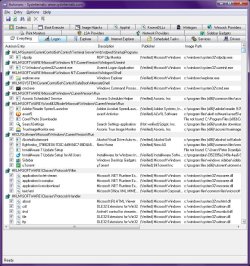
Another program you might want to look at is Autoruns for Windows v10.05 by Microsoft SysInternals. It processes much more than MSConfig dares, and should thusly be used with caution, as making inappropriate changes is almost as bad as editing the registry wrong!

Image1.jpg
 

My Computer My Computer

At a glance

Windows 7 Professional 32-bit SP1AMD A4/A63.00GB EDOVMware SVGA 3D
Computer type
PC/Desktop
Computer Manufacturer/Model Number
Virtual Machine
OS
Windows 7 Professional 32-bit SP1
CPU
AMD A4/A6
Motherboard
Intel Corporation 440BX Desktop Reference Platform
Memory
3.00GB EDO
Graphics Card(s)
VMware SVGA 3D
Sound Card
High Definition Audio Device
Monitor(s) Displays
Generic Non-PnP Monitor on VMware SVGA 3D
Screen Resolution
1440x900
Hard Drives
1 x 60GB VMware Virtual SATA Hard Drive ATA Device
Antivirus
Kaspersky Total Security
Back
Top