Solved Opening tabs

napa21

New member
Local time
4:05 PM
Messages
3
Location
Arlington,Ma.
This is difficult to explain, but here goes, Example if I open a site and then open something else I used to be able to point my mouse to the second item and click it and it would now be on the screen and stay there until I clicked it off or clicked something else,but now when I click the item is shows but it won`t stay on the screen
Same thing in the notification area if I put my mouse on an item and click it will show but when I go to touch the item it goes back to the notification area.This just started happing a day ago after Microsoft Tech Support fixed something on my computer so they must have made some changes.When I asked them to put everything back the way it was when there through, they must have missed this one thing.I hope someone knows what I`m talking about.
 

My Computer

OS
Windows 7 Home Premium 32bit.
Welcome to the Forum.
Lets get you started. I think I understand what you are saying. Just moving your mouse cursor over a page closes it or minimizes it.
First lets get your specs filled in and located properly. Use this little free program to get the specs.
Speccy - System Information - Free Download
You can use the User CP at the top of the page to put them in your specs. These specs will follow your every post.
The next thing I would suggest is going to your mouse and set it to default.
Then run this sfc /scannow. This is Windows 7 way of checking it's own System Files. A little Tutorial to guide you along.
http://www.sevenforums.com/tutorials/1538-sfc-scannow-command-system-file-checker.html
We are like you, we have no idea what those folks at Microsoft Support did. Could you tell us what problem you were having that Microsoft fixed.
Get back with your results.
 

My Computer

Computer type
PC/Desktop
Computer Manufacturer/Model Number
Home made Desktop
OS
Windows 10 Pro. 64/ version 1709 Windows 7 Pro/64
CPU
Intel i7-6800K @ 4.3
Motherboard
ASUS X-99 Deluxe II
Memory
Corsair Platinum 16 gig @2400
Graphics Card(s)
EVGA GTX 1070 OC
Monitor(s) Displays
Asus 27" LED LCD/VE278Q
Screen Resolution
1920-1080 or 1280-720 HDMI
Hard Drives
INTEL SSD 730-240 Gb Sata 3.0/
PSU
EVGA Platium 1200W
Case
Phanteks Luxe Tempered Glass 8 fans/ one radiator
Cooling
XSPC/ Water Cooled CPU
Keyboard
Das 4 Professional
Mouse
Logitech M705/MX Anywhere 2-S
Internet Speed
100 mbits
Antivirus
Microsoft Security Essentials/ Malwarebytes Premium 3.0/ SAS
Browser
I.E. 11 default/Firefox/ ISP Time Warner Cable/Spectrum
Other Info
LG BluRay Burner/
Sound system-KLipsch-THX/
Icy Dock ssd Hot Swap bays.
Welcome to Seven Forums napa21. If I understand correctly...try this:

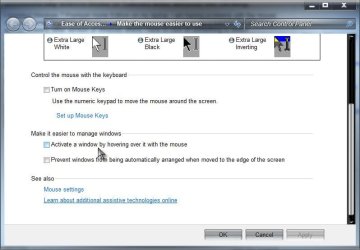
Start> In search box type change how your mouse works> Enter> Under Make it easier to manage windows, make sure Activate a window by hovering over it with the mouse is unchecked

If it is checked, uncheck it and Apply and OK your way out. Try it now.

Hovering.jpg

A Guy
 
Last edited:

My Computer

Computer type
PC/Desktop
OS
Windows 10 Home x64
CPU
INTEL Core i5-750 Quad-Core 3.37GHz
Motherboard
ASUS P7P55D
Memory
HyperX Fury Black Series 8GB (2 x 4GB) 1866Mhz
Graphics Card(s)
EVGA GeForce GTX 750 Superclocked 1GB 128-Bit GDDR5
Monitor(s) Displays
LG 32MA68HY 32" IPS
Screen Resolution
1920 x 1080
Hard Drives
Samsung 840 Evo 120GB, SEAGATE 500GB Barracuda® 7200.12, SATA 3 Gb/s, 7200 RPM, 16MB cache
PSU
ANTEC TruePower New TP-550, 80 PLUS, 550W
Case
ANTEC Three Hundred Illusion
Cooling
COOLER MASTER Hyper 212 Plus, 4 x 120mm 1 x 140mm Noctua's
Internet Speed
85 + Mbps
Antivirus
Avast
Browser
Vivaldi
Back
Top