Opening web site without having to enter password?

flycaster

New member
Member
VIP
Local time
10:22 PM
Messages
472
Location
Boynton Beach, FL
Until recently, when my.yahoo opened on booting, it would open to my customized page. However, when I now boot up, my.yahoo needs my username and pw to open. I'm not sure why this is happening (could it be my use of CCleaner?), but would like to be able to have certain sites that have usernames and pw's to open automatically...can this be done?
 

My Computer My Computer

Computer Manufacturer/Model Number
Gateway DX4720-03/HP Pavilion dv6
OS
Windows 7 HP 64-bit
Memory
4GB/4GB
Antivirus
Avast Pro
Browser
Firefox, the latest
If you clean off the cookies that save your login then you will have to log in when you go to the site. Go in CCleaner and uncheck the Cookies option in the browser you use. That should save your login cookie info.

Another way if your browser supports LastPass is to use LastPass extension. It will fill in user name and password and then you just click Login button.

I use LastPass on Chromium, Firefox and Opera. Seems to work very well.
 

My Computer My Computer

Computer Manufacturer/Model Number
HP Media Center
OS
Windows 7 32 bit
CPU
AMD 5200+ dual core
Memory
2 GB
Graphics Card(s)
NVidia GeForce 6150SE 128 MB
Monitor(s) Displays
CRT
Screen Resolution
1280x1024
Hard Drives
500 GB Sata internal :

SIIG USB 3.0 docking stations w/WD Caviar Black 6 Gb/s drives
Keyboard
PS/2
Mouse
PS/2 Wheel Mouse
Other Info
SIIG USB 3.0 PCIexpress card.
If you clean off the cookies that save your login then you will have to log in when you go to the site. Go in CCleaner and uncheck the Cookies option in the browser you use. That should save your login cookie info.

Another way if your browser supports LastPass is to use LastPass extension. It will fill in user name and password and then you just click Login button.

I use LastPass on Chromium, Firefox and Opera. Seems to work very well.

I am somewhat confused by your answer. I had thought that cookies don't hold passwords??? Not sure aout this, though. Anyway, assuming that they do, how does one determine which cookie is it that saves the pw? I am also looking into LastPass. Right now I am using Keepass to hold my pws.
 

My Computer My Computer

Computer Manufacturer/Model Number
Gateway DX4720-03/HP Pavilion dv6
OS
Windows 7 HP 64-bit
Memory
4GB/4GB
Antivirus
Avast Pro
Browser
Firefox, the latest
The cookies save your login status. Exactly how I don't know. But when you check "keep me logged in" on a site it has nowhere to put it but a cookie.

You still don't say what browser you use.
 

My Computer My Computer

Computer Manufacturer/Model Number
HP Media Center
OS
Windows 7 32 bit
CPU
AMD 5200+ dual core
Memory
2 GB
Graphics Card(s)
NVidia GeForce 6150SE 128 MB
Monitor(s) Displays
CRT
Screen Resolution
1280x1024
Hard Drives
500 GB Sata internal :

SIIG USB 3.0 docking stations w/WD Caviar Black 6 Gb/s drives
Keyboard
PS/2
Mouse
PS/2 Wheel Mouse
Other Info
SIIG USB 3.0 PCIexpress card.
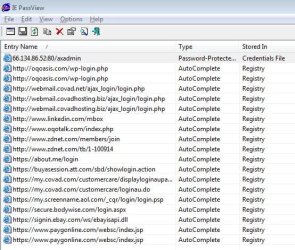
I believe IE saves login password data in the registry. (At least that's what IEPassView is telling me for about 18 of my logins. If you save the wrong or incomplete information, you may not get a chance to correct it. That's what IEPassView is for; it lets you selectively delete the info so that IE will ask you again if you want to save the login data for a given site: http://www.nirsoft.net/utils/internet_explorer_password.html . Without IEPassView you can use IE's Internet Options/Content/AutoComplete/Settings to delete all stored auto complete data.
 

Attachments

  • IEPassView.JPG
    IEPassView.JPG
    70.5 KB · Views: 4

My Computer My Computer

Computer type
PC/Desktop
Computer Manufacturer/Model Number
OQO 2+
OS
Windows 8 Pro w/MC 32-bit
CPU
Intel Atom 1.86 GHz
Motherboard
OQO 2+
Memory
2 GB
Graphics Card(s)
Intel GMA 500
Sound Card
IDT
Monitor(s) Displays
LCD
Screen Resolution
800 x 480 (portable) 1280 x 1024 (docked)
Hard Drives
64 GB SSD
PSU
9 Ah Battery (portable) or OQO Brick (docked)
Case
Shirt Pocket Sized
Cooling
Tiny Fan
Keyboard
Slide out (portable) DiNovo Edge (docked)
Mouse
Eraser head (portable) Logitech Bluetooth (docked)
Internet Speed
WWAN or 802.11G (portable) T1 (docked)
Browser
IE 10
Other Info
DVD-RW OQO Docking Station
My browser is Maxthon 2.5.18.1000 (listed under "My Specs"), which uses IE's engine. Started using LastPass and will continue with my cookie eaters.
 
Last edited:

My Computer My Computer

Computer Manufacturer/Model Number
Gateway DX4720-03/HP Pavilion dv6
OS
Windows 7 HP 64-bit
Memory
4GB/4GB
Antivirus
Avast Pro
Browser
Firefox, the latest
My browser is Maxthon 2.5.18.1000 (listed under "My Specs"), which uses IE's engine. Started using LastPass and will continue with my cookie eaters.

MaxThon is fun. Lots of user-written extensions to play with. Nice community there too. I've just sworn off anything IE based since I got burned by a BHO. Never again. 'sides, Chromium just snaps off the HD even when the drive is already churning. Other browsers may be as fast once loaded and running a benchmark. But I haven't seen anything else that snaps up off a busy disk like this does!

Of course it runs 1/2 processes when doing nothing. But who cares? That's what GBs of ram and multi-cores are for. :)

(So many have specs amounting to "Win7 32 bit" that I've gotten out of the habit of looking in the drop down.)

Anyway, glad you found an approach you can live with. I don't have Chromium set for any cleaning in my CCleaner. Maybe once a week I just delete the cookies and cache with a batch file. LastPass I use for non-critical passwords.. auto login to forums etc..

It works pretty well.
 

My Computer My Computer

Computer Manufacturer/Model Number
HP Media Center
OS
Windows 7 32 bit
CPU
AMD 5200+ dual core
Memory
2 GB
Graphics Card(s)
NVidia GeForce 6150SE 128 MB
Monitor(s) Displays
CRT
Screen Resolution
1280x1024
Hard Drives
500 GB Sata internal :

SIIG USB 3.0 docking stations w/WD Caviar Black 6 Gb/s drives
Keyboard
PS/2
Mouse
PS/2 Wheel Mouse
Other Info
SIIG USB 3.0 PCIexpress card.
Back
Top