Opera 11.0 Alpha out

yowanvista

New member
Guru
Gold Member
VIP
Local time
11:24 AM
Messages
6,557
Location
Mauritius
Last edited:

My Computer

Computer type
PC/Desktop
Computer Manufacturer/Model Number
Custom Build
OS
Windows 10 Pro x64, Arch Linux
CPU
Intel Core 2 Quad Q8200 OC'd 3.08GHz
Motherboard
Asus Rampage formula LGA775
Memory
8GB DDR2 900Mhz
Graphics Card(s)
MSI GT730 2GB GDDR5 (Kepler)
Sound Card
Supreme FX2
Monitor(s) Displays
Samsung LS22F350 LED
Screen Resolution
1080P
Hard Drives
Kingston SSDNow UV400 120GB, 500GB Hitachi, 2TB Samsung, 500GB Seagate FreeAgent, 640GB Samsung, 160GB Toshiba (Arch)
PSU
AeroCool 500W Bronze
Cooling
Cooler Master V6 + 3X fans
Keyboard
Prolink keyboard
Mouse
Logitech M705
Internet Speed
1MiB/s
Browser
Chrome Beta
testing also.
 

My Computer

Computer Manufacturer/Model Number
self built
OS
Windows 7 Professional 64-bit
CPU
Intel E8400 3GHz
Motherboard
Intel DX48BT2
Memory
Kingston PC3-10700H 4Gb
Graphics Card(s)
XFX Radeon HD 5850 BlackEd.
Sound Card
Asus Xonar DG
Monitor(s) Displays
2x Samsung SM-T220HD 22"
Screen Resolution
1680x1050 on two monitors
Hard Drives
OCZ Vertex 2 120gb 3.5" (OS)
Seagate Momentus XT 500gb
Samsung F3 1Tb (games)
2x Samsung F1 1Tb
PSU
Thermaltake ToughPower 850w
Case
Thermaltake Armor
Cooling
Scythe Mugen II
Keyboard
Microsoft Comfort Curve USB
Mouse
Razer Diamondback 3G
Internet Speed
8128/443
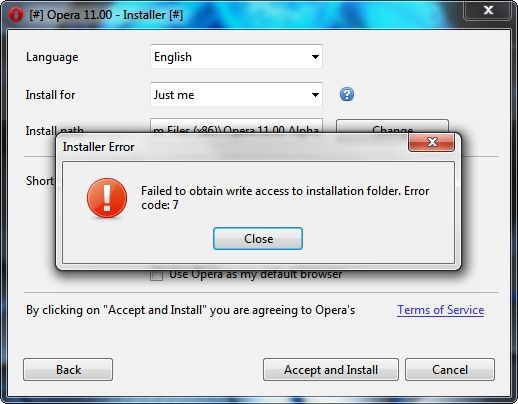
Have any of you had a problem using Opera 11 Alpha's new installer on their Win7 x64 computer? After I downloaded Opera 11 Alpha's new installer I tried several times to install it and each time I got this message...

6aa01852.jpg


What I finally did was to use 7-zip to extract Opera 11 Alpha from the new installer package and run the .exe without having to use the new installer. Its working great so far and Opera 11 Alpha has set up its own AppData> Roaming files just like the installed versions always have.

I also discovered that Opera 11 Alpha comes with Unite activated by default so I went to opera:config and turned it off which cut the browser's RAM usage by over 100 MB.

~Maxx~

f0a783bf.png
 

My Computer

Computer Manufacturer/Model Number
HP HPE 270f
OS
Windows 7 x64 Home Premium
CPU
Intel Core i7 930 @ 2.8 Ghz Socket 1366 LGA
Motherboard
Pegatron Truckee v1.04E41
Memory
8 GB 1366 Mhz DDR3 (PC3-10700) RAM
Graphics Card(s)
ATI Radeon 5770 1 GB DDR5 RAM
Sound Card
Realtech High Definition
Monitor(s) Displays
32" Sony Bravia
Screen Resolution
1366 X 768
Hard Drives
Intel 25nm 120 GB Series 320 SSD HD Tune- 265 MBps Read/ 130 MBps Write

LaCie 1TB + 1TB RAID 0 eSATA Drive HD Tune- 160 MBps Read/ 90 MBps Write
Keyboard
Logitech Illuminated
Mouse
Logitech MX Revolution
Internet Speed
36.4 Mbps Maximum on a 37 Mbps Motorola SB501 Modem
I like Opera's GUI, speed, performance, etc. but what I don't like about it is that it displays websites incorrectly like on Facebook for example. The comment link is misplaced. Another example is YouTube's video player. If you scroll down, the color of the video duration text turns to white. If you scroll up, it returns to the normal color. :(
 

My Computer

Computer type
PC/Desktop
Computer Manufacturer/Model Number
Custom Built
OS
Windows 7 Ultimate x64
CPU
Intel(R) Core(TM) 2 Quad Q8200 @ 2.33 GHz
Motherboard
Asus P5KPL-AM SE Motherboard
Memory
2x2GB Kingston DDR2
Graphics Card(s)
1GB AMD Radeon HD 5450
Sound Card
VIA Technologies High Definition Audio Device
Monitor(s) Displays
Samsung SyncMaster 733NW
Screen Resolution
1440x900
Hard Drives
SEAGATE 320GB Barracuda® 7200.12, SATA 3 Gb/s, 7200 RPM, 16MB cache x 2
Case
Custom Casing
Cooling
Ice cubes from the freezer ;)
Keyboard
Generic Plug & Play Keyboard
Mouse
Optical Mouse
Internet Speed
Very slow
I like Opera's GUI, speed, performance, etc. but what I don't like about it is that it displays websites incorrectly.(

Opera has been my default web browser for almost 2 years now and so I am inclined to view the way other browsers display websites as incorrect by comparison so how critical is it as long as all of the buttons are displayed. I wouldn't imagine that each and every web browser except Opera displays every webpage exactly the same anyway.

~Maxx~

f0a783bf.png
 

My Computer

Computer Manufacturer/Model Number
HP HPE 270f
OS
Windows 7 x64 Home Premium
CPU
Intel Core i7 930 @ 2.8 Ghz Socket 1366 LGA
Motherboard
Pegatron Truckee v1.04E41
Memory
8 GB 1366 Mhz DDR3 (PC3-10700) RAM
Graphics Card(s)
ATI Radeon 5770 1 GB DDR5 RAM
Sound Card
Realtech High Definition
Monitor(s) Displays
32" Sony Bravia
Screen Resolution
1366 X 768
Hard Drives
Intel 25nm 120 GB Series 320 SSD HD Tune- 265 MBps Read/ 130 MBps Write

LaCie 1TB + 1TB RAID 0 eSATA Drive HD Tune- 160 MBps Read/ 90 MBps Write
Keyboard
Logitech Illuminated
Mouse
Logitech MX Revolution
Internet Speed
36.4 Mbps Maximum on a 37 Mbps Motorola SB501 Modem
Wow, I must say.. very stable for an alpha release. 10.7 builds didn't run half as good as this.
 

My Computer

OS
Windows 7 Pro
Wow, I must say.. very stable for an alpha release. 10.7 builds didn't run half as good as this.

Back in December of 2008 the Opera 10 Alpha release was also quite stable, but this latest Opera 11 Alpha seems to be much more stable and as you pointed out runs much better than the v10 builds!

3db35a2c.png


~Maxx~
.
da59fa57.png
 

My Computer

Computer Manufacturer/Model Number
HP HPE 270f
OS
Windows 7 x64 Home Premium
CPU
Intel Core i7 930 @ 2.8 Ghz Socket 1366 LGA
Motherboard
Pegatron Truckee v1.04E41
Memory
8 GB 1366 Mhz DDR3 (PC3-10700) RAM
Graphics Card(s)
ATI Radeon 5770 1 GB DDR5 RAM
Sound Card
Realtech High Definition
Monitor(s) Displays
32" Sony Bravia
Screen Resolution
1366 X 768
Hard Drives
Intel 25nm 120 GB Series 320 SSD HD Tune- 265 MBps Read/ 130 MBps Write

LaCie 1TB + 1TB RAID 0 eSATA Drive HD Tune- 160 MBps Read/ 90 MBps Write
Keyboard
Logitech Illuminated
Mouse
Logitech MX Revolution
Internet Speed
36.4 Mbps Maximum on a 37 Mbps Motorola SB501 Modem
I like Opera's GUI, speed, performance, etc. but what I don't like about it is that it displays websites incorrectly.(

Opera has been my default web browser for almost 2 years now and so I am inclined to view the way other browsers display websites as incorrect by comparison so how critical is it as long as all of the buttons are displayed. I wouldn't imagine that each and every web browser except Opera displays every webpage exactly the same anyway.

~Maxx~

f0a783bf.png

They really should fix it. It's now 11.0 Alpha but still, it displays websites incorrectly since the 10.x and 9.x versions. That's why Opera does not have a big slice in marketshare.
 

My Computer

Computer type
PC/Desktop
Computer Manufacturer/Model Number
Custom Built
OS
Windows 7 Ultimate x64
CPU
Intel(R) Core(TM) 2 Quad Q8200 @ 2.33 GHz
Motherboard
Asus P5KPL-AM SE Motherboard
Memory
2x2GB Kingston DDR2
Graphics Card(s)
1GB AMD Radeon HD 5450
Sound Card
VIA Technologies High Definition Audio Device
Monitor(s) Displays
Samsung SyncMaster 733NW
Screen Resolution
1440x900
Hard Drives
SEAGATE 320GB Barracuda® 7200.12, SATA 3 Gb/s, 7200 RPM, 16MB cache x 2
Case
Custom Casing
Cooling
Ice cubes from the freezer ;)
Keyboard
Generic Plug & Play Keyboard
Mouse
Optical Mouse
Internet Speed
Very slow
They really should fix it. It's now 11.0 Alpha but still, it displays websites incorrectly since the 10.x and 9.x versions. That's why Opera does not have a big slice in marketshare.

Opera isn't broken, they are very standards compliant. Usually it is the way the webpage is badly written. I guess you could say they should write Opera to display the badly written web pages, but if the pages followed standards, there would be more issues. Frankly, I don't see any issues, but then, I always use Opera, so I don't say "it doesn't look the same as in X browser". Opera is my default browser since I tried it when it became free. I don't try to sell others on it, but I think it's the best. A Guy
 

My Computer

Computer type
PC/Desktop
OS
Windows 10 Home x64
CPU
INTEL Core i5-750 Quad-Core 3.37GHz
Motherboard
ASUS P7P55D
Memory
HyperX Fury Black Series 8GB (2 x 4GB) 1866Mhz
Graphics Card(s)
EVGA GeForce GTX 750 Superclocked 1GB 128-Bit GDDR5
Monitor(s) Displays
LG 32MA68HY 32" IPS
Screen Resolution
1920 x 1080
Hard Drives
Samsung 840 Evo 120GB, SEAGATE 500GB Barracuda® 7200.12, SATA 3 Gb/s, 7200 RPM, 16MB cache
PSU
ANTEC TruePower New TP-550, 80 PLUS, 550W
Case
ANTEC Three Hundred Illusion
Cooling
COOLER MASTER Hyper 212 Plus, 4 x 120mm 1 x 140mm Noctua's
Internet Speed
85 + Mbps
Antivirus
Avast
Browser
Vivaldi
I love the new installer it gives you the option to install to a external drive ( different folder or USB stick)
& you have Opera portable :D
 

My Computer

Computer type
PC/Desktop
Computer Manufacturer/Model Number
self build
OS
Windows 7 Ultimate 64 bit
CPU
Intel Core i7 4770K overclocked to 4.7GHz Quad Core Haswell
Motherboard
Asus Z87 Pro (Socket 1150) ATX Motherboard
Memory
16GB Team Group Vulcan Gold 2133MHz
Graphics Card(s)
ATI Radeon HD 7880 Series Display adapter
Monitor(s) Displays
NEC LCD2690WUXi2
Screen Resolution
26" 1920 x 1200
Hard Drives
Samsung 500GB SSD 840 EVO SATA 6Gb/s
Samsung 250GB SSD 840 EVO SATA 6Gb/s
PSU
Corsair AX760 Platinum
Case
Cooler Master HAF X Gaming Tower
Cooling
XSPC RayStorm 750 RS360 Water cooling
Mouse
Razer Death Adder left handed
Internet Speed
126Mb download 11.5Mb up
Antivirus
Avast free
Browser
Opera
Other Info
Main Browser is Opera
Favorite software Adobe Lightroom & Photoshop
best plugins Nik software
Firewall : Private firewall 7
Opera is my default browser since I tried it when it became free. I don't try to sell others on it, but I think it's the best. A Guy

f5e16fcd.png


I ran FF for a while, but from the first Opera 9 build I tried to each new Snapshot that is released on a weekly basis and sometimes even more often Opera has been my first and only browser of choice.

~Maxx~

f0a783bf.png
 

Attachments

  • Opera 11 Alpha.jpg
    Opera 11 Alpha.jpg
    203.4 KB · Views: 35

My Computer

Computer Manufacturer/Model Number
HP HPE 270f
OS
Windows 7 x64 Home Premium
CPU
Intel Core i7 930 @ 2.8 Ghz Socket 1366 LGA
Motherboard
Pegatron Truckee v1.04E41
Memory
8 GB 1366 Mhz DDR3 (PC3-10700) RAM
Graphics Card(s)
ATI Radeon 5770 1 GB DDR5 RAM
Sound Card
Realtech High Definition
Monitor(s) Displays
32" Sony Bravia
Screen Resolution
1366 X 768
Hard Drives
Intel 25nm 120 GB Series 320 SSD HD Tune- 265 MBps Read/ 130 MBps Write

LaCie 1TB + 1TB RAID 0 eSATA Drive HD Tune- 160 MBps Read/ 90 MBps Write
Keyboard
Logitech Illuminated
Mouse
Logitech MX Revolution
Internet Speed
36.4 Mbps Maximum on a 37 Mbps Motorola SB501 Modem
I like Opera's GUI, speed, performance, etc. but what I don't like about it is that it displays websites incorrectly like on Facebook for example. The comment link is misplaced. :(

Thats a drawback of using Opera because of its small userbase many developers don't bother testing in Opera.
If you come across a site that is acting up you can right click the page & edit the site preferences to try & fix it or right click & open with another browser.
Google's Sputnik Java conformance test shows Opera as the browser closest to the standard

Off topic but if you have not set up your own blog in My Opera you are missing out it s very easy to do & looks great.
stve10 - About Steves Snaps
Is a page describing how i set up the Browser myself .
 
Last edited:

My Computer

Computer type
PC/Desktop
Computer Manufacturer/Model Number
self build
OS
Windows 7 Ultimate 64 bit
CPU
Intel Core i7 4770K overclocked to 4.7GHz Quad Core Haswell
Motherboard
Asus Z87 Pro (Socket 1150) ATX Motherboard
Memory
16GB Team Group Vulcan Gold 2133MHz
Graphics Card(s)
ATI Radeon HD 7880 Series Display adapter
Monitor(s) Displays
NEC LCD2690WUXi2
Screen Resolution
26" 1920 x 1200
Hard Drives
Samsung 500GB SSD 840 EVO SATA 6Gb/s
Samsung 250GB SSD 840 EVO SATA 6Gb/s
PSU
Corsair AX760 Platinum
Case
Cooler Master HAF X Gaming Tower
Cooling
XSPC RayStorm 750 RS360 Water cooling
Mouse
Razer Death Adder left handed
Internet Speed
126Mb download 11.5Mb up
Antivirus
Avast free
Browser
Opera
Other Info
Main Browser is Opera
Favorite software Adobe Lightroom & Photoshop
best plugins Nik software
Firewall : Private firewall 7

My Computer

Computer type
PC/Desktop
Computer Manufacturer/Model Number
Self built custom
OS
64-bit Windows 11 Pro for Workstations
CPU
Intel i7-8700K OC'd to 5 GHz
Motherboard
ASUS ROG Maximus XI Formula Z390
Memory
64 GB (4x16GB) G.SKILL TridentZ RGB DDR4 3600 MHz
Graphics Card(s)
ASUS ROG-STRIX-GTX1080TI-O11G-GAMING
Sound Card
Integrated
Monitor(s) Displays
2 x Samsung Odyssey G7 27"
Screen Resolution
2560x1440
Hard Drives
1TB Samsung 990 PRO M.2,
4TB Samsung 990 PRO PRO M.2,
TerraMaster F8 SSD Plus NAS
PSU
Seasonic Prime Titanium 850W
Case
Thermaltake Core P3
Cooling
Corsair Hydro H115i
Keyboard
Logitech wireless K800
Mouse
Logitech MX Master 4
Internet Speed
2 Gb/s Download and 100 Mb/s Upload
Antivirus
Malwarebyte Anti-Malware Premium
Browser
Google Chrome
Other Info
Logitech Z625 speaker system,
Logitech BRIO 4K Pro webcam,
HP Color LaserJet Pro MFP M477fdn,
APC SMART-UPS RT 1000 XL - SURT1000XLI,
Galaxy S23 Plus phone
bb7f9863.png


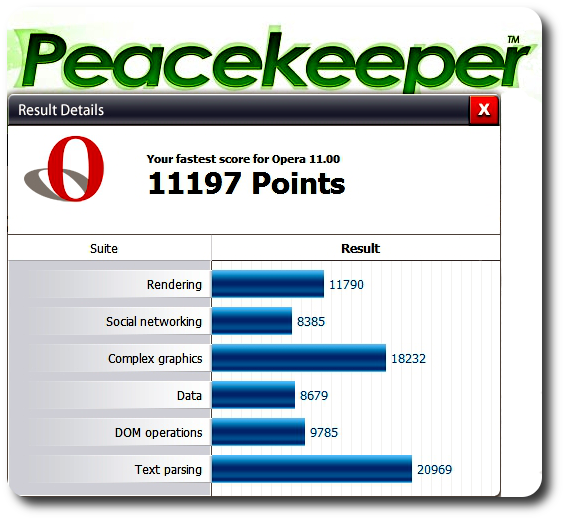
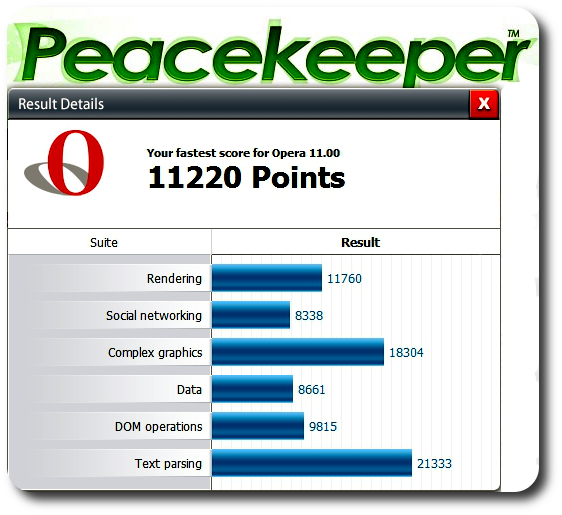
I took Opera 11 Alpha out for a late night run at Peacekeeper and it did slightly better than the day it was released.

~Maxx~

f0a783bf.png
 

My Computer

Computer Manufacturer/Model Number
HP HPE 270f
OS
Windows 7 x64 Home Premium
CPU
Intel Core i7 930 @ 2.8 Ghz Socket 1366 LGA
Motherboard
Pegatron Truckee v1.04E41
Memory
8 GB 1366 Mhz DDR3 (PC3-10700) RAM
Graphics Card(s)
ATI Radeon 5770 1 GB DDR5 RAM
Sound Card
Realtech High Definition
Monitor(s) Displays
32" Sony Bravia
Screen Resolution
1366 X 768
Hard Drives
Intel 25nm 120 GB Series 320 SSD HD Tune- 265 MBps Read/ 130 MBps Write

LaCie 1TB + 1TB RAID 0 eSATA Drive HD Tune- 160 MBps Read/ 90 MBps Write
Keyboard
Logitech Illuminated
Mouse
Logitech MX Revolution
Internet Speed
36.4 Mbps Maximum on a 37 Mbps Motorola SB501 Modem
No problem, Maxx

I have tried the alpha build and I would agree with most people that it's very stable and usable. I just hope that the community catches on and builds up a good number of extensions; after all the years of not using Opera, I would love to try out something different and "new", lol.
 

My Computer

Computer type
Laptop
Computer Manufacturer/Model Number
Custom
OS
Windows 7 Home Premium x64
CPU
Intel Core i5 2500K
Motherboard
MSI MS-7750
Memory
8GB DDR3
Graphics Card(s)
nVidia GeForce GTX650 Ti BOOST
Sound Card
Realtek
Monitor(s) Displays
21' Philips
Screen Resolution
Full HD
Hard Drives
1TB
PSU
500W
I just hope that the community catches on and builds up a good number of extensions; after all the years of not using Opera, I would love to try out something different and "new", lol.

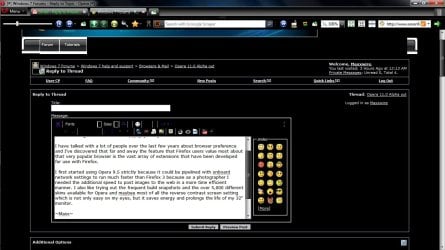
I have talked with a lot of people over the last few years about browser preference and I've discovered that far and away the feature that Firefox users value most about that very popular browser is the vast array of extensions that have been developed for use with Firefox.

I first started using Opera 9.5 strictly because it could be pipelined with onboard network settings to run much faster than Firefox 3 in that as a photographer I needed the additional speed to post images to the web in a more time efficient manner. I also like trying out the frequent build snapshots and the over 5,000 different skins available for Opera and maybe most of all the reverse contrast screen setting which is not only is it easier on my eyes, but it saves energy and prolongs the life of my 32" Bravia monitor.

~Maxx~

f0a783bf.png
 

Attachments

  • Opera Reverse Contrast Screen.jpg
    Opera Reverse Contrast Screen.jpg
    117.7 KB · Views: 14

My Computer

Computer Manufacturer/Model Number
HP HPE 270f
OS
Windows 7 x64 Home Premium
CPU
Intel Core i7 930 @ 2.8 Ghz Socket 1366 LGA
Motherboard
Pegatron Truckee v1.04E41
Memory
8 GB 1366 Mhz DDR3 (PC3-10700) RAM
Graphics Card(s)
ATI Radeon 5770 1 GB DDR5 RAM
Sound Card
Realtech High Definition
Monitor(s) Displays
32" Sony Bravia
Screen Resolution
1366 X 768
Hard Drives
Intel 25nm 120 GB Series 320 SSD HD Tune- 265 MBps Read/ 130 MBps Write

LaCie 1TB + 1TB RAID 0 eSATA Drive HD Tune- 160 MBps Read/ 90 MBps Write
Keyboard
Logitech Illuminated
Mouse
Logitech MX Revolution
Internet Speed
36.4 Mbps Maximum on a 37 Mbps Motorola SB501 Modem
Also testing Opera Alpha right now and it's been really nice and stable. Kudos to extensions, just hope that more gets developed and it becomes really useful.
 

My Computer

Computer Manufacturer/Model Number
Dell Optiplex 755
OS
Windows 7 Professional (32-bit)
CPU
Intel Core 2 Duo E8400 @ 3.00GHz - Wolfdale 45nm Technology
Motherboard
Dell Inc. 0R092H (CPU)
Memory
4.0GB Dual-Channel DDR2 @ 399MHz (6-6-6-18)
Graphics Card(s)
Intel(R) Q35 Express Chipset Family
Sound Card
High Definition Audio Device (built-in)
Monitor(s) Displays
Viore 24" LED LCD HDTV
Screen Resolution
1920x1080 (32 bits per pixel @ 60 Hz)
Hard Drives
156GB Seagate ST3160815AS ATA Device
Keyboard
Dell
Mouse
Dell
Internet Speed
3.0 Mbits/sec @ Verizon DSL
I gave up on the alpha build earlier today. After deleting the web cache and cookies and all other stuff and starting Opera again, I found it painfully slow while caching any and all websites, from Hotmail to deviantART.
I remember this happening to me ever since Opera Turbo was introduced, even though I don't use it.

I have a habit of deleting my cache every few days, or as soon as it hits above ~500MB, and I remember uninstalling Opera due to this behavior which haunted me ever since. (I am sure that it wasn't an issue with the current internet speed because IE9 displayed the same webpages much faster, also not having its cache)

I think I might just go ahead and installed 10.63 instead and see how it goes. I'm sick of Google's arrogance, Safari's RAM usage, instability and lack of some features of IE9, Firefox in general, plain weird behavior if Maxthon 3 etc. xD
I should be fair and give Opera one more chance :)
 

My Computer

Computer type
Laptop
Computer Manufacturer/Model Number
Custom
OS
Windows 7 Home Premium x64
CPU
Intel Core i5 2500K
Motherboard
MSI MS-7750
Memory
8GB DDR3
Graphics Card(s)
nVidia GeForce GTX650 Ti BOOST
Sound Card
Realtek
Monitor(s) Displays
21' Philips
Screen Resolution
Full HD
Hard Drives
1TB
PSU
500W
I have a habit of deleting my cache every few days, or as soon as it hits above ~500MB, )

Have u tried Preferences>Advanced>History>empty cache on exit & you can also delete cookies on exit as well.

You can have Opera 10.63 & Op 11 both installed at the same time.
When u run the installer click on Options & change the install path to another folder on your hardrive or USB drive, then install for external drive.
Its the portable version nothing is written to your registry everything is contained in the install folder.
 

My Computer

Computer type
PC/Desktop
Computer Manufacturer/Model Number
self build
OS
Windows 7 Ultimate 64 bit
CPU
Intel Core i7 4770K overclocked to 4.7GHz Quad Core Haswell
Motherboard
Asus Z87 Pro (Socket 1150) ATX Motherboard
Memory
16GB Team Group Vulcan Gold 2133MHz
Graphics Card(s)
ATI Radeon HD 7880 Series Display adapter
Monitor(s) Displays
NEC LCD2690WUXi2
Screen Resolution
26" 1920 x 1200
Hard Drives
Samsung 500GB SSD 840 EVO SATA 6Gb/s
Samsung 250GB SSD 840 EVO SATA 6Gb/s
PSU
Corsair AX760 Platinum
Case
Cooler Master HAF X Gaming Tower
Cooling
XSPC RayStorm 750 RS360 Water cooling
Mouse
Razer Death Adder left handed
Internet Speed
126Mb download 11.5Mb up
Antivirus
Avast free
Browser
Opera
Other Info
Main Browser is Opera
Favorite software Adobe Lightroom & Photoshop
best plugins Nik software
Firewall : Private firewall 7
It's not much about automating the deletion of the cache as it is about actually caching webpages for the first time.

Installed 10.63 and performed the same way, worst of all, Opera's usage of Flash was hideously choppy, so I gave in. I might just wait for a stable build of 11 and try again.
 

My Computer

Computer type
Laptop
Computer Manufacturer/Model Number
Custom
OS
Windows 7 Home Premium x64
CPU
Intel Core i5 2500K
Motherboard
MSI MS-7750
Memory
8GB DDR3
Graphics Card(s)
nVidia GeForce GTX650 Ti BOOST
Sound Card
Realtek
Monitor(s) Displays
21' Philips
Screen Resolution
Full HD
Hard Drives
1TB
PSU
500W
Back
Top