Opera 12.17 suddenly not working with SOME https sites

morph000

New member
As of today Opera 12.17 won't connect to a number of sites like Google, Paypal.
Whole bunch of Win updates last night if relevant.
Works FINE with ANY run-of-the-mill http: anything though.
CAN login to some https sites like eBay no problem.
Other browsers work fine on anything.
Seems some sites have changed their encryption protocols or such so Opera doesn't work with them as other people are reporting this issue.

My homepage is google which redirects these days to the secure version, and now gives the following errors:

Unable to complete secure transaction

You tried to access the address Google, which is currently unavailable. Please make sure that the web address (URL) is correctly spelled and punctuated, then try reloading the page.

Secure connection: fatal error (40)

https://www.google.com.au/?gws_rd=ssl

Failed to connect to server. The reason may be that the encryption methods supported by the server are not enabled in the security preferences.

Please note that some encryption methods are no longer supported, and that access will not be possible until the website has been upgraded to use strong encryption.
Make sure your internet connection is active and check whether other applications that rely on the same connection are working.
Check that the setup of any internet security software is correct and does not interfere with ordinary web browsing.
If you are behind a firewall on a Local Area Network and think this may be causing problems, talk to your systems administrator.
Try pressing the F12 key on your keyboard and disabling proxy servers, unless you know that you are required to use a proxy to connect to the internet. Reload the page.


Any ideas on how to fix this ?
And no, I do not want Opera v25 for a number of reasons !
 

My Computer

Computer type
Laptop
Computer Manufacturer/Model Number
Toshiba
OS
Windows 7 64 bit
CPU
i7
Memory
16GB
Antivirus
Kaspersky IS 2013
Opera 25 was just released the other day. Why not try a newer version? Sorry did not see your last statement. May I ask why? I cannot get there either using Fx 34.

Untrusted Connection I would have to add a certificate exception. Must be something to do with SSL 3.0
 

My Computer

Computer type
PC/Desktop
Computer Manufacturer/Model Number
Custom Build
OS
Win 10 Pro 64
CPU
Intel Core i7 960 @3.20 GHz
Motherboard
MSI MS7522
Memory
24.0 GB DDR3
Graphics Card(s)
EVGA GTX 750Ti
Monitor(s) Displays
LG E2341 23 Inch
Screen Resolution
1920x1080
Hard Drives
1TB Western Dgital 1002FAEX-00Y9A0
1TB Hitachi HDS721010CLA322
PSU
700 Watt
Case
Haf 912
Cooling
Fans
Keyboard
Logitech MK710
Mouse
Logitech M705
Internet Speed
Cable
Antivirus
AIS 2015 .10.0.2225
Browser
Firefox 49
Other Info
MalwareBytes Anti-Rootkit utility

My Computer

Computer type
PC/Desktop
Computer Manufacturer/Model Number
self build
OS
Windows 7 Ultimate 64 bit
CPU
Intel Core i7 4770K overclocked to 4.7GHz Quad Core Haswell
Motherboard
Asus Z87 Pro (Socket 1150) ATX Motherboard
Memory
16GB Team Group Vulcan Gold 2133MHz
Graphics Card(s)
ATI Radeon HD 7880 Series Display adapter
Monitor(s) Displays
NEC LCD2690WUXi2
Screen Resolution
26" 1920 x 1200
Hard Drives
Samsung 500GB SSD 840 EVO SATA 6Gb/s
Samsung 250GB SSD 840 EVO SATA 6Gb/s
PSU
Corsair AX760 Platinum
Case
Cooler Master HAF X Gaming Tower
Cooling
XSPC RayStorm 750 RS360 Water cooling
Mouse
Razer Death Adder left handed
Internet Speed
126Mb download 11.5Mb up
Antivirus
Avast free
Browser
Opera
Other Info
Main Browser is Opera
Favorite software Adobe Lightroom & Photoshop
best plugins Nik software
Firewall : Private firewall 7
SSL 3.0 has been disabled in Opera (Presto based), because of the Poodle flaw. Some sites might not work anymore if the servers haven't been updated.

Finally, Opera 12 on desktop is taking the lead with disabling SSLv3 support! Since we are not able to apply the countermeasure to all of the remaining Opera 12 installations (and it also does not support TLS_FALLBACK_SCSV), we have remotely turned off SSLv3. This will be automatically distributed to all Opera 12 desktop installations in the next few days. We’re allowing ourselves to be a bit experimental with this, so users who have not yet upgraded to Opera 25 may see more of the broken servers, and we will get some experience in turning off SSLv3.
More info : Security changes in Opera 25; the poodle attacks - Opera Security - Opera Software

So you could try with another browser for the time being or try and download a version of Opera 12 unpatched (the portable app suggestion is a good idea) and keep auto update disabled, but be aware that this is temporary and soon all browsers will have SSL3 disabled too.


Opera 25 was just released the other day. Why not try a newer version?

Opera 12 is NOT the same as Opera 25, so no it's not the "newer version". The latest version of Opera based on Presto is Opera 12.17. As you see in the quotes, concerning security, it still receives attention from the developers and gets updated occasionally and has no vulnerabilities unpatched (Opera 12.x - Secunia) unlike say old versions of IE or Chrome.

Opera 11/12 has a LOT more features not found in any other browser, or at least not without a dozen extensions.
Vertical Tabs built-in without the need for a slow/buggy extension (plus ability to stack tabs and create followers) ? Check.
Per-site options (ability to turn off Javascript/Plugins/Animation of GIF/User Agent spoofing/Proxy/etc.. for only one site) ? Check.
Fine grain control of what Javascript is able to do (resizing/moving windows, changing status field, hide adress bar) ? Check.
Support for User-Javascript (similar to Greasemonkey on FF) and User CSS built-in ? Check.
Complete customization (all buttons/menus/UI elements can be moved/deleted/edited, their pictures modified, etc..) ? Check.
The list is endless.

Opera 25 is only a clone of Chrome lacking most features of the original Presto based browser (and many features of the original Chrome too). Kind of like trading an old racing car for the newest small family car...
 
Last edited:

My Computer

Computer type
PC/Desktop
OS
Windows 8
Last edited:

My Computer

Computer type
Laptop
Computer Manufacturer/Model Number
ASUS
OS
Microsoft Windows 7 Home Premium 64-bit 7601 Multiprocessor Free Service Pack 1
CPU
AMD C-60 APU with Radeon(tm) HD Graphics
Motherboard
ASUSTeK COMPUTER INC. X501U
Memory
4.00 GB
Graphics Card(s)
AMD Radeon HD 6290 Graphics
Sound Card
(1) AMD High Definition Audio Device (2) Realtek High Defi
Screen Resolution
1366 x 768 x 32 bits (4294967296 colors) @ 60 Hz
Hard Drives
Hitachi HTS545050A7E380 SATA Disk Device
Antivirus
Comodo CIS & FW, SecureAplus App Whitelisting, Threatfire
Browser
Cyberfox 64bit, Opera 64bit, Airfox
Other Info
Spy-The-Spy, HitmanPro.Alert, Norton Connect Safe, MJRegWatcher, BitDefender TrafficLight, Voodoo Shield, Zemana AntiMalware

My Computer

Computer type
PC/Desktop
Computer Manufacturer/Model Number
self build
OS
Windows 7 Ultimate 64 bit
CPU
Intel Core i7 4770K overclocked to 4.7GHz Quad Core Haswell
Motherboard
Asus Z87 Pro (Socket 1150) ATX Motherboard
Memory
16GB Team Group Vulcan Gold 2133MHz
Graphics Card(s)
ATI Radeon HD 7880 Series Display adapter
Monitor(s) Displays
NEC LCD2690WUXi2
Screen Resolution
26" 1920 x 1200
Hard Drives
Samsung 500GB SSD 840 EVO SATA 6Gb/s
Samsung 250GB SSD 840 EVO SATA 6Gb/s
PSU
Corsair AX760 Platinum
Case
Cooler Master HAF X Gaming Tower
Cooling
XSPC RayStorm 750 RS360 Water cooling
Mouse
Razer Death Adder left handed
Internet Speed
126Mb download 11.5Mb up
Antivirus
Avast free
Browser
Opera
Other Info
Main Browser is Opera
Favorite software Adobe Lightroom & Photoshop
best plugins Nik software
Firewall : Private firewall 7
Have been experimenting and have compensated for this by disabling SSL scanning by Kaspersky.
None of the other suggestions "out there" helped, installing Kaspersky root certificate for Opera didn't fix it either.
Tried v25 Opera and earlier versions ages ago but it's a different development path to V12 and I don't like it for a number of reasons, most notably lack of proper bookmark support, and I have around 10,000...
I uninstalled Opera and reinstalled 12.17 64 bit last night but no fix, so the Kaspersky "cure" is it for now
Oneeyed seems to have hit the nail here:
"Finally, Opera 12 on desktop is taking the lead with disabling SSLv3 support! Since we are not able to apply the countermeasure to all of the remaining Opera 12 installations (and it also does not support TLS_FALLBACK_SCSV), we have remotely turned off SSLv3. This will be automatically distributed to all Opera 12 desktop installations in the next few days"
So thanks for that! remote deactivation...explains it !
 

My Computer

Computer type
Laptop
Computer Manufacturer/Model Number
Toshiba
OS
Windows 7 64 bit
CPU
i7
Memory
16GB
Antivirus
Kaspersky IS 2013
Security Prefs Opera 12.17

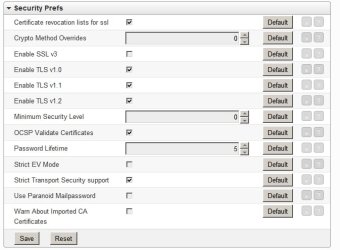
I'm not convinced that disabling SSL v3 causes the problem. Take a look at my setup for Security Prefs:

Preferences Editor - Opera@USB 12.17.jpg

SSL v3 is disabled.

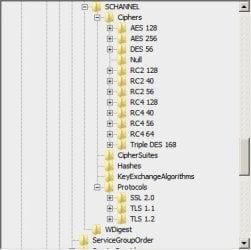
Also SSL v3 is removed totally from Windows on my machine:

Protocols.jpg

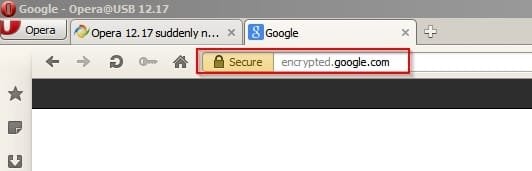
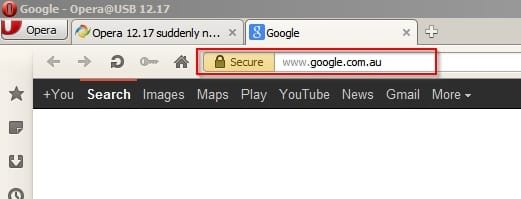
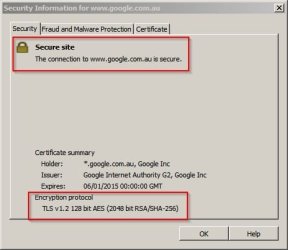
I can still get a secure connection here:

https://www.google.com.au/?gws_rd=ssl

Proof:

Google - Opera@USB 12.17.jpg

It's not a problem with Opera 12.17

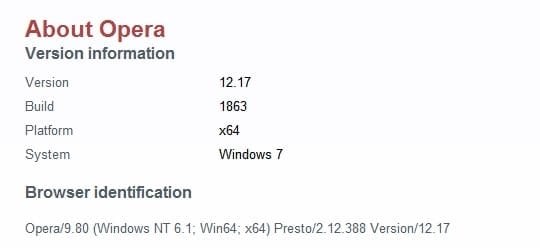
Version used:

About Opera - Opera@USB 12.17.jpg

What happens when you visit the following site?

https://www.fortify.net/sslcheck.html

Using Opera 12.17 64 bit you should see this:

You have connected to this web server using the RC4-SHA encryption cipher with a key length of 128 bits.

This is a high-grade encryption connection, regarded by most experts as being suitable for sending or receiving even the most sensitive or valuable information across a network.

In a crude analogy, using this cipher is similar to sending or storing your data inside a high quality safe - compared to an export-grade cipher which is similar to using a paper envelope to protect your data.
 
Last edited:

My Computer

Computer type
Laptop
Computer Manufacturer/Model Number
ASUS
OS
Microsoft Windows 7 Home Premium 64-bit 7601 Multiprocessor Free Service Pack 1
CPU
AMD C-60 APU with Radeon(tm) HD Graphics
Motherboard
ASUSTeK COMPUTER INC. X501U
Memory
4.00 GB
Graphics Card(s)
AMD Radeon HD 6290 Graphics
Sound Card
(1) AMD High Definition Audio Device (2) Realtek High Defi
Screen Resolution
1366 x 768 x 32 bits (4294967296 colors) @ 60 Hz
Hard Drives
Hitachi HTS545050A7E380 SATA Disk Device
Antivirus
Comodo CIS & FW, SecureAplus App Whitelisting, Threatfire
Browser
Cyberfox 64bit, Opera 64bit, Airfox
Other Info
Spy-The-Spy, HitmanPro.Alert, Norton Connect Safe, MJRegWatcher, BitDefender TrafficLight, Voodoo Shield, Zemana AntiMalware
Suggestion

If your Security Prefs match those in my screenshot and it still doesn't work consider the following:

Security Information for google com au.jpg

Shows TLS v1.2 is needed.

Try running OpenPortsView

Start Opera then run the program - run as admin.

You should see secure connections on port 443 https

If not - maybe check your firewall.

Opened Ports Viewer.jpg
 

My Computer

Computer type
Laptop
Computer Manufacturer/Model Number
ASUS
OS
Microsoft Windows 7 Home Premium 64-bit 7601 Multiprocessor Free Service Pack 1
CPU
AMD C-60 APU with Radeon(tm) HD Graphics
Motherboard
ASUSTeK COMPUTER INC. X501U
Memory
4.00 GB
Graphics Card(s)
AMD Radeon HD 6290 Graphics
Sound Card
(1) AMD High Definition Audio Device (2) Realtek High Defi
Screen Resolution
1366 x 768 x 32 bits (4294967296 colors) @ 60 Hz
Hard Drives
Hitachi HTS545050A7E380 SATA Disk Device
Antivirus
Comodo CIS & FW, SecureAplus App Whitelisting, Threatfire
Browser
Cyberfox 64bit, Opera 64bit, Airfox
Other Info
Spy-The-Spy, HitmanPro.Alert, Norton Connect Safe, MJRegWatcher, BitDefender TrafficLight, Voodoo Shield, Zemana AntiMalware
Opera bookmarks

It's possible to import bookmarks into folders in newer versions of Opera but you need also need Chrome or a Chromium browser to do it.

Bookmarks - Opera 22.jpg
 

My Computer

Computer type
Laptop
Computer Manufacturer/Model Number
ASUS
OS
Microsoft Windows 7 Home Premium 64-bit 7601 Multiprocessor Free Service Pack 1
CPU
AMD C-60 APU with Radeon(tm) HD Graphics
Motherboard
ASUSTeK COMPUTER INC. X501U
Memory
4.00 GB
Graphics Card(s)
AMD Radeon HD 6290 Graphics
Sound Card
(1) AMD High Definition Audio Device (2) Realtek High Defi
Screen Resolution
1366 x 768 x 32 bits (4294967296 colors) @ 60 Hz
Hard Drives
Hitachi HTS545050A7E380 SATA Disk Device
Antivirus
Comodo CIS & FW, SecureAplus App Whitelisting, Threatfire
Browser
Cyberfox 64bit, Opera 64bit, Airfox
Other Info
Spy-The-Spy, HitmanPro.Alert, Norton Connect Safe, MJRegWatcher, BitDefender TrafficLight, Voodoo Shield, Zemana AntiMalware
Callender - I tried your site and got RC4, 128 bit so ok there.
With a port viewer (I use Nirsoft CurrPorts but tried opview but made no difference) all Opera remote ports are 127.0.0.1 but Kaspersky shows port 443 connections to remote host so all getting routed to Kaspersky THEN to the website via 443 so effectively the same thing.
Not sure where your security prefs pic comes from. I Use Kaspersky Internet Security 2013 suite.

I have used Chrome but hated it plus it causes a whole range of other issues ranging from email to HTML association screw ups through to non-working hyperlinks in XLS's...
Major PAIN to try and fix.


Just noticed - Google no longer redirects to the https equivalent. Guess they are aware of the problem now ..
 
Last edited:

My Computer

Computer type
Laptop
Computer Manufacturer/Model Number
Toshiba
OS
Windows 7 64 bit
CPU
i7
Memory
16GB
Antivirus
Kaspersky IS 2013
Opera 12 - Security Preferences

To get to security preferences type:

about:config

in the address bar and press enter.

Scroll down and expand security preferences.

Make sure OSCP Validate Certificates is checked along with the other settings shown in the screenshot in Post #8 in this thread.

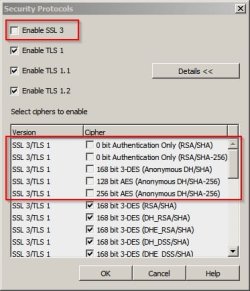
However there are even more settings available and you get to them like this:

To enable or disable specific security protocols, from the menu, go to Settings > Preferences > Advanced > Security. Check or uncheck the protocols you want to enable or disable.

If you want to select ciphers to enable or disable, click the "Details" button.

Compare your settings with mine. Those highlighted in red are unchecked - everything else is checked.

Security Protocols.jpg

On another note it might be wise to follow the general advice given in the link below if you haven't already done so:

How to configure Opera 12.x for safer internet browsing

If it still doesn't work the only other suggestion that I've go is to temporarily disable Kaspersky and try visiting problem sites to see if you can connect. If it works then it's a Kaspersky issue.
 
Last edited:

My Computer

Computer type
Laptop
Computer Manufacturer/Model Number
ASUS
OS
Microsoft Windows 7 Home Premium 64-bit 7601 Multiprocessor Free Service Pack 1
CPU
AMD C-60 APU with Radeon(tm) HD Graphics
Motherboard
ASUSTeK COMPUTER INC. X501U
Memory
4.00 GB
Graphics Card(s)
AMD Radeon HD 6290 Graphics
Sound Card
(1) AMD High Definition Audio Device (2) Realtek High Defi
Screen Resolution
1366 x 768 x 32 bits (4294967296 colors) @ 60 Hz
Hard Drives
Hitachi HTS545050A7E380 SATA Disk Device
Antivirus
Comodo CIS & FW, SecureAplus App Whitelisting, Threatfire
Browser
Cyberfox 64bit, Opera 64bit, Airfox
Other Info
Spy-The-Spy, HitmanPro.Alert, Norton Connect Safe, MJRegWatcher, BitDefender TrafficLight, Voodoo Shield, Zemana AntiMalware
RE: Other browsers. I have six browsers (installed or portable) as they all have different strengths and weaknesses. I don't have Chrome but do have a Chromium based browser installed.
 

My Computer

Computer type
Laptop
Computer Manufacturer/Model Number
ASUS
OS
Microsoft Windows 7 Home Premium 64-bit 7601 Multiprocessor Free Service Pack 1
CPU
AMD C-60 APU with Radeon(tm) HD Graphics
Motherboard
ASUSTeK COMPUTER INC. X501U
Memory
4.00 GB
Graphics Card(s)
AMD Radeon HD 6290 Graphics
Sound Card
(1) AMD High Definition Audio Device (2) Realtek High Defi
Screen Resolution
1366 x 768 x 32 bits (4294967296 colors) @ 60 Hz
Hard Drives
Hitachi HTS545050A7E380 SATA Disk Device
Antivirus
Comodo CIS & FW, SecureAplus App Whitelisting, Threatfire
Browser
Cyberfox 64bit, Opera 64bit, Airfox
Other Info
Spy-The-Spy, HitmanPro.Alert, Norton Connect Safe, MJRegWatcher, BitDefender TrafficLight, Voodoo Shield, Zemana AntiMalware
Yep to everything ! Same as yours...
Sticking with KIS disable ssl scan option for now until a better fix comes along.
Thanks for the input !

3/11/2014 - still works fine with Google etc now but some sites using https images no longer display those images.

Secure connection: fatal error (1066)
Unable to verify the website's identity (OCSP error).
The response from the online certificate validation (OCSP) server was too old.

Sounds like the sites need to fix their certificates to fix this...
 
Last edited:

My Computer

Computer type
Laptop
Computer Manufacturer/Model Number
Toshiba
OS
Windows 7 64 bit
CPU
i7
Memory
16GB
Antivirus
Kaspersky IS 2013
Hi,

I had the same problem, with the certificates.
Opera 12.17 and some URL (google, yahoo...).

I forgot that I changed (the day before) the date of the computer to may 2015, and as the certificates are valid from.... to... (before may)

I put the date today (in the interval OK for certificate valid), and everything come OK.

Michel
 

My Computer

Computer type
PC/Desktop
OS
still XP SP3
Back
Top