Operating System not found

LushMan

New member
Local time
12:47 AM
Messages
10
Had a problem with my samsung notebook saying remove any removable devices bla bla. I put Windows 7 iso on my extrental hdd and its runs, very slow and gets half way installed then restarts and does the same thing. Ive changed between about 3 different iso's. Anyway someone told me to run CMD and do disk part, and clean both disks and when i did so it restarted and it wont boot my usb now... Ive checked the bios and its alright but it dont boot off usb
 

My Computer

OS
windows 7

My Computer

Computer Manufacturer/Model Number
* BFK Customs *
OS
W 7 64-bit Ultimate
CPU
Intel Q9550 Yorkfield
Motherboard
ASUS P5Q Pro
Memory
8GB Dominator 8500C5D
Graphics Card(s)
ATI : XFX 5870
Sound Card
Realtek HD Audio 7-1
Monitor(s) Displays
1x 47" LCD HDMI & 3x 26" LCD HDMI
Screen Resolution
1920x1080P & 1920x1200
Hard Drives
1x 80GB Intel X25-M G2 SSD : 1x 500GB & 1x 640GB WD Caviar Black(s)
PSU
Corsair 620HX
Case
Cooler Master RC-690
Cooling
Tuniq Tower 120, 2x 140mm and 3x 120mm case fans
Keyboard
Microsoft 500
Mouse
Razer Diamondback 3G
Internet Speed
14 Mb/s
Other Info
1x Koutech 3Gb/s SATA HDD Hot Swap Rack
Did you wipe the USB drive, too?

Follow these steps to get a perfect Clean Reinstall - Factory OEM Windows 7 which includes the latest installer and tool to write to flash stick or burn to DVD>

Oops, I think I did clean my external HHD :S. Now when I plug it into my working laptop it doesn't show on my computer. It shows in printers and devices and its called 'USB TO IDE Bridge' Any idea?
 

My Computer

OS
windows 7
If you have any important data on the HDD then back that up if possible, if not then try to get it to work on another computer and then format it from there.
 

My Computer

Computer Manufacturer/Model Number
Zoostorm, Intel
OS
Windows 7 Ultimate x64
CPU
Intel(R) Celeron(R) CPU E3200 @ 2.40GHz, 2
Motherboard
Unsure?
Memory
x2 2gb
Graphics Card(s)
Intel(R) g33/G31 Express Chipset Family
Sound Card
Speakers (HD Audio Device)
Monitor(s) Displays
x1 AOC
Screen Resolution
1440x900
Hard Drives
500gb HDD
232GB External HDD
16gb External USB
4gb External USB
PSU
500 Watt
Case
Standard
Cooling
Fan
Keyboard
Standard
Mouse
Gaming
Internet Speed
20mb +
Did you wipe the USB drive, too?

Follow these steps to get a perfect Clean Reinstall - Factory OEM Windows 7 which includes the latest installer and tool to write to flash stick or burn to DVD>

Oops, I think I did clean my external HHD :S. Now when I plug it into my working laptop it doesn't show on my computer. It shows in printers and devices and its called 'USB TO IDE Bridge' Any idea?

You'll need to format it in Disk Mgmt.

If you used Clean command only then you might be able to recover it's partition using Partition Wizard Partition Recovery Wizard - Video Help.
 
Good to see mate, thanks for the update.
 

My Computer

Computer Manufacturer/Model Number
* BFK Customs *
OS
W 7 64-bit Ultimate
CPU
Intel Q9550 Yorkfield
Motherboard
ASUS P5Q Pro
Memory
8GB Dominator 8500C5D
Graphics Card(s)
ATI : XFX 5870
Sound Card
Realtek HD Audio 7-1
Monitor(s) Displays
1x 47" LCD HDMI & 3x 26" LCD HDMI
Screen Resolution
1920x1080P & 1920x1200
Hard Drives
1x 80GB Intel X25-M G2 SSD : 1x 500GB & 1x 640GB WD Caviar Black(s)
PSU
Corsair 620HX
Case
Cooler Master RC-690
Cooling
Tuniq Tower 120, 2x 140mm and 3x 120mm case fans
Keyboard
Microsoft 500
Mouse
Razer Diamondback 3G
Internet Speed
14 Mb/s
Other Info
1x Koutech 3Gb/s SATA HDD Hot Swap Rack
Good to see mate, thanks for the update.

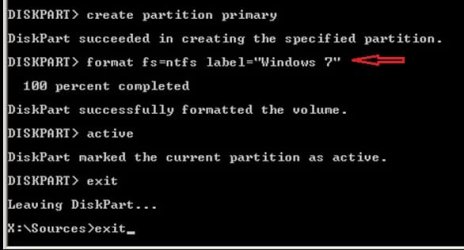
After following that tutorial you sent me to, when I type "clean all" after half an hour it says 'DiskPart has encountered an error: The parameter is incorrect.'. So I tried again but just "clean" and it works and when I type "format fs=ntfs label="Windows 7"" it says on 0 for about 10 minutes and says 'DiskPart has encountered an error: The parameter is incorrect.'.. weird
 

My Computer

OS
windows 7
Now i'm informing you that I am downloading the bootable Magic Partition to see if that will work. I will let you know
 

My Computer

OS
windows 7
Have a better look at the correct way to format. ;)


click image to enlarge
corretc.jpg
 

My Computer

Computer Manufacturer/Model Number
* BFK Customs *
OS
W 7 64-bit Ultimate
CPU
Intel Q9550 Yorkfield
Motherboard
ASUS P5Q Pro
Memory
8GB Dominator 8500C5D
Graphics Card(s)
ATI : XFX 5870
Sound Card
Realtek HD Audio 7-1
Monitor(s) Displays
1x 47" LCD HDMI & 3x 26" LCD HDMI
Screen Resolution
1920x1080P & 1920x1200
Hard Drives
1x 80GB Intel X25-M G2 SSD : 1x 500GB & 1x 640GB WD Caviar Black(s)
PSU
Corsair 620HX
Case
Cooler Master RC-690
Cooling
Tuniq Tower 120, 2x 140mm and 3x 120mm case fans
Keyboard
Microsoft 500
Mouse
Razer Diamondback 3G
Internet Speed
14 Mb/s
Other Info
1x Koutech 3Gb/s SATA HDD Hot Swap Rack
Back
Top