
Solved Optimizing my SSD install.

AnthonyP

New member
Local time
6:53 PM
Messages
17
I just re-installed Windows 7 on my machine and I want to maximize my boot speed. Everything else is blazing fast its just taking a long time (about 50 seconds) to boot, from and SSD mind you. Maybe some services I can disable safely for a faster boot that would be great. I dunno anyway if I haven't provided enough info please let me know so I can post it.

Thank you all. :)
 

My Computer

Computer type
PC/Desktop
Computer Manufacturer/Model Number
Custom
OS
Windows 7 Home Premium x64 SP1
CPU
Intel Core i5 2500K 3.3GHz
Motherboard
Gigabyte Z68XP-UD3P [rev 1.3] F7 BIOS
Memory
8GB (2 x 4GB) Patriot G series ‘Sector 5’ (PC3 12800)
Graphics Card(s)
GIGABYTE GV-R685OC-1GD
Sound Card
Onboard
Monitor(s) Displays
Dell 1707FP(Digital)
Screen Resolution
1280x1024
Hard Drives
2x OCZ Agility 3 60GB [FW 2.50]
1x Hitachi Travelstar HTS541616J9SA00 160GB 5400 RPM
PSU
OCZ600MXSP ModXStream Pro 600W
Cooling
Stock
Keyboard
Logitech G15 (2004)
Mouse
Gigabye m6880 gaming mouse
Internet Speed
Cable 2Mb/s Download 1Mb/s Upload
Antivirus
ESET Smart Security 7
Browser
Chrome
Other Info
ASUS DRW-24B3LT DVD-RW Drive
Vantec Multi-Memory Internal Card Reader w/USB 2.0
Rosewill USB 2.0 4-Port Hub
Trendnet Wireless N Router
RCA modem
I've got an i-5 2500 that boots in about 25 seconds from an Intel SSD.

I didn't go to any great lengths to optimize anything.

You should check alignment and minimize stuff that tries to load at startup.

What do you show with a checkmark on the startup tab of msconfig?

How many non-Microsoft services do you have running a couple of minutes after booting? 8? 28?

How many total processes do you have running a couple of minutes after booting? 45? 75?

Maybe post some screenshots of what you see.

Are you using RAID?
 

My Computer

Computer type
PC/Desktop
Computer Manufacturer/Model Number
Ignatz Special; 4 speed manual gearbox; factory air conditioning; one of one
OS
Windows 7 Home Premium SP1, 64-bit
CPU
Intel Skylake i5-6600K, not overclocked
Motherboard
AsRock Z170M Extreme 4, micro ATX
Memory
8 GB HyperX DDR4-2666 (2 x 4 GB)
Graphics Card(s)
none; graphics are integrated on CPU
Sound Card
onboard: Realtek ALC1150; external: USB Behringer UF0-202
Monitor(s) Displays
Dell S2340M 23 inch IPS
Screen Resolution
1600 x 900
Hard Drives
System: Crucial MX100 series SSD, 128 GB;
Data: Samsung Spinpoint 103SJ, 1 TB;
Backup: WD Caviar Green WD30EZRX-00D8PB0, 3 TB
PSU
Rosewill SilentNight 500 watt fanless, semi-modular
Case
Antec Solo II
Cooling
Noctua NH-U12S; Noctua F12 intake, Noctua S12A exhaust
Keyboard
Microsoft 200 6JH-00001 USB
Mouse
Dell or Microsoft optical wired; USB
Antivirus
Microsoft Security Essentials and Malwarebytes Premium
Browser
Pale Moon
Other Info
All fans PWM; speeds at idle: CPU circa 500 rpm; intake circa 600 rpm; exhaust circa 600 rpm; CPU temps 27 idle and 47 C load in a warm room (27 C/81 F) when running Intel Extreme Tuning Utility stress test.
You should check alignment and minimize stuff that tries to load at startup.

>How do I check alignment?

What do you show with a checkmark on the startup tab of msconfig?

1 Brother control center (printer software)
2 Catalyst Control Center
3 Keyboard macro program
4 intel delayed launcher (RST)
5 ESET (AV)
6 Install Shield update service-isuspm.exe
7 Install Shield update service-issch.exe
8 intel(R)common user interface-igfxtray.exe
9i ntel(R)common user interface-hkcmd.exe
10 intel(R)common user interface-igfxpers.exe
11 Malwarebytes
12 Virtu Control Panel

How many non-Microsoft services do you have running a couple of minutes after booting? 8? 28?

>23

How many total processes do you have running a couple of minutes after booting? 45? 75?
>~75

Maybe post some screenshots of what you see.

Will do

Are you using RAID?

Yes and no. There are no disks in an array but the primary storage controller is the RAID controller not AHCI. The AHCI makes the boot longer though.

EDIT: I've got it to 45 now.
 

Attachments

  • Untitled.png
    Untitled.png
    5.6 KB · Views: 21

My Computer

Computer type
PC/Desktop
Computer Manufacturer/Model Number
Custom
OS
Windows 7 Home Premium x64 SP1
CPU
Intel Core i5 2500K 3.3GHz
Motherboard
Gigabyte Z68XP-UD3P [rev 1.3] F7 BIOS
Memory
8GB (2 x 4GB) Patriot G series ‘Sector 5’ (PC3 12800)
Graphics Card(s)
GIGABYTE GV-R685OC-1GD
Sound Card
Onboard
Monitor(s) Displays
Dell 1707FP(Digital)
Screen Resolution
1280x1024
Hard Drives
2x OCZ Agility 3 60GB [FW 2.50]
1x Hitachi Travelstar HTS541616J9SA00 160GB 5400 RPM
PSU
OCZ600MXSP ModXStream Pro 600W
Cooling
Stock
Keyboard
Logitech G15 (2004)
Mouse
Gigabye m6880 gaming mouse
Internet Speed
Cable 2Mb/s Download 1Mb/s Upload
Antivirus
ESET Smart Security 7
Browser
Chrome
Other Info
ASUS DRW-24B3LT DVD-RW Drive
Vantec Multi-Memory Internal Card Reader w/USB 2.0
Rosewill USB 2.0 4-Port Hub
Trendnet Wireless N Router
RCA modem
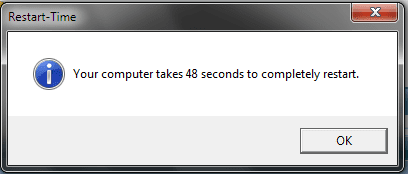
Just for your comparison purposes:

I have 7 non-Microsoft services running and 54 total processes.

And I have 7 things checked in the startup tab of msconfig. You've got 12 things checked. Do a test--uncheck all but your anti-virus and see if that affects boot speed.
 

My Computer

Computer type
PC/Desktop
Computer Manufacturer/Model Number
Ignatz Special; 4 speed manual gearbox; factory air conditioning; one of one
OS
Windows 7 Home Premium SP1, 64-bit
CPU
Intel Skylake i5-6600K, not overclocked
Motherboard
AsRock Z170M Extreme 4, micro ATX
Memory
8 GB HyperX DDR4-2666 (2 x 4 GB)
Graphics Card(s)
none; graphics are integrated on CPU
Sound Card
onboard: Realtek ALC1150; external: USB Behringer UF0-202
Monitor(s) Displays
Dell S2340M 23 inch IPS
Screen Resolution
1600 x 900
Hard Drives
System: Crucial MX100 series SSD, 128 GB;
Data: Samsung Spinpoint 103SJ, 1 TB;
Backup: WD Caviar Green WD30EZRX-00D8PB0, 3 TB
PSU
Rosewill SilentNight 500 watt fanless, semi-modular
Case
Antec Solo II
Cooling
Noctua NH-U12S; Noctua F12 intake, Noctua S12A exhaust
Keyboard
Microsoft 200 6JH-00001 USB
Mouse
Dell or Microsoft optical wired; USB
Antivirus
Microsoft Security Essentials and Malwarebytes Premium
Browser
Pale Moon
Other Info
All fans PWM; speeds at idle: CPU circa 500 rpm; intake circa 600 rpm; exhaust circa 600 rpm; CPU temps 27 idle and 47 C load in a warm room (27 C/81 F) when running Intel Extreme Tuning Utility stress test.
When you boot, do you see a series of dots progressing across a black screen for 20 to 30 seconds before Windows actually shows your desktop?
 

My Computer

Computer type
PC/Desktop
Computer Manufacturer/Model Number
Ignatz Special; 4 speed manual gearbox; factory air conditioning; one of one
OS
Windows 7 Home Premium SP1, 64-bit
CPU
Intel Skylake i5-6600K, not overclocked
Motherboard
AsRock Z170M Extreme 4, micro ATX
Memory
8 GB HyperX DDR4-2666 (2 x 4 GB)
Graphics Card(s)
none; graphics are integrated on CPU
Sound Card
onboard: Realtek ALC1150; external: USB Behringer UF0-202
Monitor(s) Displays
Dell S2340M 23 inch IPS
Screen Resolution
1600 x 900
Hard Drives
System: Crucial MX100 series SSD, 128 GB;
Data: Samsung Spinpoint 103SJ, 1 TB;
Backup: WD Caviar Green WD30EZRX-00D8PB0, 3 TB
PSU
Rosewill SilentNight 500 watt fanless, semi-modular
Case
Antec Solo II
Cooling
Noctua NH-U12S; Noctua F12 intake, Noctua S12A exhaust
Keyboard
Microsoft 200 6JH-00001 USB
Mouse
Dell or Microsoft optical wired; USB
Antivirus
Microsoft Security Essentials and Malwarebytes Premium
Browser
Pale Moon
Other Info
All fans PWM; speeds at idle: CPU circa 500 rpm; intake circa 600 rpm; exhaust circa 600 rpm; CPU temps 27 idle and 47 C load in a warm room (27 C/81 F) when running Intel Extreme Tuning Utility stress test.
Right before windows logo it says "Loading Operating System...".

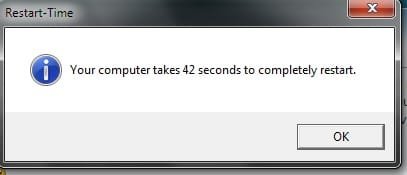
43 seconds now. Shaved off 5 seconds, nothing much.
 

Attachments

  • Untitled.jpg
    Untitled.jpg
    7.3 KB · Views: 21

My Computer

Computer type
PC/Desktop
Computer Manufacturer/Model Number
Custom
OS
Windows 7 Home Premium x64 SP1
CPU
Intel Core i5 2500K 3.3GHz
Motherboard
Gigabyte Z68XP-UD3P [rev 1.3] F7 BIOS
Memory
8GB (2 x 4GB) Patriot G series ‘Sector 5’ (PC3 12800)
Graphics Card(s)
GIGABYTE GV-R685OC-1GD
Sound Card
Onboard
Monitor(s) Displays
Dell 1707FP(Digital)
Screen Resolution
1280x1024
Hard Drives
2x OCZ Agility 3 60GB [FW 2.50]
1x Hitachi Travelstar HTS541616J9SA00 160GB 5400 RPM
PSU
OCZ600MXSP ModXStream Pro 600W
Cooling
Stock
Keyboard
Logitech G15 (2004)
Mouse
Gigabye m6880 gaming mouse
Internet Speed
Cable 2Mb/s Download 1Mb/s Upload
Antivirus
ESET Smart Security 7
Browser
Chrome
Other Info
ASUS DRW-24B3LT DVD-RW Drive
Vantec Multi-Memory Internal Card Reader w/USB 2.0
Rosewill USB 2.0 4-Port Hub
Trendnet Wireless N Router
RCA modem
See my post # 5.
 

My Computer

Computer type
PC/Desktop
Computer Manufacturer/Model Number
Ignatz Special; 4 speed manual gearbox; factory air conditioning; one of one
OS
Windows 7 Home Premium SP1, 64-bit
CPU
Intel Skylake i5-6600K, not overclocked
Motherboard
AsRock Z170M Extreme 4, micro ATX
Memory
8 GB HyperX DDR4-2666 (2 x 4 GB)
Graphics Card(s)
none; graphics are integrated on CPU
Sound Card
onboard: Realtek ALC1150; external: USB Behringer UF0-202
Monitor(s) Displays
Dell S2340M 23 inch IPS
Screen Resolution
1600 x 900
Hard Drives
System: Crucial MX100 series SSD, 128 GB;
Data: Samsung Spinpoint 103SJ, 1 TB;
Backup: WD Caviar Green WD30EZRX-00D8PB0, 3 TB
PSU
Rosewill SilentNight 500 watt fanless, semi-modular
Case
Antec Solo II
Cooling
Noctua NH-U12S; Noctua F12 intake, Noctua S12A exhaust
Keyboard
Microsoft 200 6JH-00001 USB
Mouse
Dell or Microsoft optical wired; USB
Antivirus
Microsoft Security Essentials and Malwarebytes Premium
Browser
Pale Moon
Other Info
All fans PWM; speeds at idle: CPU circa 500 rpm; intake circa 600 rpm; exhaust circa 600 rpm; CPU temps 27 idle and 47 C load in a warm room (27 C/81 F) when running Intel Extreme Tuning Utility stress test.
No the dots extend from the "Loading OS" message and that takes up some of the least amount of time, the most its been is maybe 10 seconds.

This is my boot from start to finish:
1 Restarted PC Windows takes about 5-7 seconds to shut down.
2 POST starts BIOS starts trying to detecting IDE drives that aren't there.
3 AHCI BIOS starts and detects SATA devices connected or not.
4. "Loading Operating System..." about 5 seconds or less.
5. Windows Logo for about 5 seconds.
6. Welcome Screen Flashes and desktop is loaded and I can start any applications I need right off.

Thanks for your help so far, you've been a great help.
 

My Computer

Computer type
PC/Desktop
Computer Manufacturer/Model Number
Custom
OS
Windows 7 Home Premium x64 SP1
CPU
Intel Core i5 2500K 3.3GHz
Motherboard
Gigabyte Z68XP-UD3P [rev 1.3] F7 BIOS
Memory
8GB (2 x 4GB) Patriot G series ‘Sector 5’ (PC3 12800)
Graphics Card(s)
GIGABYTE GV-R685OC-1GD
Sound Card
Onboard
Monitor(s) Displays
Dell 1707FP(Digital)
Screen Resolution
1280x1024
Hard Drives
2x OCZ Agility 3 60GB [FW 2.50]
1x Hitachi Travelstar HTS541616J9SA00 160GB 5400 RPM
PSU
OCZ600MXSP ModXStream Pro 600W
Cooling
Stock
Keyboard
Logitech G15 (2004)
Mouse
Gigabye m6880 gaming mouse
Internet Speed
Cable 2Mb/s Download 1Mb/s Upload
Antivirus
ESET Smart Security 7
Browser
Chrome
Other Info
ASUS DRW-24B3LT DVD-RW Drive
Vantec Multi-Memory Internal Card Reader w/USB 2.0
Rosewill USB 2.0 4-Port Hub
Trendnet Wireless N Router
RCA modem
OK.

I'm not sure what else to tell you, but circa 45 is faster than nearly all standard HDD boot times.

You could investigate a more sophisticated product than Task Manager to take a look at what happens during your boot process in depth.

And maybe do some mild experimentation with BIOS settings. I asked about those dots because if you have your DVD drive set to boot first, Gigabyte boards will often search for a disc in the DVD drive and show about 25 seconds of dots--even when the DVD drive is empty. So there may be some oddball BIOS setting that has some effect. Most people can get an SSD down to a 30 second boot.

Did you check your SSD's alignment?
 

My Computer

Computer type
PC/Desktop
Computer Manufacturer/Model Number
Ignatz Special; 4 speed manual gearbox; factory air conditioning; one of one
OS
Windows 7 Home Premium SP1, 64-bit
CPU
Intel Skylake i5-6600K, not overclocked
Motherboard
AsRock Z170M Extreme 4, micro ATX
Memory
8 GB HyperX DDR4-2666 (2 x 4 GB)
Graphics Card(s)
none; graphics are integrated on CPU
Sound Card
onboard: Realtek ALC1150; external: USB Behringer UF0-202
Monitor(s) Displays
Dell S2340M 23 inch IPS
Screen Resolution
1600 x 900
Hard Drives
System: Crucial MX100 series SSD, 128 GB;
Data: Samsung Spinpoint 103SJ, 1 TB;
Backup: WD Caviar Green WD30EZRX-00D8PB0, 3 TB
PSU
Rosewill SilentNight 500 watt fanless, semi-modular
Case
Antec Solo II
Cooling
Noctua NH-U12S; Noctua F12 intake, Noctua S12A exhaust
Keyboard
Microsoft 200 6JH-00001 USB
Mouse
Dell or Microsoft optical wired; USB
Antivirus
Microsoft Security Essentials and Malwarebytes Premium
Browser
Pale Moon
Other Info
All fans PWM; speeds at idle: CPU circa 500 rpm; intake circa 600 rpm; exhaust circa 600 rpm; CPU temps 27 idle and 47 C load in a warm room (27 C/81 F) when running Intel Extreme Tuning Utility stress test.
OK.

I'm not sure what else to tell you, but circa 45 is faster than nearly all standard HDD boot times.

You could investigate a more sophisticated product than Task Manager to take a look at what happens during your boot process in depth.

And maybe do some mild experimentation with BIOS settings. I asked about those dots because if you have your DVD drive set to boot first, Gigabyte boards will often search for a disc in the DVD drive and show about 25 seconds of dots--even when the DVD drive is empty. So there may be some oddball BIOS setting that has some effect. Most people can get an SSD down to a 30 second boot.

Did you check your SSD's alignment?

I've been trying to fiddle with the BIOS settings but the documentation on some of the things for this board is cryptic or missing completely, typical Gigabyte crap.

SSD1: Partition Starting Offset 105,906,176 bytes (OS)
SSD2: Partition Starting Offset 1,048,576 bytes (data)
 

My Computer

Computer type
PC/Desktop
Computer Manufacturer/Model Number
Custom
OS
Windows 7 Home Premium x64 SP1
CPU
Intel Core i5 2500K 3.3GHz
Motherboard
Gigabyte Z68XP-UD3P [rev 1.3] F7 BIOS
Memory
8GB (2 x 4GB) Patriot G series ‘Sector 5’ (PC3 12800)
Graphics Card(s)
GIGABYTE GV-R685OC-1GD
Sound Card
Onboard
Monitor(s) Displays
Dell 1707FP(Digital)
Screen Resolution
1280x1024
Hard Drives
2x OCZ Agility 3 60GB [FW 2.50]
1x Hitachi Travelstar HTS541616J9SA00 160GB 5400 RPM
PSU
OCZ600MXSP ModXStream Pro 600W
Cooling
Stock
Keyboard
Logitech G15 (2004)
Mouse
Gigabye m6880 gaming mouse
Internet Speed
Cable 2Mb/s Download 1Mb/s Upload
Antivirus
ESET Smart Security 7
Browser
Chrome
Other Info
ASUS DRW-24B3LT DVD-RW Drive
Vantec Multi-Memory Internal Card Reader w/USB 2.0
Rosewill USB 2.0 4-Port Hub
Trendnet Wireless N Router
RCA modem
How do I check alignment?

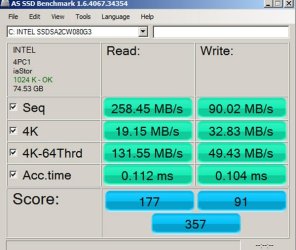
You can check it with a benchmark tool.

You should do a benchmark anyway to satisfy yourself that your SSD is healthy and operating as intended.

Google for the AS SSD benchmark tool as shown in the pic below.

Note in the upper left where it says "1024 OK". The OK means it's properly aligned. The number isn't critical, but the key point is that it is evenly divisible by 4.
 

Attachments

  • AS SSD benchmark.jpg
    AS SSD benchmark.jpg
    67.5 KB · Views: 14

My Computer

Computer type
PC/Desktop
Computer Manufacturer/Model Number
Ignatz Special; 4 speed manual gearbox; factory air conditioning; one of one
OS
Windows 7 Home Premium SP1, 64-bit
CPU
Intel Skylake i5-6600K, not overclocked
Motherboard
AsRock Z170M Extreme 4, micro ATX
Memory
8 GB HyperX DDR4-2666 (2 x 4 GB)
Graphics Card(s)
none; graphics are integrated on CPU
Sound Card
onboard: Realtek ALC1150; external: USB Behringer UF0-202
Monitor(s) Displays
Dell S2340M 23 inch IPS
Screen Resolution
1600 x 900
Hard Drives
System: Crucial MX100 series SSD, 128 GB;
Data: Samsung Spinpoint 103SJ, 1 TB;
Backup: WD Caviar Green WD30EZRX-00D8PB0, 3 TB
PSU
Rosewill SilentNight 500 watt fanless, semi-modular
Case
Antec Solo II
Cooling
Noctua NH-U12S; Noctua F12 intake, Noctua S12A exhaust
Keyboard
Microsoft 200 6JH-00001 USB
Mouse
Dell or Microsoft optical wired; USB
Antivirus
Microsoft Security Essentials and Malwarebytes Premium
Browser
Pale Moon
Other Info
All fans PWM; speeds at idle: CPU circa 500 rpm; intake circa 600 rpm; exhaust circa 600 rpm; CPU temps 27 idle and 47 C load in a warm room (27 C/81 F) when running Intel Extreme Tuning Utility stress test.
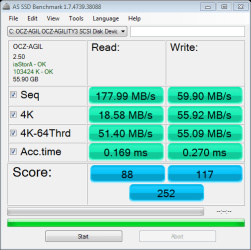
They're both 4k aligned. Thanks for your help.
 

Attachments

  • as-ssd-bench OCZ-AGIL OCZ-AGI 6.18.2014 2-15-57 AM.png
    as-ssd-bench OCZ-AGIL OCZ-AGI 6.18.2014 2-15-57 AM.png
    13.1 KB · Views: 13

My Computer

Computer type
PC/Desktop
Computer Manufacturer/Model Number
Custom
OS
Windows 7 Home Premium x64 SP1
CPU
Intel Core i5 2500K 3.3GHz
Motherboard
Gigabyte Z68XP-UD3P [rev 1.3] F7 BIOS
Memory
8GB (2 x 4GB) Patriot G series ‘Sector 5’ (PC3 12800)
Graphics Card(s)
GIGABYTE GV-R685OC-1GD
Sound Card
Onboard
Monitor(s) Displays
Dell 1707FP(Digital)
Screen Resolution
1280x1024
Hard Drives
2x OCZ Agility 3 60GB [FW 2.50]
1x Hitachi Travelstar HTS541616J9SA00 160GB 5400 RPM
PSU
OCZ600MXSP ModXStream Pro 600W
Cooling
Stock
Keyboard
Logitech G15 (2004)
Mouse
Gigabye m6880 gaming mouse
Internet Speed
Cable 2Mb/s Download 1Mb/s Upload
Antivirus
ESET Smart Security 7
Browser
Chrome
Other Info
ASUS DRW-24B3LT DVD-RW Drive
Vantec Multi-Memory Internal Card Reader w/USB 2.0
Rosewill USB 2.0 4-Port Hub
Trendnet Wireless N Router
RCA modem
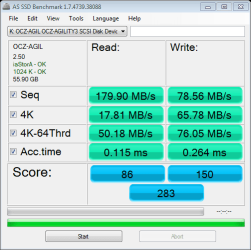
The access times and read times in your benchmarks are relatively slow for an SSD, but I can't say if that would account for your relatively slow boot.

You might have something else going that would be revealed by a tool such as Process Monitor from Microsoft. It's just a matter of how concerned you are. It may reveal nothing, and then you are left with just accepting the SSD for what it is.
 

My Computer

Computer type
PC/Desktop
Computer Manufacturer/Model Number
Ignatz Special; 4 speed manual gearbox; factory air conditioning; one of one
OS
Windows 7 Home Premium SP1, 64-bit
CPU
Intel Skylake i5-6600K, not overclocked
Motherboard
AsRock Z170M Extreme 4, micro ATX
Memory
8 GB HyperX DDR4-2666 (2 x 4 GB)
Graphics Card(s)
none; graphics are integrated on CPU
Sound Card
onboard: Realtek ALC1150; external: USB Behringer UF0-202
Monitor(s) Displays
Dell S2340M 23 inch IPS
Screen Resolution
1600 x 900
Hard Drives
System: Crucial MX100 series SSD, 128 GB;
Data: Samsung Spinpoint 103SJ, 1 TB;
Backup: WD Caviar Green WD30EZRX-00D8PB0, 3 TB
PSU
Rosewill SilentNight 500 watt fanless, semi-modular
Case
Antec Solo II
Cooling
Noctua NH-U12S; Noctua F12 intake, Noctua S12A exhaust
Keyboard
Microsoft 200 6JH-00001 USB
Mouse
Dell or Microsoft optical wired; USB
Antivirus
Microsoft Security Essentials and Malwarebytes Premium
Browser
Pale Moon
Other Info
All fans PWM; speeds at idle: CPU circa 500 rpm; intake circa 600 rpm; exhaust circa 600 rpm; CPU temps 27 idle and 47 C load in a warm room (27 C/81 F) when running Intel Extreme Tuning Utility stress test.
The access times and read times in your benchmarks are relatively slow for an SSD, but I can't say if that would account for your relatively slow boot.

You might have something else going that would be revealed by a tool such as Process Monitor from Microsoft. It's just a matter of how concerned you are. It may reveal nothing, and then you are left with just accepting the SSD for what it is.

What's this process monitor going to show me or do I have to look for it? I haven't had the SSD long. It's still under warranty. I don't know if its bad enough to RMA though I do want an SSD that works well though.
 

Attachments

  • as-ssd-bench OCZ-AGIL OCZ-AGI 6.18.2014 2-30-25 AM.png
    as-ssd-bench OCZ-AGIL OCZ-AGI 6.18.2014 2-30-25 AM.png
    13.7 KB · Views: 13

My Computer

Computer type
PC/Desktop
Computer Manufacturer/Model Number
Custom
OS
Windows 7 Home Premium x64 SP1
CPU
Intel Core i5 2500K 3.3GHz
Motherboard
Gigabyte Z68XP-UD3P [rev 1.3] F7 BIOS
Memory
8GB (2 x 4GB) Patriot G series ‘Sector 5’ (PC3 12800)
Graphics Card(s)
GIGABYTE GV-R685OC-1GD
Sound Card
Onboard
Monitor(s) Displays
Dell 1707FP(Digital)
Screen Resolution
1280x1024
Hard Drives
2x OCZ Agility 3 60GB [FW 2.50]
1x Hitachi Travelstar HTS541616J9SA00 160GB 5400 RPM
PSU
OCZ600MXSP ModXStream Pro 600W
Cooling
Stock
Keyboard
Logitech G15 (2004)
Mouse
Gigabye m6880 gaming mouse
Internet Speed
Cable 2Mb/s Download 1Mb/s Upload
Antivirus
ESET Smart Security 7
Browser
Chrome
Other Info
ASUS DRW-24B3LT DVD-RW Drive
Vantec Multi-Memory Internal Card Reader w/USB 2.0
Rosewill USB 2.0 4-Port Hub
Trendnet Wireless N Router
RCA modem
Process Monitor

I think I played with it a few years ago, but didn't have any significant problems at the time. I was just curious. It's a serious tool from Mark Russinovich, a guru of some renown.

There's another tool that more directly targets booting details, but I can't recall the name.
 

My Computer

Computer type
PC/Desktop
Computer Manufacturer/Model Number
Ignatz Special; 4 speed manual gearbox; factory air conditioning; one of one
OS
Windows 7 Home Premium SP1, 64-bit
CPU
Intel Skylake i5-6600K, not overclocked
Motherboard
AsRock Z170M Extreme 4, micro ATX
Memory
8 GB HyperX DDR4-2666 (2 x 4 GB)
Graphics Card(s)
none; graphics are integrated on CPU
Sound Card
onboard: Realtek ALC1150; external: USB Behringer UF0-202
Monitor(s) Displays
Dell S2340M 23 inch IPS
Screen Resolution
1600 x 900
Hard Drives
System: Crucial MX100 series SSD, 128 GB;
Data: Samsung Spinpoint 103SJ, 1 TB;
Backup: WD Caviar Green WD30EZRX-00D8PB0, 3 TB
PSU
Rosewill SilentNight 500 watt fanless, semi-modular
Case
Antec Solo II
Cooling
Noctua NH-U12S; Noctua F12 intake, Noctua S12A exhaust
Keyboard
Microsoft 200 6JH-00001 USB
Mouse
Dell or Microsoft optical wired; USB
Antivirus
Microsoft Security Essentials and Malwarebytes Premium
Browser
Pale Moon
Other Info
All fans PWM; speeds at idle: CPU circa 500 rpm; intake circa 600 rpm; exhaust circa 600 rpm; CPU temps 27 idle and 47 C load in a warm room (27 C/81 F) when running Intel Extreme Tuning Utility stress test.
I posted the bench for my other SSD is that one messed up too? What am I looking for in process monitor, there is so much information...
 

My Computer

Computer type
PC/Desktop
Computer Manufacturer/Model Number
Custom
OS
Windows 7 Home Premium x64 SP1
CPU
Intel Core i5 2500K 3.3GHz
Motherboard
Gigabyte Z68XP-UD3P [rev 1.3] F7 BIOS
Memory
8GB (2 x 4GB) Patriot G series ‘Sector 5’ (PC3 12800)
Graphics Card(s)
GIGABYTE GV-R685OC-1GD
Sound Card
Onboard
Monitor(s) Displays
Dell 1707FP(Digital)
Screen Resolution
1280x1024
Hard Drives
2x OCZ Agility 3 60GB [FW 2.50]
1x Hitachi Travelstar HTS541616J9SA00 160GB 5400 RPM
PSU
OCZ600MXSP ModXStream Pro 600W
Cooling
Stock
Keyboard
Logitech G15 (2004)
Mouse
Gigabye m6880 gaming mouse
Internet Speed
Cable 2Mb/s Download 1Mb/s Upload
Antivirus
ESET Smart Security 7
Browser
Chrome
Other Info
ASUS DRW-24B3LT DVD-RW Drive
Vantec Multi-Memory Internal Card Reader w/USB 2.0
Rosewill USB 2.0 4-Port Hub
Trendnet Wireless N Router
RCA modem
I posted the bench for my other SSD is that one messed up too? What am I looking for in process monitor, there is so much information...

I'm not going to tell you either is screwed up or that either is responsible for your boot times.

Maybe they are performing better than 9 out of 10 OCZ SSDs of that model. I have no idea. They are both properly aligned.

You are on your own with Process Monitor.

I think MS has some other tools used to dig into the boot process. You might Google the phrase "boot trace" and see what you get. Some of the tools may not be available for download to ordinary civilians.
 

My Computer

Computer type
PC/Desktop
Computer Manufacturer/Model Number
Ignatz Special; 4 speed manual gearbox; factory air conditioning; one of one
OS
Windows 7 Home Premium SP1, 64-bit
CPU
Intel Skylake i5-6600K, not overclocked
Motherboard
AsRock Z170M Extreme 4, micro ATX
Memory
8 GB HyperX DDR4-2666 (2 x 4 GB)
Graphics Card(s)
none; graphics are integrated on CPU
Sound Card
onboard: Realtek ALC1150; external: USB Behringer UF0-202
Monitor(s) Displays
Dell S2340M 23 inch IPS
Screen Resolution
1600 x 900
Hard Drives
System: Crucial MX100 series SSD, 128 GB;
Data: Samsung Spinpoint 103SJ, 1 TB;
Backup: WD Caviar Green WD30EZRX-00D8PB0, 3 TB
PSU
Rosewill SilentNight 500 watt fanless, semi-modular
Case
Antec Solo II
Cooling
Noctua NH-U12S; Noctua F12 intake, Noctua S12A exhaust
Keyboard
Microsoft 200 6JH-00001 USB
Mouse
Dell or Microsoft optical wired; USB
Antivirus
Microsoft Security Essentials and Malwarebytes Premium
Browser
Pale Moon
Other Info
All fans PWM; speeds at idle: CPU circa 500 rpm; intake circa 600 rpm; exhaust circa 600 rpm; CPU temps 27 idle and 47 C load in a warm room (27 C/81 F) when running Intel Extreme Tuning Utility stress test.
Hi there.

Slow boot times - especially from an SSD usually mean that you've got too many startup services running -- see if you can cut these down to a minimum -- and also ensure that the paging device is also on the SSD rather than a traditional spinner.

Even a "Slow" (almost a contradiction in terms !!) SSD will give you far better performance than any sort of spinner -- even expensive 10,000 RPM SCSI devices !!.

If your PC is really old the SSD will actually give you even better performance - paradoxically enough !!. Always ensure though there's sufficient RAM in the system for the OS you are running.

Don't share the SSD with another IDE device if you have the older type with an IDE connection (Master / Slave stuff). SSD's should only go to dedicated SATA ports on the Mobo. If you have an older IDE SSD connection keep it ALONE on that connecton. These are quite rare now but DO exist for connecting SSD's to older computers without SATA ports.

My advice always though is not to go with the bog standard cheapest peripherals when you want decent performance as you'll always find out (the hard way) that it's false economy.

The best bang for buck performance wise are either the INTEL or SAMSUNG 840 series SSD's -- they cost a little more but in reliability and performance they are hard to beat. I believe also the VERTEX stuff has now gone out of production -- could be wrong there but I'm sure I read about that recently.

Cheers
jimbo
 

My Computer

Computer type
PC/Desktop
Computer Manufacturer/Model Number
Custom built, several laptops HP/ASUS
OS
Linux CENTOS 7 / various Windows OS'es and servers
CPU
Intel i7 Intel i5
Memory
8GB, 16GB
Graphics Card(s)
On Motherboard
Sound Card
Realtek HD audio
Monitor(s) Displays
Apple Cinema display, Samsung LCD
Screen Resolution
1920 X 1080
Hard Drives
4 X 1TB SATA
Mouse
Toshiba wireless laser
Internet Speed
> 20MB up
Hi there.

Slow boot times - especially from an SSD usually mean that you've got too many startup services running -- see if you can cut these down to a minimum -- and also ensure that the paging device is also on the SSD rather than a traditional spinner.

Even a "Slow" (almost a contradiction in terms !!) SSD will give you far better performance than any sort of spinner -- even expensive 10,000 RPM SCSI devices !!.

If your PC is really old the SSD will actually give you even better performance - paradoxically enough !!. Always ensure though there's sufficient RAM in the system for the OS you are running.

Don't share the SSD with another IDE device if you have the older type with an IDE connection (Master / Slave stuff). SSD's should only go to dedicated SATA ports on the Mobo. If you have an older IDE SSD connection keep it ALONE on that connecton. These are quite rare now but DO exist for connecting SSD's to older computers without SATA ports.

My advice always though is not to go with the bog standard cheapest peripherals when you want decent performance as you'll always find out (the hard way) that it's false economy.

The best bang for buck performance wise are either the INTEL or SAMSUNG 840 series SSD's -- they cost a little more but in reliability and performance they are hard to beat. I believe also the VERTEX stuff has now gone out of production -- could be wrong there but I'm sure I read about that recently.

Cheers
jimbo

Is there a list of services I can disable? Also by paging device you mean the pagefile for virtual memory right? Thanks for those tips!
 

My Computer

Computer type
PC/Desktop
Computer Manufacturer/Model Number
Custom
OS
Windows 7 Home Premium x64 SP1
CPU
Intel Core i5 2500K 3.3GHz
Motherboard
Gigabyte Z68XP-UD3P [rev 1.3] F7 BIOS
Memory
8GB (2 x 4GB) Patriot G series ‘Sector 5’ (PC3 12800)
Graphics Card(s)
GIGABYTE GV-R685OC-1GD
Sound Card
Onboard
Monitor(s) Displays
Dell 1707FP(Digital)
Screen Resolution
1280x1024
Hard Drives
2x OCZ Agility 3 60GB [FW 2.50]
1x Hitachi Travelstar HTS541616J9SA00 160GB 5400 RPM
PSU
OCZ600MXSP ModXStream Pro 600W
Cooling
Stock
Keyboard
Logitech G15 (2004)
Mouse
Gigabye m6880 gaming mouse
Internet Speed
Cable 2Mb/s Download 1Mb/s Upload
Antivirus
ESET Smart Security 7
Browser
Chrome
Other Info
ASUS DRW-24B3LT DVD-RW Drive
Vantec Multi-Memory Internal Card Reader w/USB 2.0
Rosewill USB 2.0 4-Port Hub
Trendnet Wireless N Router
RCA modem
1 Brother control center (printer software)
2 Catalyst Control Center
3 Keyboard macro program
4 intel delayed launcher (RST)
5 ESET (AV)
6 Install Shield update service-isuspm.exe
7 Install Shield update service-issch.exe
8 intel(R)common user interface-igfxtray.exe
9i ntel(R)common user interface-hkcmd.exe
10 intel(R)common user interface-igfxpers.exe
11 Malwarebytes
12 Virtu Control Panel

How many non-Microsoft services do you have running a couple of minutes after booting? 8? 28?

>23

You dont' need any of those Startups or Services besides your AV and the printer if you need to scan from printer top. Period. I run a Clean Boot on all of my installs with perfect performance. All others are freeloaders starting on Win7's back for no good reason other than to spy on you to sell your consumer data to advertisers for extra income.

CCC is monstrous bloatware traced hundreds of times here to issues. If you don't need specific controls it provides then uninstall it and default only to the display driver which is all that's needed.

If you have Malwarebytes paid protection then it needs to start otherwise uncheck it as its only an on-demand scanner. I only have users buy MBAM if they get chronically infected. MSE is sufficient for most and offers best performance. If turning off all the freeloaders at boot doesn't resolve your issue then uninstall ESET and install MSE to see the difference.

Finally, compare the install you did with the perfect install in Clean Reinstall - Factory OEM Windows 7 which compiles everything that's worked best here since beta in tens of thousands of installs we've helped with.
 
Back
Top