
Ordered new laptop with Win 8 but plan to install Win 7 - partitions?

Your partitioning will be smaller than 500 & 250.
Could work out the size better with a screenshot of Disk management.
Well, I was working it out in gigabytes rather than gibibytes (which Windows shows everything in).

I don't have the laptop yet so I can't take a screenshot ;)
 

My Computer My Computer

At a glance

Windows 7 Home-Premium 64bitAMD Phenom II x4 955 Black Edition 3.2GHz (st...8GB Corsair Red Vengeance @1333MHz 9-9-9-24 D...XFX AMD Radeon HD 6970 2GB (stock)
Computer Manufacturer/Model Number
Myself
OS
Windows 7 Home-Premium 64bit
CPU
AMD Phenom II x4 955 Black Edition 3.2GHz (stock) with CM V8
Motherboard
Gigabyte GA-MA790XT-UD4P (AM3)
Memory
8GB Corsair Red Vengeance @1333MHz 9-9-9-24 Dual-Channel
Graphics Card(s)
XFX AMD Radeon HD 6970 2GB (stock)
Sound Card
Onboard Realtek Azalea 8.1 Channel
Monitor(s) Displays
Samsung Syncmaster P2250 DVI-D
Screen Resolution
1920x1080@60Hz
Hard Drives
1. 60GB (55.7GiB) Corsair Force 3 SSD (firmware 1.3.3) SATA III (in SATA II mode) - contains OS, drivers and non-game programs
2. 500GB (465GiB) Western Digital Caviar Blue 500GB SATA II 7,200rpm 16MB Cache - contains games
3. 250GB (232GiB) Weste
PSU
Corsair TX750W 750W PSU with 4x PCI-E 6+2-pin connectors
Case
Lancool [Lian Li] PC-K62 Dragonlord (originally w/blue fans)
Cooling
Lian Li: 3x140mm, 1x120mm | Bitfenix: 1x140mm - ALL RED LED
Keyboard
Logitech G110
Mouse
Logitech MX518
Internet Speed
BT Infinity Option 2 ~38Mbps download, ~8Mbps upload
Other Info
Also have a Logitech G27 Racing Wheel, Creative Fatal1ty Stereo headset, Logitech X-140 Stereo Speakers, a disused Xbox 360 USB game controller pad and a CM Storm WoC M4 Mouse mat. The *GB of Corsair Red Vengeance DRAM is the CMZ8GX3M2A1600C9R set which can run at 1600MHz at 9-9-9-24 in Intel's XMP but my AMD board doesn't have this and it's not recommended for AMD Phenom II's anyway.

My Computer My Computer

At a glance

ME/XP/Vista/Win7
OS
ME/XP/Vista/Win7
Your partitioning will be smaller than 500 & 250.
Could work out the size better with a screenshot of Disk management.
Well, I was working it out in gigabytes rather than gibibytes (which Windows shows everything in).

I don't have the laptop yet so I can't take a screenshot ;)

Take a look here:
Hard Drive Size Capacities Calculator

500 = 465.66.

This is what I used: MB to MiB and GB to GiB conversions « Mythical Noppatech

Same thing? Maybe I got GB and GiB mixed round though?

So partitions of 465.6 GB (or GiB not sure) for Windows 7 and 232.8 GB (or GiB not sure) for the pre-installed Windows 8

Secure Boot OFF

Bob's you're uncle?
 

My Computer My Computer

At a glance

Windows 7 Home-Premium 64bitAMD Phenom II x4 955 Black Edition 3.2GHz (st...8GB Corsair Red Vengeance @1333MHz 9-9-9-24 D...XFX AMD Radeon HD 6970 2GB (stock)
Computer Manufacturer/Model Number
Myself
OS
Windows 7 Home-Premium 64bit
CPU
AMD Phenom II x4 955 Black Edition 3.2GHz (stock) with CM V8
Motherboard
Gigabyte GA-MA790XT-UD4P (AM3)
Memory
8GB Corsair Red Vengeance @1333MHz 9-9-9-24 Dual-Channel
Graphics Card(s)
XFX AMD Radeon HD 6970 2GB (stock)
Sound Card
Onboard Realtek Azalea 8.1 Channel
Monitor(s) Displays
Samsung Syncmaster P2250 DVI-D
Screen Resolution
1920x1080@60Hz
Hard Drives
1. 60GB (55.7GiB) Corsair Force 3 SSD (firmware 1.3.3) SATA III (in SATA II mode) - contains OS, drivers and non-game programs
2. 500GB (465GiB) Western Digital Caviar Blue 500GB SATA II 7,200rpm 16MB Cache - contains games
3. 250GB (232GiB) Weste
PSU
Corsair TX750W 750W PSU with 4x PCI-E 6+2-pin connectors
Case
Lancool [Lian Li] PC-K62 Dragonlord (originally w/blue fans)
Cooling
Lian Li: 3x140mm, 1x120mm | Bitfenix: 1x140mm - ALL RED LED
Keyboard
Logitech G110
Mouse
Logitech MX518
Internet Speed
BT Infinity Option 2 ~38Mbps download, ~8Mbps upload
Other Info
Also have a Logitech G27 Racing Wheel, Creative Fatal1ty Stereo headset, Logitech X-140 Stereo Speakers, a disused Xbox 360 USB game controller pad and a CM Storm WoC M4 Mouse mat. The *GB of Corsair Red Vengeance DRAM is the CMZ8GX3M2A1600C9R set which can run at 1600MHz at 9-9-9-24 in Intel's XMP but my AMD board doesn't have this and it's not recommended for AMD Phenom II's anyway.
I'm only recommended Bypass UEFI to Install WIn7 for those who are seriously stuck trying to install to UEFI, a growing backlog. These need more intensive UEFI-experienced help.

No backlog with legal installs.

How would UEFI deem a install not legal when most of these haven't even had a chance to insert their Product Key or activate, and are using the latest official Win7 installer.
 
I'm only recommended Bypass UEFI to Install WIn7 for those who are seriously stuck trying to install to UEFI, a growing backlog. These need more intensive UEFI-experienced help.

No backlog with legal installs.

How would UEFI deem a install not legal when most of these haven't even had a chance to insert their Product Key or activate, and are using the latest official Win7 installer.

Using a OEM manufacturer's disc & Torrent downloads with no uEFI support.
 

My Computer My Computer

At a glance

ME/XP/Vista/Win7
OS
ME/XP/Vista/Win7
The backlog I'm referring to is a half dozen cases right now where UEFI install is failing after trying UEFI (Unified Extensible Firmware Interface) - Install Windows 7 with - Windows 7 Forums, using the official installer with a good Product Key.

There are even a few cases using Downgrade Windows 8 to Windows 7 or Bypass UEFI to Install WIn7 which still fail.

This is unusual as we've always got it installed here before.

The biggest problem is every UEFI is mobo-specific rather than install-fix-specific.
 
After reading that link again, I'm confused again. Partitions: system, MSR and Primary - I'm confused as to what will go where and the sizes of these partitions.
 

My Computer My Computer

At a glance

Windows 7 Home-Premium 64bitAMD Phenom II x4 955 Black Edition 3.2GHz (st...8GB Corsair Red Vengeance @1333MHz 9-9-9-24 D...XFX AMD Radeon HD 6970 2GB (stock)
Computer Manufacturer/Model Number
Myself
OS
Windows 7 Home-Premium 64bit
CPU
AMD Phenom II x4 955 Black Edition 3.2GHz (stock) with CM V8
Motherboard
Gigabyte GA-MA790XT-UD4P (AM3)
Memory
8GB Corsair Red Vengeance @1333MHz 9-9-9-24 Dual-Channel
Graphics Card(s)
XFX AMD Radeon HD 6970 2GB (stock)
Sound Card
Onboard Realtek Azalea 8.1 Channel
Monitor(s) Displays
Samsung Syncmaster P2250 DVI-D
Screen Resolution
1920x1080@60Hz
Hard Drives
1. 60GB (55.7GiB) Corsair Force 3 SSD (firmware 1.3.3) SATA III (in SATA II mode) - contains OS, drivers and non-game programs
2. 500GB (465GiB) Western Digital Caviar Blue 500GB SATA II 7,200rpm 16MB Cache - contains games
3. 250GB (232GiB) Weste
PSU
Corsair TX750W 750W PSU with 4x PCI-E 6+2-pin connectors
Case
Lancool [Lian Li] PC-K62 Dragonlord (originally w/blue fans)
Cooling
Lian Li: 3x140mm, 1x120mm | Bitfenix: 1x140mm - ALL RED LED
Keyboard
Logitech G110
Mouse
Logitech MX518
Internet Speed
BT Infinity Option 2 ~38Mbps download, ~8Mbps upload
Other Info
Also have a Logitech G27 Racing Wheel, Creative Fatal1ty Stereo headset, Logitech X-140 Stereo Speakers, a disused Xbox 360 USB game controller pad and a CM Storm WoC M4 Mouse mat. The *GB of Corsair Red Vengeance DRAM is the CMZ8GX3M2A1600C9R set which can run at 1600MHz at 9-9-9-24 in Intel's XMP but my AMD board doesn't have this and it's not recommended for AMD Phenom II's anyway.
Not seen any.
 

My Computer My Computer

At a glance

ME/XP/Vista/Win7
OS
ME/XP/Vista/Win7
Not seen any.

http://www.sevenforums.com/tutorial...e-firmware-interface-install-windows-7-a.html

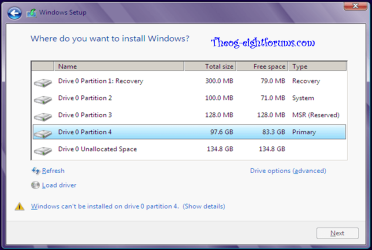
6. You will notice that the disk has now been formatted as GPT with 3 partitions. Select the "Primary" partition 3, and click/tap on Next. (see screenshot below)
NOTE: You might receive a "Windows can't be installed on drive 0" warning, but as long as you can click on the Next button, you're fine.

Note
The 3 partitions are:
Partition 1 - System - The EFI System partition that contains the NTLDR, HAL, Boot.txt, and other files that are needed to boot the system, such as drivers.
Partition 2 - MSR - The Microsoft Reserved (MSR) partition that reserves space on each disk drive for subsequent use by operating system software.
Partition 3 - Primary - Where Windows is to be installed to.

It is imperative that these 3 partitions remain in the exact order as they are


246030d1355766218-uefi-unified-extensible-firmware-interface-install-windows-7-windows7.png
 

My Computer My Computer

At a glance

Windows 7 Home-Premium 64bitAMD Phenom II x4 955 Black Edition 3.2GHz (st...8GB Corsair Red Vengeance @1333MHz 9-9-9-24 D...XFX AMD Radeon HD 6970 2GB (stock)
Computer Manufacturer/Model Number
Myself
OS
Windows 7 Home-Premium 64bit
CPU
AMD Phenom II x4 955 Black Edition 3.2GHz (stock) with CM V8
Motherboard
Gigabyte GA-MA790XT-UD4P (AM3)
Memory
8GB Corsair Red Vengeance @1333MHz 9-9-9-24 Dual-Channel
Graphics Card(s)
XFX AMD Radeon HD 6970 2GB (stock)
Sound Card
Onboard Realtek Azalea 8.1 Channel
Monitor(s) Displays
Samsung Syncmaster P2250 DVI-D
Screen Resolution
1920x1080@60Hz
Hard Drives
1. 60GB (55.7GiB) Corsair Force 3 SSD (firmware 1.3.3) SATA III (in SATA II mode) - contains OS, drivers and non-game programs
2. 500GB (465GiB) Western Digital Caviar Blue 500GB SATA II 7,200rpm 16MB Cache - contains games
3. 250GB (232GiB) Weste
PSU
Corsair TX750W 750W PSU with 4x PCI-E 6+2-pin connectors
Case
Lancool [Lian Li] PC-K62 Dragonlord (originally w/blue fans)
Cooling
Lian Li: 3x140mm, 1x120mm | Bitfenix: 1x140mm - ALL RED LED
Keyboard
Logitech G110
Mouse
Logitech MX518
Internet Speed
BT Infinity Option 2 ~38Mbps download, ~8Mbps upload
Other Info
Also have a Logitech G27 Racing Wheel, Creative Fatal1ty Stereo headset, Logitech X-140 Stereo Speakers, a disused Xbox 360 USB game controller pad and a CM Storm WoC M4 Mouse mat. The *GB of Corsair Red Vengeance DRAM is the CMZ8GX3M2A1600C9R set which can run at 1600MHz at 9-9-9-24 in Intel's XMP but my AMD board doesn't have this and it's not recommended for AMD Phenom II's anyway.

My Computer My Computer

At a glance

ME/XP/Vista/Win7
OS
ME/XP/Vista/Win7
After reading that link again, I'm confused again. Partitions: system, MSR and Primary - I'm confused as to what will go where and the sizes of these partitions.


First three partitions

View attachment 248807


For more info on uEFI:
Windows and GPT FAQ
Unified Extensible Firmware Interface - Wikipedia, the free encyclopedia
UEFI and Windows

OK, so I'm likely to have those 4 partitions already - the 3 special ones which make up just over 500MB of, then the larger partition where Windows 8 and everything else goes... the C: drive basically, then I will be creating another partition for Windows 7 - if I don't install it using uEFI (if given the choice) then I will have 5 partitions, the 4 mentioned already plus the new one for Windows 7. If I do it uEFI way, there will be 8 partitions? 3 extra ones with the GPT stuff then Windows 7? Or am I completely wrong?
 

My Computer My Computer

At a glance

Windows 7 Home-Premium 64bitAMD Phenom II x4 955 Black Edition 3.2GHz (st...8GB Corsair Red Vengeance @1333MHz 9-9-9-24 D...XFX AMD Radeon HD 6970 2GB (stock)
Computer Manufacturer/Model Number
Myself
OS
Windows 7 Home-Premium 64bit
CPU
AMD Phenom II x4 955 Black Edition 3.2GHz (stock) with CM V8
Motherboard
Gigabyte GA-MA790XT-UD4P (AM3)
Memory
8GB Corsair Red Vengeance @1333MHz 9-9-9-24 Dual-Channel
Graphics Card(s)
XFX AMD Radeon HD 6970 2GB (stock)
Sound Card
Onboard Realtek Azalea 8.1 Channel
Monitor(s) Displays
Samsung Syncmaster P2250 DVI-D
Screen Resolution
1920x1080@60Hz
Hard Drives
1. 60GB (55.7GiB) Corsair Force 3 SSD (firmware 1.3.3) SATA III (in SATA II mode) - contains OS, drivers and non-game programs
2. 500GB (465GiB) Western Digital Caviar Blue 500GB SATA II 7,200rpm 16MB Cache - contains games
3. 250GB (232GiB) Weste
PSU
Corsair TX750W 750W PSU with 4x PCI-E 6+2-pin connectors
Case
Lancool [Lian Li] PC-K62 Dragonlord (originally w/blue fans)
Cooling
Lian Li: 3x140mm, 1x120mm | Bitfenix: 1x140mm - ALL RED LED
Keyboard
Logitech G110
Mouse
Logitech MX518
Internet Speed
BT Infinity Option 2 ~38Mbps download, ~8Mbps upload
Other Info
Also have a Logitech G27 Racing Wheel, Creative Fatal1ty Stereo headset, Logitech X-140 Stereo Speakers, a disused Xbox 360 USB game controller pad and a CM Storm WoC M4 Mouse mat. The *GB of Corsair Red Vengeance DRAM is the CMZ8GX3M2A1600C9R set which can run at 1600MHz at 9-9-9-24 in Intel's XMP but my AMD board doesn't have this and it's not recommended for AMD Phenom II's anyway.
Post 14, screenshot 2, A setup, 5 partitions.
 

My Computer My Computer

At a glance

ME/XP/Vista/Win7
OS
ME/XP/Vista/Win7
Post 14, screenshot 2, A setup, 5 partitions.

Ah ok, so the 300MB and 100MB are part of the GPT - is that part of the GPT for Windows 7 or Windows 8 though? I'm not sure what I'm likely to expect when I receive my laptop.

I mean, is only Windows 8 OR Windows 7 in GPT and the other not?
 

My Computer My Computer

At a glance

Windows 7 Home-Premium 64bitAMD Phenom II x4 955 Black Edition 3.2GHz (st...8GB Corsair Red Vengeance @1333MHz 9-9-9-24 D...XFX AMD Radeon HD 6970 2GB (stock)
Computer Manufacturer/Model Number
Myself
OS
Windows 7 Home-Premium 64bit
CPU
AMD Phenom II x4 955 Black Edition 3.2GHz (stock) with CM V8
Motherboard
Gigabyte GA-MA790XT-UD4P (AM3)
Memory
8GB Corsair Red Vengeance @1333MHz 9-9-9-24 Dual-Channel
Graphics Card(s)
XFX AMD Radeon HD 6970 2GB (stock)
Sound Card
Onboard Realtek Azalea 8.1 Channel
Monitor(s) Displays
Samsung Syncmaster P2250 DVI-D
Screen Resolution
1920x1080@60Hz
Hard Drives
1. 60GB (55.7GiB) Corsair Force 3 SSD (firmware 1.3.3) SATA III (in SATA II mode) - contains OS, drivers and non-game programs
2. 500GB (465GiB) Western Digital Caviar Blue 500GB SATA II 7,200rpm 16MB Cache - contains games
3. 250GB (232GiB) Weste
PSU
Corsair TX750W 750W PSU with 4x PCI-E 6+2-pin connectors
Case
Lancool [Lian Li] PC-K62 Dragonlord (originally w/blue fans)
Cooling
Lian Li: 3x140mm, 1x120mm | Bitfenix: 1x140mm - ALL RED LED
Keyboard
Logitech G110
Mouse
Logitech MX518
Internet Speed
BT Infinity Option 2 ~38Mbps download, ~8Mbps upload
Other Info
Also have a Logitech G27 Racing Wheel, Creative Fatal1ty Stereo headset, Logitech X-140 Stereo Speakers, a disused Xbox 360 USB game controller pad and a CM Storm WoC M4 Mouse mat. The *GB of Corsair Red Vengeance DRAM is the CMZ8GX3M2A1600C9R set which can run at 1600MHz at 9-9-9-24 in Intel's XMP but my AMD board doesn't have this and it's not recommended for AMD Phenom II's anyway.
A setup is Windows 8 installed first.
B setup is Windows 7 installed first.
I can only do a base of partitioning without a screenshot.
New PC with uEFI are mainly Windows 7 & 8.
 

My Computer My Computer

At a glance

ME/XP/Vista/Win7
OS
ME/XP/Vista/Win7
So if I've learned correctly, if I install Win 7 in uEFI mode and GPT thingy I should expect this:

Disk 0 P1 approx 100MB Named "System"
Disk 0 P2 approx 128MB Named "MSR (Reserved)"
Disk 0 P3 approx 230GB Named "Primary" - Windows 8's location
Disk 0 Unallocated space approx 465GB - new partition to install a uEFI GPT mode (or whatever the terminology) of Win 7

Later that will become

Disk 0 P1 approx 100MB Named "System"
Disk 0 P2 approx 128MB Named "MSR (Reserved)"
Disk 0 P3 approx 230GB Named "Primary" - Windows 8's location
Disk 0 P4 approx 100MB Named "System" but a (1) next to it?
Disk 0 P5 approx 128MB Named "MSR (Reserved)" but a (1) next to it?
Disk 0 P6 approx 465GB Named "Windows 7"

Is this wrong or right?

Edit:

Found this in some instructions for installing Windows 7 under UEFI: http://www.sevenforums.com/tutorial...e-firmware-interface-install-windows-7-a.html

You will need to satisfy the following requirements in order to proceed:
A Windows 7 compatible system
A Windows 7 x64-bit installation media. 32-bit is not supported.
A UEFI v2.0+ compliant PC. Check your chipset manufacturer/firmware documentation.
A blank, partition-free, hard disk for installation.

Hmm... not sure what this means for me.
 
Last edited:

My Computer My Computer

At a glance

Windows 7 Home-Premium 64bitAMD Phenom II x4 955 Black Edition 3.2GHz (st...8GB Corsair Red Vengeance @1333MHz 9-9-9-24 D...XFX AMD Radeon HD 6970 2GB (stock)
Computer Manufacturer/Model Number
Myself
OS
Windows 7 Home-Premium 64bit
CPU
AMD Phenom II x4 955 Black Edition 3.2GHz (stock) with CM V8
Motherboard
Gigabyte GA-MA790XT-UD4P (AM3)
Memory
8GB Corsair Red Vengeance @1333MHz 9-9-9-24 Dual-Channel
Graphics Card(s)
XFX AMD Radeon HD 6970 2GB (stock)
Sound Card
Onboard Realtek Azalea 8.1 Channel
Monitor(s) Displays
Samsung Syncmaster P2250 DVI-D
Screen Resolution
1920x1080@60Hz
Hard Drives
1. 60GB (55.7GiB) Corsair Force 3 SSD (firmware 1.3.3) SATA III (in SATA II mode) - contains OS, drivers and non-game programs
2. 500GB (465GiB) Western Digital Caviar Blue 500GB SATA II 7,200rpm 16MB Cache - contains games
3. 250GB (232GiB) Weste
PSU
Corsair TX750W 750W PSU with 4x PCI-E 6+2-pin connectors
Case
Lancool [Lian Li] PC-K62 Dragonlord (originally w/blue fans)
Cooling
Lian Li: 3x140mm, 1x120mm | Bitfenix: 1x140mm - ALL RED LED
Keyboard
Logitech G110
Mouse
Logitech MX518
Internet Speed
BT Infinity Option 2 ~38Mbps download, ~8Mbps upload
Other Info
Also have a Logitech G27 Racing Wheel, Creative Fatal1ty Stereo headset, Logitech X-140 Stereo Speakers, a disused Xbox 360 USB game controller pad and a CM Storm WoC M4 Mouse mat. The *GB of Corsair Red Vengeance DRAM is the CMZ8GX3M2A1600C9R set which can run at 1600MHz at 9-9-9-24 in Intel's XMP but my AMD board doesn't have this and it's not recommended for AMD Phenom II's anyway.
wrong

Base of 5 partitions + MSR hidden.

Delete Win 7-009.PNG
 

My Computer My Computer

At a glance

ME/XP/Vista/Win7
OS
ME/XP/Vista/Win7
wrong

Base of 5 partitions + MSR hidden.

View attachment 248815

Are both of your Win 8 and Win 7 installed in this GPT mode? If I've got the terminology right?

Also, you say that your 5th one is for your data and/or Win XP so would that leave me with 4 partitions visible?
 

My Computer My Computer

At a glance

Windows 7 Home-Premium 64bitAMD Phenom II x4 955 Black Edition 3.2GHz (st...8GB Corsair Red Vengeance @1333MHz 9-9-9-24 D...XFX AMD Radeon HD 6970 2GB (stock)
Computer Manufacturer/Model Number
Myself
OS
Windows 7 Home-Premium 64bit
CPU
AMD Phenom II x4 955 Black Edition 3.2GHz (stock) with CM V8
Motherboard
Gigabyte GA-MA790XT-UD4P (AM3)
Memory
8GB Corsair Red Vengeance @1333MHz 9-9-9-24 Dual-Channel
Graphics Card(s)
XFX AMD Radeon HD 6970 2GB (stock)
Sound Card
Onboard Realtek Azalea 8.1 Channel
Monitor(s) Displays
Samsung Syncmaster P2250 DVI-D
Screen Resolution
1920x1080@60Hz
Hard Drives
1. 60GB (55.7GiB) Corsair Force 3 SSD (firmware 1.3.3) SATA III (in SATA II mode) - contains OS, drivers and non-game programs
2. 500GB (465GiB) Western Digital Caviar Blue 500GB SATA II 7,200rpm 16MB Cache - contains games
3. 250GB (232GiB) Weste
PSU
Corsair TX750W 750W PSU with 4x PCI-E 6+2-pin connectors
Case
Lancool [Lian Li] PC-K62 Dragonlord (originally w/blue fans)
Cooling
Lian Li: 3x140mm, 1x120mm | Bitfenix: 1x140mm - ALL RED LED
Keyboard
Logitech G110
Mouse
Logitech MX518
Internet Speed
BT Infinity Option 2 ~38Mbps download, ~8Mbps upload
Other Info
Also have a Logitech G27 Racing Wheel, Creative Fatal1ty Stereo headset, Logitech X-140 Stereo Speakers, a disused Xbox 360 USB game controller pad and a CM Storm WoC M4 Mouse mat. The *GB of Corsair Red Vengeance DRAM is the CMZ8GX3M2A1600C9R set which can run at 1600MHz at 9-9-9-24 in Intel's XMP but my AMD board doesn't have this and it's not recommended for AMD Phenom II's anyway.
I've got to do this right - no mess ups when I get the laptop I hope!

So, in order of future events:

Receive laptop and create my user e.t.c.

-Create recovery media for OS
-Check if Secure boot is true or false and turn off if true in bios
-Check it's off once back into Win 8
-Create a partition for Win 7
-Install Win 7 in UEFI mode using a USB boot drive I will create while in Win 8 from the DVD
-Partitions that should be created (automatically?) include System, recovery and MSR which will be hidden within Windows
-Win 7 has been installed

Is this correct?

A blank, partition-free, hard disk for installation.

^ This confuses me.

I'll get back to this after some sleep although I do have a lot of work to do I remember so I hope I don't distract myself too much by looking on here too much.
 

My Computer My Computer

At a glance

Windows 7 Home-Premium 64bitAMD Phenom II x4 955 Black Edition 3.2GHz (st...8GB Corsair Red Vengeance @1333MHz 9-9-9-24 D...XFX AMD Radeon HD 6970 2GB (stock)
Computer Manufacturer/Model Number
Myself
OS
Windows 7 Home-Premium 64bit
CPU
AMD Phenom II x4 955 Black Edition 3.2GHz (stock) with CM V8
Motherboard
Gigabyte GA-MA790XT-UD4P (AM3)
Memory
8GB Corsair Red Vengeance @1333MHz 9-9-9-24 Dual-Channel
Graphics Card(s)
XFX AMD Radeon HD 6970 2GB (stock)
Sound Card
Onboard Realtek Azalea 8.1 Channel
Monitor(s) Displays
Samsung Syncmaster P2250 DVI-D
Screen Resolution
1920x1080@60Hz
Hard Drives
1. 60GB (55.7GiB) Corsair Force 3 SSD (firmware 1.3.3) SATA III (in SATA II mode) - contains OS, drivers and non-game programs
2. 500GB (465GiB) Western Digital Caviar Blue 500GB SATA II 7,200rpm 16MB Cache - contains games
3. 250GB (232GiB) Weste
PSU
Corsair TX750W 750W PSU with 4x PCI-E 6+2-pin connectors
Case
Lancool [Lian Li] PC-K62 Dragonlord (originally w/blue fans)
Cooling
Lian Li: 3x140mm, 1x120mm | Bitfenix: 1x140mm - ALL RED LED
Keyboard
Logitech G110
Mouse
Logitech MX518
Internet Speed
BT Infinity Option 2 ~38Mbps download, ~8Mbps upload
Other Info
Also have a Logitech G27 Racing Wheel, Creative Fatal1ty Stereo headset, Logitech X-140 Stereo Speakers, a disused Xbox 360 USB game controller pad and a CM Storm WoC M4 Mouse mat. The *GB of Corsair Red Vengeance DRAM is the CMZ8GX3M2A1600C9R set which can run at 1600MHz at 9-9-9-24 in Intel's XMP but my AMD board doesn't have this and it's not recommended for AMD Phenom II's anyway.
Back
Top