
Ordered new laptop with Win 8 but plan to install Win 7 - partitions?

jayrap

New member
Member
Local time
9:17 PM
Messages
92
Location
United Kingdom
I've ordered myself a new Acer laptop which will come with Windows 8 64 already installed, however, I also ordered Windows 7 to install as I really don't want to be using Windows 8. My original intention was to format the drive and install Windows 7 instead, but come to think of it, I'd quite like to have both operating systems on the hard drive.

Can I partition the hard drive to allow for the 750GB HDD to be split up into another partition for Windows 8 and if so, how simple should it be? Also, what complications may there be, if any if both Win 7 and Win 8 are installed?

Cheers :)

Edit: 17/01/2013 - after a long time of trying to find a solution to dual booting, I have not found a working solution, but I hope others do.

Acer Aspire V3-571G

Specs of laptop:

Intel Core i5 3210m
8GB DDR3-1600
GT 630M 1GB
750GB WD Scorpio Blue SATA II

BIOS version was v2.02 when I got it - yesterday updated it to v2.11
 
Last edited:

My Computer My Computer

At a glance

Windows 7 Home-Premium 64bitAMD Phenom II x4 955 Black Edition 3.2GHz (st...8GB Corsair Red Vengeance @1333MHz 9-9-9-24 D...XFX AMD Radeon HD 6970 2GB (stock)
Computer Manufacturer/Model Number
Myself
OS
Windows 7 Home-Premium 64bit
CPU
AMD Phenom II x4 955 Black Edition 3.2GHz (stock) with CM V8
Motherboard
Gigabyte GA-MA790XT-UD4P (AM3)
Memory
8GB Corsair Red Vengeance @1333MHz 9-9-9-24 Dual-Channel
Graphics Card(s)
XFX AMD Radeon HD 6970 2GB (stock)
Sound Card
Onboard Realtek Azalea 8.1 Channel
Monitor(s) Displays
Samsung Syncmaster P2250 DVI-D
Screen Resolution
1920x1080@60Hz
Hard Drives
1. 60GB (55.7GiB) Corsair Force 3 SSD (firmware 1.3.3) SATA III (in SATA II mode) - contains OS, drivers and non-game programs
2. 500GB (465GiB) Western Digital Caviar Blue 500GB SATA II 7,200rpm 16MB Cache - contains games
3. 250GB (232GiB) Weste
PSU
Corsair TX750W 750W PSU with 4x PCI-E 6+2-pin connectors
Case
Lancool [Lian Li] PC-K62 Dragonlord (originally w/blue fans)
Cooling
Lian Li: 3x140mm, 1x120mm | Bitfenix: 1x140mm - ALL RED LED
Keyboard
Logitech G110
Mouse
Logitech MX518
Internet Speed
BT Infinity Option 2 ~38Mbps download, ~8Mbps upload
Other Info
Also have a Logitech G27 Racing Wheel, Creative Fatal1ty Stereo headset, Logitech X-140 Stereo Speakers, a disused Xbox 360 USB game controller pad and a CM Storm WoC M4 Mouse mat. The *GB of Corsair Red Vengeance DRAM is the CMZ8GX3M2A1600C9R set which can run at 1600MHz at 9-9-9-24 in Intel's XMP but my AMD board doesn't have this and it's not recommended for AMD Phenom II's anyway.

My Computer My Computer

At a glance

Windows 10 Pro x64 ; Xubuntu x64Intel i7 860 @ 2.80 GHz O/C'ed to 4.0GHz16GB Corsair Vengance DDR3 @ 661 MHz Dual Cha...EVGA NVidia GTX 560 1024MB
Computer type
PC/Desktop
Computer Manufacturer/Model Number
Golden Mk. I.4
OS
Windows 10 Pro x64 ; Xubuntu x64
CPU
Intel i7 860 @ 2.80 GHz O/C'ed to 4.0GHz
Motherboard
Gigabyte P55A-UD3R Rev.1. Award BIOS F13
Memory
16GB Corsair Vengance DDR3 @ 661 MHz Dual Channel (9-9-9-24)
Graphics Card(s)
EVGA NVidia GTX 560 1024MB
Sound Card
Realtek Integrated
Monitor(s) Displays
Dual Samsung SyncMaster 2494HS
Screen Resolution
1920*1080 and 1920*1080
Hard Drives
1*Samsung 840 EVO 120GB SSD;
1*OCZ Vertex 2 60GB SSD;
2*Samsung F3 SpinPoint 1TB in RAID0;
1*Samsung F1 SpinPoint 1TB;
2*Western Digital 1TB External USB 3.0
1*Western Digital 500GB External USB 3.0
1*Seagate 500GB External USB 2.0
PSU
Thermaltake ToughPower QFan 750W
Case
Thermaltake Element S VK60001W2Z
Cooling
Corsair H60 Water Cooling, 2*230mm and 2*80mm case fans
Keyboard
Logitech G110
Mouse
Logitech MX518
Have looked into Windows Classic Shell? I've been using it on Windows 7 Pro for a couple of years. Very stable, very good. I just put it on two new Windows 8 laptops that I bought for my daughters.
Welcome to Classic Shell
 

My Computer My Computer

At a glance

Windows 7 Professional 64-bitIntel Core i5 2.67 GHz8 GB
Computer Manufacturer/Model Number
Dell Latitude E6410
OS
Windows 7 Professional 64-bit
CPU
Intel Core i5 2.67 GHz
Memory
8 GB

My Computer My Computer

At a glance

Windows 10 Pro x64 ; Xubuntu x64Intel i7 860 @ 2.80 GHz O/C'ed to 4.0GHz16GB Corsair Vengance DDR3 @ 661 MHz Dual Cha...EVGA NVidia GTX 560 1024MB
Computer type
PC/Desktop
Computer Manufacturer/Model Number
Golden Mk. I.4
OS
Windows 10 Pro x64 ; Xubuntu x64
CPU
Intel i7 860 @ 2.80 GHz O/C'ed to 4.0GHz
Motherboard
Gigabyte P55A-UD3R Rev.1. Award BIOS F13
Memory
16GB Corsair Vengance DDR3 @ 661 MHz Dual Channel (9-9-9-24)
Graphics Card(s)
EVGA NVidia GTX 560 1024MB
Sound Card
Realtek Integrated
Monitor(s) Displays
Dual Samsung SyncMaster 2494HS
Screen Resolution
1920*1080 and 1920*1080
Hard Drives
1*Samsung 840 EVO 120GB SSD;
1*OCZ Vertex 2 60GB SSD;
2*Samsung F3 SpinPoint 1TB in RAID0;
1*Samsung F1 SpinPoint 1TB;
2*Western Digital 1TB External USB 3.0
1*Western Digital 500GB External USB 3.0
1*Seagate 500GB External USB 2.0
PSU
Thermaltake ToughPower QFan 750W
Case
Thermaltake Element S VK60001W2Z
Cooling
Corsair H60 Water Cooling, 2*230mm and 2*80mm case fans
Keyboard
Logitech G110
Mouse
Logitech MX518
I've bookmarked all of those links - thank you for your help guys - I'll post back in a few days when I receive the laptop and get to work on getting it running as a like, or ask for help if I can't :)
 

My Computer My Computer

At a glance

Windows 7 Home-Premium 64bitAMD Phenom II x4 955 Black Edition 3.2GHz (st...8GB Corsair Red Vengeance @1333MHz 9-9-9-24 D...XFX AMD Radeon HD 6970 2GB (stock)
Computer Manufacturer/Model Number
Myself
OS
Windows 7 Home-Premium 64bit
CPU
AMD Phenom II x4 955 Black Edition 3.2GHz (stock) with CM V8
Motherboard
Gigabyte GA-MA790XT-UD4P (AM3)
Memory
8GB Corsair Red Vengeance @1333MHz 9-9-9-24 Dual-Channel
Graphics Card(s)
XFX AMD Radeon HD 6970 2GB (stock)
Sound Card
Onboard Realtek Azalea 8.1 Channel
Monitor(s) Displays
Samsung Syncmaster P2250 DVI-D
Screen Resolution
1920x1080@60Hz
Hard Drives
1. 60GB (55.7GiB) Corsair Force 3 SSD (firmware 1.3.3) SATA III (in SATA II mode) - contains OS, drivers and non-game programs
2. 500GB (465GiB) Western Digital Caviar Blue 500GB SATA II 7,200rpm 16MB Cache - contains games
3. 250GB (232GiB) Weste
PSU
Corsair TX750W 750W PSU with 4x PCI-E 6+2-pin connectors
Case
Lancool [Lian Li] PC-K62 Dragonlord (originally w/blue fans)
Cooling
Lian Li: 3x140mm, 1x120mm | Bitfenix: 1x140mm - ALL RED LED
Keyboard
Logitech G110
Mouse
Logitech MX518
Internet Speed
BT Infinity Option 2 ~38Mbps download, ~8Mbps upload
Other Info
Also have a Logitech G27 Racing Wheel, Creative Fatal1ty Stereo headset, Logitech X-140 Stereo Speakers, a disused Xbox 360 USB game controller pad and a CM Storm WoC M4 Mouse mat. The *GB of Corsair Red Vengeance DRAM is the CMZ8GX3M2A1600C9R set which can run at 1600MHz at 9-9-9-24 in Intel's XMP but my AMD board doesn't have this and it's not recommended for AMD Phenom II's anyway.
So can I just assume that everything done in the second tutorial is exactly the same from within Windows 8?

1. Disable secure boot
2. Open Windows 8 and create another partition for Windows 7
3. Restart and install Windows 7 on the new partition
4. Once Windows 7 is setup, restart again and change the boot defaults.

Is this pretty much correct?
 

My Computer My Computer

At a glance

Windows 7 Home-Premium 64bitAMD Phenom II x4 955 Black Edition 3.2GHz (st...8GB Corsair Red Vengeance @1333MHz 9-9-9-24 D...XFX AMD Radeon HD 6970 2GB (stock)
Computer Manufacturer/Model Number
Myself
OS
Windows 7 Home-Premium 64bit
CPU
AMD Phenom II x4 955 Black Edition 3.2GHz (stock) with CM V8
Motherboard
Gigabyte GA-MA790XT-UD4P (AM3)
Memory
8GB Corsair Red Vengeance @1333MHz 9-9-9-24 Dual-Channel
Graphics Card(s)
XFX AMD Radeon HD 6970 2GB (stock)
Sound Card
Onboard Realtek Azalea 8.1 Channel
Monitor(s) Displays
Samsung Syncmaster P2250 DVI-D
Screen Resolution
1920x1080@60Hz
Hard Drives
1. 60GB (55.7GiB) Corsair Force 3 SSD (firmware 1.3.3) SATA III (in SATA II mode) - contains OS, drivers and non-game programs
2. 500GB (465GiB) Western Digital Caviar Blue 500GB SATA II 7,200rpm 16MB Cache - contains games
3. 250GB (232GiB) Weste
PSU
Corsair TX750W 750W PSU with 4x PCI-E 6+2-pin connectors
Case
Lancool [Lian Li] PC-K62 Dragonlord (originally w/blue fans)
Cooling
Lian Li: 3x140mm, 1x120mm | Bitfenix: 1x140mm - ALL RED LED
Keyboard
Logitech G110
Mouse
Logitech MX518
Internet Speed
BT Infinity Option 2 ~38Mbps download, ~8Mbps upload
Other Info
Also have a Logitech G27 Racing Wheel, Creative Fatal1ty Stereo headset, Logitech X-140 Stereo Speakers, a disused Xbox 360 USB game controller pad and a CM Storm WoC M4 Mouse mat. The *GB of Corsair Red Vengeance DRAM is the CMZ8GX3M2A1600C9R set which can run at 1600MHz at 9-9-9-24 in Intel's XMP but my AMD board doesn't have this and it's not recommended for AMD Phenom II's anyway.
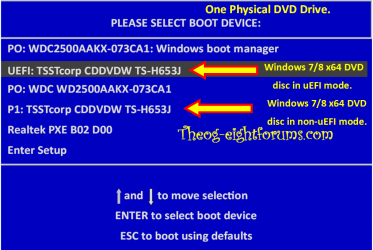
1. Disable secure boot
2. Open Windows 8 and create another partition for Windows 7
Yes.

3. Restart and install Windows 7 on the new partition

Install in uEFI mode.

4. Once Windows 7 is setup, restart again and change the boot defaults.

To what?
 

My Computer My Computer

At a glance

ME/XP/Vista/Win7
OS
ME/XP/Vista/Win7

My Computer My Computer

At a glance

Windows 7 Home-Premium 64bitAMD Phenom II x4 955 Black Edition 3.2GHz (st...8GB Corsair Red Vengeance @1333MHz 9-9-9-24 D...XFX AMD Radeon HD 6970 2GB (stock)
Computer Manufacturer/Model Number
Myself
OS
Windows 7 Home-Premium 64bit
CPU
AMD Phenom II x4 955 Black Edition 3.2GHz (stock) with CM V8
Motherboard
Gigabyte GA-MA790XT-UD4P (AM3)
Memory
8GB Corsair Red Vengeance @1333MHz 9-9-9-24 Dual-Channel
Graphics Card(s)
XFX AMD Radeon HD 6970 2GB (stock)
Sound Card
Onboard Realtek Azalea 8.1 Channel
Monitor(s) Displays
Samsung Syncmaster P2250 DVI-D
Screen Resolution
1920x1080@60Hz
Hard Drives
1. 60GB (55.7GiB) Corsair Force 3 SSD (firmware 1.3.3) SATA III (in SATA II mode) - contains OS, drivers and non-game programs
2. 500GB (465GiB) Western Digital Caviar Blue 500GB SATA II 7,200rpm 16MB Cache - contains games
3. 250GB (232GiB) Weste
PSU
Corsair TX750W 750W PSU with 4x PCI-E 6+2-pin connectors
Case
Lancool [Lian Li] PC-K62 Dragonlord (originally w/blue fans)
Cooling
Lian Li: 3x140mm, 1x120mm | Bitfenix: 1x140mm - ALL RED LED
Keyboard
Logitech G110
Mouse
Logitech MX518
Internet Speed
BT Infinity Option 2 ~38Mbps download, ~8Mbps upload
Other Info
Also have a Logitech G27 Racing Wheel, Creative Fatal1ty Stereo headset, Logitech X-140 Stereo Speakers, a disused Xbox 360 USB game controller pad and a CM Storm WoC M4 Mouse mat. The *GB of Corsair Red Vengeance DRAM is the CMZ8GX3M2A1600C9R set which can run at 1600MHz at 9-9-9-24 in Intel's XMP but my AMD board doesn't have this and it's not recommended for AMD Phenom II's anyway.
When you install Windows 7 after Windows 8, Windows 7 will boot first.
 

My Computer My Computer

At a glance

ME/XP/Vista/Win7
OS
ME/XP/Vista/Win7
uEFI is a very new thing to me - I've never come across it before - is uEFI 100% required or just more beneficial to the user?
 

My Computer My Computer

At a glance

Windows 7 Home-Premium 64bitAMD Phenom II x4 955 Black Edition 3.2GHz (st...8GB Corsair Red Vengeance @1333MHz 9-9-9-24 D...XFX AMD Radeon HD 6970 2GB (stock)
Computer Manufacturer/Model Number
Myself
OS
Windows 7 Home-Premium 64bit
CPU
AMD Phenom II x4 955 Black Edition 3.2GHz (stock) with CM V8
Motherboard
Gigabyte GA-MA790XT-UD4P (AM3)
Memory
8GB Corsair Red Vengeance @1333MHz 9-9-9-24 Dual-Channel
Graphics Card(s)
XFX AMD Radeon HD 6970 2GB (stock)
Sound Card
Onboard Realtek Azalea 8.1 Channel
Monitor(s) Displays
Samsung Syncmaster P2250 DVI-D
Screen Resolution
1920x1080@60Hz
Hard Drives
1. 60GB (55.7GiB) Corsair Force 3 SSD (firmware 1.3.3) SATA III (in SATA II mode) - contains OS, drivers and non-game programs
2. 500GB (465GiB) Western Digital Caviar Blue 500GB SATA II 7,200rpm 16MB Cache - contains games
3. 250GB (232GiB) Weste
PSU
Corsair TX750W 750W PSU with 4x PCI-E 6+2-pin connectors
Case
Lancool [Lian Li] PC-K62 Dragonlord (originally w/blue fans)
Cooling
Lian Li: 3x140mm, 1x120mm | Bitfenix: 1x140mm - ALL RED LED
Keyboard
Logitech G110
Mouse
Logitech MX518
Internet Speed
BT Infinity Option 2 ~38Mbps download, ~8Mbps upload
Other Info
Also have a Logitech G27 Racing Wheel, Creative Fatal1ty Stereo headset, Logitech X-140 Stereo Speakers, a disused Xbox 360 USB game controller pad and a CM Storm WoC M4 Mouse mat. The *GB of Corsair Red Vengeance DRAM is the CMZ8GX3M2A1600C9R set which can run at 1600MHz at 9-9-9-24 in Intel's XMP but my AMD board doesn't have this and it's not recommended for AMD Phenom II's anyway.
It's pretty new to us as well and challenges many of the install and boot fixes we helped pioneer here for Win7.

So far some have chosen to successfully Bypass UEFI to Install WIn7 but it's not at all clear this is a best practice and we are always trying to assure that is what's being recommended. However we've had no complaints from those who did.

Ray do you know for sure on a Windows 8 PC that after turning off Secure Boot to install Win7 in a Dual Boot Win8 will still run? I thought Secure Boot was too secure to do that.
 
Two HDD dual boot,

Win 8-7-XP-boot001.PNG

One HDD dual boot.

Delete Win 7-007.PNG

No problems with Windows 8 booting dual boot.


No need to by-uEFI, you can install Win XP, Vista, Windows 7, Windows 8 & Linux.

HDD three is Win XP.
 

My Computer My Computer

At a glance

ME/XP/Vista/Win7
OS
ME/XP/Vista/Win7
One HDD dual boot.

View attachment 248805

No problems with Windows 8 booting dual boot.


No need to by-uEFI, you can install Win XP, Vista, Windows 7, Windows 8 & Linux.

HDD three is Win XP.

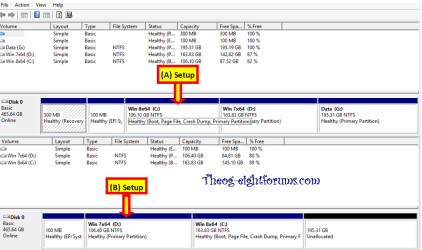
The laptop I ordered has one 750GB (so 696.5GiB as shown in Windows?) HDD so I suppose this is what I will be following. As the the partition sizes - I'm a little confused - is this because of uEFI? Approx 100GB per OS? Then a data partition? Then another 2 including a recovery partition? I'm confused. Please enlighten me :)
 

My Computer My Computer

At a glance

Windows 7 Home-Premium 64bitAMD Phenom II x4 955 Black Edition 3.2GHz (st...8GB Corsair Red Vengeance @1333MHz 9-9-9-24 D...XFX AMD Radeon HD 6970 2GB (stock)
Computer Manufacturer/Model Number
Myself
OS
Windows 7 Home-Premium 64bit
CPU
AMD Phenom II x4 955 Black Edition 3.2GHz (stock) with CM V8
Motherboard
Gigabyte GA-MA790XT-UD4P (AM3)
Memory
8GB Corsair Red Vengeance @1333MHz 9-9-9-24 Dual-Channel
Graphics Card(s)
XFX AMD Radeon HD 6970 2GB (stock)
Sound Card
Onboard Realtek Azalea 8.1 Channel
Monitor(s) Displays
Samsung Syncmaster P2250 DVI-D
Screen Resolution
1920x1080@60Hz
Hard Drives
1. 60GB (55.7GiB) Corsair Force 3 SSD (firmware 1.3.3) SATA III (in SATA II mode) - contains OS, drivers and non-game programs
2. 500GB (465GiB) Western Digital Caviar Blue 500GB SATA II 7,200rpm 16MB Cache - contains games
3. 250GB (232GiB) Weste
PSU
Corsair TX750W 750W PSU with 4x PCI-E 6+2-pin connectors
Case
Lancool [Lian Li] PC-K62 Dragonlord (originally w/blue fans)
Cooling
Lian Li: 3x140mm, 1x120mm | Bitfenix: 1x140mm - ALL RED LED
Keyboard
Logitech G110
Mouse
Logitech MX518
Internet Speed
BT Infinity Option 2 ~38Mbps download, ~8Mbps upload
Other Info
Also have a Logitech G27 Racing Wheel, Creative Fatal1ty Stereo headset, Logitech X-140 Stereo Speakers, a disused Xbox 360 USB game controller pad and a CM Storm WoC M4 Mouse mat. The *GB of Corsair Red Vengeance DRAM is the CMZ8GX3M2A1600C9R set which can run at 1600MHz at 9-9-9-24 in Intel's XMP but my AMD board doesn't have this and it's not recommended for AMD Phenom II's anyway.
One HDD dual boot.

View attachment 248805

No problems with Windows 8 booting dual boot.


No need to by-uEFI, you can install Win XP, Vista, Windows 7, Windows 8 & Linux.

HDD three is Win XP.

The laptop I ordered has one 750GB (so 696.5GiB as shown in Windows?) HDD so I suppose this is what I will be following. As the the partition sizes - I'm a little confused - is this because of uEFI? Approx 100GB per OS? Then a data partition? Then another 2 including a recovery partition? I'm confused. Please enlighten me :)

Your partitioning would be like my A setup.
 

My Computer My Computer

At a glance

ME/XP/Vista/Win7
OS
ME/XP/Vista/Win7
One HDD dual boot.

View attachment 248805

No problems with Windows 8 booting dual boot.


No need to by-uEFI, you can install Win XP, Vista, Windows 7, Windows 8 & Linux.

HDD three is Win XP.

The laptop I ordered has one 750GB (so 696.5GiB as shown in Windows?) HDD so I suppose this is what I will be following. As the the partition sizes - I'm a little confused - is this because of uEFI? Approx 100GB per OS? Then a data partition? Then another 2 including a recovery partition? I'm confused. Please enlighten me :)

Your partitioning would be like my A setup.

So let's imagine we're dealing with GB rather than GiB here, and say the capacity is 750GB I want to give 500GB to the Windows 7 partition, leaving the Windows 8 partition with 250GB or less (not sure if there will be a pre-built recovery partition or anything as I'm not used to pre-build computers - I built my own) - this is also my second laptop but I gave the laptop to my sister a while ago but didn't have to mess around with anything. Can my disk be split like this in uEFI?

750GB total
------------
500GB Win 7
250GB Win 8

And I'm assuming it's going to be more complicated than that because of the whole uEFI thing. Could you correct my... err... thing?
 

My Computer My Computer

At a glance

Windows 7 Home-Premium 64bitAMD Phenom II x4 955 Black Edition 3.2GHz (st...8GB Corsair Red Vengeance @1333MHz 9-9-9-24 D...XFX AMD Radeon HD 6970 2GB (stock)
Computer Manufacturer/Model Number
Myself
OS
Windows 7 Home-Premium 64bit
CPU
AMD Phenom II x4 955 Black Edition 3.2GHz (stock) with CM V8
Motherboard
Gigabyte GA-MA790XT-UD4P (AM3)
Memory
8GB Corsair Red Vengeance @1333MHz 9-9-9-24 Dual-Channel
Graphics Card(s)
XFX AMD Radeon HD 6970 2GB (stock)
Sound Card
Onboard Realtek Azalea 8.1 Channel
Monitor(s) Displays
Samsung Syncmaster P2250 DVI-D
Screen Resolution
1920x1080@60Hz
Hard Drives
1. 60GB (55.7GiB) Corsair Force 3 SSD (firmware 1.3.3) SATA III (in SATA II mode) - contains OS, drivers and non-game programs
2. 500GB (465GiB) Western Digital Caviar Blue 500GB SATA II 7,200rpm 16MB Cache - contains games
3. 250GB (232GiB) Weste
PSU
Corsair TX750W 750W PSU with 4x PCI-E 6+2-pin connectors
Case
Lancool [Lian Li] PC-K62 Dragonlord (originally w/blue fans)
Cooling
Lian Li: 3x140mm, 1x120mm | Bitfenix: 1x140mm - ALL RED LED
Keyboard
Logitech G110
Mouse
Logitech MX518
Internet Speed
BT Infinity Option 2 ~38Mbps download, ~8Mbps upload
Other Info
Also have a Logitech G27 Racing Wheel, Creative Fatal1ty Stereo headset, Logitech X-140 Stereo Speakers, a disused Xbox 360 USB game controller pad and a CM Storm WoC M4 Mouse mat. The *GB of Corsair Red Vengeance DRAM is the CMZ8GX3M2A1600C9R set which can run at 1600MHz at 9-9-9-24 in Intel's XMP but my AMD board doesn't have this and it's not recommended for AMD Phenom II's anyway.
Your partitioning will be smaller than 500 & 250.
Could work out the size better with a screenshot of Disk management.
 

My Computer My Computer

At a glance

ME/XP/Vista/Win7
OS
ME/XP/Vista/Win7
Back
Top