
Ordinal 54 error could not be located in the dynamic library cscdll.dl

Daeriah

New member
Local time
7:28 AM
Messages
2
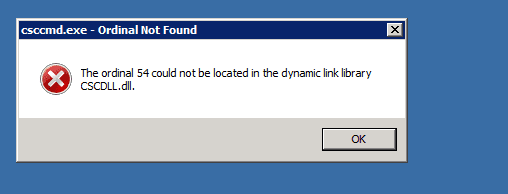
I have searched high and low for a solution to this error. "The ordinal 54 error could not be located in the dynamic library cscdll.dll" (see attached picture)

When I log on to a win7 ent or pro machine locally, the error is not there. When I log on to the win7 machine using a domain account with a mandatory profile the error does not come on, however when I log on with a roaming profile it comes on.

I have a windows 2008 domain controller running AD.

Any ideas at all on how to fix this will be most appreciated.

Thank you in advance
 

Attachments
  • ordinalerror.png
    ordinalerror.png
    2.5 KB · Views: 18

My Computer My Computer

At a glance

win7 ent 32
OS
win7 ent 32

My Computer My Computer

At a glance

Windows 7 Ultimate 32bit SP1Intel(R) Core(TM)2 Quad CPU @ 2.40GHz, 2400 MHz4 GBATI Radeon HD 2600 Pro
Computer type
PC/Desktop
Computer Manufacturer/Model Number
Bruce ... somewhere in his 40's
OS
Windows 7 Ultimate 32bit SP1
CPU
Intel(R) Core(TM)2 Quad CPU @ 2.40GHz, 2400 MHz
Motherboard
INTEL/D975XBX2
Memory
4 GB
Graphics Card(s)
ATI Radeon HD 2600 Pro
Monitor(s) Displays
Samsung SyncMaster 914v
Screen Resolution
1280 x 1024
Hard Drives
2/500GB each ... ST3500630AS ATA Device.
One is not connected
PSU
Rocketfish 700 W
Case
G.Skill Gigabyte Chassis
Keyboard
Standard PS/2 Keyboard
Mouse
Microsoft PS/2 Mouse
Internet Speed
DSL
Antivirus
Avira Internet Security
Browser
IE 11
Other Info
ATI HDMI Audio
Thanks Jacee,

Had a look at the link Windows 7 DLL File Information - cscdll.dll and did some testing but still no luck.

I had two laptops that have the same specs. Laptop A and B say. They were recently build and installed with win 7 ent.

Tests:
Laptop A
Logged in using a user with roaming profile -> ordinal 54 error
Logged in with mandatory profile -> no error

Laptop B
Logged in using a user with roaming profile -> ordinal 54 error
Logged in using a user with mandatory profile -> no error

I did the same again with a different user with roaming profile and still the same result (ordinal 54 error)
and a different user with mandatory profile -> no error

I checked the contents of system32 folder on both laptops and they are exactly the same. The system32 folder has msvcrt.dll, ntdll.dll, KERNEL32.dll files which cscdll.dll is statistically linked to.

It appears that it is pointing to a roaming profile issue but I'm open to suggestions and directions to solve this issue.

Cheers
 

My Computer My Computer

At a glance

win7 ent 32
OS
win7 ent 32
Back
Top