Solved Out of 150GB free space only 66MB available for partition ?

Wicky12

New member
Member
Local time
10:48 AM
Messages
41
HDD: Total capacity 500GB partitioned to C & D equally.
O S: Windows 7 Pro. installed on C.
Actual space on C: About 223GB.
Space occupied : About 73GB.
Free space on C: About 150GB. (The properties of the partition show so.)

Tried to make another partition out of the 150GB free space on C.
So, I ran an estimation to find out the free space available for a new partition.
After an automatic calculation, report showed only 66MB available.

Astounded.
Properties of the partition show 150GB free space.
Why only 66MB available out of 150GB of free space?

Please help.

Thank you!
 

My Computer My Computer

At a glance

Windows 7 Pro. 64b.
OS
Windows 7 Pro. 64b.
A screen shot of your Disk Management would help out here, but if you are breaking off part of the available space for another partition, it would reduce your free space left to the existing partition.
 

My Computer My Computer

At a glance

Windows 7 Ultimate x64 SP1Intel Core i7-260012 GB Patriot Extreme DDR3-1333Nvidia GTX 470
OS
Windows 7 Ultimate x64 SP1
CPU
Intel Core i7-2600
Motherboard
Gigabyte GA-P67A-UD3P-B3
Memory
12 GB Patriot Extreme DDR3-1333
Graphics Card(s)
Nvidia GTX 470
Monitor(s) Displays
Dell UltraSharp 2209WA
Hard Drives
OCZ Agility3 240 GB, WD5001AALS, WD7501AALS
PSU
OCZ ModStream 700W
Case
CoolerMaster HAF 912 Advanced
Cooling
CoolerMaster Hyper 212 Plus
Free space can't be used for a new partition...it is already part of one. You are looking for "Unallocated Space." Shrink your existing partition to create some.
 

My Computer My Computer

At a glance

Windows 7 Ultimate RTM (Technet)3.00 gigahertz Intel Core2 Duo E84004GBATI Radeon X1950 Pro
Computer Manufacturer/Model Number
Custom
OS
Windows 7 Ultimate RTM (Technet)
CPU
3.00 gigahertz Intel Core2 Duo E8400
Motherboard
ASUSTeK Computer INC. P5K/EPU Rev 1.xx
Memory
4GB
Graphics Card(s)
ATI Radeon X1950 Pro
Sound Card
Built in HD Audio
Monitor(s) Displays
22" Gateway LCD
Screen Resolution
1920 x 1200
Hard Drives
ST3160023A [Hard drive] (160.04 GB) -- drive 0, rev 8.01, ST3500630AS [Hard drive] (500.11 GB) -- drive 2, rev 3.AAK
ST3500630AS [Hard drive] (500.11 GB) -- drive 1, rev 3.AAK
Keyboard
Logitech G11
Mouse
Microsoft Wireless Laser Mouse 5000
Internet Speed
13.44 Mbps
A screen shot of your Disk Management would help out here, but if you are breaking off part of the available space for another partition, it would reduce your free space left to the existing partition.

Thanks, Mr. DeaconFrost

A screen shot would be of little help due to the fact that it is in a completely different
language.

It is said that Vista & Win7 have disk manager built in. So, I want to try it out.
The method applied here is compressing the existing partion, to squeeze some
space out of the free space for another or an add-on partition.
The first step prior to compressing is to estimate the available free space for
such an add-on partition.
Estimation report shows that only 66MB free space is available.
This is done on partition C of my HDD where Vista is installed.
Total capacity of this C is 250GB (about 225GB in reality).
Total space occupied is around 75GB.
So, the properties of this partition show 150GB free space.
What I do not understand is that why only 66MB out of 150GB is available.

The estimation carried out on the other partion D which is similar to C reports the same result except for a bit more available space, 103MB.

What occupies or reserves the free space?

Thank you!
 

My Computer My Computer

At a glance

Windows 7 Pro. 64b.
OS
Windows 7 Pro. 64b.
Free space can't be used for a new partition...it is already part of one. You are looking for "Unallocated Space." Shrink your existing partition to create some.

Mr. MacGyvr

Thank you!

No. The free space can not be directly partitioned as a new partition.

Before compressing the existing partion to where an additional partition shall be added
the Windows' disk manager runs as estimation. The report of this estimation states that the available free space for another partion on C containing Vista is only 66MB
and on D containing Win7 is only 103MD.

Capacity of partition C: 250GB and free space 150GB.
Capacity of partition D: 250GB and free space 168GB.

I do not understand the factors that affect the calculation of the estimation.

Thank you!
 

My Computer My Computer

At a glance

Windows 7 Pro. 64b.
OS
Windows 7 Pro. 64b.
Regardless of the language difficulties, you really do need to show us a screenshot of your disk management configuration before we can give you any meaningful help.

To repeat what has already been said, free space is part of an existing partition, whereas unallocated space is a raw section of the drive i.e. it doesn't have a partition allocated to it.

From what I can make out, you have 500GB of drive space divided into two partitions of 250GB each. In order to create another partition you would need to shrink one of your existing partitions.

Partition Layout.PNG

As you can see, this shows the configuration of a single partition/drive, which would have to be shrunk to create new, unallocated space for a new partition. The free space shown is available for you to use to store data.

In addition, Windows 7's disk manager is very basic and will only let you shrink a partition once. You need a third-party tool such as Partition Wizard.
 
Last edited:

My Computer My Computer

At a glance

Windows 7 Ultimate SP1 64-BitIntel Core i7 870 @ 2.93GHz8Gb Dual-Channel DDR3 @ 664MHznVidia GeForce GTX 460 1024MB dedicated RAM
Computer Manufacturer/Model Number
HP Pavilion Elite 495UK
OS
Windows 7 Ultimate SP1 64-Bit
CPU
Intel Core i7 870 @ 2.93GHz
Motherboard
MSI 2A9C (CPU1)
Memory
8Gb Dual-Channel DDR3 @ 664MHz
Graphics Card(s)
nVidia GeForce GTX 460 1024MB dedicated RAM
Sound Card
Realtek HD Audio
Monitor(s) Displays
HP2310i
Screen Resolution
1920 x 1080
Hard Drives
1x1954GB Hitachi HDS22020ALA 330 (RAID), 1x1954GB Hitachi External for backup and storage
PSU
460W
Case
HP Elite
Cooling
Air cooled
Keyboard
Logitech K750 solar-powered keyboard
Mouse
Logitech Wireless M180 mouse
Internet Speed
2Mb
Other Info
Pure Avanti Flow Internet Radio with iPod Dock, 64Gb iPod, HP USB Speakers, Sony MDR-V500 Headphones, Sony Vaio F-Series Laptop
Regardless of the language difficulties, you really do need to show us a screenshot of your disk management configuration before we can give you any meaningful help.

To repeat what has already been said, free space is part of an existing partition, whereas unallocated space is a raw section of the drive i.e. it doesn't have a partition allocated to it.

From what I can make out, you have 500GB of drive space divided into two partitions of 250GB each. In order to create another partition you would need to shrink one of your existing partitions.

View attachment 157674

As you can see, this shows the configuration of a single partition/drive, which would have to be shrunk to create new, unallocated space for a new partition. The free space shown is available for you to use to store data.

In addition, Windows 7's disk manager is very basic and will only let you shrink a partition once. You need a third-party tool such as Partition Wizard.

Thank you, Mr. Seavixen32!

What I am trying to get is a 10GB or 20GB unallocated free space which can then be allocated as a partition. It puzzles me that out of 150GB free space only 66MB abailable for another partition.

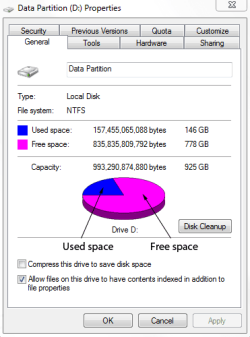
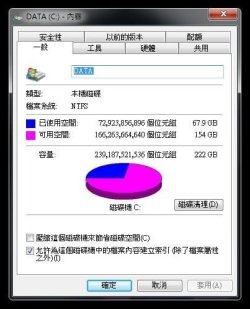
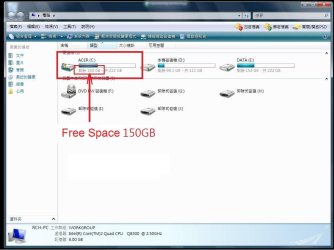
The hereunder are four screenshots.
The first one (Acer C) is of the partition where Vista is installed.
The 2nd one (Data C) is of the partition where Win7 is installed.
The 3rd one (Free Space 150GB) is also of the partion where Vista is installed.
The 4th one (66MB) is the estimation repart statement prior to compression.

Thank you and your help is really appreciated!
 

Attachments

  • V2.jpg
    V2.jpg
    30.1 KB · Views: 6
  • 7B.jpg
    7B.jpg
    31 KB · Views: 5
  • 00.jpg
    00.jpg
    65.8 KB · Views: 9
  • 0.jpg
    0.jpg
    93 KB · Views: 32

My Computer My Computer

At a glance

Windows 7 Pro. 64b.
OS
Windows 7 Pro. 64b.
hkuenph, thank you for providing the screenshots of your disk layout.

The reason you cannot shrink your C drive any further is because the partition is badly fragmented.

You have 154Gb of free space on the drive in question that is available to use, but because the drive is badly fragmented you can only SHRINK it by a further 66Mb.

The text at the bottom of your fourth screenshot translates as follows:

You cannot shrink a volume beyond a point where any unmovable files are located. See the "Defrag" event in the application log for detailed information about the operation when it has completed.

You need to defragment the drive first, and then go back into Disk Management to see whether the shrink space has increased. If it hasn't it means you can't shrink that partition any further.
 

My Computer My Computer

At a glance

Windows 7 Ultimate SP1 64-BitIntel Core i7 870 @ 2.93GHz8Gb Dual-Channel DDR3 @ 664MHznVidia GeForce GTX 460 1024MB dedicated RAM
Computer Manufacturer/Model Number
HP Pavilion Elite 495UK
OS
Windows 7 Ultimate SP1 64-Bit
CPU
Intel Core i7 870 @ 2.93GHz
Motherboard
MSI 2A9C (CPU1)
Memory
8Gb Dual-Channel DDR3 @ 664MHz
Graphics Card(s)
nVidia GeForce GTX 460 1024MB dedicated RAM
Sound Card
Realtek HD Audio
Monitor(s) Displays
HP2310i
Screen Resolution
1920 x 1080
Hard Drives
1x1954GB Hitachi HDS22020ALA 330 (RAID), 1x1954GB Hitachi External for backup and storage
PSU
460W
Case
HP Elite
Cooling
Air cooled
Keyboard
Logitech K750 solar-powered keyboard
Mouse
Logitech Wireless M180 mouse
Internet Speed
2Mb
Other Info
Pure Avanti Flow Internet Radio with iPod Dock, 64Gb iPod, HP USB Speakers, Sony MDR-V500 Headphones, Sony Vaio F-Series Laptop
AS you upgrade from Vista to Windows 7, the Acer Recovery Partition is unusable.

Did you make your Recovery disks?

Why do you need a 4th partition?
 

My Computer My Computer

At a glance

ME/XP/Vista/Win7
OS
ME/XP/Vista/Win7
You need to defragment the drive first, and then go back into Disk Management to see whether the shrink space has increased. If it hasn't it means you can't shrink that partition any further.

Often people struggle with achieving their partitioning aims with Windows 7's own utilities. The chief cause being that Windows has placed a system file at/near the end of the disk/volume which hinders the anticipated outcome, even after performing a Windows defrag.

To get around this you can either use a third party partitioning solution, or you will need to perform a number of boot time defrags, shrinks and/or expands, plus restarts (usually 2-4 cycles in my experience). This option also requires a third party solution that offers boot time defrag (be sure to check how any such software handles Windows shadow copies/restore points for this type of operation), whereby the system files can be moved whilst Windows is offline. I have used PerfeckDisk for the purpose on a number of machines and without any problems.

Typically;

Shrink and/or expand > restart > boot time defrag > restart > shrink and/or expand > restart > normal defrag > restart > shrink and/or expand

Hope this helps.
 

My Computer My Computer

At a glance

Windows 7
Computer type
PC/Desktop
OS
Windows 7
hkuenph, thank you for providing the screenshots of your disk layout.

The reason you cannot shrink your C drive any further is because the partition is badly fragmented.

You have 154Gb of free space on the drive in question that is available to use, but because the drive is badly fragmented you can only SHRINK it by a further 66Mb.

The text at the bottom of your fourth screenshot translates as follows:

You cannot shrink a volume beyond a point where any unmovable files are located. See the "Defrag" event in the application log for detailed information about the operation when it has completed.

You need to defragment the drive first, and then go back into Disk Management to see whether the shrink space has increased. If it hasn't it means you can't shrink that partition any further.

Mr. Seavixen32

Thank you!

My first reflect was defragmentation when the 66MB poked my eyes.
So, the partition was defragmented.
Actually, this was not needed because defragmentation was set to carry out
automatically ar certain time intervals.
But I manually did one more time anyway, just to be sure.
Then, the estimation reported 66MB still.

Then, I suspected the software that had been installed.
So, they were removed and so also their hidden files and folders.
Still, the estimation showed 66MB after all of the removals and deletions.

And I did the same thing with the partition containing Windows 7 Pro.
The result was the same.

The screenshots above were taken at this stage.

Articles sharing their successful experiences of the same operation are not rare.
But why my experience is quite different from theirs.
Beats me.

Really appreciate your goodwill!
 

My Computer My Computer

At a glance

Windows 7 Pro. 64b.
OS
Windows 7 Pro. 64b.
AS you upgrade from Vista to Windows 7, the Acer Recovery Partition is unusable.

Did you make your Recovery disks?

Why do you need a 4th partition?

Mr. Theog

Thank you!

I did not upgrade Vista to Win 7.
Win 7 is installed on partion D.
And Vista is still in use on C.

Why do I need it? For handy and slightly safe storage, safe against my mistakes.

Thanks for your concerns.
 

My Computer My Computer

At a glance

Windows 7 Pro. 64b.
OS
Windows 7 Pro. 64b.
If you want more storage space your best bet is to invest in an external hard drive.

Also, is there any particular reason why you're still using Windows Vista? You'd make life a lot easier if you were to wipe your hard drive and just install Windows 7.
 

My Computer My Computer

At a glance

Windows 7 Ultimate SP1 64-BitIntel Core i7 870 @ 2.93GHz8Gb Dual-Channel DDR3 @ 664MHznVidia GeForce GTX 460 1024MB dedicated RAM
Computer Manufacturer/Model Number
HP Pavilion Elite 495UK
OS
Windows 7 Ultimate SP1 64-Bit
CPU
Intel Core i7 870 @ 2.93GHz
Motherboard
MSI 2A9C (CPU1)
Memory
8Gb Dual-Channel DDR3 @ 664MHz
Graphics Card(s)
nVidia GeForce GTX 460 1024MB dedicated RAM
Sound Card
Realtek HD Audio
Monitor(s) Displays
HP2310i
Screen Resolution
1920 x 1080
Hard Drives
1x1954GB Hitachi HDS22020ALA 330 (RAID), 1x1954GB Hitachi External for backup and storage
PSU
460W
Case
HP Elite
Cooling
Air cooled
Keyboard
Logitech K750 solar-powered keyboard
Mouse
Logitech Wireless M180 mouse
Internet Speed
2Mb
Other Info
Pure Avanti Flow Internet Radio with iPod Dock, 64Gb iPod, HP USB Speakers, Sony MDR-V500 Headphones, Sony Vaio F-Series Laptop
You need to defragment the drive first, and then go back into Disk Management to see whether the shrink space has increased. If it hasn't it means you can't shrink that partition any further.
Often people struggle with achieving their partitioning aims with Windows 7's own utilities. The chief cause being that Windows has placed a system file at/near the end of the disk/volume which hinders the anticipated outcome, even after performing a Windows defrag.

To get around this you can either use a third party partitioning solution, or you will need to perform a number of boot time defrags, shrinks and/or expands, plus restarts (usually 2-4 cycles in my experience). This option also requires a third party solution that offers boot time defrag (be sure to check how any such software handles Windows shadow copies/restore points for this type of operation), whereby the system files can be moved whilst Windows is offline. I have used PerfeckDisk for the purpose on a number of machines and without any problems.

Typically;

Shrink and/or expand > restart > boot time defrag > restart > shrink and/or expand > restart > normal defrag > restart > shrink and/or expand

Hope this helps.


Mr. OakenG

Thank you very much for sharing.

Very appreciate your help.

The following is not to argue with you but express
my inability to comprehend the issue.

Yes, I have read an article saying the same thing as you do, a file or folder placed at or near the end of the partition, and this limits the availability of the free space on the partion.

I have also read several articles telling their successful experiences of adding a partition to the existing partition C by applying only the built in tools of Vista and Win 7, i.e., simply compressing the existing partition C for an unallocated free space. And there is no trace or hint of any difficulties or any file/folder blocking the estimation or any third party applications involved.
Roughly, estimate>set capacity of the intended
additional partition>compress>an unallocated partition appears.

Are these write ups advertisements?
Different OEM products make defferences?
Their HDD's and/or partitions are different?

Really like a puzzle or riddle.
How to put the pieces together or find the answer?

Thank you very much, Mr. OakenG!
 

My Computer My Computer

At a glance

Windows 7 Pro. 64b.
OS
Windows 7 Pro. 64b.
If you want more storage space your best bet is to invest in an external hard drive.

Also, is there any particular reason why you're still using Windows Vista? You'd make life a lot easier if you were to wipe your hard drive and just install Windows 7.

Mr. Seavixen32

Do I want more storage space?
Not really.
Just to practice how the Vista & Win 7 built in function works.

Why do I still use Vista?
I am asociated with people who still use Vista & XP.
So, XP & Vista & Win7 all installed for their convenience when we exchange information.

Thanks.
 

My Computer My Computer

At a glance

Windows 7 Pro. 64b.
OS
Windows 7 Pro. 64b.
Hi hkuenph,

Probably some of those factors make a difference, which is not surprising given the myriad of variables involved. I don't know why some people have this difficulty shrinking/expanding, and others do not. Perhaps somebody in the know can tell us why? Conversely there are other issues, which going by the forums, many users have suffered and yet I and others have not.

I can say for the half-a-dozen or so instances I've come across, when it is not desirable to use any partitioning tools, the solution I mentioned has worked. There is one freeware defrag software I know of, Puran Defrag Free Edition, that offers boot time defragmentation. I stopped using Puran some time ago as every now and then it would wipe all of the shadow copies, though I believe support for this has now been improved? As suggested previously- check the developers documentation support information.

Provided you have a solid system recovery plan, it may be worth the effort to go down this route to get the job done?

At least you are enjoying the puzzle, rather than becoming agitated by it!

All the best.
 

My Computer My Computer

At a glance

Windows 7
Computer type
PC/Desktop
OS
Windows 7
If you want more storage space your best bet is to invest in an external hard drive.

Also, is there any particular reason why you're still using Windows Vista? You'd make life a lot easier if you were to wipe your hard drive and just install Windows 7.

Mr. Seavixen32

Do I want more storage space?
Not really.
Just to practice how the Vista & Win 7 built in function works.

Why do I still use Vista?
I am asociated with people who still use Vista & XP.
So, XP & Vista & Win7 all installed for their convenience when we exchange information.

Thanks.

Well, I can't argue with that and nor would I want to.

The important thing is that we have managed to answer your original query we hope.
 

My Computer My Computer

At a glance

Windows 7 Ultimate SP1 64-BitIntel Core i7 870 @ 2.93GHz8Gb Dual-Channel DDR3 @ 664MHznVidia GeForce GTX 460 1024MB dedicated RAM
Computer Manufacturer/Model Number
HP Pavilion Elite 495UK
OS
Windows 7 Ultimate SP1 64-Bit
CPU
Intel Core i7 870 @ 2.93GHz
Motherboard
MSI 2A9C (CPU1)
Memory
8Gb Dual-Channel DDR3 @ 664MHz
Graphics Card(s)
nVidia GeForce GTX 460 1024MB dedicated RAM
Sound Card
Realtek HD Audio
Monitor(s) Displays
HP2310i
Screen Resolution
1920 x 1080
Hard Drives
1x1954GB Hitachi HDS22020ALA 330 (RAID), 1x1954GB Hitachi External for backup and storage
PSU
460W
Case
HP Elite
Cooling
Air cooled
Keyboard
Logitech K750 solar-powered keyboard
Mouse
Logitech Wireless M180 mouse
Internet Speed
2Mb
Other Info
Pure Avanti Flow Internet Radio with iPod Dock, 64Gb iPod, HP USB Speakers, Sony MDR-V500 Headphones, Sony Vaio F-Series Laptop
If you want more storage space your best bet is to invest in an external hard drive.

Also, is there any particular reason why you're still using Windows Vista? You'd make life a lot easier if you were to wipe your hard drive and just install Windows 7.

Mr. Seavixen32

Do I want more storage space?
Not really.
Just to practice how the Vista & Win 7 built in function works.

Why do I still use Vista?
I am asociated with people who still use Vista & XP.
So, XP & Vista & Win7 all installed for their convenience when we exchange information.

Thanks.

Well, I can't argue with that and nor would I want to.


The important thing is that we have managed to answer your original query we hope.


Mr. Seavixen32

Thank you very much!

All of you have tried to help, THANK YOU!

It has been a very good discussion. All the participants are very informative.
The problem is clarified even though it is remaining still.
This is what life really is.

Appreciate very much!

Hkuenph
 

My Computer My Computer

At a glance

Windows 7 Pro. 64b.
OS
Windows 7 Pro. 64b.
Back
Top