Solved out of memory

The verifier should stress the drivers and then cause it to blue screen if I am correct. Let's see what x bluerobot says
 

My Computer My Computer

Computer Manufacturer/Model Number
Custom Built
OS
Windows 7 Ultimate 32-Bit & Windows 7 Ultimate 64-Bit
CPU
Intel Core i7 CPU 950 @ 3.07GHz
Motherboard
ASUS P6T DELUXE V2
Memory
OCZ 6GB (3 x 2GB) 240-Pin DDR3 SDRAM DDR3 1600 OCZ3X1600R2
Graphics Card(s)
ATI Radeon HD 5700 Series
Sound Card
OnBoard
Hard Drives
WD6400AACS-00M3B0 (640GB SATA )
PSU
CORSAIR 850w
Case
NZXT LEXA
Cooling
Intel Stock Heatsink Fan
Keyboard
Microsoft Wireless Laser Keyboard 7000
Mouse
Microsoft Wireless Laser Mouse 7000
OK, but what about my understanding of physical memory % vs total mb in task manager memory column ?
 

My Computer My Computer

Computer type
PC/Desktop
OS
Microsoft Windows 7 Home Premium 64-bit 7601 Multiprocessor Free Service Pack 1
CPU
Intel(R) Core(TM)2 Duo CPU T6600 @ 2.20GHz
Motherboard
Hewlett-Packard 3628
Memory
4,00 GB
Graphics Card(s)
(1) ATI Mobility Radeon HD 4530 (2) LogMeIn Mirror Driver
Sound Card
(1) IDT High Definition Audio CODEC (2) High Definition Au
Screen Resolution
1366 x 768 x 32 bits (4294967296 colors) @ 59 Hz
Hard Drives
(1) ST9500420AS (2) Iomega E xternal HD USB Device
Can you PrntScrn the task manager
 

My Computer My Computer

Computer Manufacturer/Model Number
Custom Built
OS
Windows 7 Ultimate 32-Bit & Windows 7 Ultimate 64-Bit
CPU
Intel Core i7 CPU 950 @ 3.07GHz
Motherboard
ASUS P6T DELUXE V2
Memory
OCZ 6GB (3 x 2GB) 240-Pin DDR3 SDRAM DDR3 1600 OCZ3X1600R2
Graphics Card(s)
ATI Radeon HD 5700 Series
Sound Card
OnBoard
Hard Drives
WD6400AACS-00M3B0 (640GB SATA )
PSU
CORSAIR 850w
Case
NZXT LEXA
Cooling
Intel Stock Heatsink Fan
Keyboard
Microsoft Wireless Laser Keyboard 7000
Mouse
Microsoft Wireless Laser Mouse 7000
Question about task manager 'Physical memory ..%_' :
If I add up all mb in 'Memory (Private working set)' column, should I get the percentage based on my amount of RAM ?

I am currently using about 300mb of memory, and I have 4 gb RAM.
So it is 7.5%. But it shows 'Physical memory 53%' !

Adding up the items in the memory usage column rarely produces meaningful results. There are a number of reasons for this.

The "private working set" does not account for the full memory usage of a process. You would need to show the "Working set" column to do that. But there is some double counting there because of memory shared between processes. This is a good thing. Fully and accurately accounting for process memory usage is very difficult.

Then there are some very significant users of memory that are not processes. These include the non-paged kernel memory, the resident portion of the paged kernel memory, the file cache, and more. Most of these things are not shown in Task Manager. Some are shown with other utilities but not all.

Memory usage in Windows is a very complex thing. Even with full understanding (a great deal to learn) and with all the data available (difficult to obtain) a full accounting of memory usage would be very difficult.
 

My Computer My Computer

Computer type
PC/Desktop
Computer Manufacturer/Model Number
HP
OS
Windows 7 Pro 64 bit
CPU
Xeon W3520
Memory
8 GB
Graphics Card(s)
Nvidia Geforce 210

My Computer My Computer

Computer type
Laptop
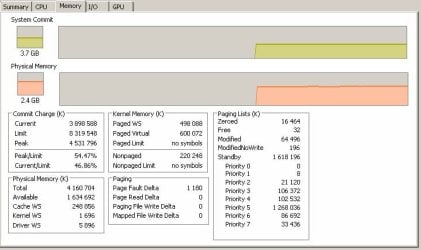
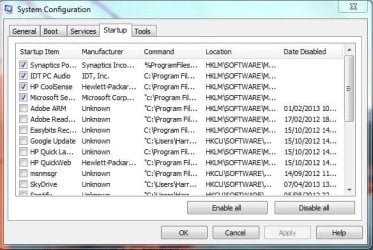
I've attached screenshots of the memory tab and the startup programs (those are only the ones checked).
 

Attachments

  • startup.jpg
    startup.jpg
    43.8 KB · Views: 10
  • memory.jpg
    memory.jpg
    40.4 KB · Views: 9

My Computer My Computer

Computer type
PC/Desktop
OS
Microsoft Windows 7 Home Premium 64-bit 7601 Multiprocessor Free Service Pack 1
CPU
Intel(R) Core(TM)2 Duo CPU T6600 @ 2.20GHz
Motherboard
Hewlett-Packard 3628
Memory
4,00 GB
Graphics Card(s)
(1) ATI Mobility Radeon HD 4530 (2) LogMeIn Mirror Driver
Sound Card
(1) IDT High Definition Audio CODEC (2) High Definition Au
Screen Resolution
1366 x 768 x 32 bits (4294967296 colors) @ 59 Hz
Hard Drives
(1) ST9500420AS (2) Iomega E xternal HD USB Device
Do you need Logmein running at startup? I seem to remember reading somewhere this can use a lot of memory.

Paul
 

My Computer My Computer

OS
Windows 7 Professional 64 bit
You won't need that many programs at boot, you will need the basic drivers and your AV program.

Here's an example of my system:

MSCONFIG.JPG
 

My Computer My Computer

Computer type
Laptop
OK.
I did a lot of cleanup (startup programs and services, etc.).

I let you know if the problem occur again (maybe it was logmein...).

Thanks,

Patrick
 

My Computer My Computer

Computer type
PC/Desktop
OS
Microsoft Windows 7 Home Premium 64-bit 7601 Multiprocessor Free Service Pack 1
CPU
Intel(R) Core(TM)2 Duo CPU T6600 @ 2.20GHz
Motherboard
Hewlett-Packard 3628
Memory
4,00 GB
Graphics Card(s)
(1) ATI Mobility Radeon HD 4530 (2) LogMeIn Mirror Driver
Sound Card
(1) IDT High Definition Audio CODEC (2) High Definition Au
Screen Resolution
1366 x 768 x 32 bits (4294967296 colors) @ 59 Hz
Hard Drives
(1) ST9500420AS (2) Iomega E xternal HD USB Device
Welcome, glad to be able to help :)

Leave this thread open for a few days, and then mark the thread as solved if no other problems occur.
 

My Computer My Computer

Computer type
Laptop

My Computer My Computer

Computer type
PC/Desktop
Computer Manufacturer/Model Number
Home made Desktop
OS
Windows 10 Pro. 64/ version 1709 Windows 7 Pro/64
CPU
Intel i7-6800K @ 4.3
Motherboard
ASUS X-99 Deluxe II
Memory
Corsair Platinum 16 gig @2400
Graphics Card(s)
EVGA GTX 1070 OC
Monitor(s) Displays
Asus 27" LED LCD/VE278Q
Screen Resolution
1920-1080 or 1280-720 HDMI
Hard Drives
INTEL SSD 730-240 Gb Sata 3.0/
PSU
EVGA Platium 1200W
Case
Phanteks Luxe Tempered Glass 8 fans/ one radiator
Cooling
XSPC/ Water Cooled CPU
Keyboard
Das 4 Professional
Mouse
Logitech M705/MX Anywhere 2-S
Internet Speed
100 mbits
Antivirus
Microsoft Security Essentials/ Malwarebytes Premium 3.0/ SAS
Browser
I.E. 11 default/Firefox/ ISP Time Warner Cable/Spectrum
Other Info
LG BluRay Burner/
Sound system-KLipsch-THX/
Icy Dock ssd Hot Swap bays.

My Computer My Computer

Computer type
PC/Desktop
OS
Microsoft Windows 7 Home Premium 64-bit 7601 Multiprocessor Free Service Pack 1
CPU
Intel(R) Core(TM)2 Duo CPU T6600 @ 2.20GHz
Motherboard
Hewlett-Packard 3628
Memory
4,00 GB
Graphics Card(s)
(1) ATI Mobility Radeon HD 4530 (2) LogMeIn Mirror Driver
Sound Card
(1) IDT High Definition Audio CODEC (2) High Definition Au
Screen Resolution
1366 x 768 x 32 bits (4294967296 colors) @ 59 Hz
Hard Drives
(1) ST9500420AS (2) Iomega E xternal HD USB Device
No more problems!!! I guess it's solved, so it must have been logmein.

Thanks
 

My Computer My Computer

Computer type
PC/Desktop
OS
Microsoft Windows 7 Home Premium 64-bit 7601 Multiprocessor Free Service Pack 1
CPU
Intel(R) Core(TM)2 Duo CPU T6600 @ 2.20GHz
Motherboard
Hewlett-Packard 3628
Memory
4,00 GB
Graphics Card(s)
(1) ATI Mobility Radeon HD 4530 (2) LogMeIn Mirror Driver
Sound Card
(1) IDT High Definition Audio CODEC (2) High Definition Au
Screen Resolution
1366 x 768 x 32 bits (4294967296 colors) @ 59 Hz
Hard Drives
(1) ST9500420AS (2) Iomega E xternal HD USB Device
No more problems!!! I guess it's solved, so it must have been logmein.

Thanks

Maybe, but the main thing is your sorted. That is good news :cool:
 

My Computer My Computer

OS
Windows 7 Professional 64 bit
Unfortunately, I still have this low memory problem.
So the culprit is not logmein.

Anything I can do ?

Thanks,

Patrick
 

My Computer My Computer

Computer type
PC/Desktop
OS
Microsoft Windows 7 Home Premium 64-bit 7601 Multiprocessor Free Service Pack 1
CPU
Intel(R) Core(TM)2 Duo CPU T6600 @ 2.20GHz
Motherboard
Hewlett-Packard 3628
Memory
4,00 GB
Graphics Card(s)
(1) ATI Mobility Radeon HD 4530 (2) LogMeIn Mirror Driver
Sound Card
(1) IDT High Definition Audio CODEC (2) High Definition Au
Screen Resolution
1366 x 768 x 32 bits (4294967296 colors) @ 59 Hz
Hard Drives
(1) ST9500420AS (2) Iomega E xternal HD USB Device
Back
Top