Outbrain pop up can't get it out.

Bonnie Jean,
Calm down, you didn't ruin anything! Most, if not all computer issues are correctable! Some take longer than others. I am very patient when it comes to computer issues & assisting other with them!

You most likely have a large amount of junk on your system. Yes, is relates to your computer being slow.
Please download this batch file
View attachment Disk Cleanup Extended.zip
which is in a zipped/compressed folder. To open the folder, double-click the zip folder and extract contents to Desktop. Run the batch file by double-clicking it. A CMD window will open, do not close it, it will close by itself when Disk Cleanup Extended has completed. You will see a popup titled Disk Cleanup. Scroll through the Files in the Delete section and check all checkboxes. Click continue OK and let it finish. If you are prompted to reboot, do so.

Click :orb: type Disk Defrag, click on Disk Defragmenter when it appears, select your C:\ drive and click Defragment Disk. Let it run till it completes. If you are prompted to reboot, do so.

Please report back when you have completed the steps! Is everything running quicker?
 

My Computer My Computer

At a glance

Win 10 x64, Linux Lite, Win 7 x64, BlackArch,...
Computer type
PC/Desktop
Computer Manufacturer/Model Number
HP Desktop & Compaq Laptop
OS
Win 10 x64, Linux Lite, Win 7 x64, BlackArch, & Kali
Hard Drives
Samsung 850 Pro 256Gb,
Hitachi HDD 1Tb,
Crucial MX SSD 250Gb
Segate 3Tb USB 3.0 Ext. Backup HDD
Internet Speed
150Mbps dn, 20Mbps up
Antivirus
Avast Free, Malwarebytes Anti-Exploit & Anti-Ransomware
Browser
Firefox, Chrome, Opera, & VPN
After all that please run FRST again
In Search type sendspace as it appears here, without a space between, Send and Space.
Post SearchReg.txt, don't need others.

Nic
 

My Computer My Computer

At a glance

Win 10 x64, Linux Lite, Win 7 x64, BlackArch,...
Computer type
PC/Desktop
Computer Manufacturer/Model Number
HP Desktop & Compaq Laptop
OS
Win 10 x64, Linux Lite, Win 7 x64, BlackArch, & Kali
Hard Drives
Samsung 850 Pro 256Gb,
Hitachi HDD 1Tb,
Crucial MX SSD 250Gb
Segate 3Tb USB 3.0 Ext. Backup HDD
Internet Speed
150Mbps dn, 20Mbps up
Antivirus
Avast Free, Malwarebytes Anti-Exploit & Anti-Ransomware
Browser
Firefox, Chrome, Opera, & VPN
The pop ups disappeared !!!!!!! The first one, Disk Cleanup just closed and never showed me anything to mark off to delete.
Thank you Nic I am calm.
The defrag will take a long time so will leave the pc on and go to bed now.
 

Attachments

My Computer My Computer

At a glance

Windows 7 Home 64 bit8192MB RAM? my pc has what it came with I didn't add th...
Computer type
PC/Desktop
Computer Manufacturer/Model Number
HP Pavilion Vision p6-2020sc
OS
Windows 7 Home 64 bit
Memory
8192MB RAM
Graphics Card(s)
? my pc has what it came with I didn't add things like cards
Hard Drives
Under My computer it says 3
Antivirus
Panda free
Browser
Internet Explorer
Logs are Clean!
Please see section 3) of Disk Cleanup : Extended - Windows 7 Help Forums

I'll have a few recommendations for you in regards to AV, Anti-Exploit, Anti-Ransomware, and add-ons for Chrome and Firefox (if you use FF) it's my preferred choice. Add-ons are the same for each just a different download location. They will help keep unwanted garbage off your computer!


Last edited:

My Computer My Computer

At a glance

Win 10 x64, Linux Lite, Win 7 x64, BlackArch,...
Computer type
PC/Desktop
Computer Manufacturer/Model Number
HP Desktop & Compaq Laptop
OS
Win 10 x64, Linux Lite, Win 7 x64, BlackArch, & Kali
Hard Drives
Samsung 850 Pro 256Gb,
Hitachi HDD 1Tb,
Crucial MX SSD 250Gb
Segate 3Tb USB 3.0 Ext. Backup HDD
Internet Speed
150Mbps dn, 20Mbps up
Antivirus
Avast Free, Malwarebytes Anti-Exploit & Anti-Ransomware
Browser
Firefox, Chrome, Opera, & VPN
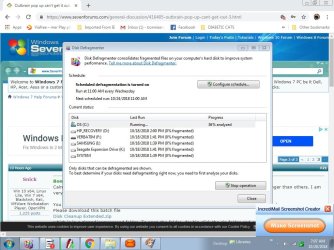
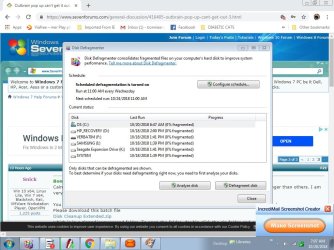
That defrag is still at the the same spot it was hours ago. I clicked on analyze disk to see what was happening and it stays the same. I took screen shots of it.
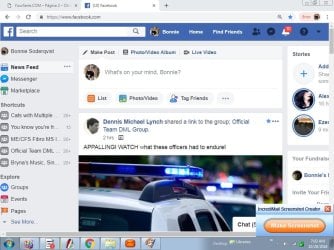
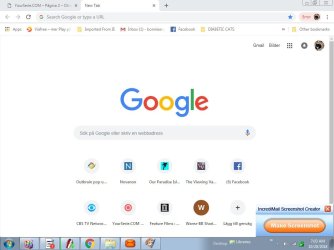
Also the tool bar that shows things I click on often is gone. Shots of that also.
I have never used Fire Fox.
I will do whatever you say.
My questions must get dumb and dumber! I just turned 72 and feel like it must feel to be 125. Lots of pain all of the time and it keeps me from sleeping as there is no medication for the pain. So I have bad short term memory loss.
Thanks for helping me.
 

Attachments

  • IncrediMail_Screenshot_0004.jpg
    IncrediMail_Screenshot_0004.jpg
    113.6 KB · Views: 0
  • IncrediMail_Screenshot_0003.jpg
    IncrediMail_Screenshot_0003.jpg
    115.3 KB · Views: 0
  • IncrediMail_Screenshot_0002.jpg
    IncrediMail_Screenshot_0002.jpg
    97.7 KB · Views: 0
  • IncrediMail_Screenshot_0001.jpg
    IncrediMail_Screenshot_0001.jpg
    48.1 KB · Views: 0

My Computer My Computer

At a glance

Windows 7 Home 64 bit8192MB RAM? my pc has what it came with I didn't add th...
Computer type
PC/Desktop
Computer Manufacturer/Model Number
HP Pavilion Vision p6-2020sc
OS
Windows 7 Home 64 bit
Memory
8192MB RAM
Graphics Card(s)
? my pc has what it came with I didn't add things like cards
Hard Drives
Under My computer it says 3
Antivirus
Panda free
Browser
Internet Explorer
Sorry I must have clicked wrong as I was attaching them!
 

My Computer My Computer

At a glance

Windows 7 Home 64 bit8192MB RAM? my pc has what it came with I didn't add th...
Computer type
PC/Desktop
Computer Manufacturer/Model Number
HP Pavilion Vision p6-2020sc
OS
Windows 7 Home 64 bit
Memory
8192MB RAM
Graphics Card(s)
? my pc has what it came with I didn't add things like cards
Hard Drives
Under My computer it says 3
Antivirus
Panda free
Browser
Internet Explorer
Sorry, but is the popup you're referring the Incredimail Screen shot creator?

If so, it's generated by Mail program you're using (IncrediMail).

Disks are all defragmented.
 

My Computers My Computers

  • At a glance

    Windows 7 HP 64i5 6600K - 800MHz to 4200MHz4+4G GSkill DDR4 3000IG - Intel 530
    Computer type
    PC/Desktop
    Computer Manufacturer/Model Number
    custom build
    OS
    Windows 7 HP 64
    CPU
    i5 6600K - 800MHz to 4200MHz
    Motherboard
    GA-Z170-HD3P
    Memory
    4+4G GSkill DDR4 3000
    Graphics Card(s)
    IG - Intel 530
    Monitor(s) Displays
    Samsung 226BW
    Screen Resolution
    1680x1050
    Hard Drives
    (1) -1 SM951 – 128GB M.2 AHCI PCIe SSD drive for Windows 7 and Lubuntu
    (2) -1 WD SATA 3 - 1T for Data
    (3) -1 WD SATA 3 - 1T for backup
    PSU
    Thermaltake 450W TR2 gold
    Keyboard
    Old and good Chicony mechanical keyboard
    Mouse
    Logitech mX performance - 9 buttons (had to disable some)
    Internet Speed
    500Mb/s
    Browser
    Firefox 64
    Other Info
    TinyWall firewall
  • At a glance

    Windows 7 Proi7-4500U 800MHz to 3.0GHz(4+4)G DDR3 1600IG intel 4400 + NVIDIA GeForce GT 745M
    Computer type
    Laptop
    System Manufacturer/Model Number
    Asus Q550LF
    OS
    Windows 7 Pro
    CPU
    i7-4500U 800MHz to 3.0GHz
    Motherboard
    Asus Q550LF
    Memory
    (4+4)G DDR3 1600
    Graphics Card(s)
    IG intel 4400 + NVIDIA GeForce GT 745M
    Sound Card
    Realtek
    Monitor(s) Displays
    LG Display LP156WF4-SPH1
    Screen Resolution
    1920 x 1080
    Hard Drives
    BX500 120G SSD for Windows and programs +
    1T HDD for data
    Internet Speed
    500 Mb/s
    Browser
    Firefox
    Other Info
    TinyWall firewall
The orange Incredimail rectangle at the bottom right is from my email program. I have a screen shot maker but have never found the screenshots. I can't find a clipboard but was told Windows 7 didn't have one. I figured I have someplace filled with screenshots. The only one I can get that I know what I am doing is the Incredimail one.
The sendspace popup disappeared sometime while I was rerunning all of the programs. outbrain has not been around.
Things are opening better. Are there other things I should do to clean out things. I run CCleaner often as I have about 500 to 1000 emails a day. I make stationary for on line use and gets lots of things I end up deleting. But being housebound and often unable to sleep it keeps me from going crazy.
 

My Computer My Computer

At a glance

Windows 7 Home 64 bit8192MB RAM? my pc has what it came with I didn't add th...
Computer type
PC/Desktop
Computer Manufacturer/Model Number
HP Pavilion Vision p6-2020sc
OS
Windows 7 Home 64 bit
Memory
8192MB RAM
Graphics Card(s)
? my pc has what it came with I didn't add things like cards
Hard Drives
Under My computer it says 3
Antivirus
Panda free
Browser
Internet Explorer
All Windows OSs have clipboards, it is where a copy and paste, or cut and paste stores the information. Windows has a built-in screenshot app. On your keyboard it is Print Scrn. Pressing it will take a screenshot of your display and place it on your clipboard. You can paste it into Paint, Word, or any program that accepts graphics.
 

My Computer My Computer

At a glance

Win 10 x64, Linux Lite, Win 7 x64, BlackArch,...
Computer type
PC/Desktop
Computer Manufacturer/Model Number
HP Desktop & Compaq Laptop
OS
Win 10 x64, Linux Lite, Win 7 x64, BlackArch, & Kali
Hard Drives
Samsung 850 Pro 256Gb,
Hitachi HDD 1Tb,
Crucial MX SSD 250Gb
Segate 3Tb USB 3.0 Ext. Backup HDD
Internet Speed
150Mbps dn, 20Mbps up
Antivirus
Avast Free, Malwarebytes Anti-Exploit & Anti-Ransomware
Browser
Firefox, Chrome, Opera, & VPN
How do I find it? Nothing comes up on search and well every place I think of looking it isn't there.
 

My Computer My Computer

At a glance

Windows 7 Home 64 bit8192MB RAM? my pc has what it came with I didn't add th...
Computer type
PC/Desktop
Computer Manufacturer/Model Number
HP Pavilion Vision p6-2020sc
OS
Windows 7 Home 64 bit
Memory
8192MB RAM
Graphics Card(s)
? my pc has what it came with I didn't add things like cards
Hard Drives
Under My computer it says 3
Antivirus
Panda free
Browser
Internet Explorer
Google is your friend!

By default, Windows 7 does not have a clipboard viewer or permit you access to view the clipboard. Windows XP had a clipboard executable clipbrd.exe which can be copied and pasted into Windows 7 if you can find a copy of Windows XP or the executable. There are 3rd party programs that provide this functionality, however, I have not perused or used one.

Office does and here's a link
How to Use the Built-in Microsoft Office Clipboard in Windows

Windows also has a snipping tool built into it.

How to take screenshots with the Snipping Tool in Windows
 

My Computer My Computer

At a glance

Win 10 x64, Linux Lite, Win 7 x64, BlackArch,...
Computer type
PC/Desktop
Computer Manufacturer/Model Number
HP Desktop & Compaq Laptop
OS
Win 10 x64, Linux Lite, Win 7 x64, BlackArch, & Kali
Hard Drives
Samsung 850 Pro 256Gb,
Hitachi HDD 1Tb,
Crucial MX SSD 250Gb
Segate 3Tb USB 3.0 Ext. Backup HDD
Internet Speed
150Mbps dn, 20Mbps up
Antivirus
Avast Free, Malwarebytes Anti-Exploit & Anti-Ransomware
Browser
Firefox, Chrome, Opera, & VPN
Pop-ups are back and worse than before §

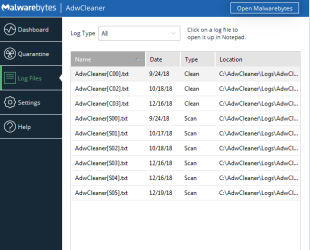
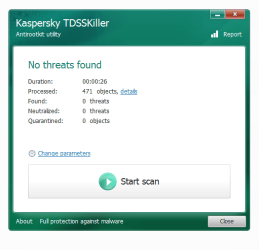
I have gone over all of the things you had me do and where I couldn't get a history I snipped out the results. This started a couple of weeks ago but I have been in the hospital with a heart attack.

Hope you can help me. They pop up so often and if I leave the pc for a short while I come back to a dozen piled up.

Thank you! Bonnie
 

Attachments

Last edited:

My Computer My Computer

At a glance

Windows 7 Home 64 bit8192MB RAM? my pc has what it came with I didn't add th...
Computer type
PC/Desktop
Computer Manufacturer/Model Number
HP Pavilion Vision p6-2020sc
OS
Windows 7 Home 64 bit
Memory
8192MB RAM
Graphics Card(s)
? my pc has what it came with I didn't add things like cards
Hard Drives
Under My computer it says 3
Antivirus
Panda free
Browser
Internet Explorer
Back
Top