Outlook 2010 Access denied. Cannot open pst file.

JohnLa

New member
Local time
6:19 PM
Messages
3
Hello everyone,

I wonder if anybody has the same issue as me.

My Office 2010 beta just expired, so I had to uninstall MS Office 2010 and reinstall the official release.

After the uninstall, I saved my pst file to a different location and cleaned the AppData directory of Outlook which contained the pst files and other files.

I installed Office 2010 and when I opened Outlook it missed the Outlook.pst file. So I put my old pst file back in the AppData dir.
But when I select the pst file to open, it throws the message (translated from dutch):

"Access is denied. You don't have permission to open C:\Users\..\..\..\..\Outlook.pst".

I checked the properties of the file. readonly was not selected and I changed the security permission for me to full control. (it was set to read & write)

But this had no effect.

I moved my Outlook.pst and let Outlook 2010 create a new Outlook.pst file. After that I noticed that all my emailaccounts where still in place, so I wonder where Outlook saved my accounts.

Now I wanted to import my Outlook_old.pst file, but I still get the message:
"Access is denied. You don't have permission to open C:\Users\..\..\..\..\Outlook.pst".

I really want my old mailbox back, so if any of you guys have an idea for me, I would be very grateful :)

Kind regards,

John

Ps. I did the backup & replace of my Outlook.pst file a bunch of times in Office 2003 and Office 2007 and never got this message. :(
 

My Computer My Computer

OS
Windows 7 Ultimate x86
hello..
use data file management to add your .pst file
if that's disable maybe some missing on it, where is the location that's you put the pst file?? is it in other HDD or external one?
 

My Computer My Computer

Computer Manufacturer/Model Number
built up
OS
windows 7
CPU
Phenom II AMD Dragon 3.5Ghz
Memory
DDR3 4GB
Graphics Card(s)
ATI Radeon 512Mb
Monitor(s) Displays
HP L1506
Screen Resolution
1152 x 864
Hard Drives
WDC 1 TB SATA-II Green Power
Keyboard
HP wireless keyboard
Mouse
HP Optic
Internet Speed
1GB
I put my old pst in the AppData\outlook dir on the HDD. (no external)
Data file management is function in Outlook 2010 or an extra tool?
 

My Computer My Computer

OS
Windows 7 Ultimate x86
sorry i though outlook 2007,
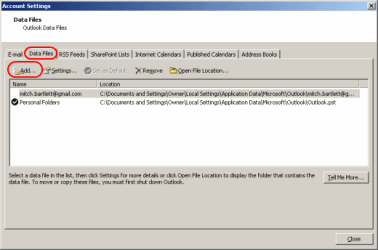
if outlook 2010, select account setting then click data files and click add
outlook-2010-add-pst.png
 
Last edited:

My Computer My Computer

Computer Manufacturer/Model Number
built up
OS
windows 7
CPU
Phenom II AMD Dragon 3.5Ghz
Memory
DDR3 4GB
Graphics Card(s)
ATI Radeon 512Mb
Monitor(s) Displays
HP L1506
Screen Resolution
1152 x 864
Hard Drives
WDC 1 TB SATA-II Green Power
Keyboard
HP wireless keyboard
Mouse
HP Optic
Internet Speed
1GB
I also already tried that but I get the same error. I wonder what kind of permission I need to get Outlook to open it. :(
 

My Computer My Computer

OS
Windows 7 Ultimate x86
Try putting your saved PST file in your "Documents" folder and "importing" it from there into Outlook.
 

My Computer My Computer

Computer Manufacturer/Model Number
Custom-build to order (no brand)
OS
Windows 7 32-bit
CPU
Intel Q8300 Core 2 Quad (2.50GHz x 4)
Motherboard
ASRock G31M-VS
Memory
4GB
Graphics Card(s)
Intel G33 Express (Integrated)
Sound Card
Realtek (Integrated)
Monitor(s) Displays
AOC 831W 19-inch LCD
Screen Resolution
1366 x 768
Hard Drives
Maxtor 500GB x 1
PSU
Octigen 500W Dual Fan
Case
Octigen Tower
Cooling
2 x case fans
Keyboard
Generic PS2
Mouse
Microsoft Wireless 3000
Internet Speed
2Mbit
I also already tried that but I get the same error. I wonder what kind of permission I need to get Outlook to open it. :(
can you take snapshot on what error is it?
 

My Computer My Computer

Computer Manufacturer/Model Number
built up
OS
windows 7
CPU
Phenom II AMD Dragon 3.5Ghz
Memory
DDR3 4GB
Graphics Card(s)
ATI Radeon 512Mb
Monitor(s) Displays
HP L1506
Screen Resolution
1152 x 864
Hard Drives
WDC 1 TB SATA-II Green Power
Keyboard
HP wireless keyboard
Mouse
HP Optic
Internet Speed
1GB
Hi. I am having the same problem. Was a resolution found for it?
 

My Computer My Computer

OS
windows 7 home premium
klw,
In future you are advised to start a new thread instead of joining onto an old one.

Read carefully through the link below.
I note in Post 5 that the problem appeared to be resolved.

The things I did to make it work again:

- I made a new mail profile for Outlook in control panel.
- I copied the .pst file from my Outlook on a different computer. (which was not corrupted in the process of moving it)

and I could successfully import that .pst file.
Good luck & let us know how it goes.

Outlook 2010 Access Denied. Cannot open pst file‏ - Microsoft Answers


My Computer My Computer

Computer Manufacturer/Model Number
LAPTOP. HP Pavilion dv7-4010TX .
OS
Win 7 Ultimate 64-bit. SP1.
CPU
Intel i7 -720QM.[1.6GHz Turbo Boost 2.8GHz. 6MB Cache.]
Memory
8 DDR 3 RAM. 1066MHZ
Graphics Card(s)
ATI 1024 MB. DDR3. Radeon HD5650
Monitor(s) Displays
17.3" High Definition Brightview LCD. LED Backlit.
Screen Resolution
1600 x 900.
Hard Drives
640GB
Case
Laptop / notebook.
Mouse
Logitech Anywhere mouse. MX.
Internet Speed
ADSL [ but too slow ]
Hi JMH, I don't read the same post in entry #5. I read:

"I also already tried that but I get the same error. I wonder what kind of permission I need to [COLOR=#3485bd !important][COLOR=#3485BD ! important]get [COLOR=#3485BD ! important]Outlook[/COLOR][/COLOR][/COLOR] to open it. :("

Reading carefully, JohnLa was originally getting an error importing his PST file. He sounded like he was correctly importing the file, but it was not recognized. Yet all the answers seem to be 'how to import a PST file'. He was following the instructions and it didn't help.

I suspect KLW had the same problem, but won't be coming back to this site for help, nor to post if he fixed it :(
 

My Computer My Computer

OS
Windows 7 Enterprise
Fix

Outlook 2010 and/or your Admin probably has some security restrictions on where your PST files can be located. Try copying your PST to the default folder (i.e. Users\userName\My Documents\Outlook Files\) and then opening them (or adding them using the Data files option).
 

My Computer My Computer

OS
Windows 7 x64
Fix

I archive my email every quarter to a 2nd partition on my hard drive. I recently needed to look for an email in my last archive. When I tried to open it, I got the permission denied message. Other archives opened fine. I tired moving it to the default location on the C: drive. I made sure my domain name was in the security tab with full permissions. I added the "everyone" name with full permissions and finally, I tried adding the file using the "add data file" method - all fixes everyone else suggested, but none of them worked. The issue was that the archive file was somehow set to "read only." I'm not sure how that got set, but unchecking the box was what allowed me to finally open the archive no matter where it was.
 

My Computer My Computer

OS
Win 7 Pro 64bit
Hi,

I just logged in to check solutions for the same issue...
I just checked the properties of my Otlook.pst (right mouse click on the file...properties) and foiund out that in the SECURITY panel for the USERS there was no FULL Ctrl allowed.
After I edited the USERS's rights I was able to access the Oulook.pst

Hope this helps.
 

My Computer My Computer

OS
Win7
Importing .PST file into Outlook 2010

I found a way of getting aroung the security issue when trying to import a .PST file
into Outlook 2010. I copied the problem .PST file (using CRTL C) and then I pasted (using CRTL V) the copied .PST file into "my documents". I then imported the copied .PST file into Outlook, it worked.
 

My Computer My Computer

OS
32bit
I found a way of getting aroung the security issue when trying to import a .PST file
into Outlook 2010. I copied the problem .PST file (using CRTL C) and then I pasted (using CRTL V) the copied .PST file into "my documents". I then imported the copied .PST file into Outlook, it worked.
DON'T PANIC. (I did.) Yes, this works. A previous poster mention possible restrictions to where the files are located. That must be it. When attempting to open the .pst's from the USB bak drive, it was "access denied." But as soon as I moved them into the old "My Documents>Outlook" folder, it was fine.

Even though I have redirected all those folders (my documents, My Photos, my music, etc.) to a different partition, doesn't matter. Works.

FYI I created a 75G partition for Win7, but now I am wishing I had done more. 75G is fine, but go 100G just to be safe. Remember all your apps (at least the MS ones) are not giving an option for location when they install - they install on C:\ . I loaded Office2010 and Acro 8 Std so far and I still have 51GB free, so it's casual. But in hindsight, I would have done 100G partition for the system.
 

My Computer My Computer

Computer Manufacturer/Model Number
Custom
OS
Win7Pro 64bit
CPU
Intel Core 2 Duo E8400, OC'd to 3GHz
Motherboard
Gigabyte GA-EP45T-UD3P
Memory
2G x2 CORSAIR DDR3
Graphics Card(s)
SAPPHIRE 100248L HD3850 512M RT
Monitor(s) Displays
Hannspree
Screen Resolution
1920X1200
Hard Drives
Seagate Barracuda, 465G X2, RAID 0
PSU
PCP - WRCLS61EPS RT
Case
XCLIO Windtunnel ATX full tower, black, 1.0mm SECC
Keyboard
Logitech illuminated
Mouse
Logitech mouseman wheel
Internet Speed
broadband
Back
Top