
Outlook 2010 - Always Send from Default Account

How to Always Send New Email from Default Account in Outlook 2010


Outlook 2010 lacks a true default account when there are multiple accounts delivered to different pst files in the profile. Outlook uses the account assigned to the pst the folder is in for new messages, not the default account assigned in Account Settings.

Someone wrote a macro that gets around this (see here: Exchange Messaging Outlook August 19 2010) Problem with this is, if you have both imap and pop3 accounts, Outlook will use the pop3 not the “default” account.


This guide will show you how to create a “New Mail” button on Outlook’s Home tab which will always send from your default account.

In Outlook press Alt+F11and open ThisOutlookSession and paste in the following code:

Public Sub New_Mail()
Dim oAccount As Outlook.Account
Dim oMail As Outlook.MailItem
For Each oAccount In Application.Session.Accounts
If oAccount = "Name of Default Account" Then
Set oMail = Application.CreateItem(olMailItem)
oMail.SendUsingAccount = oAccount
oMail.Display
End If
Next
End Sub
Make sure you change the bold to the name of your default account
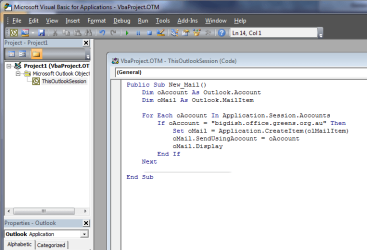


1.PNG


1. Click File :ar: Save and close the VB window​


2. Back in Outlook, click File :ar: Options :ar: Customize Ribbon


3. From the “Choose commands from” drop box select Macros
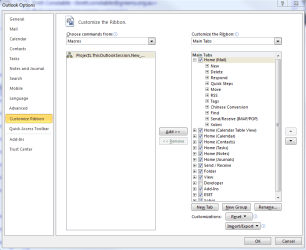


2.PNG


4. Under Main Tabs click Home (Mail) and down the bottom click “New Group”

5. You can then click “Rename” and change the name

6. Click the macro in the left panel and “Add” to the New Group
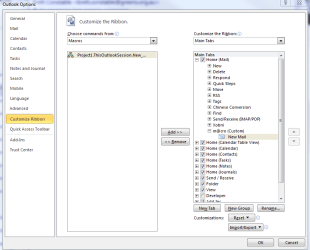

4.PNG


7. You can now click “Rename” and call it “New Mail” (or whatever you’d like)
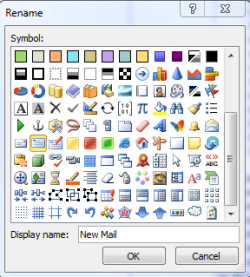

3.PNG


8. Click OK and you’ll now see a “New Mail” button on the Outlook ribbon


5.PNG


9. Now click File :ar: Options :ar: Trust Centre :ar: Trust Centre Settings :ar: Macro Settings and make sure “Notifications for all macros” is selected


Finished


Now when you want to send new mail from your default account just use this button
 
Last edited by a moderator:
Reply macro from within a mail item

Here is some sample code that will work from within a mail item. To reply/reply all/forward from a specific account:

Code:
Public Sub SpecificAccountReply_InMailWindow()
    Dim oAccount As Outlook.Account
    Dim oMail As Outlook.MailItem
   
    For Each oAccount In Application.Session.Accounts
        If oAccount = "Account Name" Then
            'Set oMail = Application.ActiveExplorer.Selection(1).Reply
            Set oMail = ActiveInspector.CurrentItem.Reply
            oMail.SendUsingAccount = oAccount
            oMail.Display
        End If
    Next
End Sub

Public Sub SpecificAccountReplyAll_InMailWindow()
    Dim oAccount As Outlook.Account
    Dim oMail As Outlook.MailItem
   
    For Each oAccount In Application.Session.Accounts
        If oAccount = "Account Name" Then
            'Set oMail = Application.ActiveExplorer.Selection(1).Reply
            Set oMail = ActiveInspector.CurrentItem.ReplyAll
            oMail.SendUsingAccount = oAccount
            oMail.Display
        End If
    Next
End Sub

Public Sub SpecificAccountForward_InMailWindow()
    Dim oAccount As Outlook.Account
    Dim oMail As Outlook.MailItem
   
    For Each oAccount In Application.Session.Accounts
        If oAccount = "Account Name" Then
            'Set oMail = Application.ActiveExplorer.Selection(1).Reply
            Set oMail = ActiveInspector.CurrentItem.Forward
            oMail.SendUsingAccount = oAccount
            oMail.Display
        End If
    Next
End Sub

This code would need to be added as 3 different macros, in the same way as the above posts.

Hope this is helpful - I know that it is a year late!
 

My Computer My Computer

At a glance

Windows 7 Ultimate x64
Computer type
PC/Desktop
OS
Windows 7 Ultimate x64
it does not work...

After following all steps, it doesn't work!
Is it possible for shared accounts as well?
 

My Computer My Computer

At a glance

Windows 7; 64 bit
Computer type
Laptop
Computer Manufacturer/Model Number
HP
OS
Windows 7; 64 bit
Problem in Outlook 2013

This VBA insert works pretty well, but I have an issue if I delete the new mail message I created. It gets stuck in the Outbox of the account from which I have set as "default".

Is there a way around this?

Update:
I found the answer. Get rid of the VBA code and do this instead:

In Outlook 2013, the key is:
HKEY_CURRENT_USER\Software\Microsoft\Office\15.0\Outlook\Options\Mail DWORD value: NewItemsUseDefaultSendingAccount Value: 1 In my case, the key "Mail" did not exist so I had to add it, along with the DWORD.
Works great now and doesn't leave any discarded messages sitting in the Outbox.
 

My Computer My Computer

At a glance

Windows 7 Ultimate x64
Computer type
Laptop
OS
Windows 7 Ultimate x64
OK, i tried this and it works as far as I can see. Great!

It would for me be perfect if I also could set a specific email adress in CC when I click any of the custom buttons.

I use my default account and it is not always that I want to have this adress in CC, only when I respond to emails sent through a secondary account. So having both the ordinary reply button and the custom reply is perfect. And it would be fantastic if it also could set a CC email adress.

Is there anyone that could help me modify the macros to do that?
 

My Computer My Computer

At a glance

Win7 32
Computer type
PC/Desktop
OS
Win7 32
Back
Top