
Outlook 2010 - How to Edit To Address

KrelvinAZ

New member
Local time
7:13 AM
Messages
6
Location
Mesa, AZ
New box came with Office 2010....Outlook 2010 is a bit of a shock with little time to learn all over how I do things daily all day long to get my job done.

Figured out most of it but one issue is causing lots of grief for what used to be a very simple thing to do.

When I type in an email address which I do a lot for email support (They are not in the GAL) and mistype it, I can't seem to find out how to edit it after Outlook fixes it.

In Outlook 2003, I could just double click on the address and a box would pop up to let me change what I needed. Can't seem to find anything that lets me do that in
2010.

Double click gives me nothing now. Right click gives me options that don't help. I've tried single click, looked for an option to edit... can't find any way of doing this other than retyping the address is not a good solution as many times it is a very complicated email address to type in the first place.

So the question is:

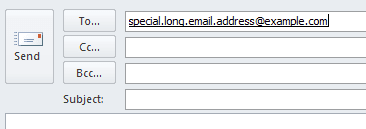
How do you edit an email address on any of the To: Cc: and Bcc: lines?

Example attached (I hope) shows an email address that I entered using example.com... In this case, i want to change it to example.net without having to retype the whole address again.


Box is a Win7 Pro box if that matters.
 

Attachments
  • editcontact.png
    editcontact.png
    2 KB · Views: 2

My Computer My Computer

At a glance

Win7 Pro 32 and 64 - XP and various Unix
OS
Win7 Pro 32 and 64 - XP and various Unix
When the cursor is in the position shown in your illustration, just press the backspace key and type in the correct address.

If it is one of your contacts, you need to do a permanent 'fix' in the Contact file by pressing backspace in the same position.
 

My Computer My Computer

At a glance

Windows 7 Home Premium 64bitIntel(R) Core(TM) i3-2120 CPU @ 3.30GHz3.00 GB(1) Intel(R) HD Graphics (2) VNC Mirror Driver
Computer type
PC/Desktop
Computer Manufacturer/Model Number
Packard Bell
OS
Windows 7 Home Premium 64bit
CPU
Intel(R) Core(TM) i3-2120 CPU @ 3.30GHz
Motherboard
Packard Bell IPISB-AG
Memory
3.00 GB
Graphics Card(s)
(1) Intel(R) HD Graphics (2) VNC Mirror Driver
Sound Card
Realtek High Definition Audio
Monitor(s) Displays
AIO LCD
Screen Resolution
1920 x 1080
Hard Drives
WDC WD10EADX-22TDHB0 ATA Device
Fixed hard disk media
4 partitions
931.51 GB
Keyboard
Wireless
Mouse
Wireless
Antivirus
Microsoft Security Essentials
Browser
IE; Firefox
Other Info
Also:
Samsung N220 Plus Netbook - Windows 7 Home
HP laptop
iPad 5
The problem is I don't want to have to retype the whole email address when all I need to do it correct a part of it.

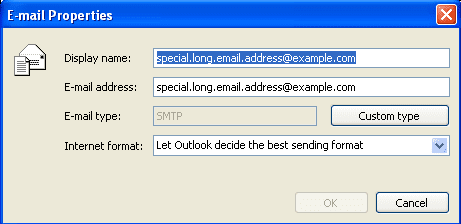
In Outlook 2003, you double click on the address, and the Email properties show up and you can edit the address to your hearts content.

As a mail administrator (Unix side) I do this all day long dealing with tons of email contacts that are not in our GAL and never will be. Some of the addresses are very complicated and easy to mess up.

Below is the view you get when you double click in Outlook 2003... simple easy to correct anything about the address, including contact name, email address....

Looking for similar function in 2010.
 

Attachments

  • editcontact2.png
    editcontact2.png
    4.2 KB · Views: 5

My Computer My Computer

At a glance

Win7 Pro 32 and 64 - XP and various Unix
OS
Win7 Pro 32 and 64 - XP and various Unix
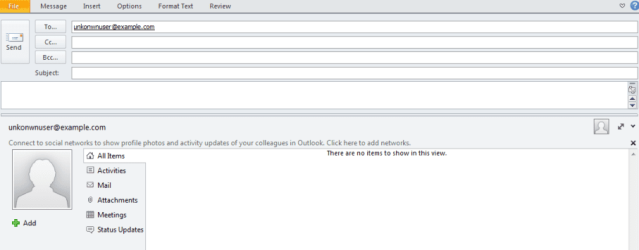
BTW... it appears that the way to do this if you want to change a GAL entry is to use the People Pain Pane.... but when you type in an address, the People Pane does not have any info about the user so there is nothing to change.
 

My Computer My Computer

At a glance

Win7 Pro 32 and 64 - XP and various Unix
OS
Win7 Pro 32 and 64 - XP and various Unix
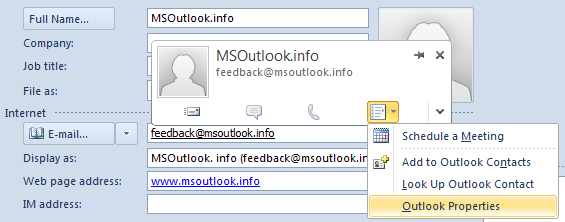
The option for accessing Outlook 2010 Properties is by using the following method:
E-mail properties for contact addresses in Outlook 2010 | MSOutlook.info
.
.

Outlook Properties

To get to the Outlook Properties option you can do the following;

  1. Open that specific contact by double clicking the item in your Contacts folder
  2. Hover on the email address of the contact and a Address Card pop-up will become visible.
  3. On the right side of the contact card you’ll see a menu button. Click on it and from the list choose; Outlook Properties
  4. Make sure that the “Internet format” is set to “Let Outlook decide the best sending format”.


The Outlook Properties option for the contact’s address is located on the new Contact Card.
(click on image to enlarge)


Locations of other message formatting options


You can find the other message formatting options mentioned in the original Quick Tip in the following locations;
General options;
File-> Options-> Mail-> option group: Compose Messages-> option: Compose message in this format
Internet format;
File-> Options-> Mail-> option group: Message Format-> option: When sending messages in Rich Text format to Internet recipients
I hope this helps to resolve the problem for you. :)
 

My Computer My Computer

At a glance

Windows 7 Home Premium 64bitIntel(R) Core(TM) i3-2120 CPU @ 3.30GHz3.00 GB(1) Intel(R) HD Graphics (2) VNC Mirror Driver
Computer type
PC/Desktop
Computer Manufacturer/Model Number
Packard Bell
OS
Windows 7 Home Premium 64bit
CPU
Intel(R) Core(TM) i3-2120 CPU @ 3.30GHz
Motherboard
Packard Bell IPISB-AG
Memory
3.00 GB
Graphics Card(s)
(1) Intel(R) HD Graphics (2) VNC Mirror Driver
Sound Card
Realtek High Definition Audio
Monitor(s) Displays
AIO LCD
Screen Resolution
1920 x 1080
Hard Drives
WDC WD10EADX-22TDHB0 ATA Device
Fixed hard disk media
4 partitions
931.51 GB
Keyboard
Wireless
Mouse
Wireless
Antivirus
Microsoft Security Essentials
Browser
IE; Firefox
Other Info
Also:
Samsung N220 Plus Netbook - Windows 7 Home
HP laptop
iPad 5
They are not in my contacts. There is nothing to double click on except the address that I typed in in the To Cc or Bcc entry windows and while 2003 popped up a box with the info, 2010 does nothing.

I also don't to add them to my contacts list as I don't need them saved. I do this for 4-5 addresses a day most of which I will never email to again.

Hovering over them even with the people pane shows nothing, no options.
 

Attachments

  • unknown.png
    unknown.png
    14.8 KB · Views: 4

My Computer My Computer

At a glance

Win7 Pro 32 and 64 - XP and various Unix
OS
Win7 Pro 32 and 64 - XP and various Unix
I just tried it and I see what you are experiencing. It looks like you may have to re-type the entire email again, which is lame.
It looks like it makes a temporary contact card for that email address.
 

My Computer My Computer

At a glance

Windows 7 Ultimate 64bitIntel i7 3770K16GB DDR3 1333 Corsair XMS3XFX HD6950 2GB EyeFinity
Computer Manufacturer/Model Number
HAL-9000
OS
Windows 7 Ultimate 64bit
CPU
Intel i7 3770K
Motherboard
Asus Sabertooth Z77
Memory
16GB DDR3 1333 Corsair XMS3
Graphics Card(s)
XFX HD6950 2GB EyeFinity
Sound Card
Logitech G35 & Sennheiser PC135 & VIA HD
Monitor(s) Displays
23" HP 2310e, 23" Samsung B2230, 21.5" Viewsonic
Screen Resolution
5760x1080
Hard Drives
16TB of Storage
128GB & 256GB Crucial M4 SSD's, 2X 1TB WD Black, 3x 2TB WD, 3x 2TB Samsung F4, 1.5TB Seagate, WD 500GB,
PSU
Antec True Power New 650watt
Case
Cooler Master HAF-932
Cooling
Corsair H60 Hydro Cooler, 3x 230mm Fans, 2x120mm Fan
Keyboard
Logitech G15 and G13
Mouse
Logitech G700 Gaming Mouse
Internet Speed
50/10 Mbit
Other Info
Speakers : Alesis M1 Active Mk2 Studio Monitors , APC RS 1200 UPS, HP 4500DN Color Laser, HP P1006 mono Laser, Kodak 8500 Dye-Sub, Epson 1280 inkjet, Epson Worforce 610 MFC
That was what I was afraid of. That and a number of other minor issues, plus the the new ribbon interface which really doesn't look like it's very intuitive.

Looks like I will be removing 2010 altogether and putting Office 2003 on the box.
 

My Computer My Computer

At a glance

Win7 Pro 32 and 64 - XP and various Unix
OS
Win7 Pro 32 and 64 - XP and various Unix
Back
Top