
Outlook 2010 Taskbar Icon Right Click Menu

TheFifthWave

New member
Local time
11:38 AM
Messages
3
I have Outlook 2010 with the icon pinned to the taskbar. Before, I could right click on this icon and a menu would show up with options like "New Email, New Calendar Item", etc.

I ran a System Cleaner and the Extended Menu is no longer there. I've searched thru the Option settings and was not able to find anything.

Does anyone know where I can re-activate this?
Thank you!
 

My Computer My Computer

Computer Manufacturer/Model Number
HP
OS
Windows 7 Ultimate 64bit
CPU
AMD
Memory
16Gb
Graphics Card(s)
AMD HD 5700
Monitor(s) Displays
Auria
Hello TheFifthWave and welcome to Seven Forums. You could try to unpin it from the taskbar and then repin it. If that doesn't work maybe try a System Restore. Good Luck
 

My Computer My Computer

Computer Manufacturer/Model Number
Acer Aspire 5532
OS
Windows 7 Home Premium 64 bit SP1
CPU
AMD Athlon 64 processor TF-20 1.6 GHz. 1 Core
Motherboard
MB.PGY02.001/MBPGY02001
Memory
3 GB (2.75 available)
Graphics Card(s)
ATI Radion HD 3200
Sound Card
Realtek High Definition Audio
Monitor(s) Displays
Generic PnP 15.6"
Screen Resolution
1366 x 768
Hard Drives
250 GB HDD (220 available)
PSU
?
Case
?
Cooling
Single cycling fan, on cooling stand
Keyboard
PNP Device ID ACPI\PNP0303\4&12734F14&0
Mouse
Microsoft Laser 7000
Internet Speed
Ultra high speed download 2500 kb/s upload 720 kb/s
Other Info
Norton Internet Security 2011
Sorry but this is the best I could do.
I used the tutorial for finding the missing info but still could not find it. Special Thanks to PooMan UK and DocBrown for their help in filling out these specs.
I tried to unpin and repin and it's still the same. I was afraid the restore would be required. I'll do that late tonight.
Thank you for the fast response!
 

My Computer My Computer

Computer Manufacturer/Model Number
HP
OS
Windows 7 Ultimate 64bit
CPU
AMD
Memory
16Gb
Graphics Card(s)
AMD HD 5700
Monitor(s) Displays
Auria
My pleasure, and again welcome and good luck. I can't say for sure that the system restore will work although I think it should. Keep checking back here, someone may have a better solution.
 

My Computer My Computer

Computer Manufacturer/Model Number
Acer Aspire 5532
OS
Windows 7 Home Premium 64 bit SP1
CPU
AMD Athlon 64 processor TF-20 1.6 GHz. 1 Core
Motherboard
MB.PGY02.001/MBPGY02001
Memory
3 GB (2.75 available)
Graphics Card(s)
ATI Radion HD 3200
Sound Card
Realtek High Definition Audio
Monitor(s) Displays
Generic PnP 15.6"
Screen Resolution
1366 x 768
Hard Drives
250 GB HDD (220 available)
PSU
?
Case
?
Cooling
Single cycling fan, on cooling stand
Keyboard
PNP Device ID ACPI\PNP0303\4&12734F14&0
Mouse
Microsoft Laser 7000
Internet Speed
Ultra high speed download 2500 kb/s upload 720 kb/s
Other Info
Norton Internet Security 2011
Sorry but this is the best I could do.
I used the tutorial for finding the missing info but still could not find it. Special Thanks to PooMan UK and DocBrown for their help in filling out these specs.
alfred01, your solution is the best, at the moment (great job!), provided TheFifthWave (a big welcome to the Seven Forums from me, as well :) ) has a restore point prior to the "System Cleaner" used.
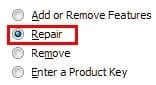
Another option would be to repair the installation of Outlook 2010.

ScreenShot00393.jpg ScreenShot00394.jpg
 

My Computer My Computer

Computer Manufacturer/Model Number
Toshiba L355D
OS
Windows 7 Ultimate x64 SP1
CPU
Core2 Duo
Motherboard
Intel
Memory
4 GB
Graphics Card(s)
GM965 on-board
Sound Card
RealTek on-board
Monitor(s) Displays
19"+17"(laptop)
Screen Resolution
1440x900 (x 2)
Hard Drives
500GB Ext. 200GB Internal
PSU
N/A
Case
N/A
Cooling
N/A
alfred01, your solution is the best, at the moment (great job!), provided TheFifthWave (a big welcome to the Seven Forums from me, as well :) ) has a restore point prior to the "System Cleaner" used.

Another option would be to repair the installation of Outlook 2010.

View attachment 131896 View attachment 131897

Yes, of course you're absolutely right mikedl, I obviously didn't think this one through enough. This is the second time now that I've given an answer that hasn't been the correct one. Guess I better just answer when I'm absolutely sure of the answer in the future. Thanks for setting me straight mike, the important thing is that we get the correct answer to the people with the questions.
 

My Computer My Computer

Computer Manufacturer/Model Number
Acer Aspire 5532
OS
Windows 7 Home Premium 64 bit SP1
CPU
AMD Athlon 64 processor TF-20 1.6 GHz. 1 Core
Motherboard
MB.PGY02.001/MBPGY02001
Memory
3 GB (2.75 available)
Graphics Card(s)
ATI Radion HD 3200
Sound Card
Realtek High Definition Audio
Monitor(s) Displays
Generic PnP 15.6"
Screen Resolution
1366 x 768
Hard Drives
250 GB HDD (220 available)
PSU
?
Case
?
Cooling
Single cycling fan, on cooling stand
Keyboard
PNP Device ID ACPI\PNP0303\4&12734F14&0
Mouse
Microsoft Laser 7000
Internet Speed
Ultra high speed download 2500 kb/s upload 720 kb/s
Other Info
Norton Internet Security 2011
Sorry but this is the best I could do.
I used the tutorial for finding the missing info but still could not find it. Special Thanks to PooMan UK and DocBrown for their help in filling out these specs.
alfred, your answer was fine! :)
I just presented another option. Keep up the good work. We all contribute in helping solve issues and I thank you for doing so. :D
 

My Computer My Computer

Computer Manufacturer/Model Number
Toshiba L355D
OS
Windows 7 Ultimate x64 SP1
CPU
Core2 Duo
Motherboard
Intel
Memory
4 GB
Graphics Card(s)
GM965 on-board
Sound Card
RealTek on-board
Monitor(s) Displays
19"+17"(laptop)
Screen Resolution
1440x900 (x 2)
Hard Drives
500GB Ext. 200GB Internal
PSU
N/A
Case
N/A
Cooling
N/A
alfred, your answer was fine! :)
I just presented another option. Keep up the good work. We all contribute in helping solve issues and I thank you for doing so. :D

Thanks mikedl.
 

My Computer My Computer

Computer Manufacturer/Model Number
Acer Aspire 5532
OS
Windows 7 Home Premium 64 bit SP1
CPU
AMD Athlon 64 processor TF-20 1.6 GHz. 1 Core
Motherboard
MB.PGY02.001/MBPGY02001
Memory
3 GB (2.75 available)
Graphics Card(s)
ATI Radion HD 3200
Sound Card
Realtek High Definition Audio
Monitor(s) Displays
Generic PnP 15.6"
Screen Resolution
1366 x 768
Hard Drives
250 GB HDD (220 available)
PSU
?
Case
?
Cooling
Single cycling fan, on cooling stand
Keyboard
PNP Device ID ACPI\PNP0303\4&12734F14&0
Mouse
Microsoft Laser 7000
Internet Speed
Ultra high speed download 2500 kb/s upload 720 kb/s
Other Info
Norton Internet Security 2011
Sorry but this is the best I could do.
I used the tutorial for finding the missing info but still could not find it. Special Thanks to PooMan UK and DocBrown for their help in filling out these specs.
Thank you both for the help. Last night I performed the Outlook Repair and my Menu is back!

Thank you again and have a great weekend!
 

My Computer My Computer

Computer Manufacturer/Model Number
HP
OS
Windows 7 Ultimate 64bit
CPU
AMD
Memory
16Gb
Graphics Card(s)
AMD HD 5700
Monitor(s) Displays
Auria
That's great, TheFifthWave! :D

I'm very happy you got it sorted!
 

My Computer My Computer

Computer Manufacturer/Model Number
Toshiba L355D
OS
Windows 7 Ultimate x64 SP1
CPU
Core2 Duo
Motherboard
Intel
Memory
4 GB
Graphics Card(s)
GM965 on-board
Sound Card
RealTek on-board
Monitor(s) Displays
19"+17"(laptop)
Screen Resolution
1440x900 (x 2)
Hard Drives
500GB Ext. 200GB Internal
PSU
N/A
Case
N/A
Cooling
N/A
I hate to bump this old thread but thought other people would like to know another solution to this seeing how this forum is the first answer that comes up on Google.

If your taskbar is locked then you will not get right click options on any of your pinned icons. You must unlock the taskbar first. I tried the above and didnt work. I was surprised at how easy the solution was when I unlocked..
 

My Computer My Computer

OS
Windows 7 64
Back
Top