Solved Outlook 2010 won't open hyperlinks in Chrome (Win 7 Home Premium, 64)

rlee123

New member
Local time
5:38 PM
Messages
15
Location
Los Angeles, CA
Hi, thanks in advance for your time. In the last few days, I have not been able to open links in Outlook 2010 when Chrome is my default browser. When I switch to IE to be my default browser, the links open just fine. But when Chrome is my default browser, I can see the links, I can "mouse over" them and see the URL displayed (with the "click to follow link" message appearing), but I can't follow the links. Even when I hit CRTL and click at the same time, I can't follow the links.

This operation was working fine recently. I have not changed Chrome at all, and I've been using it as my default browser for years. However, I have allowed Windows Update to install its recommended updates. That said, the last update that was installed was done on December 13, 2013, and my links were opening just fine after that date.

Thanks again for your help!
 

My Computer My Computer

At a glance

Windows 7 Home Premium 64-bit, Service Pack 1Intel Core i7-2670QM @2.20 GHz8 GB
Computer type
Laptop
Computer Manufacturer/Model Number
Dell XPS L702X
OS
Windows 7 Home Premium 64-bit, Service Pack 1
CPU
Intel Core i7-2670QM @2.20 GHz
Memory
8 GB
Antivirus
AVG Free
Browser
Chrome
Hi, Welcome to Seven forums.

Click Start, and then click Run.
In the Open box, type regedit, and then click OK.
Locate, and then click the following registry subkey:
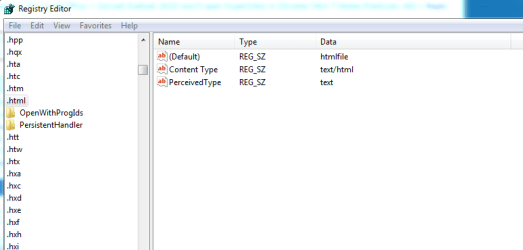
HKEY_CLASSES_ROOT \.html
Make sure that the value of the String (Default) is "htmlfile". If it's not "htmlfile", right-click (Default), click Modify, input htmlfile in the Value data box, and then click OK.

Exit Registry Editor.


And then check.
 

My Computer My Computer

At a glance

Windows 11 x64i5 2500K @ 3.3 GHz16 GB DDR 3 @ 1600MhzMSI 1050TI 4GB OC version
Computer type
PC/Desktop
Computer Manufacturer/Model Number
Custom Bulid/Self made
OS
Windows 11 x64
CPU
i5 2500K @ 3.3 GHz
Motherboard
ASUS P8 Z77 V pro
Memory
16 GB DDR 3 @ 1600Mhz
Graphics Card(s)
MSI 1050TI 4GB OC version
Sound Card
On Board (Realtek HD audio)
Monitor(s) Displays
Samsung 22" LCD
Screen Resolution
1920*1080
Hard Drives
Seagate 1 TB, WD 1TB, Seagate 2 TB ( I use a lot of space)
PSU
coolermaster 750 W
Case
Coolermaster HAF912
Cooling
Coolermaster hyper 212 EVO
Keyboard
Samsung
Mouse
Dell Wireless
Internet Speed
Wireless 50 Mbps
Antivirus
AVG 2016 Internet Security
Browser
Google Chrome
That worked. Thanks so much. Is there an easy explanation for what happened to cause this issue or when I might experience it again?
 

My Computer My Computer

At a glance

Windows 7 Home Premium 64-bit, Service Pack 1Intel Core i7-2670QM @2.20 GHz8 GB
Computer type
Laptop
Computer Manufacturer/Model Number
Dell XPS L702X
OS
Windows 7 Home Premium 64-bit, Service Pack 1
CPU
Intel Core i7-2670QM @2.20 GHz
Memory
8 GB
Antivirus
AVG Free
Browser
Chrome
Glad the issue is resolved. If you uninstall the browser the entry in registry goes bad. We just fixed the entry and we are back on track.
You can mark this thread as solved. This will help others as well.
 

My Computer My Computer

At a glance

Windows 11 x64i5 2500K @ 3.3 GHz16 GB DDR 3 @ 1600MhzMSI 1050TI 4GB OC version
Computer type
PC/Desktop
Computer Manufacturer/Model Number
Custom Bulid/Self made
OS
Windows 11 x64
CPU
i5 2500K @ 3.3 GHz
Motherboard
ASUS P8 Z77 V pro
Memory
16 GB DDR 3 @ 1600Mhz
Graphics Card(s)
MSI 1050TI 4GB OC version
Sound Card
On Board (Realtek HD audio)
Monitor(s) Displays
Samsung 22" LCD
Screen Resolution
1920*1080
Hard Drives
Seagate 1 TB, WD 1TB, Seagate 2 TB ( I use a lot of space)
PSU
coolermaster 750 W
Case
Coolermaster HAF912
Cooling
Coolermaster hyper 212 EVO
Keyboard
Samsung
Mouse
Dell Wireless
Internet Speed
Wireless 50 Mbps
Antivirus
AVG 2016 Internet Security
Browser
Google Chrome
Thanks, Archer. I marked the thread as solved. However, it's been about 13 months since I uninstalled and reinstalled Chrome, so I wonder why this issue popped up in the last weeks. No worries. As long as it's solved now.
 

My Computer My Computer

At a glance

Windows 7 Home Premium 64-bit, Service Pack 1Intel Core i7-2670QM @2.20 GHz8 GB
Computer type
Laptop
Computer Manufacturer/Model Number
Dell XPS L702X
OS
Windows 7 Home Premium 64-bit, Service Pack 1
CPU
Intel Core i7-2670QM @2.20 GHz
Memory
8 GB
Antivirus
AVG Free
Browser
Chrome
No joy

I'm having the same problem. I checked the regkey setting and it's exactly as you indicated it should be (see attached)

what do you suggest now?
 

Attachments

  • regkey.png
    regkey.png
    10.3 KB · Views: 1

My Computer My Computer

At a glance

Windows 7 Ultimate 64biti79gb
Computer type
PC/Desktop
Computer Manufacturer/Model Number
Dell
OS
Windows 7 Ultimate 64bit
CPU
i7
Memory
9gb
Browser
Chrome

My Computer My Computer

At a glance

Windows 11 x64i5 2500K @ 3.3 GHz16 GB DDR 3 @ 1600MhzMSI 1050TI 4GB OC version
Computer type
PC/Desktop
Computer Manufacturer/Model Number
Custom Bulid/Self made
OS
Windows 11 x64
CPU
i5 2500K @ 3.3 GHz
Motherboard
ASUS P8 Z77 V pro
Memory
16 GB DDR 3 @ 1600Mhz
Graphics Card(s)
MSI 1050TI 4GB OC version
Sound Card
On Board (Realtek HD audio)
Monitor(s) Displays
Samsung 22" LCD
Screen Resolution
1920*1080
Hard Drives
Seagate 1 TB, WD 1TB, Seagate 2 TB ( I use a lot of space)
PSU
coolermaster 750 W
Case
Coolermaster HAF912
Cooling
Coolermaster hyper 212 EVO
Keyboard
Samsung
Mouse
Dell Wireless
Internet Speed
Wireless 50 Mbps
Antivirus
AVG 2016 Internet Security
Browser
Google Chrome
Back
Top