
Solved Outlook 2016 Personal file using format Outlook Data File (97-2002)

Norm777

New member
Local time
7:04 AM
Messages
18
Windows 7 x64 Office Professional 2016

I just found out that my Outlook is using Personal file format Outlook Data File (97-2002) which means ANSI according to what I've learnt. I wanted to change it to the UNICODE format that's been in use since 2003.

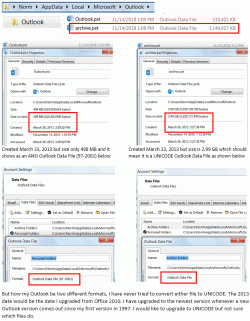
I am confused however by these facts about my outlook folders. The archive.pst file is 3+ GB in size and uses a file format of Outlook Data File, which would indicate it is already saved as UNICODE format since ANSI is limited to 2 GB. However the file location is User/AppData/Local/Microsoft/Outlook which I gather is the old ANSI format storage location which is different from the UNICODE storage location. The file properties indicate the archive.pst file was created on March 23, 2013 with format type Outlook Data File.

The outlook.pst file was also created March 23, 2013 with format Outlook Data File (97-2002).

So what does this mean? Are these files ANSI, or is one ANSI and one UNICODE?
 

Attachments
  • Capture.GIF
    Capture.GIF
    111.9 KB · Views: 0

My Computer My Computer

Computer type
PC/Desktop
Computer Manufacturer/Model Number
custom build
OS
Windows 7 Professional x64 SP1
CPU
Intel i7-2600K 3400K @ 3.4 GHz
Motherboard
ASUS P8P67 Deluxe
Memory
16Gb
Graphics Card(s)
NVIDIA GeForce GTS 450 silent (no fans)
Hard Drives
1 - 2 GB
1- 1 GB
2 - 2 GB WD portable
Antivirus
Norton Security 2.0
Browser
Firefox 35.1
One way you could convert the ANSI file to Unicode would be to create a new, blank PST file (it would create it in Unicode format), open both the old and the new files in Outlook, then manually move the items in the old file to the new file. Not only would you be assured of getting a Unicode file, but you would get a clean Unicode file, because the file would be created as Unicode rather than created as ANSI and then converted to Unicode.
 

My Computer My Computer

Computer type
PC/Desktop
Computer Manufacturer/Model Number
Dell
OS
Linux Mint 18.2 xfce 64-bit (VMWare host) / Windows 8.1 Pro 32-bit (VMWare guest)
CPU
Haswell
Memory
4 GB
Monitor(s) Displays
Acer 23"
Screen Resolution
1920 x 1080
Hard Drives
Two hard drives, 1TB each: One for Linux, one for my data.
Keyboard
IBM Model M
Antivirus
Sophos (Linux), Trend Micro (Windows)
Browser
Firefox, Opera
Other Info
I use Samba to share my data drive with the other computers at my house and with my guest session in VMWare Workstation Player.
With Unicode, you can have a huge PST file - I have heard that you can go up to 50 GB. (ANSI would max out at 2 GB, and if you kept adding data, you would corrupt the file.)

Here's how you can set the allowable size of the PST file in Outlook 2010 (it's probably the same in 2016):

Go to the following location in the Registry (it will be something other than 14.0 for Outlook 2016):
HKEY_CURRENT_USER\Software\Microsoft\Office\14.0\Outlook\PST

Create and set 2 new DWORD values (note that these values are case sensitive):

WarnLargeFileSize -- Don’t set this higher than 4090445042 (decimal) or f3cf3cf2 (hexadecimal)
MaxLargeFileSize -- Don’t set this higher than 4294967295 (decimal) or ffffffff (hexadecimal)

The first value is how many MB a user can write to a PST file. The second value is how many MB the system can write to a PST file. This difference has to be at least 5% since there is more written to a PST file than just user data.

Here's what I did several years ago with Outlook 2007:

I ran regedit as administrator.

I atttempted to go to HKEY_CURRENT_USER\Software\Microsoft\Office\12.0\Outlook\PST; however, there was no \PST key at the end of the string, so I created a PST key at the end of the string.

I then created the two DWORD values indicated above.

The numbers indicated were for a 50GB PST file, the maximum allowable size. But to be safe, I decided to go with a 20GB limit. To get from 50 to 20, I simply multiplied each number by 2/5.

Since the author said that there needed to be at least a 5% difference in the two numbers, I reduced the "warn" number a little for good measure.

If you accumulate 2GB of email every three months, you should be good for about 30 months, or 2-1/2 years. And the nice thing is that there should be a warning when you are getting close to the limit.
 

My Computer My Computer

Computer type
PC/Desktop
Computer Manufacturer/Model Number
Dell
OS
Linux Mint 18.2 xfce 64-bit (VMWare host) / Windows 8.1 Pro 32-bit (VMWare guest)
CPU
Haswell
Memory
4 GB
Monitor(s) Displays
Acer 23"
Screen Resolution
1920 x 1080
Hard Drives
Two hard drives, 1TB each: One for Linux, one for my data.
Keyboard
IBM Model M
Antivirus
Sophos (Linux), Trend Micro (Windows)
Browser
Firefox, Opera
Other Info
I use Samba to share my data drive with the other computers at my house and with my guest session in VMWare Workstation Player.
Thanks mrjimphelps for your answer, I will definitely give it a try.
 

My Computer My Computer

Computer type
PC/Desktop
Computer Manufacturer/Model Number
custom build
OS
Windows 7 Professional x64 SP1
CPU
Intel i7-2600K 3400K @ 3.4 GHz
Motherboard
ASUS P8P67 Deluxe
Memory
16Gb
Graphics Card(s)
NVIDIA GeForce GTS 450 silent (no fans)
Hard Drives
1 - 2 GB
1- 1 GB
2 - 2 GB WD portable
Antivirus
Norton Security 2.0
Browser
Firefox 35.1
Back
Top