Outlook Attachment security Warning

gaffirth

New member
Local time
7:48 AM
Messages
17
Morning.
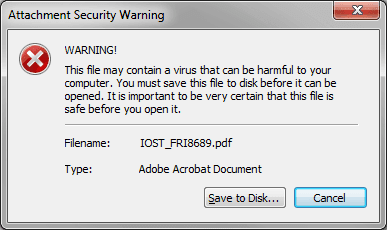
OK I have this problem where every time one of our users clicks on an attachment the outlook "Attachment Security Warning" box appears.
It was also blocking PDF. XLS and Doc files for a while but think that issue is now solved.
Does anyone know how to get rid of this Attachment security warning message?
 

My Computer

OS
Windows 7 32bit
Which version of outlook?
 

My Computer

Computer type
PC/Desktop
Computer Manufacturer/Model Number
Self assembled
OS
Windows 10 Home 64Bit
CPU
Intel Core i5 10400 @ 2.90GHz
Motherboard
Intel Corporation DG41WV (PROCESSOR)
Memory
8.00GB Single-Channel Unknown @ 1329MHz (16-20-20-38)
Sound Card
Realtek High Definition Audio
Monitor(s) Displays
DELL E170S
Screen Resolution
1280x1024 pixels
Hard Drives
931GB TOSHIBA DT01ACA100 (SATA)
238GB TEAM TM8PS7256G (SATA SSD)
Case
Nothing Fancy
Cooling
Fans
Keyboard
A4 Tech Co LTD
Mouse
A4 Tech Co Ltd/Logitech
Internet Speed
25 Mbps
Last edited:

My Computer

Computer type
PC/Desktop
Computer Manufacturer/Model Number
Self assembled
OS
Windows 10 Home 64Bit
CPU
Intel Core i5 10400 @ 2.90GHz
Motherboard
Intel Corporation DG41WV (PROCESSOR)
Memory
8.00GB Single-Channel Unknown @ 1329MHz (16-20-20-38)
Sound Card
Realtek High Definition Audio
Monitor(s) Displays
DELL E170S
Screen Resolution
1280x1024 pixels
Hard Drives
931GB TOSHIBA DT01ACA100 (SATA)
238GB TEAM TM8PS7256G (SATA SSD)
Case
Nothing Fancy
Cooling
Fans
Keyboard
A4 Tech Co LTD
Mouse
A4 Tech Co Ltd/Logitech
Internet Speed
25 Mbps
No its this one
 

Attachments

  • ASW.png
    ASW.png
    7.7 KB · Views: 23

My Computer

OS
Windows 7 32bit

My Computer

Computer type
PC/Desktop
Computer Manufacturer/Model Number
Self assembled
OS
Windows 10 Home 64Bit
CPU
Intel Core i5 10400 @ 2.90GHz
Motherboard
Intel Corporation DG41WV (PROCESSOR)
Memory
8.00GB Single-Channel Unknown @ 1329MHz (16-20-20-38)
Sound Card
Realtek High Definition Audio
Monitor(s) Displays
DELL E170S
Screen Resolution
1280x1024 pixels
Hard Drives
931GB TOSHIBA DT01ACA100 (SATA)
238GB TEAM TM8PS7256G (SATA SSD)
Case
Nothing Fancy
Cooling
Fans
Keyboard
A4 Tech Co LTD
Mouse
A4 Tech Co Ltd/Logitech
Internet Speed
25 Mbps
Nope still no joy.
Have even un-installed Mcafee.. no joy.
 

My Computer

OS
Windows 7 32bit
I hope this one does?
:ar: How to modify the behavior of the Attachment Security Warning message in Outlook 2000 Service Release 1

When you open attachments with file name extensions such as .exe, .bat, .com, or .cmd, you receive the following warning message: Attachment Security Warning

WARNING!

The file may contain a virus that can be harmful to your computer. It is important to be VERY certain that this file is safe before you open it. You must save this file to disk before it can be opened.

Filename: "file name"
Type: "file type"

To save the attachment, click Save to Disk.


Caution: The attachment warning runs for all attachments with executable file name extensions. It does not detect, or clean a virus from an infected attachment. If you save a file that has a virus, and then run it from the hard disk, your computer is still infected. Saving the file is simply an extra precaution to take when considering the safety of the attached file. You must still use an updated virus-scanning program to check the file for a possible virus.

Microsoft Office files, such as .doc, .xls, or .ppt, are not affected by this patch, and behave just as they did before installing the patch. To control macro behavior for Office documents, set the security level in the individual Office program itself. To Modify the Behavior of the Attachment Security Warning

Important This section, method, or task contains steps that tell you how to modify the registry. However, serious problems might occur if you modify the registry incorrectly. Therefore, make sure that you follow these steps carefully. For added protection, back up the registry before you modify it. Then, you can restore the registry if a problem occurs. For more information about how to back up and restore the registry, click the following article number to view the article in the Microsoft Knowledge Base: 322756 How to back up and restore the registry in Windows

To either add, or remove file types for the Attachment Security Warning, follow these steps:
  1. Click Start, click Run, type regedit, and then click OK.
  2. Locate the following key: HKEY_LOCAL_MACHINE\SOFTWARE\Microsoft\Office\9.0\Outlook\Security
    If the Security key is not present, right-click the Outlook key, point to New on the shortcut menu, and then click Key. Type Security as the name, and then press ENTER.
  3. Click to select the Security key, and on the Edit menu, point to New. Click String Value, type AddWarningFileTypes, and then press ENTER.
  4. Right click AddWarningFileTypes, and then click Modify. Enter the extensions of those file types for which you want to receive a warning in the Value data box. Note that the file extensions should be entered as semicolon- (; )delimited strings without using any periods (.).
  5. Click the Security key, on the Edit menu, point to New, and then click String Value. Type RemoveWarningFileTypes, and then press ENTER.
  6. Right-click the RemoveWarningFileTypes value, and then click Modify on the shortcut menu. Enter the extensions of those file types for which you do not want to receive a warning. Note that the file extensions should be entered as semicolon-delimited strings without using any periods.
  7. Quit Registry Editor.NOTE: You must have some string value added to the AddWarningFileTypes key in order for RemoveWarningFileTypes to work. If necessary create a fake extension for AddWarningFileTypes, such as <qqq>
For additional information about this feature as used in previous versions of Outlook, click the article number below to view the article in the Microsoft Knowledge Base: 235309 Outlook E-mail Attachment Security Update

 

My Computer

Computer type
PC/Desktop
Computer Manufacturer/Model Number
Self assembled
OS
Windows 10 Home 64Bit
CPU
Intel Core i5 10400 @ 2.90GHz
Motherboard
Intel Corporation DG41WV (PROCESSOR)
Memory
8.00GB Single-Channel Unknown @ 1329MHz (16-20-20-38)
Sound Card
Realtek High Definition Audio
Monitor(s) Displays
DELL E170S
Screen Resolution
1280x1024 pixels
Hard Drives
931GB TOSHIBA DT01ACA100 (SATA)
238GB TEAM TM8PS7256G (SATA SSD)
Case
Nothing Fancy
Cooling
Fans
Keyboard
A4 Tech Co LTD
Mouse
A4 Tech Co Ltd/Logitech
Internet Speed
25 Mbps
Tried that too. lol
Its a real pain in the arse and it would have to happen to a director too.
Have also uninstalled and reinstalled outlook.
 

My Computer

OS
Windows 7 32bit
I'll be calling for more help :(
 

My Computer

Computer type
PC/Desktop
Computer Manufacturer/Model Number
Self assembled
OS
Windows 10 Home 64Bit
CPU
Intel Core i5 10400 @ 2.90GHz
Motherboard
Intel Corporation DG41WV (PROCESSOR)
Memory
8.00GB Single-Channel Unknown @ 1329MHz (16-20-20-38)
Sound Card
Realtek High Definition Audio
Monitor(s) Displays
DELL E170S
Screen Resolution
1280x1024 pixels
Hard Drives
931GB TOSHIBA DT01ACA100 (SATA)
238GB TEAM TM8PS7256G (SATA SSD)
Case
Nothing Fancy
Cooling
Fans
Keyboard
A4 Tech Co LTD
Mouse
A4 Tech Co Ltd/Logitech
Internet Speed
25 Mbps
its a head sctratcher alright.. :huh:
 

My Computer

OS
Windows 7 32bit
Hi,

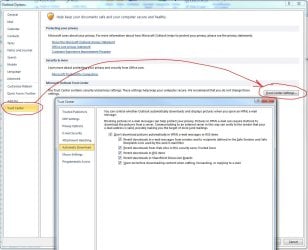
You will find several security options under Trust Center, as shown below. I think you have control over the warnings/downloads from the various settings in there. have a look at all the options - they are quite extensive.

Capture.JPG

Regards,
Golden
 

My Computer

Computer type
PC/Desktop
Computer Manufacturer/Model Number
Golden Mk. I.4
OS
Windows 10 Pro x64 ; Xubuntu x64
CPU
Intel i7 860 @ 2.80 GHz O/C'ed to 4.0GHz
Motherboard
Gigabyte P55A-UD3R Rev.1. Award BIOS F13
Memory
16GB Corsair Vengance DDR3 @ 661 MHz Dual Channel (9-9-9-24)
Graphics Card(s)
EVGA NVidia GTX 560 1024MB
Sound Card
Realtek Integrated
Monitor(s) Displays
Dual Samsung SyncMaster 2494HS
Screen Resolution
1920*1080 and 1920*1080
Hard Drives
1*Samsung 840 EVO 120GB SSD;
1*OCZ Vertex 2 60GB SSD;
2*Samsung F3 SpinPoint 1TB in RAID0;
1*Samsung F1 SpinPoint 1TB;
2*Western Digital 1TB External USB 3.0
1*Western Digital 500GB External USB 3.0
1*Seagate 500GB External USB 2.0
PSU
Thermaltake ToughPower QFan 750W
Case
Thermaltake Element S VK60001W2Z
Cooling
Corsair H60 Water Cooling, 2*230mm and 2*80mm case fans
Keyboard
Logitech G110
Mouse
Logitech MX518
  • Like
Reactions: Arc
F.Uck MICROSOFT. SPENDING WHOLE DAY on this ****ing issue still can't find a solution.
WHICH NUMBER CAN I CALL MICROSOFT TO RESOLVE THIS?
 

My Computer

Computer type
PC/Desktop
OS
Selangor
Hi there,

I fixed this problem in Outlook 2007 according to this post: https://forums.techguy.org/threads/solved-outlook-2007-attachment-security-warning.759468/

To turn off the Attachment Security Update after you install it:
1. Click Start, click Run, type regedit, and then click OK.
2. Locate and click the following registry key:
HKEY_LOCAL_MACHINE\Software\Microsoft\Office\Outlook
If this registry key is not present, right-click the Office registry key, point to New on the shortcut menu, click Key, type Outlook for the name of the new registry key, and then press ENTER.
3. Click the Outlook key, and then point to New on the Edit menu.
4. Click DWORD Value, type OldAttachmentDialog, and then press ENTER.
5. Double-click OldAttachmentDialog, type 1 in the Value Data box, and then click OK.
6. Quit Registry Editor.


The "Level1Remove" registry key fix allows you to open the specified type of attachments but Attachment Security Warning will pop up each time instead.

Just use the above "OldAttachmentDialog" registry key fix alone should fix the problem.
 

My Computer

Computer type
PC/Desktop
OS
Windows 7 Professional x64
Back
Top