- Local time
- 11:49 AM
- Messages
- 43
"Open File - Security Warning" each time I open WinExplorer on toolbar
The pinned icon on my toolbar has always worked fine. Earlier today, I was having a problem where the folder on the left column wouldn't expand. In the end, rebooting fixed that so I'm not working on that, but in the process of TRYING to fix that, I tried unpinning my icon and recreating it by deleting the icon already there, clicking START, left-clicking "Windows Explorer" and choosing "Pin to taskbar".
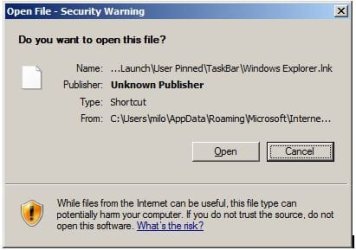
The icon sort of works, but every time I open an instance of WinExplorer now, it first gives me a box that looks something like this:
"Open File - Security Warning"
Do you want to open this file?
And when I click the button that says Open, it does. But this interim step that I never had before is annoying. I've gotten the same thing when I open snipping-tool and Firefox on the toolbar for years and just tolerated it, but i open and close Exploring so often that I'm finally asking, What is causing this and how can I either fix it for the icons there or creating pinned objects that won't do that?
Thank you!
The pinned icon on my toolbar has always worked fine. Earlier today, I was having a problem where the folder on the left column wouldn't expand. In the end, rebooting fixed that so I'm not working on that, but in the process of TRYING to fix that, I tried unpinning my icon and recreating it by deleting the icon already there, clicking START, left-clicking "Windows Explorer" and choosing "Pin to taskbar".
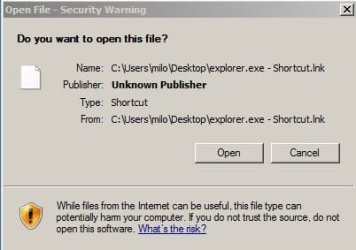
The icon sort of works, but every time I open an instance of WinExplorer now, it first gives me a box that looks something like this:
"Open File - Security Warning"
Do you want to open this file?
And when I click the button that says Open, it does. But this interim step that I never had before is annoying. I've gotten the same thing when I open snipping-tool and Firefox on the toolbar for years and just tolerated it, but i open and close Exploring so often that I'm finally asking, What is causing this and how can I either fix it for the icons there or creating pinned objects that won't do that?
Thank you!
Last edited:
My Computer
At a glance
Microsoft Windows 7 Home Premium 64-bit 7601 ...AMD Phenom(tm) II X4 945 Processor8.00 GBATI Radeon HD 5450
- Computer type
- PC/Desktop
- Computer Manufacturer/Model Number
- HP
- OS
- Microsoft Windows 7 Home Premium 64-bit 7601 Multiprocessor Free Service Pack 1
- CPU
- AMD Phenom(tm) II X4 945 Processor
- Motherboard
- FOXCONN 2AB1
- Memory
- 8.00 GB
- Graphics Card(s)
- ATI Radeon HD 5450
- Sound Card
- (1) Realtek High Definition Audio (2) Logitech Microphone
- Screen Resolution
- 1920 x 1080 x 32 bits (4294967296 colors) @ 60 Hz
- Hard Drives
- (1) Hitachi HDS721010CLA332 SATA Disk Device (2) Generic- Compact Flash USB Device (3) Generic- MS/MS-Pro USB Device (4) Generic- SD/MMC USB Device (5) Generic- SM/xD-Picture USB Device (6) Iomega E xternal HD USB Device (7) Seagate Backu