"Open File - Security Warning" each time I open WinExplorer on toolbar

On image post #19 below buttons Yes / no
"Change when these notification appear"
 

My Computers My Computers

  • At a glance

    Windows 7 HP 64i5 6600K - 800MHz to 4200MHz4+4G GSkill DDR4 3000IG - Intel 530
    Computer type
    PC/Desktop
    Computer Manufacturer/Model Number
    custom build
    OS
    Windows 7 HP 64
    CPU
    i5 6600K - 800MHz to 4200MHz
    Motherboard
    GA-Z170-HD3P
    Memory
    4+4G GSkill DDR4 3000
    Graphics Card(s)
    IG - Intel 530
    Monitor(s) Displays
    Samsung 226BW
    Screen Resolution
    1680x1050
    Hard Drives
    (1) -1 SM951 – 128GB M.2 AHCI PCIe SSD drive for Windows 7 and Lubuntu
    (2) -1 WD SATA 3 - 1T for Data
    (3) -1 WD SATA 3 - 1T for backup
    PSU
    Thermaltake 450W TR2 gold
    Keyboard
    Old and good Chicony mechanical keyboard
    Mouse
    Logitech mX performance - 9 buttons (had to disable some)
    Internet Speed
    500Mb/s
    Browser
    Firefox 64
    Other Info
    TinyWall firewall
  • At a glance

    Windows 7 Proi7-4500U 800MHz to 3.0GHz(4+4)G DDR3 1600IG intel 4400 + NVIDIA GeForce GT 745M
    Computer type
    Laptop
    System Manufacturer/Model Number
    Asus Q550LF
    OS
    Windows 7 Pro
    CPU
    i7-4500U 800MHz to 3.0GHz
    Motherboard
    Asus Q550LF
    Memory
    (4+4)G DDR3 1600
    Graphics Card(s)
    IG intel 4400 + NVIDIA GeForce GT 745M
    Sound Card
    Realtek
    Monitor(s) Displays
    LG Display LP156WF4-SPH1
    Screen Resolution
    1920 x 1080
    Hard Drives
    BX500 120G SSD for Windows and programs +
    1T HDD for data
    Internet Speed
    500 Mb/s
    Browser
    Firefox
    Other Info
    TinyWall firewall
The fact that so many people are trying to help indicates that the helpers don't experience this problem. I have had the slider set to the default for 8 years and never get Message A.

What still bothers me is, that in both instances of Message A, there is the reference to the internet on the bottom half of the message. I expected that with the first instance since, the link is incorrectly made to internet explorer. However, that's not the case for the second instance. In the Action Settings, you can turn messages off and on. I tried changing various ones to try to get Message A but was unsuccessful. However, I didn't reboot after making the changes and don't know if one needs to do that. I would think that the pertinent message to disable in this case in the one for the Internet.

Is Win 7 on this machine an OEM version?
 

My Computer My Computer

At a glance

Windows 7 Pro SP1 64 bit8 GB
Computer type
Laptop
Computer Manufacturer/Model Number
Dell M6500 Precision Work Station
OS
Windows 7 Pro SP1 64 bit
Memory
8 GB
Screen Resolution
1920x
Internet Speed
30 Mbps
Antivirus
Norton Security
Browser
IE 11
Yes, this machine came with Win7 installed. I don't follow a lot of what you say, though. You reference Internet Explorer but this has no connection to IE. It's "Exploring" that's involved. This should not even require an internet connection to function because Exploring is just a Windows process.
 

My Computer My Computer

At a glance

Microsoft Windows 7 Home Premium 64-bit 7601 ...AMD Phenom(tm) II X4 945 Processor8.00 GBATI Radeon HD 5450
Computer type
PC/Desktop
Computer Manufacturer/Model Number
HP
OS
Microsoft Windows 7 Home Premium 64-bit 7601 Multiprocessor Free Service Pack 1
CPU
AMD Phenom(tm) II X4 945 Processor
Motherboard
FOXCONN 2AB1
Memory
8.00 GB
Graphics Card(s)
ATI Radeon HD 5450
Sound Card
(1) Realtek High Definition Audio (2) Logitech Microphone
Screen Resolution
1920 x 1080 x 32 bits (4294967296 colors) @ 60 Hz
Hard Drives
(1) Hitachi HDS721010CLA332 SATA Disk Device (2) Generic- Compact Flash USB Device (3) Generic- MS/MS-Pro USB Device (4) Generic- SD/MMC USB Device (5) Generic- SM/xD-Picture USB Device (6) Iomega E xternal HD USB Device (7) Seagate Backu
In the first A message you posted, the second link in the message is going to \Roaming\Microsoft\Internet Explorer. I mentioned that was incorrect and asked you to create a new shortcut on your desktop. You did that and the link was then correct. However, looking around the web, it appears that the little blurb about the internet in the A messages is standard.

I asked about the OEM version because I thought this has to do with a Group Policy setting. Later on, I was looking further around the web about this problem and found a fix for it. However, as I understand it, the fix can't be carried out in Home Premium. One needs to have Pro, Ultimate, etc.

I'm not on my Win 7 system right now so I can't check to see if the setting I have in the Group Policy is consistent with the fix. I'll have to do that later since the golf course is calling. I'll back at you tonight.
 

My Computer My Computer

At a glance

Windows 7 Pro SP1 64 bit8 GB
Computer type
Laptop
Computer Manufacturer/Model Number
Dell M6500 Precision Work Station
OS
Windows 7 Pro SP1 64 bit
Memory
8 GB
Screen Resolution
1920x
Internet Speed
30 Mbps
Antivirus
Norton Security
Browser
IE 11
C:\Users\NAME\AppData\Roaming\Microsoft\Internet Explorer\Quick Launch\User Pinned\TaskBar is the folder on where the links on the taskbar are stored.
It has nothing to do with Internet Explorer. Just a bad name for a it.

Miloshapiro, did you do what I wrote on post #21
 

My Computers My Computers

  • At a glance

    Windows 7 HP 64i5 6600K - 800MHz to 4200MHz4+4G GSkill DDR4 3000IG - Intel 530
    Computer type
    PC/Desktop
    Computer Manufacturer/Model Number
    custom build
    OS
    Windows 7 HP 64
    CPU
    i5 6600K - 800MHz to 4200MHz
    Motherboard
    GA-Z170-HD3P
    Memory
    4+4G GSkill DDR4 3000
    Graphics Card(s)
    IG - Intel 530
    Monitor(s) Displays
    Samsung 226BW
    Screen Resolution
    1680x1050
    Hard Drives
    (1) -1 SM951 – 128GB M.2 AHCI PCIe SSD drive for Windows 7 and Lubuntu
    (2) -1 WD SATA 3 - 1T for Data
    (3) -1 WD SATA 3 - 1T for backup
    PSU
    Thermaltake 450W TR2 gold
    Keyboard
    Old and good Chicony mechanical keyboard
    Mouse
    Logitech mX performance - 9 buttons (had to disable some)
    Internet Speed
    500Mb/s
    Browser
    Firefox 64
    Other Info
    TinyWall firewall
  • At a glance

    Windows 7 Proi7-4500U 800MHz to 3.0GHz(4+4)G DDR3 1600IG intel 4400 + NVIDIA GeForce GT 745M
    Computer type
    Laptop
    System Manufacturer/Model Number
    Asus Q550LF
    OS
    Windows 7 Pro
    CPU
    i7-4500U 800MHz to 3.0GHz
    Motherboard
    Asus Q550LF
    Memory
    (4+4)G DDR3 1600
    Graphics Card(s)
    IG intel 4400 + NVIDIA GeForce GT 745M
    Sound Card
    Realtek
    Monitor(s) Displays
    LG Display LP156WF4-SPH1
    Screen Resolution
    1920 x 1080
    Hard Drives
    BX500 120G SSD for Windows and programs +
    1T HDD for data
    Internet Speed
    500 Mb/s
    Browser
    Firefox
    Other Info
    TinyWall firewall
as per my comment in #20, i don't know WHERE you're referring to.
Where is "Change when these notification appear" ?
Sorry if it seems i'm being dense but I don't know where you want me to check that.
 

My Computer My Computer

At a glance

Microsoft Windows 7 Home Premium 64-bit 7601 ...AMD Phenom(tm) II X4 945 Processor8.00 GBATI Radeon HD 5450
Computer type
PC/Desktop
Computer Manufacturer/Model Number
HP
OS
Microsoft Windows 7 Home Premium 64-bit 7601 Multiprocessor Free Service Pack 1
CPU
AMD Phenom(tm) II X4 945 Processor
Motherboard
FOXCONN 2AB1
Memory
8.00 GB
Graphics Card(s)
ATI Radeon HD 5450
Sound Card
(1) Realtek High Definition Audio (2) Logitech Microphone
Screen Resolution
1920 x 1080 x 32 bits (4294967296 colors) @ 60 Hz
Hard Drives
(1) Hitachi HDS721010CLA332 SATA Disk Device (2) Generic- Compact Flash USB Device (3) Generic- MS/MS-Pro USB Device (4) Generic- SD/MMC USB Device (5) Generic- SM/xD-Picture USB Device (6) Iomega E xternal HD USB Device (7) Seagate Backu
This is the link I was referring to-

Disable do you want to run this file prompt in Windows 7 << Windows 7 Home

Turns out, only method one is not applicable to Home Premium.

You can use method 2. You would want to either set a system restore point or save the registry before doing the registry edits.

What's interesting is that when I use method one, there are no file extensions listed when I follow his instructions for the inclusion list. Neither the "inclusion list..." nor the "do not preserve...." items are configured."
 

My Computer My Computer

At a glance

Windows 7 Pro SP1 64 bit8 GB
Computer type
Laptop
Computer Manufacturer/Model Number
Dell M6500 Precision Work Station
OS
Windows 7 Pro SP1 64 bit
Memory
8 GB
Screen Resolution
1920x
Internet Speed
30 Mbps
Antivirus
Norton Security
Browser
IE 11
trying out the disablepromt.reg option

This one got me excited because it sounded so promising.
I went to method 2, read up on it. It sounded exactly like what I needed.
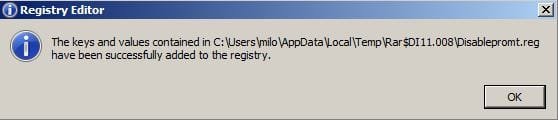
I unzipped it in WinRAR, double clicked the poorly-spelled file called Disablepromt.reg .
Followed all the agreement steps, finally getting to the image below, and hoped this would finally be resolved.
Clicked the icon for WinExplorer on the toolbar: same issue; no change.
Likewise for Firefox icon and Snipping Tool icon.
So no progress, darn it.
 

Attachments

  • temp5.jpg
    temp5.jpg
    16.1 KB · Views: 14

My Computer My Computer

At a glance

Microsoft Windows 7 Home Premium 64-bit 7601 ...AMD Phenom(tm) II X4 945 Processor8.00 GBATI Radeon HD 5450
Computer type
PC/Desktop
Computer Manufacturer/Model Number
HP
OS
Microsoft Windows 7 Home Premium 64-bit 7601 Multiprocessor Free Service Pack 1
CPU
AMD Phenom(tm) II X4 945 Processor
Motherboard
FOXCONN 2AB1
Memory
8.00 GB
Graphics Card(s)
ATI Radeon HD 5450
Sound Card
(1) Realtek High Definition Audio (2) Logitech Microphone
Screen Resolution
1920 x 1080 x 32 bits (4294967296 colors) @ 60 Hz
Hard Drives
(1) Hitachi HDS721010CLA332 SATA Disk Device (2) Generic- Compact Flash USB Device (3) Generic- MS/MS-Pro USB Device (4) Generic- SD/MMC USB Device (5) Generic- SM/xD-Picture USB Device (6) Iomega E xternal HD USB Device (7) Seagate Backu
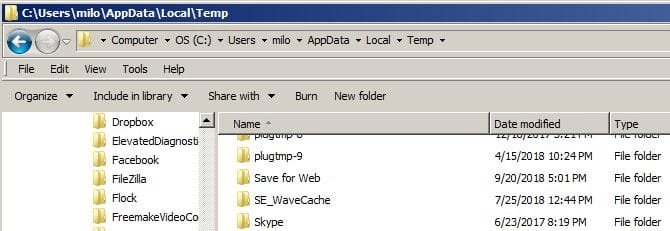
Would you provide a screenshot of what's in the folder identified in your screen shot.

By the way, I just tried method 1 in Vista Home Premium and it wouldn't work. Since Win 7 is 60% Vista, it's not surprising.
 

My Computer My Computer

At a glance

Windows 7 Pro SP1 64 bit8 GB
Computer type
Laptop
Computer Manufacturer/Model Number
Dell M6500 Precision Work Station
OS
Windows 7 Pro SP1 64 bit
Memory
8 GB
Screen Resolution
1920x
Internet Speed
30 Mbps
Antivirus
Norton Security
Browser
IE 11
Strange...i cannot drill to that folder. As you can see, the path includes something that starts with the letters Rar, but there's no folders at that point in the path between "P" and S". I wonder if it creates that folder temporarily and then deletes it.
Unless this isn't what you were asking to see?
(Thank you again for your diligence on this!)
 

Attachments

  • temp6.jpg
    temp6.jpg
    33.9 KB · Views: 9

My Computer My Computer

At a glance

Microsoft Windows 7 Home Premium 64-bit 7601 ...AMD Phenom(tm) II X4 945 Processor8.00 GBATI Radeon HD 5450
Computer type
PC/Desktop
Computer Manufacturer/Model Number
HP
OS
Microsoft Windows 7 Home Premium 64-bit 7601 Multiprocessor Free Service Pack 1
CPU
AMD Phenom(tm) II X4 945 Processor
Motherboard
FOXCONN 2AB1
Memory
8.00 GB
Graphics Card(s)
ATI Radeon HD 5450
Sound Card
(1) Realtek High Definition Audio (2) Logitech Microphone
Screen Resolution
1920 x 1080 x 32 bits (4294967296 colors) @ 60 Hz
Hard Drives
(1) Hitachi HDS721010CLA332 SATA Disk Device (2) Generic- Compact Flash USB Device (3) Generic- MS/MS-Pro USB Device (4) Generic- SD/MMC USB Device (5) Generic- SM/xD-Picture USB Device (6) Iomega E xternal HD USB Device (7) Seagate Backu
I'm sort of at a loss for additional possibilities. A shot in the dark- In the off chance that this is internet related because the OEM downloaded Win 7, you might temporarily make IE your default browser (if it's not already), and follow the advice of this-

How to Disable the Open File Security Warning in Windows 8

In my settings, I have the "Prompt" option set in both cases he mentions and don't get the problem you're having.
 

My Computer My Computer

At a glance

Windows 7 Pro SP1 64 bit8 GB
Computer type
Laptop
Computer Manufacturer/Model Number
Dell M6500 Precision Work Station
OS
Windows 7 Pro SP1 64 bit
Memory
8 GB
Screen Resolution
1920x
Internet Speed
30 Mbps
Antivirus
Norton Security
Browser
IE 11
changing the setting in security

I can do that and I don't have to change my default browser settings...I can get there by typing "inetcpl.cpl" in the start box and it takes me to that place where I can set the status to "Enable (not secure)". And indeed, if I do, I can open WinExplorer, SnippingTool, and Firefox without the annoying box. BUT! Every single time I open IE, instead of my usual default, it shows me:
shield.png
Your security setting level puts your computer at risk

We recommend that you do not browse the web with your current security settings.

green_shield.png


To browse the web securely, click Fix settings for me on the notification bar below.

red_shield.png


To continue browsing in the current state, click the Home button (not recommended).


and at the bottom of my screen is the image you see here. I'm not sure getting those warnings all the time from IE is better than clicking Yes on the annoying box, esp if I'm actually at risk somehow. Sounds like it may not be so safe to have that setting that way. Just so frustrating that this only happened for Snipping Tool and FF until this week and now WinExplorer is on the list as well.
 

Attachments

  • temp7.jpg
    temp7.jpg
    14.4 KB · Views: 0

My Computer My Computer

At a glance

Microsoft Windows 7 Home Premium 64-bit 7601 ...AMD Phenom(tm) II X4 945 Processor8.00 GBATI Radeon HD 5450
Computer type
PC/Desktop
Computer Manufacturer/Model Number
HP
OS
Microsoft Windows 7 Home Premium 64-bit 7601 Multiprocessor Free Service Pack 1
CPU
AMD Phenom(tm) II X4 945 Processor
Motherboard
FOXCONN 2AB1
Memory
8.00 GB
Graphics Card(s)
ATI Radeon HD 5450
Sound Card
(1) Realtek High Definition Audio (2) Logitech Microphone
Screen Resolution
1920 x 1080 x 32 bits (4294967296 colors) @ 60 Hz
Hard Drives
(1) Hitachi HDS721010CLA332 SATA Disk Device (2) Generic- Compact Flash USB Device (3) Generic- MS/MS-Pro USB Device (4) Generic- SD/MMC USB Device (5) Generic- SM/xD-Picture USB Device (6) Iomega E xternal HD USB Device (7) Seagate Backu
As the church lady said- "Isn't that special."

Seems we're on the right track to what causes the first problem but now how to get rid of the new one. I suppose clicking on the Fix settings.......... button would put everything back the way it was?
 

My Computer My Computer

At a glance

Windows 7 Pro SP1 64 bit8 GB
Computer type
Laptop
Computer Manufacturer/Model Number
Dell M6500 Precision Work Station
OS
Windows 7 Pro SP1 64 bit
Memory
8 GB
Screen Resolution
1920x
Internet Speed
30 Mbps
Antivirus
Norton Security
Browser
IE 11
Back
Top