Outlook mail going to WLM

Gunny3053

New member
Power User
Local time
8:08 AM
Messages
148
Hi Gang

I recently thought it would be a good idea to have my e-mail accounts together.
I use Windows live mail and Outlook mail. My provider is AT&T, so I have Yahoo mail also.

Outlook mail had been my default e-mail. So I liked the way WLM worked so I thought I would add my Outlook mail to it. I tried it for a while and decided I did not like it and wanted to change it back to the way it was.

So I went into WLM and deleted my Outlook mail account, looked real simple so I thought. As it turns out my Outlook mail is still going to my WLM account. No matter what I check or un-check it still goes there. I have un-installed my WLM account and reinstalled it and got the same results. In my Outlook mail I have the leave mail on the server checked. I was looking for a similar setting on WLM and cannot find it. I thought maybe they would fix it.


Thanx.....Gunny
 

My Computer My Computer

Computer Manufacturer/Model Number
PC desktop
OS
win7
CPU
Intel Pent 4 3.2 G
Motherboard
Intel DG965WH
Memory
3G
Graphics Card(s)
Nividia G-force 6600
Sound Card
na
Monitor(s) Displays
Samsung 22"
Hard Drives
1-WD 500G
PSU
600
Keyboard
Microsoft
Mouse
Microsoft
Hi Gang

I recently thought it would be a good idea to have my e-mail accounts together.
I use Windows live mail and Outlook mail. My provider is AT&T, so I have Yahoo mail also.

Outlook mail had been my default e-mail. So I liked the way WLM worked so I thought I would add my Outlook mail to it. I tried it for a while and decided I did not like it and wanted to change it back to the way it was.

So I went into WLM and deleted my Outlook mail account, looked real simple so I thought. As it turns out my Outlook mail is still going to my WLM account. No matter what I check or un-check it still goes there. I have un-installed my WLM account and reinstalled it and got the same results. In my Outlook mail I have the leave mail on the server checked. I was looking for a similar setting on WLM and cannot find it. I thought maybe they would fix it.


Thanx.....Gunny

Gunny,

If I'm understanding this correctly, you downloaded the Windows Live Mail app and don't want to use it anymore but it's still the default app for your email, is that correct?

If that's the case, go to Start > Default Programs > "Set Program Access and Computer Defaults" and choose the CUSTOM pull down/group and choose Microsoft Outlook for Email.

After that's done, just uninstall Windows Live Mail through Start > Control Panel > Programs and Features > Windows Live Essentials.
 

My Computer My Computer

OS
Windows 7 Ultimate 64-bit
CPU
AMD Phenom II X6 1090T 3.2GHZ
Motherboard
MSI 890FXA-GD70
Memory
G.SKILL RipJaw 3x2GB DDR3-1066
Graphics Card(s)
2x HIS Radeon HD 6850 1 GB
Sound Card
VIA 8-channel
Monitor(s) Displays
2x 20 inch Acer LCDs, 1x 32" Sony LCD TV
Screen Resolution
4480x900
Hard Drives
1x Crucial 64GB SSD
3x 1TB HDDs (WD, Seagate, Hitatchi)
1x 500GB Seagate External
PSU
Kingwin 1000W Modular
Case
Coolermaster HAF 932
Cooling
1x 120mm, 3x 200mm, CoolerMaster Hyper 212+
Keyboard
Microsoft Wireless Keyboard 1000
Mouse
Microsoft Wiresless Mouse 5000
Internet Speed
20mbps
Other Info
Samsung BD-ROM/DVD-RW
Hi jelyman

No I still want to use WLM, and Outlook mail but I want them to stay separate. I have had the WLM account for several years and have always like how it worked, smooth and with no problems. And I use to use Yahoo mail as my default mail, and decided it was backwoods compared to the others so Outlook is my default mail now. Yahoo mail would not allow some forums to replay back to you they would block it, so that is one of the reasons I have WLM. With Outlook I have the "leave mail on the server", (yahoo) box checked.

I have done that default thing you mentioned. I will recheck it to make sure I have my T's crossed and my I's dotted. After I did this I thought for sure this would take care of it. I use to have an older version of WLM and recently they have gone to this 2011, and it does not work as well as the old versions, it is slower, jerky, etc. But I do use it but no so much that this bothers me. And I think it is this newer versions is part of my problem. I have researched it trying to find if I can in fact use an older version of WLM, and have not been successful there.

So if does not supply all the info you need just let me know, and I would be more than happy to give you what you need. This is a small problem, but it is the small ones that are most frustrating and hardest to fix it seems.

Thanx a bunch....Gunny
 

My Computer My Computer

Computer Manufacturer/Model Number
PC desktop
OS
win7
CPU
Intel Pent 4 3.2 G
Motherboard
Intel DG965WH
Memory
3G
Graphics Card(s)
Nividia G-force 6600
Sound Card
na
Monitor(s) Displays
Samsung 22"
Hard Drives
1-WD 500G
PSU
600
Keyboard
Microsoft
Mouse
Microsoft
Hi jelyman

Ok I went into the default settings, and double checked everything, and Outlook is my default e-mail account. One thing that is funny is previsouly my WLM 2011 account was listed there, since the change I made it is no longer there. Making Outlook my default mail I guess is what removed it but I thought it would be there any way even if it was not the default one.

So I will try sending my self some mail and see what happens now.

Thanx....Gunny
 

My Computer My Computer

Computer Manufacturer/Model Number
PC desktop
OS
win7
CPU
Intel Pent 4 3.2 G
Motherboard
Intel DG965WH
Memory
3G
Graphics Card(s)
Nividia G-force 6600
Sound Card
na
Monitor(s) Displays
Samsung 22"
Hard Drives
1-WD 500G
PSU
600
Keyboard
Microsoft
Mouse
Microsoft
Hi Jelyman

Well I tried it and it is doing the same thing, no changes except now in order to get my mail in WLM I have to click on the send/receive in the ribbon, then I get my WLM mail and mail from Outlook. This is going from bad to worse. :-)

Thanx....Gunny
 

My Computer My Computer

Computer Manufacturer/Model Number
PC desktop
OS
win7
CPU
Intel Pent 4 3.2 G
Motherboard
Intel DG965WH
Memory
3G
Graphics Card(s)
Nividia G-force 6600
Sound Card
na
Monitor(s) Displays
Samsung 22"
Hard Drives
1-WD 500G
PSU
600
Keyboard
Microsoft
Mouse
Microsoft
Windows Live Mail only reads (receives) emails to those accounts that are setup in Live Mail. If you remove the account in question from Live Mail, there's absolutely no way it still receives messages for that account.

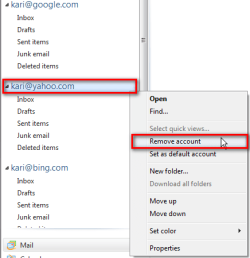
Right click the email account you want to remove in left pane in Live Mail's main window, and choose Remove account.

Kari

Live_Mail_remove_account.png
 

My Computer My Computer

Computer type
Laptop
Computer Manufacturer/Model Number
HP ENVY 17-1150eg
OS
Windows 10 Pro x64 EN-GB
CPU
1.6 GHz Intel Core i7-720QM Processor
Memory
6 GB
Graphics Card(s)
ATI Mobility Radeon HD 5850 Graphics
Sound Card
Beats sound system with integrated subwoofer
Monitor(s) Displays
17" laptop display, 22" LED and 32" Full HD TV through HDMI
Screen Resolution
1600*900 (1), 1920*1080 (2&3)
Hard Drives
Internal: 2 x 500 GB SATA Hard Disk Drive 7200 rpm
External: 2TB for backups, 3TB USB3 network drive for media
Cooling
As Envy runs a bit warm, I have it on a Cooler Master pad
Keyboard
Logitech diNovo Media Desktop Laser (bluetooth)
Mouse
Logitech Performance Mouse MX
Internet Speed
50/10 Mbps VDSL
Antivirus
Windows Defender 4.3.9431.0
Browser
Maxthon 3.5.2., IE11
Hi Kari

When my Outlook account was still in WLM, I did exactly what you are describing, and got rid on my Outlook mail account. And like I have said I normally would say that would do it, but some how WLM is still able to get my Outlook mail. I can send you a picture of what I have in my WLM page just like you have and my only account showing there is my normal WLM account.

And trust me I know what you are saying there is no way it can receive my Outlook mail if that account is gone. I agree, but it is still getting my Outlook mail. I know this is crazy what I am saying but true. And I have gone into every place in WLM I can to see if by chance my Outlook account is there, and trust me it is not there anywhere. And I have done the same in my Outlook mail. I am not crazy or imagining things.

I can take pictures of it and show you some how. I have sent e-mails to myself in Outlook, and WLM will get it too. I have done this a bunch of times to test things out and just to see if in fact WLM was still getting my Outlook mail.

Thanx.....Gunny
 

My Computer My Computer

Computer Manufacturer/Model Number
PC desktop
OS
win7
CPU
Intel Pent 4 3.2 G
Motherboard
Intel DG965WH
Memory
3G
Graphics Card(s)
Nividia G-force 6600
Sound Card
na
Monitor(s) Displays
Samsung 22"
Hard Drives
1-WD 500G
PSU
600
Keyboard
Microsoft
Mouse
Microsoft
Hi Kari

I just did it, I sent a e-mail to my self in Outlook mail. Of course my Outlook got it right away, ok good, and about 3 minutes later here it shows up in my WLM. I told you I am not crazy :-)

Now maybe something we are not paying any attention to, in any remote way could my Yahoo mail be involved in this. My provider is AT&T which is Yahoo, and I have Yahoo mail. I have also looked there for things that might be causing this, and found nothing. Every thing that is checked or un-checked is like it was, and has been for a very long time. I cannot swear to it but this seemed to happen right around the time that WLM went to this 2011 version, and it is right around then that I deleted my Outlook account in WLM.

I have looked into several forums, and a lot of people are having all sorts of problems with this new WLM 2011. And some are close to my problem buy not exactly. having trouble with their mail accounts.

Thanx....Gunny
 

My Computer My Computer

Computer Manufacturer/Model Number
PC desktop
OS
win7
CPU
Intel Pent 4 3.2 G
Motherboard
Intel DG965WH
Memory
3G
Graphics Card(s)
Nividia G-force 6600
Sound Card
na
Monitor(s) Displays
Samsung 22"
Hard Drives
1-WD 500G
PSU
600
Keyboard
Microsoft
Mouse
Microsoft
Oh just thought of this, there is no place to click on to leave your mail on the server in WLM, but there is in Outlook mail, and I have checked it to stay on the server there.

Just to make this more stranger, I have 2 computers I use daily and they are set up about the same, win 7, same e-mail accounts, etc. And they both have the same problem, now try that on for size. I never get any mail from my WLM account in my Outlook mail, just the other way around.

Thanx.....Gunny
 

My Computer My Computer

Computer Manufacturer/Model Number
PC desktop
OS
win7
CPU
Intel Pent 4 3.2 G
Motherboard
Intel DG965WH
Memory
3G
Graphics Card(s)
Nividia G-force 6600
Sound Card
na
Monitor(s) Displays
Samsung 22"
Hard Drives
1-WD 500G
PSU
600
Keyboard
Microsoft
Mouse
Microsoft
Please do not misunderstand me now, but if the email account is not setup in Live Mail, there is absolutely no way Live Mail can receive messages for that email account. Really. It is absolutely, completely impossible.

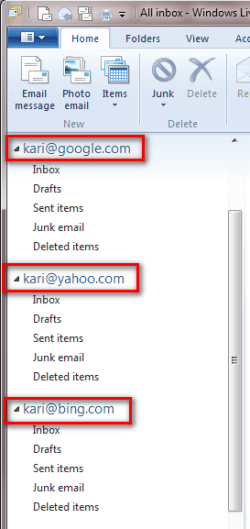
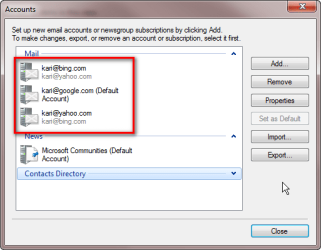
Let's say I have three email accounts, [email protected], [email protected] and [email protected]. All set up both in Outlook and Live Mail. (Mods please, do not remove these fake emails, they are not real and here only to demonstrate my point)

Outlook:

Mail_1.png

Windows Live Mail:

Mail_2.png

Now I decide I do not want to receive Yahoo mail anymore in Live Mail, so I right click my Yahoo mail account in Live Mail and choose Remove account from context menu:

Mail_3.png

From now on, I still receive messages for this account in Outlook because account still exists there, but it really is absolutely, completely 1,268,246 % sure my Live Mail does no longer receive messages for this account. It is simply impossible.

An email client application like Outlook and Live Mail can not in any circumstances receive email messages sent to a specific email address if this address (email account) is not set up in that email client.

Kari
 

My Computer My Computer

Computer type
Laptop
Computer Manufacturer/Model Number
HP ENVY 17-1150eg
OS
Windows 10 Pro x64 EN-GB
CPU
1.6 GHz Intel Core i7-720QM Processor
Memory
6 GB
Graphics Card(s)
ATI Mobility Radeon HD 5850 Graphics
Sound Card
Beats sound system with integrated subwoofer
Monitor(s) Displays
17" laptop display, 22" LED and 32" Full HD TV through HDMI
Screen Resolution
1600*900 (1), 1920*1080 (2&3)
Hard Drives
Internal: 2 x 500 GB SATA Hard Disk Drive 7200 rpm
External: 2TB for backups, 3TB USB3 network drive for media
Cooling
As Envy runs a bit warm, I have it on a Cooler Master pad
Keyboard
Logitech diNovo Media Desktop Laser (bluetooth)
Mouse
Logitech Performance Mouse MX
Internet Speed
50/10 Mbps VDSL
Antivirus
Windows Defender 4.3.9431.0
Browser
Maxthon 3.5.2., IE11
Hi Kari

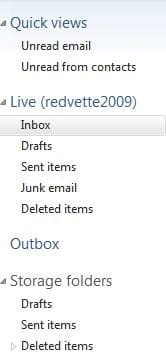
I agree with you 100%. Ok then is there any other way my Outlook account can be in WLM, with out showing in the pictured places you are showing.???? I will send you a picture like you have of my WLM setup, and I will eat your hat if you can see a Outlook mail account there....And when I deleted the Outlook accont there I did just as you are saying......Gunny
 

Attachments

  • WLM box.JPG
    WLM box.JPG
    14.9 KB · Views: 3

My Computer My Computer

Computer Manufacturer/Model Number
PC desktop
OS
win7
CPU
Intel Pent 4 3.2 G
Motherboard
Intel DG965WH
Memory
3G
Graphics Card(s)
Nividia G-force 6600
Sound Card
na
Monitor(s) Displays
Samsung 22"
Hard Drives
1-WD 500G
PSU
600
Keyboard
Microsoft
Mouse
Microsoft
Hi Kari

And as I have said before all my default things are set for Outlook to be my default mail account. And this is the way I have had it set up for a very long time, with both accounts being separate, until I got the stupid idea of combining them. And they worked great, getting my Outlook mail and my WLM separately.

Thanx....Gunny
 

My Computer My Computer

Computer Manufacturer/Model Number
PC desktop
OS
win7
CPU
Intel Pent 4 3.2 G
Motherboard
Intel DG965WH
Memory
3G
Graphics Card(s)
Nividia G-force 6600
Sound Card
na
Monitor(s) Displays
Samsung 22"
Hard Drives
1-WD 500G
PSU
600
Keyboard
Microsoft
Mouse
Microsoft
Before I can answer, could you please take one more screenshot and post it here.

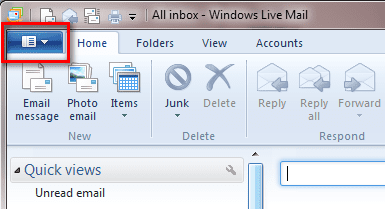
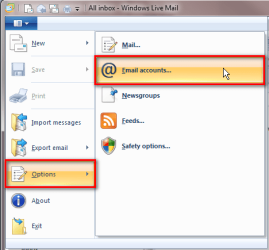
Open the Live Mail main menu by clicking the blue box top left:

Mail_4.png

Click Options > Email accounts:

Mail_5.png

Post a screenshot of the windows that opens, showing all email accounts set up in Live Mail:

Mail_6.png

Please cover those accounts partly, enough so nobody can guess the real email addresses. Forum rules forbid posting / showing real email addresses, to protect your identity (mine are not covered because they are fake, only set up for purpose of this thread).

Kari
 

My Computer My Computer

Computer type
Laptop
Computer Manufacturer/Model Number
HP ENVY 17-1150eg
OS
Windows 10 Pro x64 EN-GB
CPU
1.6 GHz Intel Core i7-720QM Processor
Memory
6 GB
Graphics Card(s)
ATI Mobility Radeon HD 5850 Graphics
Sound Card
Beats sound system with integrated subwoofer
Monitor(s) Displays
17" laptop display, 22" LED and 32" Full HD TV through HDMI
Screen Resolution
1600*900 (1), 1920*1080 (2&3)
Hard Drives
Internal: 2 x 500 GB SATA Hard Disk Drive 7200 rpm
External: 2TB for backups, 3TB USB3 network drive for media
Cooling
As Envy runs a bit warm, I have it on a Cooler Master pad
Keyboard
Logitech diNovo Media Desktop Laser (bluetooth)
Mouse
Logitech Performance Mouse MX
Internet Speed
50/10 Mbps VDSL
Antivirus
Windows Defender 4.3.9431.0
Browser
Maxthon 3.5.2., IE11
Hi Kari

Ok will do.....Gunny
 

Attachments

  • WLM box 3.JPG
    WLM box 3.JPG
    9.8 KB · Views: 37

My Computer My Computer

Computer Manufacturer/Model Number
PC desktop
OS
win7
CPU
Intel Pent 4 3.2 G
Motherboard
Intel DG965WH
Memory
3G
Graphics Card(s)
Nividia G-force 6600
Sound Card
na
Monitor(s) Displays
Samsung 22"
Hard Drives
1-WD 500G
PSU
600
Keyboard
Microsoft
Mouse
Microsoft
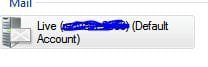
Hi Kari

See that is all that is there. I took the picture of the whole box but since there was only this there, I took what was there.

I will tell you what Kari, this is driving me a little bats. You and I are both saying this is impossible, but it is happening. One thing that is a question me when ever my account show up it has the (default account saying there) and I know it isn't

Thanx....Gunny
 

My Computer My Computer

Computer Manufacturer/Model Number
PC desktop
OS
win7
CPU
Intel Pent 4 3.2 G
Motherboard
Intel DG965WH
Memory
3G
Graphics Card(s)
Nividia G-force 6600
Sound Card
na
Monitor(s) Displays
Samsung 22"
Hard Drives
1-WD 500G
PSU
600
Keyboard
Microsoft
Mouse
Microsoft
OK. Sorry for the extra work I asked you to do, I just wanted to be sure. If there's something I don't like it is answering before knowing all the facts, thus giving wrong answer ;)

You have one mail account set up in Live Mail, let's say the email address for that account is [email protected], and your other email account / address is [email protected]. This latter account is set up in Outlook but not in Windows Live Mail.

This means your Windows Live Mail only receives mail messages sent to [email protected]. For various reasons, this account can receive all or some of the messages than your Outlook account. Here are all possible reasons why this could happen:
  • Outlook account has set to automatically forward all incoming mail to Live Mail account
  • Outlook account has set to automatically send a copy of all incoming mail to Live Mail account
  • Live Mail account is a so called alias, using the same POP3 mailbox than Outlook account (not your case if different service providers)
  • Live Mail address appears in TO, CC or BCC fields in all or some of the messages sent to Outlook address (quite possible...)
  • Live Mail accounts settings are wrong, accidentally set mail servers, username and password of those belonging to Outlook account
  • Both accounts signed to same posting lists, receiving exactly the same ads, news etc.

That's it. Other than those reasons, I have never heard.

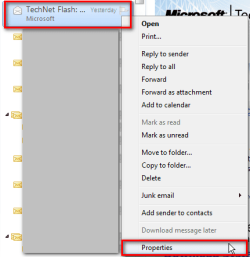
You can check something, if you want. Right click one of those emails in Live Mail you think do not belong to that account. Select Properties from the context menu:

Mail_7.png

Open Details tab from message properties window, and check to which email address that message was really sent. Is it sent to your Live Mail account, or is it sent to email address belonging to your Outlook account?

Mail_8.png

Kari
 
Last edited:

My Computer My Computer

Computer type
Laptop
Computer Manufacturer/Model Number
HP ENVY 17-1150eg
OS
Windows 10 Pro x64 EN-GB
CPU
1.6 GHz Intel Core i7-720QM Processor
Memory
6 GB
Graphics Card(s)
ATI Mobility Radeon HD 5850 Graphics
Sound Card
Beats sound system with integrated subwoofer
Monitor(s) Displays
17" laptop display, 22" LED and 32" Full HD TV through HDMI
Screen Resolution
1600*900 (1), 1920*1080 (2&3)
Hard Drives
Internal: 2 x 500 GB SATA Hard Disk Drive 7200 rpm
External: 2TB for backups, 3TB USB3 network drive for media
Cooling
As Envy runs a bit warm, I have it on a Cooler Master pad
Keyboard
Logitech diNovo Media Desktop Laser (bluetooth)
Mouse
Logitech Performance Mouse MX
Internet Speed
50/10 Mbps VDSL
Antivirus
Windows Defender 4.3.9431.0
Browser
Maxthon 3.5.2., IE11
Hi Keri

Well I looked at a few of them. And from what I can make of them they look like they are addressed to the address I use for Outlook and Yahoo mail. No problem on the work, if you want to call it that. :-)

I do use the same password for both accounts, but I had that when it was working right. And like I have said nothing comes from WLM to my Outlook mail. I am going to go into my Yahoo mail and see if I can find anything there.

Thanx....Gunny
 

My Computer My Computer

Computer Manufacturer/Model Number
PC desktop
OS
win7
CPU
Intel Pent 4 3.2 G
Motherboard
Intel DG965WH
Memory
3G
Graphics Card(s)
Nividia G-force 6600
Sound Card
na
Monitor(s) Displays
Samsung 22"
Hard Drives
1-WD 500G
PSU
600
Keyboard
Microsoft
Mouse
Microsoft
Hi Keri

Well I have looked at a bunch more and they are all addressed to my Outlook address, none to my WLM address, except the ones that normally go to it. I checked at least 10/15 of them and all the to's are to my Outlook address. Boy I am telling you this is some mystery.

You never did answer my question about getting an older version of WLM, is it possible.? I am not saying that will fix it just trying all the angles. I looked in Yahoo mail and did not find anything there. I guess I could redo WLM with a diff address and all, to see what that would do. I am afraid that going to all that and it still happens. Normally I would say it would not happen but you are saying what is happening to my mail is impossible and it is happening, so there you go.

Thanx...Gunny
 

My Computer My Computer

Computer Manufacturer/Model Number
PC desktop
OS
win7
CPU
Intel Pent 4 3.2 G
Motherboard
Intel DG965WH
Memory
3G
Graphics Card(s)
Nividia G-force 6600
Sound Card
na
Monitor(s) Displays
Samsung 22"
Hard Drives
1-WD 500G
PSU
600
Keyboard
Microsoft
Mouse
Microsoft
Please do not misunderstand me now, I'm just saying that except on those situations I described in my last post, it is simply not possible to receive email messages for an account that is not set up in mail client. It would be the same as if I suddenly would receive emails sent to you. It just does not happen.

I have a feeling I'm missing something here, that we are talking about different issues. Anyway, I'll come back if I get new ideas.

Here's a link for you: Download and Use Older Version of Windows Live Messenger or MSN Messenger | Raymond.CC Blog

Kari
 

My Computer My Computer

Computer type
Laptop
Computer Manufacturer/Model Number
HP ENVY 17-1150eg
OS
Windows 10 Pro x64 EN-GB
CPU
1.6 GHz Intel Core i7-720QM Processor
Memory
6 GB
Graphics Card(s)
ATI Mobility Radeon HD 5850 Graphics
Sound Card
Beats sound system with integrated subwoofer
Monitor(s) Displays
17" laptop display, 22" LED and 32" Full HD TV through HDMI
Screen Resolution
1600*900 (1), 1920*1080 (2&3)
Hard Drives
Internal: 2 x 500 GB SATA Hard Disk Drive 7200 rpm
External: 2TB for backups, 3TB USB3 network drive for media
Cooling
As Envy runs a bit warm, I have it on a Cooler Master pad
Keyboard
Logitech diNovo Media Desktop Laser (bluetooth)
Mouse
Logitech Performance Mouse MX
Internet Speed
50/10 Mbps VDSL
Antivirus
Windows Defender 4.3.9431.0
Browser
Maxthon 3.5.2., IE11
Hi Kari

No we are ok on our understanding here, I know what you are saying. I looked at that thread and I really don't think anything there will help me. I appreciate it though.

This just blows my mind, I thought when I first posted this here, there would be a ton of people reply because they were having the very same problem. And if not to say they fixed it but just to say they are having the same problem. And looking back on this I really thought it would be an easy fix, something that I was overlooking.

But after you not coming up with a fix and you seem to know a lot more then I do about computers, and e-mail, etc. Then I started to think WOW this is a very rare problem, it is not supposed to happen. And it is happening on 2 diff computers. That makes it a double WOW.

I know most e-mail services offer a change of address notice, when you do change your e-mail address, so I might just give that a try, close out my old address and start new, user name, password, etc. And go in and delete any traces of my WLM account, like I was never there. :-) I hate doing this because I just know there are some that won't get the change or will not remember to take note of it. The one thing I do like about WLM is the fact that, I can get my replies from the forums back, cause the lame Yahoo mail will not allow some of them through their mail. I keep thinking that Yahoo will smarten up one day and get with the program, but they seem to just be plodding along doing the same old lame things.

Thanx...Gunny
 

My Computer My Computer

Computer Manufacturer/Model Number
PC desktop
OS
win7
CPU
Intel Pent 4 3.2 G
Motherboard
Intel DG965WH
Memory
3G
Graphics Card(s)
Nividia G-force 6600
Sound Card
na
Monitor(s) Displays
Samsung 22"
Hard Drives
1-WD 500G
PSU
600
Keyboard
Microsoft
Mouse
Microsoft
Back
Top