Solved Outlook won't open links if IE is open.

erulc

New member
Local time
9:53 PM
Messages
5
Well, I have searched and have not been able to find a solution to my particular issue: with IE9 set as default browser, when I click on a link in an Outlook message, the link will only open if IE is not already running. In other words, with IE closed if I click a link in Outlook, it will open, but if I click a second link, nothing happens (as IE is already running).

If I switch my default browser to Opera, FF, or Dragon, all links open fine and I can open as many as I need. The problem is only with IE9 as default. I know, I can dump IE9 as the default and use one of the other browsers, but unfortunately most of my work sites require the use of IE, so most of my links have to open in it.

I have seen many threads related to the issue of an error message when clicking the Outlook links, but none where the link won't work if IE is open. I get no error messages either, just nothing happens.

Has anyone ever run into this before? Any help would be appreciated. Thanks

W-7 Home 64, office 2010
 

My Computer My Computer

At a glance

Windows 7 Home 64-bit with Office & Outlook 2010IntelCore i5-2410M CPU @ 2.30GHzIntel HD Graphics 3000
Computer type
Laptop
Computer Manufacturer/Model Number
Lenovo G770
OS
Windows 7 Home 64-bit with Office & Outlook 2010
CPU
IntelCore i5-2410M CPU @ 2.30GHz
Graphics Card(s)
Intel HD Graphics 3000
Antivirus
Avira

My Computer My Computer

At a glance

Windows 10 Home x64INTEL Core i5-750 Quad-Core 3.37GHzHyperX Fury Black Series 8GB (2 x 4GB) 1866MhzEVGA GeForce GTX 750 Superclocked 1GB 128-Bit...
Computer type
PC/Desktop
OS
Windows 10 Home x64
CPU
INTEL Core i5-750 Quad-Core 3.37GHz
Motherboard
ASUS P7P55D
Memory
HyperX Fury Black Series 8GB (2 x 4GB) 1866Mhz
Graphics Card(s)
EVGA GeForce GTX 750 Superclocked 1GB 128-Bit GDDR5
Monitor(s) Displays
LG 32MA68HY 32" IPS
Screen Resolution
1920 x 1080
Hard Drives
Samsung 840 Evo 120GB, SEAGATE 500GB Barracuda® 7200.12, SATA 3 Gb/s, 7200 RPM, 16MB cache
PSU
ANTEC TruePower New TP-550, 80 PLUS, 550W
Case
ANTEC Three Hundred Illusion
Cooling
COOLER MASTER Hyper 212 Plus, 4 x 120mm 1 x 140mm Noctua's
Internet Speed
85 + Mbps
Antivirus
Avast
Browser
Vivaldi
Thanks A Guy, your response is appreciated.

that default key is indeed in all caps on my machine. I will try to change it to lower case after I read up on changing the registry, as I have never done that before.
 

My Computer My Computer

At a glance

Windows 7 Home 64-bit with Office & Outlook 2010IntelCore i5-2410M CPU @ 2.30GHzIntel HD Graphics 3000
Computer type
Laptop
Computer Manufacturer/Model Number
Lenovo G770
OS
Windows 7 Home 64-bit with Office & Outlook 2010
CPU
IntelCore i5-2410M CPU @ 2.30GHz
Graphics Card(s)
Intel HD Graphics 3000
Antivirus
Avira

My Computer My Computer

At a glance

Windows 10 Home x64INTEL Core i5-750 Quad-Core 3.37GHzHyperX Fury Black Series 8GB (2 x 4GB) 1866MhzEVGA GeForce GTX 750 Superclocked 1GB 128-Bit...
Computer type
PC/Desktop
OS
Windows 10 Home x64
CPU
INTEL Core i5-750 Quad-Core 3.37GHz
Motherboard
ASUS P7P55D
Memory
HyperX Fury Black Series 8GB (2 x 4GB) 1866Mhz
Graphics Card(s)
EVGA GeForce GTX 750 Superclocked 1GB 128-Bit GDDR5
Monitor(s) Displays
LG 32MA68HY 32" IPS
Screen Resolution
1920 x 1080
Hard Drives
Samsung 840 Evo 120GB, SEAGATE 500GB Barracuda® 7200.12, SATA 3 Gb/s, 7200 RPM, 16MB cache
PSU
ANTEC TruePower New TP-550, 80 PLUS, 550W
Case
ANTEC Three Hundred Illusion
Cooling
COOLER MASTER Hyper 212 Plus, 4 x 120mm 1 x 140mm Noctua's
Internet Speed
85 + Mbps
Antivirus
Avast
Browser
Vivaldi
Thank you for the link to the backup tutorial, which I will follow before making changes.

How do I actually make the change in the registry? Is it as simple as right click>modify, and then changing the text to lower case?

I appreciate your help, and sorry if its a pretty basic question; I'm just a little leery about registry editing as I have not done it before.
 

My Computer My Computer

At a glance

Windows 7 Home 64-bit with Office & Outlook 2010IntelCore i5-2410M CPU @ 2.30GHzIntel HD Graphics 3000
Computer type
Laptop
Computer Manufacturer/Model Number
Lenovo G770
OS
Windows 7 Home 64-bit with Office & Outlook 2010
CPU
IntelCore i5-2410M CPU @ 2.30GHz
Graphics Card(s)
Intel HD Graphics 3000
Antivirus
Avira
No worries, the registry is not to be taken lightly. (Click on images to see full size)

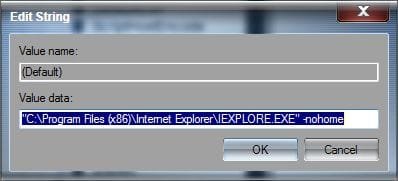
Start> In search box type regedit> Enter> Expand HKEY_LOCAL_MACHINE to

HKEY_LOCAL_MACHINE\SOFTWARE\Classes\htmlfile\shell\open\command

Regedit.jpg

Right click the name (default in my system)

Name.jpg

Modify

Before.jpg

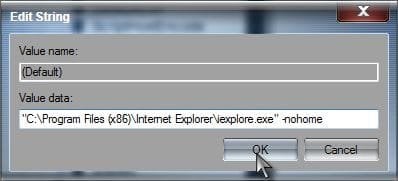
Change to lower case

After.jpg

OK

Close regedit. Done ;)

A Guy
 

My Computer My Computer

At a glance

Windows 10 Home x64INTEL Core i5-750 Quad-Core 3.37GHzHyperX Fury Black Series 8GB (2 x 4GB) 1866MhzEVGA GeForce GTX 750 Superclocked 1GB 128-Bit...
Computer type
PC/Desktop
OS
Windows 10 Home x64
CPU
INTEL Core i5-750 Quad-Core 3.37GHz
Motherboard
ASUS P7P55D
Memory
HyperX Fury Black Series 8GB (2 x 4GB) 1866Mhz
Graphics Card(s)
EVGA GeForce GTX 750 Superclocked 1GB 128-Bit GDDR5
Monitor(s) Displays
LG 32MA68HY 32" IPS
Screen Resolution
1920 x 1080
Hard Drives
Samsung 840 Evo 120GB, SEAGATE 500GB Barracuda® 7200.12, SATA 3 Gb/s, 7200 RPM, 16MB cache
PSU
ANTEC TruePower New TP-550, 80 PLUS, 550W
Case
ANTEC Three Hundred Illusion
Cooling
COOLER MASTER Hyper 212 Plus, 4 x 120mm 1 x 140mm Noctua's
Internet Speed
85 + Mbps
Antivirus
Avast
Browser
Vivaldi
Well, that was easy, and I thank for your help, but changing to lower case did not have any effect. After re-boot, it still only opens a hyperlink in Outlook if IE is closed.
 

My Computer My Computer

At a glance

Windows 7 Home 64-bit with Office & Outlook 2010IntelCore i5-2410M CPU @ 2.30GHzIntel HD Graphics 3000
Computer type
Laptop
Computer Manufacturer/Model Number
Lenovo G770
OS
Windows 7 Home 64-bit with Office & Outlook 2010
CPU
IntelCore i5-2410M CPU @ 2.30GHz
Graphics Card(s)
Intel HD Graphics 3000
Antivirus
Avira
Okay, I finally got it to work. After trying the registry edit, which did not work for me, I did a little more searching and came across this post here:

Web links in Outlook 2010 mail won't launch. Fixes recommended so - Microsoft Community

Even though I never received an error message when the clicked link did not work, (like the OP in the above link), these are the simple steps I took, located @ the sixth post down:

"Go to Start > Default Programs > Set program access and computer defaults > click Custom > select Internet Explorer.
Note: The above steps have to be done even if Internet Explorer is set as the default program."

Thank you, A Guy, your help and patience is greatly appreciated!!
 

My Computer My Computer

At a glance

Windows 7 Home 64-bit with Office & Outlook 2010IntelCore i5-2410M CPU @ 2.30GHzIntel HD Graphics 3000
Computer type
Laptop
Computer Manufacturer/Model Number
Lenovo G770
OS
Windows 7 Home 64-bit with Office & Outlook 2010
CPU
IntelCore i5-2410M CPU @ 2.30GHz
Graphics Card(s)
Intel HD Graphics 3000
Antivirus
Avira
Good job :thumbsup: Thanks for sharing your fix, it may help others. A Guy
 

My Computer My Computer

At a glance

Windows 10 Home x64INTEL Core i5-750 Quad-Core 3.37GHzHyperX Fury Black Series 8GB (2 x 4GB) 1866MhzEVGA GeForce GTX 750 Superclocked 1GB 128-Bit...
Computer type
PC/Desktop
OS
Windows 10 Home x64
CPU
INTEL Core i5-750 Quad-Core 3.37GHz
Motherboard
ASUS P7P55D
Memory
HyperX Fury Black Series 8GB (2 x 4GB) 1866Mhz
Graphics Card(s)
EVGA GeForce GTX 750 Superclocked 1GB 128-Bit GDDR5
Monitor(s) Displays
LG 32MA68HY 32" IPS
Screen Resolution
1920 x 1080
Hard Drives
Samsung 840 Evo 120GB, SEAGATE 500GB Barracuda® 7200.12, SATA 3 Gb/s, 7200 RPM, 16MB cache
PSU
ANTEC TruePower New TP-550, 80 PLUS, 550W
Case
ANTEC Three Hundred Illusion
Cooling
COOLER MASTER Hyper 212 Plus, 4 x 120mm 1 x 140mm Noctua's
Internet Speed
85 + Mbps
Antivirus
Avast
Browser
Vivaldi
EXACT same issue w\Outlook 2010

Hey all,
I hate to reply to such an old post, but I am having the exact same difficulty with Outlook 2010 & Internet Explorer 11.

It will open the first link just fine. But, if IE is running one or more pages, absolutely nothing happens when clicking on another link in an email. I have already gone through the initial "fix-it" steps:
1. Reset the html Registry key to "htmlfile" after a Chrome Install & Removal.
2. Set the Default Programs in Windows, both by the Program Selection screen AND the manual Default Program assignment screen.
3. Edited the Registry to make the IEXPLORE.EXE statement a lower case in the keys for htmlfile, http & https in HKLM\Classes\htmlfile, http & https keys respectively.

I am out of options here. IO really don't want to have to re-install Outlook on my end users systems - there are MANY to do.

Any ideas other than the ones already mentioned would be great if someone has had this specific issue resolved.

Thanks,
ReschRick
 

My Computer My Computer

At a glance

Windows 7 64 Bit ProfessionalIntel i7-4770 @ 3.40Ghz16Gb
Computer type
PC/Desktop
Computer Manufacturer/Model Number
HP Elite Desk 800
OS
Windows 7 64 Bit Professional
CPU
Intel i7-4770 @ 3.40Ghz
Memory
16Gb
Hard Drives
1Tb
Browser
Trendo Micro
Back
Top