Overclock advice wanted: Which first, multiplier or FSB?

Lava King

New member
Pro User
Local time
4:54 PM
Messages
522
Location
Arkansas, USA
Hi all,

I managed to resist the lure of Sandy Bridge and Ivy Bridge and remained somewhat content with my Core 2 Duo E8500 (overclocked to 4.2GHz). Lately, however, I become a bit unhappy with my gaming performance and bought a Core 2 Quad Extreme QX9650. Yes, I know that it's "obsolete" but it was the cheapest "upgrade" I could perform while awaiting the release and reviews of Haswell.

Currently it's running at 3.33GHz (333x10) as I only changed the multiplier but not the voltages. This works great and the quad core has given a real boost to those games that are optimized for multiple cores. I see much better performance in Far Cry 3 and Borderlands 2, for example. But, I see a decrease in performance in Torchlight II as it's not optimized for multiple threads. In a large battle I'll see the frame rate drop to 7fps. Yep, that's right, single digit, 7.

I've read quite a bit on the Overclocking websites (some of it contradictory) so my question is in what order should I be experimenting? Should I go for maximum FSB first or maximum multiplier? On the E8500 I had no choice, it had to be FSB and I really think that I just lucked into a good, stable overclock. I'm leaning towards the FSB maximization as that should give me an overall system boost but I'm just not sure if that's the right way to go.

I need some guidance from the experienced hands. :D
 

My Computer My Computer

At a glance

Windows 7 Home Premium x64Intel Core i7 5960X @3.0 GHz4 x 4 GB G.Skill Ripjaws4 DDR4-2400PNY GTX 780
Computer type
PC/Desktop
Computer Manufacturer/Model Number
Custom Build
OS
Windows 7 Home Premium x64
CPU
Intel Core i7 5960X @3.0 GHz
Motherboard
Gigabyte GA-X99-SOC Force
Memory
4 x 4 GB G.Skill Ripjaws4 DDR4-2400
Graphics Card(s)
PNY GTX 780
Sound Card
Realtek on-board ALC1150
Monitor(s) Displays
HP Z30i + Asus PA246Q + Dell U2412M
Screen Resolution
2560x1600 + 1920x1200 + 1920x1200
Hard Drives
Samsung 830 256GB
PSU
Antec EarthWatts 650W
Case
Cooler Master HAF 932
Cooling
Corsair Hydro Series H105
Keyboard
Razer BlackWidow Tournament Edition Stealth
Mouse
Razer Naga
Well, a Multi OC will OC the CPU and leave everything else alone.
FSB OC will OC CPU/RAM together. But you'll have to bear in mind, you need to slow the RAM way down before starting a FSB OC and tweak it last.

You'll get better overall numbers from a FSB OC. But theres nothing wrong with a Multi OC either. Really depends on how you want to do it and your other hardwares capabilities.

Personally, I would do a FSB OC.
Depending on how far you want to go ... a 400FSB should be pretty easy depending on your board.

But if you want to see just what it can do, reset everything back to default.
Then, set your CPU multiplier as low as it will go (x6 I think)
Then, set the RAM as slow as it will go.


Form this point, you want to start raising your FSB a little at a time untill you BSOD at start up.
This will be your FSB limit at the Nb voltage. Now you can try to raise it a bit, but I would just see how high you can get it with stock voltage. You may need to raise the NB voltage later a touch to stabilize once everything else is at full speed.

Once you know what your FSB wall is, (lets just say it was 425) youll know your NB limits.
What I would is drop a bit below the last FSB that was somewhat stable. (I/e booted to Windows at 420, but BSOD at 425 -- I would start at say 390 or 400 which should be in a safe stable range.)

Then start bumping the CPU multiplier back up 1 at a time and check for stability (Leave RAM alone for now but make not what speed its at)

I would also try to keep the RAM as close to its rated speed as possible. This may mean having it set a 667 speed in bios, but will be running at 800 or better after CPU/FSB OC.


2 DIMMs slots will be easier to OC than all 4 full too. If all 4 are full, more stress on the NB will mean less of an OC.
 

My Computer My Computer

At a glance

Windows 7 Home Premium 64bitIntel Core i7 2700k8GB Mushkin Redline Ridgebacks @1866EVGA GTX570 SC
Computer Manufacturer/Model Number
Custom (Self Build)
OS
Windows 7 Home Premium 64bit
CPU
Intel Core i7 2700k
Motherboard
eVGA P67 SLI
Memory
8GB Mushkin Redline Ridgebacks @1866
Graphics Card(s)
EVGA GTX570 SC
Sound Card
XiFi Titanium HD
Monitor(s) Displays
LG W2453V
Screen Resolution
1920x1080
Hard Drives
Intel 320 80GB -- Intel X25-V 40GB --WD Black 1TB x2 -- WD Blue 640GB
PSU
Seasonic x750
Case
Corsair 600T SE White
Cooling
eVGA Superclocked CPU Cooler
Keyboard
Saitek Cyborg
Antivirus
Kaspersky
Browser
IE
Other Info
LG BD/DVD
:ditto:

As for max safe air levels/BIOS settings:

Vcore actual 1.3625v (Use CPU-Z to montor clock speed/cpu voltage(vcore) )

Core Temps, keep below 80c (90c max) when stress testing.

NB voltage 1.4v (around 1.25 to 1.3v should be sufficient. This setting is important when dialing in the RAM after the CPU OC)

LLC = Enabled (Load Line Calibration. When you input your vcore manually in the BIOS, it will report differently in Windows. Especially under load. This is known as vdrop or voltage drop. If the voltage drops too low, instability follows.

Disable Speedstep/C1E (Unlike Sandy onwards, 775 socket does not like speedstep and Overclocks.)


With that chip, 3.6Ghz should be a giggle. 3.8ghz - 4ghz chip dependent.
 

My Computer My Computer

At a glance

8 Pro x64i7 3770K 4.6GHz16GB G.Skill Trident X 2666mhzx2 EVGA 780 Ti Superclocked SLI
Computer type
PC/Desktop
Computer Manufacturer/Model Number
Systems by SmartEyeball
OS
8 Pro x64
CPU
i7 3770K 4.6GHz
Motherboard
ASUS P8Z77 WS
Memory
16GB G.Skill Trident X 2666mhz
Graphics Card(s)
x2 EVGA 780 Ti Superclocked SLI
Sound Card
SB X-FI Surround 5.1 PRO USB / ATH-AD900 Headphones
Monitor(s) Displays
x3 Dell U2410 / 58" Samsung
Screen Resolution
5760*1200/ 1920*1200
Hard Drives
2x Intel 520 240GB (RAID 0) * 2x WD Caviar Blacks 2TB (RAID 0) * 2TB WD Caviar Black * Sony Optirac DVD
PSU
Silverstone Strider Evolution 1200W
Case
Thermaltake Level 10 GT Snow Edition
Cooling
Noctua NH-D14
Keyboard
Topre Realforce // Ducky Shine MX Black // Filco Ninja TKL
Mouse
Thermaltake Theron (Highly Recommended) + Razer Imperator
Antivirus
MSE
Browser
IE, FF, WaterFox
Other Info
GT Extreme V2 Sim Racing Cockpit + 40" LCD and K/B Mouse stand ▼
Fanatec CSR Elite Wheel + Clubsport V1 Pedals + CSR shifter/7G-H ▼Saitek X52 Pro ▼ TrackIR 5 Pro
Buttkicker v2 Seat Rumbler with Dedicated 5.1 and Sub Woofer attached to frame ▼
=
Bloody Big Grin
Thanks, Wishmaster and smarteyeball.

I'll report back with my results!
 

My Computer My Computer

At a glance

Windows 7 Home Premium x64Intel Core i7 5960X @3.0 GHz4 x 4 GB G.Skill Ripjaws4 DDR4-2400PNY GTX 780
Computer type
PC/Desktop
Computer Manufacturer/Model Number
Custom Build
OS
Windows 7 Home Premium x64
CPU
Intel Core i7 5960X @3.0 GHz
Motherboard
Gigabyte GA-X99-SOC Force
Memory
4 x 4 GB G.Skill Ripjaws4 DDR4-2400
Graphics Card(s)
PNY GTX 780
Sound Card
Realtek on-board ALC1150
Monitor(s) Displays
HP Z30i + Asus PA246Q + Dell U2412M
Screen Resolution
2560x1600 + 1920x1200 + 1920x1200
Hard Drives
Samsung 830 256GB
PSU
Antec EarthWatts 650W
Case
Cooler Master HAF 932
Cooling
Corsair Hydro Series H105
Keyboard
Razer BlackWidow Tournament Edition Stealth
Mouse
Razer Naga
Thanks smarteyeball. Thats very usefull info I probably should have included :)


Lava King, please also keep in mind that your load temps will trump all. Dont just set it at the highest safest rated voltages.
Although Smarteyeballs numbers are accurate, they are also the highest you can go safely. After that its considered a gamble.
Alot depends on your hardware. (Cooling setup etc)
So you may not be able to exceed say , 1.28Vcore or 1.3 without going into the danger zone on temps (Over 80C under stress). In which case that would be YOUR Max.

Watch those temps 1st and foremost and make sure you stay at or below those recommended voltages.


It will take some time, and a lot of stress testing but can be fun too. Let us know what you come up with. :)

Oh, and for a final stress test ... I would recommend a good 11hr run of Prime. If it gets past that after your done tweaking, your golden!
 

My Computer My Computer

At a glance

Windows 7 Home Premium 64bitIntel Core i7 2700k8GB Mushkin Redline Ridgebacks @1866EVGA GTX570 SC
Computer Manufacturer/Model Number
Custom (Self Build)
OS
Windows 7 Home Premium 64bit
CPU
Intel Core i7 2700k
Motherboard
eVGA P67 SLI
Memory
8GB Mushkin Redline Ridgebacks @1866
Graphics Card(s)
EVGA GTX570 SC
Sound Card
XiFi Titanium HD
Monitor(s) Displays
LG W2453V
Screen Resolution
1920x1080
Hard Drives
Intel 320 80GB -- Intel X25-V 40GB --WD Black 1TB x2 -- WD Blue 640GB
PSU
Seasonic x750
Case
Corsair 600T SE White
Cooling
eVGA Superclocked CPU Cooler
Keyboard
Saitek Cyborg
Antivirus
Kaspersky
Browser
IE
Other Info
LG BD/DVD
Although Smarteyeballs numbers are accurate, they are also the highest you can go safely.

Definitely. A simple thumb rule to overclocking is the lower the better when it comes to both voltages and temps.

If you can use less voltage for a desired clock speed, do it :)

And also correct is that each chip hits it's 'comfortable' point with temps and required volts.

(I had a Q9550 that would not stably budge past 3.79Ghz. 100mhz extra for 3.8ghz required a silly jump in vcore required to keep it stable. Added another 10c to temps too iirc. Not worth it.)


Here is a few main apps we use for monitoring temps and voltages and stress testing:

Core Temp

CPU-Z (CPU vcore/voltage monitoring)

Prime95 (Torture Test/Blend 8-12 hours)


There are other temp/monitor apps like speedfan, real temp, Hwinfo. it's personal preference really.

LinX/OCCT/Lin Pack/IBT (intel burntest) These are a few stress apps based on the same binaries. The only major difference is the GUI. These tests are for your 'quick and dirty' vcore tests. Pass 10 tests and you know you're on the right track. Be careful though, these apps will add up to 10c over Prime95. Never in real world usage will you hit these temps again though.
 

My Computer My Computer

At a glance

8 Pro x64i7 3770K 4.6GHz16GB G.Skill Trident X 2666mhzx2 EVGA 780 Ti Superclocked SLI
Computer type
PC/Desktop
Computer Manufacturer/Model Number
Systems by SmartEyeball
OS
8 Pro x64
CPU
i7 3770K 4.6GHz
Motherboard
ASUS P8Z77 WS
Memory
16GB G.Skill Trident X 2666mhz
Graphics Card(s)
x2 EVGA 780 Ti Superclocked SLI
Sound Card
SB X-FI Surround 5.1 PRO USB / ATH-AD900 Headphones
Monitor(s) Displays
x3 Dell U2410 / 58" Samsung
Screen Resolution
5760*1200/ 1920*1200
Hard Drives
2x Intel 520 240GB (RAID 0) * 2x WD Caviar Blacks 2TB (RAID 0) * 2TB WD Caviar Black * Sony Optirac DVD
PSU
Silverstone Strider Evolution 1200W
Case
Thermaltake Level 10 GT Snow Edition
Cooling
Noctua NH-D14
Keyboard
Topre Realforce // Ducky Shine MX Black // Filco Ninja TKL
Mouse
Thermaltake Theron (Highly Recommended) + Razer Imperator
Antivirus
MSE
Browser
IE, FF, WaterFox
Other Info
GT Extreme V2 Sim Racing Cockpit + 40" LCD and K/B Mouse stand ▼
Fanatec CSR Elite Wheel + Clubsport V1 Pedals + CSR shifter/7G-H ▼Saitek X52 Pro ▼ TrackIR 5 Pro
Buttkicker v2 Seat Rumbler with Dedicated 5.1 and Sub Woofer attached to frame ▼
=
Bloody Big Grin
Here are some preliminary results:

The CPU will not clock to 3.4GHz no matter what (high Multi and low FSB, low Multi and high FSB).

At 3.4GHz it won't pass IBT standard test, it gets an error within 10 minutes on a random core. At 3.375GHz it passes the IBT standard test (10 iterations) and ran Prime95 for 4 hours.

The FSB wall seems to be 470MHz with Vcore actual at 1.36v, Northbridge at 1.3 and ram at 2.0v (Kingston specifies 2.3v as max, didn't see a need to push it that hard). Multi at 7.0 (3.29GHz) works, 7.5 (3.525MHz) does not.

With the FSB set to 333MHz and voltages same as above, Multi at 10 (3.33MHz) works, 10.5 (3.496MHz) does not.

The Prime95 4-hour test mentioned above was run with FSB at 450MHz and the Multi at 7.5 (3.375MHz). Just got finished playing Torchlight 2 online with a friend (4.5 hours) without a problem.

I've tried the FSB in non-multiples of 5 but 3.4GHz is a no go.

Perhaps some of the more esoteric settings in BIOS would help, but I don't want to delve into it that deeply.

Overall performance is much better than the overclocked E8500, so I'll happily play on this setup until Haswell comes out.

Oh, temps were never an issue (not at these speeds). After the 4 hour Prime95 run, the max CPU temp was 60C (I think, perhaps it was a bit higher).

I'm going to run a longer Prime95 test, but foul weather is moving into the area (same storm that just went through Oklahoma City) so I'll have to put it off until later.

Thanks again for the help, guys. :D

I'll probably experiment on lowering the voltages, too.

Uh oh, tornado warning siren going off, better see what's happening.
 

My Computer My Computer

At a glance

Windows 7 Home Premium x64Intel Core i7 5960X @3.0 GHz4 x 4 GB G.Skill Ripjaws4 DDR4-2400PNY GTX 780
Computer type
PC/Desktop
Computer Manufacturer/Model Number
Custom Build
OS
Windows 7 Home Premium x64
CPU
Intel Core i7 5960X @3.0 GHz
Motherboard
Gigabyte GA-X99-SOC Force
Memory
4 x 4 GB G.Skill Ripjaws4 DDR4-2400
Graphics Card(s)
PNY GTX 780
Sound Card
Realtek on-board ALC1150
Monitor(s) Displays
HP Z30i + Asus PA246Q + Dell U2412M
Screen Resolution
2560x1600 + 1920x1200 + 1920x1200
Hard Drives
Samsung 830 256GB
PSU
Antec EarthWatts 650W
Case
Cooler Master HAF 932
Cooling
Corsair Hydro Series H105
Keyboard
Razer BlackWidow Tournament Edition Stealth
Mouse
Razer Naga
3.4Ghz is a low speed to get into trouble. Especially with those volts. You will have to adjust at least one more BIOs setting.


C.I.A.2 = Disabled


(and did you enable LLC, disable Speedstep etc? )

As for the RAM, what's it reported as @ 3.3X in mhz?

To make sure RAM's not an issue, set the:

CPU Host Frequency (Mhz) = 200

It can be readjusted later.
 

My Computer My Computer

At a glance

8 Pro x64i7 3770K 4.6GHz16GB G.Skill Trident X 2666mhzx2 EVGA 780 Ti Superclocked SLI
Computer type
PC/Desktop
Computer Manufacturer/Model Number
Systems by SmartEyeball
OS
8 Pro x64
CPU
i7 3770K 4.6GHz
Motherboard
ASUS P8Z77 WS
Memory
16GB G.Skill Trident X 2666mhz
Graphics Card(s)
x2 EVGA 780 Ti Superclocked SLI
Sound Card
SB X-FI Surround 5.1 PRO USB / ATH-AD900 Headphones
Monitor(s) Displays
x3 Dell U2410 / 58" Samsung
Screen Resolution
5760*1200/ 1920*1200
Hard Drives
2x Intel 520 240GB (RAID 0) * 2x WD Caviar Blacks 2TB (RAID 0) * 2TB WD Caviar Black * Sony Optirac DVD
PSU
Silverstone Strider Evolution 1200W
Case
Thermaltake Level 10 GT Snow Edition
Cooling
Noctua NH-D14
Keyboard
Topre Realforce // Ducky Shine MX Black // Filco Ninja TKL
Mouse
Thermaltake Theron (Highly Recommended) + Razer Imperator
Antivirus
MSE
Browser
IE, FF, WaterFox
Other Info
GT Extreme V2 Sim Racing Cockpit + 40" LCD and K/B Mouse stand ▼
Fanatec CSR Elite Wheel + Clubsport V1 Pedals + CSR shifter/7G-H ▼Saitek X52 Pro ▼ TrackIR 5 Pro
Buttkicker v2 Seat Rumbler with Dedicated 5.1 and Sub Woofer attached to frame ▼
=
Bloody Big Grin
3.4Ghz is a low speed to get into trouble. Especially with those volts. You will have to adjust at least one more BIOs setting.


C.I.A.2 = Disabled


(and did you enable LLC, disable Speedstep etc? )

As for the RAM, what's it reported as @ 3.3X in mhz?

To make sure RAM's not an issue, set the:

CPU Host Frequency (Mhz) = 200

It can be readjusted later.


C.I.A.2 and Speedstep were disabled and LLC enabled before beginning this adventure. :)

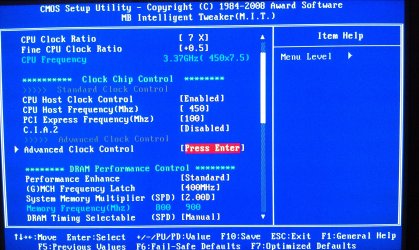
Sorry, not following you about the RAM, the picture shows what I have to work with. I was assuming that CPU Host Frequency = FSB in this case.

The memory frequency shown in the picture is as low as I can get it with the available settings.

Perhaps it's just one of those things, and this chip won't OC reliably. :huh:

Thanks for taking the time to help! :D
 

Attachments

  • IMAG0134.jpg
    IMAG0134.jpg
    833.7 KB · Views: 5

My Computer My Computer

At a glance

Windows 7 Home Premium x64Intel Core i7 5960X @3.0 GHz4 x 4 GB G.Skill Ripjaws4 DDR4-2400PNY GTX 780
Computer type
PC/Desktop
Computer Manufacturer/Model Number
Custom Build
OS
Windows 7 Home Premium x64
CPU
Intel Core i7 5960X @3.0 GHz
Motherboard
Gigabyte GA-X99-SOC Force
Memory
4 x 4 GB G.Skill Ripjaws4 DDR4-2400
Graphics Card(s)
PNY GTX 780
Sound Card
Realtek on-board ALC1150
Monitor(s) Displays
HP Z30i + Asus PA246Q + Dell U2412M
Screen Resolution
2560x1600 + 1920x1200 + 1920x1200
Hard Drives
Samsung 830 256GB
PSU
Antec EarthWatts 650W
Case
Cooler Master HAF 932
Cooling
Corsair Hydro Series H105
Keyboard
Razer BlackWidow Tournament Edition Stealth
Mouse
Razer Naga

My Computer My Computer

At a glance

Windows 10 Pro x64Intel Core i7 6700KGSkill TridentZ RGB 16GB 3600 16-16-16-36EVGA GTX 980 Ti SC x2
Computer type
PC/Desktop
Computer Manufacturer/Model Number
Skylake Special #666
OS
Windows 10 Pro x64
CPU
Intel Core i7 6700K
Motherboard
Asus Sabertooth Z170 Mark 1
Memory
GSkill TridentZ RGB 16GB 3600 16-16-16-36
Graphics Card(s)
EVGA GTX 980 Ti SC x2
Sound Card
Realtek High Definition
Monitor(s) Displays
AOC G2460PG
Screen Resolution
1920 x 1080 144Hz
Hard Drives
Samsung 860 Pro 256GB, Seagate Barracuda 4TB x2
PSU
EVGA 1000 P2, EVGA White Custom Braided Cables
Case
Corsair Vengeance C70 Gunmetal Black
Cooling
Corsair H100i v2, Corsair ML120 x2, Thermal Grizzly Kryonaut
Keyboard
Logitech G910 Orion Spectrum
Mouse
Logitech G700s
Internet Speed
Verizon Fios Quantum Gateway 75/75
Antivirus
Windows Defender, Malwarebytes Free 3.8.3
Browser
Chrome
Other Info
Corsair SP120 x4, LG Blu-ray Drive, Durabrand HT-395 100 Watt Dolby Digital Amp, Corsair H2100 Wireless 7.1 Headset
Where is the front side bus readout for this motherboard ? Am I just missing it ?

1333 MHz ?

GIGABYTE - Motherboard - Socket 775 - GA-EP45-UD3R (rev. 1.1)


It's implied rather than directly shown. According to the motherboard manual, the CPU Host Frequency sets the FSB. For example, setting the CPU Host to 333 sets a FSB speed of 1333.

However, it looks like I've made some progress! :party:

I set the CPU Host Frequency to 400 and the multiplier to 9.0 to get 3.6GHz. It just completed a 12 hour run of Prime95 without errors and with a max core temp of 61C.

Since I don't keep careful notes I'm not sure what is different between this time and the last time I tried. :o

Anyway, thanks a bunch to everyone for the help, looks like I may finally be on the right track. :D
 

My Computer My Computer

At a glance

Windows 7 Home Premium x64Intel Core i7 5960X @3.0 GHz4 x 4 GB G.Skill Ripjaws4 DDR4-2400PNY GTX 780
Computer type
PC/Desktop
Computer Manufacturer/Model Number
Custom Build
OS
Windows 7 Home Premium x64
CPU
Intel Core i7 5960X @3.0 GHz
Motherboard
Gigabyte GA-X99-SOC Force
Memory
4 x 4 GB G.Skill Ripjaws4 DDR4-2400
Graphics Card(s)
PNY GTX 780
Sound Card
Realtek on-board ALC1150
Monitor(s) Displays
HP Z30i + Asus PA246Q + Dell U2412M
Screen Resolution
2560x1600 + 1920x1200 + 1920x1200
Hard Drives
Samsung 830 256GB
PSU
Antec EarthWatts 650W
Case
Cooler Master HAF 932
Cooling
Corsair Hydro Series H105
Keyboard
Razer BlackWidow Tournament Edition Stealth
Mouse
Razer Naga
OK, MCH frequency is the RAM spped. AKA the FSB strap.
At 400, this means the RAm is running at 800mhz before OCing. So the likely issue is that the RAM is running far to high. For now set your MCH freqto 333 or lower.

Under DRAM Timning, I would set it to run at 5-5-5-15 for now. Also, set the voltage at whatever is rtecommended. Once CPU is stable you'll be able to tweak here.

You may also wortk with the System memory mutiplier. This will change the FSB/strap.So that you can have says 400FSB (3.6) CPU OC, and get the RAM running faster or slower without changing the CPU clocks.

The reason you want the RAm underclocked is that when or if you get BSODS/failures, yit will be easier to find the problem.


CPU host Freq. is your FSB speed. I would set this at 400 for now, with a CPU multi of x9 (3.6Ghz clock speed)
The lower FSB will still be a overall improvement, with faster CPU speeds. But also,, the RAM will not be clocked as high, and should ... overall be more stable as less stress on the NB.
You should be running stable this way with a Vcore on the CPU of around 1.25-1.28 with that chip (ballpark, off the top of my head)


---EDIT --- missed your last post ...

Difference, may just be that the FSB is more stable there? Or higher FSB pushed the RAM beyond its ability causing issues.
Honestly, its hard to say as every setup is different. Even identical ones. I had a Core2 Duo that would run happy at 3.6. At 37-3.8 ... nothing seemed to get it stable. Push the FSB up, and BAM 4.0 no issue (though far more more heat & juice than I wanted 24/7).

Point is, Some are just wierd, some OC like champs ... others dont want to be messed with after a certain point. Just takes time and patience to find your setups personality and sweet spots :)
 

My Computer My Computer

At a glance

Windows 7 Home Premium 64bitIntel Core i7 2700k8GB Mushkin Redline Ridgebacks @1866EVGA GTX570 SC
Computer Manufacturer/Model Number
Custom (Self Build)
OS
Windows 7 Home Premium 64bit
CPU
Intel Core i7 2700k
Motherboard
eVGA P67 SLI
Memory
8GB Mushkin Redline Ridgebacks @1866
Graphics Card(s)
EVGA GTX570 SC
Sound Card
XiFi Titanium HD
Monitor(s) Displays
LG W2453V
Screen Resolution
1920x1080
Hard Drives
Intel 320 80GB -- Intel X25-V 40GB --WD Black 1TB x2 -- WD Blue 640GB
PSU
Seasonic x750
Case
Corsair 600T SE White
Cooling
eVGA Superclocked CPU Cooler
Keyboard
Saitek Cyborg
Antivirus
Kaspersky
Browser
IE
Other Info
LG BD/DVD
Back
Top