Overclocking help; your suggestions, please.

GARoss

New member
Power User
VIP
Local time
7:14 PM
Messages
359
Location
Michigan - USA
[SOLVED] Overclocking help; your suggestions, please.

I've got my new PC running for about 2 weeks (http://www.sevenforums.com/hardware-devices/154341-just-looking-before-i-leap-new-pc-final-thoughts.html) & I'm ready to enter the world of overclocking. I found this thread over at Overclock.net of a PC very similar to mine (http://www.overclock.net/intel-cpus/1009591-ga-p67a-ud3-b3-i5-2500k.html) but not much here @ SevenForums. I guess I could just plug in the same settings he used but I'd rather play it safe & learn what & why I'm doing, rather than doing & learning nothing.

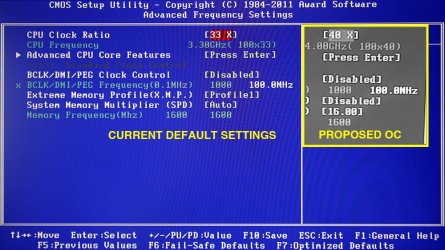
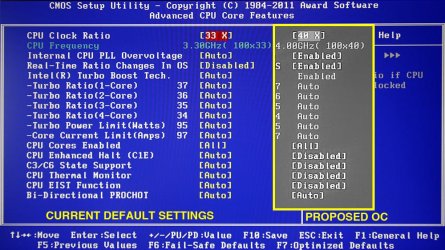
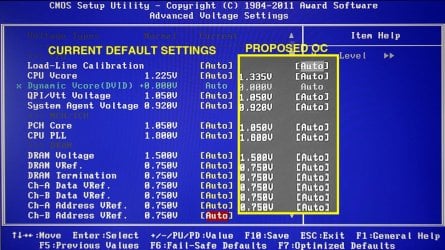
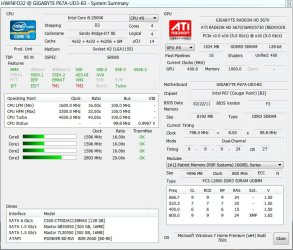
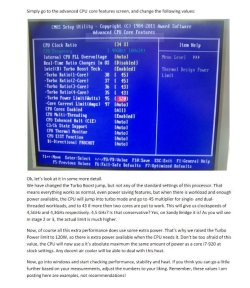
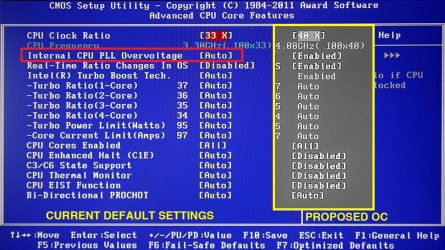
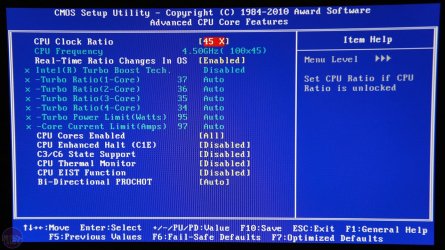
Here are some pics of my PC's default BIOS (CURRENT) setting & of a (PROPOSED) OC setting. NOTE: The B&W pics are taken from the OCed PC I mentioned above from Overclock.net (Administrators NOTE: I don't see any harm in this but please remove if you deem this improper).

So my question is, is this a good starting point @ 4.0 Ghz? I read that 4.7Ghz is about max. And, are the settings on the PROPOSED OC ok? :confused:

My system specs are up to date. Your suggestions are appreciated. :)
 

Attachments

  • PC-2a copy.jpg
    PC-2a copy.jpg
    132.4 KB · Views: 45
  • PC-1a copy.jpg
    PC-1a copy.jpg
    143.2 KB · Views: 34
  • PC-3a copy.jpg
    PC-3a copy.jpg
    129.8 KB · Views: 27
  • PC-4a copy.jpg
    PC-4a copy.jpg
    137.7 KB · Views: 30
Last edited:

My Computer

Computer type
PC/Desktop
Computer Manufacturer/Model Number
Custom built 2011
OS
Windows 7 64-bit
CPU
Intel Core i5-2500K 3300 Mhz
Motherboard
Gigabyte P67A-UD3-B3
Memory
16Gb Patriot PC3-12800 1600 Mhz
Graphics Card(s)
EVGA GeForce GTX 560 Ti (Fermi)
Sound Card
On Motherboard
Monitor(s) Displays
Dell U2412M & NEC EA232WMi
Screen Resolution
DELL 1920x1200 - NEC 1920x1080
Hard Drives
Crucial 128 Gb SSD
Hitachi Deskstar 2Tb 7200 RPM 32MB Cache
Seagate Barracuda 500Gb 7200 RPM
Hitachi GST Deskstar 1.5TB 7200 RPM 64MB Cache
PSU
Seasonic M1211-620 Bronze
Case
Antec Solo
Cooling
Tuniq Tower 120 Extreme Rev 1
Keyboard
Apple
Mouse
Microsoft
Internet Speed
5mbs
Other Info
Sunbeam PL-RS-3 Rheosmart 3 Fan Controller 3.5" Bay 3 Channel 30W Fan Controller Panel
You should get familiar with basic OC'ing and testing methods.
Sometimes plugging in someones OC numbers will work and most of the time it won't. Understanding the limits and testing procedures will make this much easier.

Always watch your temps very closely.
Learn how to re-set the BIOS to defaults.
Crashes are a part of OC'ing.

Here are some basic guides, may not all be for your motherboard but, good info.

The ULTIMATE Sandy Bridge OC Guide + P67A-UD7 Performance Review

Scroll down to the GIGABYTE Programs, section.
Although I wouldn't recommend using these programs to OC, you can try it if you wish.


How to Overclock the Intel Core i5-2500K

Sandy Bridge Overclocking Guide - from Gigabyte forum

Some lite reading to get you started ;)

If you read up on the methods you will learn a lot about how systems work.
 

My Computer

Computer type
PC/Desktop
Computer Manufacturer/Model Number
76~2.0
OS
Windows 7 Ult x64 - SP1/ Windows 8 Pro x64
CPU
Intel Core i5-3570K 4.6GHz
Motherboard
Gigabyte GA-Z77X UD3H, f18
Memory
8GB (2X4GB) DDR3 1600 Corsair Vengeance CL8 1.5v
Graphics Card(s)
Sapphire HD 7770 Vapor-X OC 1GB DDR5
Sound Card
Onboard VIA VT2021
Monitor(s) Displays
22" LCD Dell
Screen Resolution
1680x1050
Hard Drives
Samsung 840Pro 128GB SSD,
Seagate Barracuda 500GB SATA2 7200rpm 32MB cache, Seagate Barracuda 1TB SATA2 7200rpm 32MB cache,
PSU
Corsair HX650W
Case
Cooler Master Storm Scout
Cooling
Corsair H80 2x12cm Noctua NF P12 , 2x14cm case fans
Keyboard
Logitech Wave
Mouse
CM Sentinel
Internet Speed
Dismal
Antivirus
Avast
Browser
Opera Next
Other Info
Haswell laptop: HP Envy 17t-j, i7-4700MQ, GeForce 740M 2GB DDR3, 17.3" Full HD 1920x1080, 16GB RAM, Samsung 840 Pro 128GB, 1TB Hitachi 7200 HDD,
Desktop: eSATA ports,
External eSATA Seagate 500GB SATA2 7200rpm,
External WD USB 500GB
Yes, you should get familiar. Even then don't make such a large leap, work up gradually. Each processor is different so others settings may not work for you. And don't use BIOS auto settings on the critical voltages like core, VTT, and RAM. My experience is the BIOS tends to overvolt, sometimes dangerously high.
 

My Computer

Computer type
PC/Desktop
Computer Manufacturer/Model Number
Home built (GeneO industries)/Model 4
OS
Windows 10 Pro. EFI boot partition, full EFI boot
CPU
i7 4770k 4.4GHz (44-44-43-43 turbo) @ 1.248V
Motherboard
ASUS Maximus VI Hero
Memory
16GB (8GBx2) @2200 MHz G.skill Sniper 10-11-10-30-1, 1.6V
Graphics Card(s)
MSI GTX 970 Gaming 4G
Sound Card
Onboard SupremeFX Audio
Monitor(s) Displays
NEC Spectraview 2490WUXi-SV
Screen Resolution
1920 x 1200
Hard Drives
Samsung 850 Pro 256GB (OS), Samsung 2x 128GB 840 Pro SSD in RAID0, 3x WD Blue 6Gb/s 1TB RAID0, WD 2TB Black external USB 3.0, 2TB WD20EARS Green external USB 3.0, 2x 500GB Seagate and 1 750 GB external USB, 1x 350GB external USB3
PSU
Seasonic X-850 (2012 KM3 model)
Case
Fractal Design Define R4
Cooling
NH-D14, NF-F12, NF-A15; NF-P14, NF-P12,NF-A14, S12A PWM
Keyboard
Cooler Master Storm Quickfire Rapid - Brown
Mouse
Logitech G602
Internet Speed
126.4 Mb/s down, 24.3 Mb/s up
Other Info
USB 3.0 x8 , SATA III x8, eSATA, USB 2.0 x6. Samsung DVD R/W drive.

WEI: CPU 7.8, Memory 7.9, Graphics 7.9, Disk 7.9
Good point, the Gigabyte OC apps always overvolt everything, which is why they are not recommended pretty much anywhere.
 

My Computer

Computer type
PC/Desktop
Computer Manufacturer/Model Number
76~2.0
OS
Windows 7 Ult x64 - SP1/ Windows 8 Pro x64
CPU
Intel Core i5-3570K 4.6GHz
Motherboard
Gigabyte GA-Z77X UD3H, f18
Memory
8GB (2X4GB) DDR3 1600 Corsair Vengeance CL8 1.5v
Graphics Card(s)
Sapphire HD 7770 Vapor-X OC 1GB DDR5
Sound Card
Onboard VIA VT2021
Monitor(s) Displays
22" LCD Dell
Screen Resolution
1680x1050
Hard Drives
Samsung 840Pro 128GB SSD,
Seagate Barracuda 500GB SATA2 7200rpm 32MB cache, Seagate Barracuda 1TB SATA2 7200rpm 32MB cache,
PSU
Corsair HX650W
Case
Cooler Master Storm Scout
Cooling
Corsair H80 2x12cm Noctua NF P12 , 2x14cm case fans
Keyboard
Logitech Wave
Mouse
CM Sentinel
Internet Speed
Dismal
Antivirus
Avast
Browser
Opera Next
Other Info
Haswell laptop: HP Envy 17t-j, i7-4700MQ, GeForce 740M 2GB DDR3, 17.3" Full HD 1920x1080, 16GB RAM, Samsung 840 Pro 128GB, 1TB Hitachi 7200 HDD,
Desktop: eSATA ports,
External eSATA Seagate 500GB SATA2 7200rpm,
External WD USB 500GB
Yes, I meant auto in the BIOS though.
 

My Computer

Computer type
PC/Desktop
Computer Manufacturer/Model Number
Home built (GeneO industries)/Model 4
OS
Windows 10 Pro. EFI boot partition, full EFI boot
CPU
i7 4770k 4.4GHz (44-44-43-43 turbo) @ 1.248V
Motherboard
ASUS Maximus VI Hero
Memory
16GB (8GBx2) @2200 MHz G.skill Sniper 10-11-10-30-1, 1.6V
Graphics Card(s)
MSI GTX 970 Gaming 4G
Sound Card
Onboard SupremeFX Audio
Monitor(s) Displays
NEC Spectraview 2490WUXi-SV
Screen Resolution
1920 x 1200
Hard Drives
Samsung 850 Pro 256GB (OS), Samsung 2x 128GB 840 Pro SSD in RAID0, 3x WD Blue 6Gb/s 1TB RAID0, WD 2TB Black external USB 3.0, 2TB WD20EARS Green external USB 3.0, 2x 500GB Seagate and 1 750 GB external USB, 1x 350GB external USB3
PSU
Seasonic X-850 (2012 KM3 model)
Case
Fractal Design Define R4
Cooling
NH-D14, NF-F12, NF-A15; NF-P14, NF-P12,NF-A14, S12A PWM
Keyboard
Cooler Master Storm Quickfire Rapid - Brown
Mouse
Logitech G602
Internet Speed
126.4 Mb/s down, 24.3 Mb/s up
Other Info
USB 3.0 x8 , SATA III x8, eSATA, USB 2.0 x6. Samsung DVD R/W drive.

WEI: CPU 7.8, Memory 7.9, Graphics 7.9, Disk 7.9
Yes, agree that's a good point, which reminded me that the Gigabyte OC apps do the same thing, overvolt.
 

My Computer

Computer type
PC/Desktop
Computer Manufacturer/Model Number
76~2.0
OS
Windows 7 Ult x64 - SP1/ Windows 8 Pro x64
CPU
Intel Core i5-3570K 4.6GHz
Motherboard
Gigabyte GA-Z77X UD3H, f18
Memory
8GB (2X4GB) DDR3 1600 Corsair Vengeance CL8 1.5v
Graphics Card(s)
Sapphire HD 7770 Vapor-X OC 1GB DDR5
Sound Card
Onboard VIA VT2021
Monitor(s) Displays
22" LCD Dell
Screen Resolution
1680x1050
Hard Drives
Samsung 840Pro 128GB SSD,
Seagate Barracuda 500GB SATA2 7200rpm 32MB cache, Seagate Barracuda 1TB SATA2 7200rpm 32MB cache,
PSU
Corsair HX650W
Case
Cooler Master Storm Scout
Cooling
Corsair H80 2x12cm Noctua NF P12 , 2x14cm case fans
Keyboard
Logitech Wave
Mouse
CM Sentinel
Internet Speed
Dismal
Antivirus
Avast
Browser
Opera Next
Other Info
Haswell laptop: HP Envy 17t-j, i7-4700MQ, GeForce 740M 2GB DDR3, 17.3" Full HD 1920x1080, 16GB RAM, Samsung 840 Pro 128GB, 1TB Hitachi 7200 HDD,
Desktop: eSATA ports,
External eSATA Seagate 500GB SATA2 7200rpm,
External WD USB 500GB
Thanks Dave76 & GeneO. I read up & give it a try. Do you think 4.0Ghz is a good starting point? The article How to Overclock the Gigabyte GA-P67A-UD4 | bit-tech.net has it set to 4.5Ghz which, I believe, is the final maxed out level? Also, my MB has an extra setting in Advanced CPU Core Features (Internal CPU PLL Overvoltage set to AUTO. Leave this as is??? I have both pics with my PCs BIOS setting in red.
 

Attachments

  • AdvCPU CORE.jpg
    AdvCPU CORE.jpg
    140.3 KB · Views: 16
  • AdvCPU CORE OC.jpg
    AdvCPU CORE OC.jpg
    162.8 KB · Views: 12

My Computer

Computer type
PC/Desktop
Computer Manufacturer/Model Number
Custom built 2011
OS
Windows 7 64-bit
CPU
Intel Core i5-2500K 3300 Mhz
Motherboard
Gigabyte P67A-UD3-B3
Memory
16Gb Patriot PC3-12800 1600 Mhz
Graphics Card(s)
EVGA GeForce GTX 560 Ti (Fermi)
Sound Card
On Motherboard
Monitor(s) Displays
Dell U2412M & NEC EA232WMi
Screen Resolution
DELL 1920x1200 - NEC 1920x1080
Hard Drives
Crucial 128 Gb SSD
Hitachi Deskstar 2Tb 7200 RPM 32MB Cache
Seagate Barracuda 500Gb 7200 RPM
Hitachi GST Deskstar 1.5TB 7200 RPM 64MB Cache
PSU
Seasonic M1211-620 Bronze
Case
Antec Solo
Cooling
Tuniq Tower 120 Extreme Rev 1
Keyboard
Apple
Mouse
Microsoft
Internet Speed
5mbs
Other Info
Sunbeam PL-RS-3 Rheosmart 3 Fan Controller 3.5" Bay 3 Channel 30W Fan Controller Panel
Thanks Dave76 & GeneO. I read up & give it a try. Do you think 4.0Ghz is a good starting point? The article How to Overclock the Gigabyte GA-P67A-UD4 | bit-tech.net has it set to 4.5Ghz which, I believe, is the final maxed out level? Also, my MB has an extra setting in Advanced CPU Core Features (Internal CPU PLL Overvoltage set to AUTO. Leave this as is??? I have both pics with my PCs BIOS setting in red.

I found, at least on my ASUS MB, that leaving PLL on auto is fine. Since you rarely need to change it except for extreme OC, the BIOS usually leaves it alone at its nominal value. I would keep an eye on it to make sure though.

BTW, you may not have adequate cooling to reach that high an OC, and, since processors vary, you may not be able to achieve the highest.
 

My Computer

Computer type
PC/Desktop
Computer Manufacturer/Model Number
Home built (GeneO industries)/Model 4
OS
Windows 10 Pro. EFI boot partition, full EFI boot
CPU
i7 4770k 4.4GHz (44-44-43-43 turbo) @ 1.248V
Motherboard
ASUS Maximus VI Hero
Memory
16GB (8GBx2) @2200 MHz G.skill Sniper 10-11-10-30-1, 1.6V
Graphics Card(s)
MSI GTX 970 Gaming 4G
Sound Card
Onboard SupremeFX Audio
Monitor(s) Displays
NEC Spectraview 2490WUXi-SV
Screen Resolution
1920 x 1200
Hard Drives
Samsung 850 Pro 256GB (OS), Samsung 2x 128GB 840 Pro SSD in RAID0, 3x WD Blue 6Gb/s 1TB RAID0, WD 2TB Black external USB 3.0, 2TB WD20EARS Green external USB 3.0, 2x 500GB Seagate and 1 750 GB external USB, 1x 350GB external USB3
PSU
Seasonic X-850 (2012 KM3 model)
Case
Fractal Design Define R4
Cooling
NH-D14, NF-F12, NF-A15; NF-P14, NF-P12,NF-A14, S12A PWM
Keyboard
Cooler Master Storm Quickfire Rapid - Brown
Mouse
Logitech G602
Internet Speed
126.4 Mb/s down, 24.3 Mb/s up
Other Info
USB 3.0 x8 , SATA III x8, eSATA, USB 2.0 x6. Samsung DVD R/W drive.

WEI: CPU 7.8, Memory 7.9, Graphics 7.9, Disk 7.9
Usually when OC'ing you move up in small steps checking for stability as you go, run the testing programs, use it normally for a couple days if you're not sure about it.

Go to 3.6GHz, then 3.8GHz, then 4.0GHz.
Run Prime95 or other CPU stress tests after each increase, watching temps very closely. When you find your CPUs temp wall, jump in temps more then before, make your decision of where you are comfortable.

Your CPU spec sheet: Intel Core i5-2500K
The max temp for Tcase (CPU case) is 72.6°C, add 5°C for CPU core temps then 77.6°C is the recommended max core temp.
You will see some OC'ing sites blaze past this temp and say it's no problem, you have to decide if you want to take the temperature damage risk.
Your CPU cooler will let you OC to a higher level than the stock cooler but not as much as water cooling.

Some recommend to disable Speed Step and other power saving BIOS settings, standard disclaimer applies, but more and more are recommending to use them. Mine are all enabled, runs cool with low voltage and frequency for most things and then 3.84GHz when needed.
 

My Computer

Computer type
PC/Desktop
Computer Manufacturer/Model Number
76~2.0
OS
Windows 7 Ult x64 - SP1/ Windows 8 Pro x64
CPU
Intel Core i5-3570K 4.6GHz
Motherboard
Gigabyte GA-Z77X UD3H, f18
Memory
8GB (2X4GB) DDR3 1600 Corsair Vengeance CL8 1.5v
Graphics Card(s)
Sapphire HD 7770 Vapor-X OC 1GB DDR5
Sound Card
Onboard VIA VT2021
Monitor(s) Displays
22" LCD Dell
Screen Resolution
1680x1050
Hard Drives
Samsung 840Pro 128GB SSD,
Seagate Barracuda 500GB SATA2 7200rpm 32MB cache, Seagate Barracuda 1TB SATA2 7200rpm 32MB cache,
PSU
Corsair HX650W
Case
Cooler Master Storm Scout
Cooling
Corsair H80 2x12cm Noctua NF P12 , 2x14cm case fans
Keyboard
Logitech Wave
Mouse
CM Sentinel
Internet Speed
Dismal
Antivirus
Avast
Browser
Opera Next
Other Info
Haswell laptop: HP Envy 17t-j, i7-4700MQ, GeForce 740M 2GB DDR3, 17.3" Full HD 1920x1080, 16GB RAM, Samsung 840 Pro 128GB, 1TB Hitachi 7200 HDD,
Desktop: eSATA ports,
External eSATA Seagate 500GB SATA2 7200rpm,
External WD USB 500GB
OK, back with some results.

After reading everything & not having a water cooled CPU, I decided to stay on the recommended conservative side & followed this guide Gigabyte Sandy Bridge Overclocking Guide.

I didn't set as high as the author did but stayed at 4.0 & 3.8 rather than his 4.5 & 4.3.

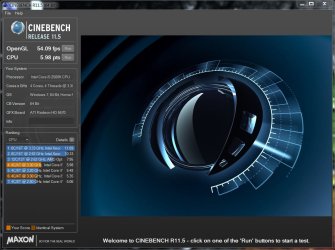
Here are the results. First pic is from the above website. I used 40 instead of his 45. Core temp max out some 10 C below max recommended by Intel.

BTW. If I can squeeze this a little more I will but I will only use Intels Tubro Boost Tech.
 

Attachments

  • Turbo at 4.0 - 3.JPG
    Turbo at 4.0 - 3.JPG
    38.3 KB · Views: 12
  • Turbo at 4.0 - 2.JPG
    Turbo at 4.0 - 2.JPG
    113.2 KB · Views: 11
  • Turbo at 4.0.JPG
    Turbo at 4.0.JPG
    121.2 KB · Views: 19
  • Turbo at 4.0 4.JPG
    Turbo at 4.0 4.JPG
    84.3 KB · Views: 18

My Computer

Computer type
PC/Desktop
Computer Manufacturer/Model Number
Custom built 2011
OS
Windows 7 64-bit
CPU
Intel Core i5-2500K 3300 Mhz
Motherboard
Gigabyte P67A-UD3-B3
Memory
16Gb Patriot PC3-12800 1600 Mhz
Graphics Card(s)
EVGA GeForce GTX 560 Ti (Fermi)
Sound Card
On Motherboard
Monitor(s) Displays
Dell U2412M & NEC EA232WMi
Screen Resolution
DELL 1920x1200 - NEC 1920x1080
Hard Drives
Crucial 128 Gb SSD
Hitachi Deskstar 2Tb 7200 RPM 32MB Cache
Seagate Barracuda 500Gb 7200 RPM
Hitachi GST Deskstar 1.5TB 7200 RPM 64MB Cache
PSU
Seasonic M1211-620 Bronze
Case
Antec Solo
Cooling
Tuniq Tower 120 Extreme Rev 1
Keyboard
Apple
Mouse
Microsoft
Internet Speed
5mbs
Other Info
Sunbeam PL-RS-3 Rheosmart 3 Fan Controller 3.5" Bay 3 Channel 30W Fan Controller Panel
Looks good, there are some good guides out there.

What is your system idle temps?
With your settings they should be +5°C above ambient.
 

My Computer

Computer type
PC/Desktop
Computer Manufacturer/Model Number
76~2.0
OS
Windows 7 Ult x64 - SP1/ Windows 8 Pro x64
CPU
Intel Core i5-3570K 4.6GHz
Motherboard
Gigabyte GA-Z77X UD3H, f18
Memory
8GB (2X4GB) DDR3 1600 Corsair Vengeance CL8 1.5v
Graphics Card(s)
Sapphire HD 7770 Vapor-X OC 1GB DDR5
Sound Card
Onboard VIA VT2021
Monitor(s) Displays
22" LCD Dell
Screen Resolution
1680x1050
Hard Drives
Samsung 840Pro 128GB SSD,
Seagate Barracuda 500GB SATA2 7200rpm 32MB cache, Seagate Barracuda 1TB SATA2 7200rpm 32MB cache,
PSU
Corsair HX650W
Case
Cooler Master Storm Scout
Cooling
Corsair H80 2x12cm Noctua NF P12 , 2x14cm case fans
Keyboard
Logitech Wave
Mouse
CM Sentinel
Internet Speed
Dismal
Antivirus
Avast
Browser
Opera Next
Other Info
Haswell laptop: HP Envy 17t-j, i7-4700MQ, GeForce 740M 2GB DDR3, 17.3" Full HD 1920x1080, 16GB RAM, Samsung 840 Pro 128GB, 1TB Hitachi 7200 HDD,
Desktop: eSATA ports,
External eSATA Seagate 500GB SATA2 7200rpm,
External WD USB 500GB
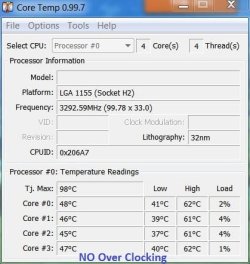
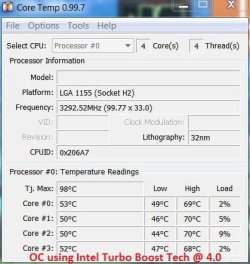
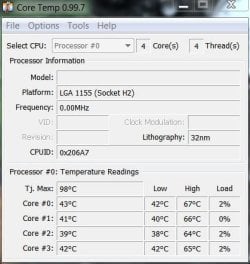
Core temps make me nervous as I'm not experienced. Recommended max core temp for i5-2500k is 76C & @ 4.0 my temps peeked @ 70C. I guess that's OK but, like I said, it makes me nervous.

I've attached a Vegas Video render test, as this is the program I'll be using a lot, and have 2 core temp pics; one @ no OC & one using Intel Turbo Boost Tech @ 4.0. BTW, I have a core temp warning set to 70C, but, it did not sound off. The room temp was 71F. The time of the render @ 4.0Ghz was 11% faster than @ 3.3Ghz. The idle & max temps were 7C warmer, too.

Maybe these temps are better with Sandy Bridge than other Intel CPUs but I wonder if it's worth it. :zip:
 

Attachments

  • Temps after RT at 3.3.JPG
    Temps after RT at 3.3.JPG
    39.8 KB · Views: 6
  • Temps after RT at 4.0.JPG
    Temps after RT at 4.0.JPG
    41.4 KB · Views: 4

My Computer

Computer type
PC/Desktop
Computer Manufacturer/Model Number
Custom built 2011
OS
Windows 7 64-bit
CPU
Intel Core i5-2500K 3300 Mhz
Motherboard
Gigabyte P67A-UD3-B3
Memory
16Gb Patriot PC3-12800 1600 Mhz
Graphics Card(s)
EVGA GeForce GTX 560 Ti (Fermi)
Sound Card
On Motherboard
Monitor(s) Displays
Dell U2412M & NEC EA232WMi
Screen Resolution
DELL 1920x1200 - NEC 1920x1080
Hard Drives
Crucial 128 Gb SSD
Hitachi Deskstar 2Tb 7200 RPM 32MB Cache
Seagate Barracuda 500Gb 7200 RPM
Hitachi GST Deskstar 1.5TB 7200 RPM 64MB Cache
PSU
Seasonic M1211-620 Bronze
Case
Antec Solo
Cooling
Tuniq Tower 120 Extreme Rev 1
Keyboard
Apple
Mouse
Microsoft
Internet Speed
5mbs
Other Info
Sunbeam PL-RS-3 Rheosmart 3 Fan Controller 3.5" Bay 3 Channel 30W Fan Controller Panel
You are experimenting as I experimented 5 years ago with my prior PC (Core 2 Duo E6600, standard clock of 2.4). I easily got it to 3.0 with acceptable temps, but ultimately decided so what and went back to stock clocks. That experience led me to NOT get a K model processor recently because I had decided against overclocking.

You have to decide how critical 11% is to you. If you are being paid for video rendering, it might effectively be an 11% pay raise. If you aren't being paid, it only saves time and only you know what that is worth.

In reality, I suspect you could run that processor at 70 degrees indefinitely with no consequences and only a slight risk of issues/noticeably shortened lifespan.

I also think overclocking is largely a hobby. Those that do it enjoy it for its own sake, irrespective of any costs or downside. The old pros will tell you to not do it with your production rig---do it with a secondary system.

And you have opted for a quiet cooler as opposed to a noisy one that would help you drop temps by maybe 10 or 15 degrees from what they are now under load. You can't have your cake.................etc.

Doesn't look like you've done anything wrong and your results and temps are in line with what I would have expected.
 

My Computer

Computer type
PC/Desktop
Computer Manufacturer/Model Number
Ignatz Special; 4 speed manual gearbox; factory air conditioning; one of one
OS
Windows 7 Home Premium SP1, 64-bit
CPU
Intel Skylake i5-6600K, not overclocked
Motherboard
AsRock Z170M Extreme 4, micro ATX
Memory
8 GB HyperX DDR4-2666 (2 x 4 GB)
Graphics Card(s)
none; graphics are integrated on CPU
Sound Card
onboard: Realtek ALC1150; external: USB Behringer UF0-202
Monitor(s) Displays
Dell S2340M 23 inch IPS
Screen Resolution
1600 x 900
Hard Drives
System: Crucial MX100 series SSD, 128 GB;
Data: Samsung Spinpoint 103SJ, 1 TB;
Backup: WD Caviar Green WD30EZRX-00D8PB0, 3 TB
PSU
Rosewill SilentNight 500 watt fanless, semi-modular
Case
Antec Solo II
Cooling
Noctua NH-U12S; Noctua F12 intake, Noctua S12A exhaust
Keyboard
Microsoft 200 6JH-00001 USB
Mouse
Dell or Microsoft optical wired; USB
Antivirus
Microsoft Security Essentials and Malwarebytes Premium
Browser
Pale Moon
Other Info
All fans PWM; speeds at idle: CPU circa 500 rpm; intake circa 600 rpm; exhaust circa 600 rpm; CPU temps 27 idle and 47 C load in a warm room (27 C/81 F) when running Intel Extreme Tuning Utility stress test.
You are experimenting as I experimented 5 years ago with my prior PC (Core 2 Duo E6600, standard clock of 2.4). I easily got it to 3.0 with acceptable temps, but ultimately decided so what and went back to stock clocks. That experience led me to NOT get a K model processor recently because I had decided against overclocking.

You have to decide how critical 11% is to you. If you are being paid for video rendering, it might effectively be an 11% pay raise. If you aren't being paid, it only saves time and only you know what that is worth.

In reality, I suspect you could run that processor at 70 degrees indefinitely with no consequences and only a slight risk of issues/noticeably shortened lifespan.

I also think overclocking is largely a hobby. Those that do it enjoy it for its own sake, irrespective of any costs or downside. The old pros will tell you to not do it with your production rig---do it with a secondary system.

And you have opted for a quiet cooler as opposed to a noisy one that would help you drop temps by maybe 10 or 15 degrees from what they are now under load. You can't have your cake.................etc.

Doesn't look like you've done anything wrong and your results and temps are in line with what I would have expected.

Before I read your post, I had already re-set everything back to AUTO. To push OC further I would need a better & probably noisier, CPU fan. And, video editing/rendering IS a hobby, now. So, what's the hurry? At least, now, I know what OC'ing is like. And, who knows? Maybe I juice it up on my next render! But, until then, there's no real need. :thumbsup:
 

My Computer

Computer type
PC/Desktop
Computer Manufacturer/Model Number
Custom built 2011
OS
Windows 7 64-bit
CPU
Intel Core i5-2500K 3300 Mhz
Motherboard
Gigabyte P67A-UD3-B3
Memory
16Gb Patriot PC3-12800 1600 Mhz
Graphics Card(s)
EVGA GeForce GTX 560 Ti (Fermi)
Sound Card
On Motherboard
Monitor(s) Displays
Dell U2412M & NEC EA232WMi
Screen Resolution
DELL 1920x1200 - NEC 1920x1080
Hard Drives
Crucial 128 Gb SSD
Hitachi Deskstar 2Tb 7200 RPM 32MB Cache
Seagate Barracuda 500Gb 7200 RPM
Hitachi GST Deskstar 1.5TB 7200 RPM 64MB Cache
PSU
Seasonic M1211-620 Bronze
Case
Antec Solo
Cooling
Tuniq Tower 120 Extreme Rev 1
Keyboard
Apple
Mouse
Microsoft
Internet Speed
5mbs
Other Info
Sunbeam PL-RS-3 Rheosmart 3 Fan Controller 3.5" Bay 3 Channel 30W Fan Controller Panel
Core temps make me nervous as I'm not experienced. Recommended max core temp for i5-2500k is 76C & @ 4.0 my temps peeked @ 70C. I guess that's OK but, like I said, it makes me nervous.

I've attached a Vegas Video render test, as this is the program I'll be using a lot, and have 2 core temp pics; one @ no OC & one using Intel Turbo Boost Tech @ 4.0. BTW, I have a core temp warning set to 70C, but, it did not sound off. The room temp was 71F. The time of the render @ 4.0Ghz was 11% faster than @ 3.3Ghz. The idle & max temps were 7C warmer, too.

Maybe these temps are better with Sandy Bridge than other Intel CPUs but I wonder if it's worth it. :zip:

70 under load at 4GHz sounds pretty good. Don't worry. If it is under Tcase, then that means it should have a normal life with minimal electromigration damage. For my 24x7, my last gen i5 reaches 66c with IBT and 64 with Prime95 @ 3.8GHz. I would go up to 70c under stress, but anything above 3.8 for me shoots the temp way past 70c :(

If you are uncomfortable, just back off a little.
 

My Computer

Computer type
PC/Desktop
Computer Manufacturer/Model Number
Home built (GeneO industries)/Model 4
OS
Windows 10 Pro. EFI boot partition, full EFI boot
CPU
i7 4770k 4.4GHz (44-44-43-43 turbo) @ 1.248V
Motherboard
ASUS Maximus VI Hero
Memory
16GB (8GBx2) @2200 MHz G.skill Sniper 10-11-10-30-1, 1.6V
Graphics Card(s)
MSI GTX 970 Gaming 4G
Sound Card
Onboard SupremeFX Audio
Monitor(s) Displays
NEC Spectraview 2490WUXi-SV
Screen Resolution
1920 x 1200
Hard Drives
Samsung 850 Pro 256GB (OS), Samsung 2x 128GB 840 Pro SSD in RAID0, 3x WD Blue 6Gb/s 1TB RAID0, WD 2TB Black external USB 3.0, 2TB WD20EARS Green external USB 3.0, 2x 500GB Seagate and 1 750 GB external USB, 1x 350GB external USB3
PSU
Seasonic X-850 (2012 KM3 model)
Case
Fractal Design Define R4
Cooling
NH-D14, NF-F12, NF-A15; NF-P14, NF-P12,NF-A14, S12A PWM
Keyboard
Cooler Master Storm Quickfire Rapid - Brown
Mouse
Logitech G602
Internet Speed
126.4 Mb/s down, 24.3 Mb/s up
Other Info
USB 3.0 x8 , SATA III x8, eSATA, USB 2.0 x6. Samsung DVD R/W drive.

WEI: CPU 7.8, Memory 7.9, Graphics 7.9, Disk 7.9
70 under load at 4GHz sounds pretty good. Don't worry. If it is under Tcase, then that means it should have a normal life with minimal electromigration damage. For my 24x7, my last gen i5 reaches 66c with IBT and 64 with Prime95 @ 3.8GHz. I would go up to 70c under stress, but anything above 3.8 for me shoots the temp way past 70c :(

If you are uncomfortable, just back off a little.

That's the plan. Thanks.
 

My Computer

Computer type
PC/Desktop
Computer Manufacturer/Model Number
Custom built 2011
OS
Windows 7 64-bit
CPU
Intel Core i5-2500K 3300 Mhz
Motherboard
Gigabyte P67A-UD3-B3
Memory
16Gb Patriot PC3-12800 1600 Mhz
Graphics Card(s)
EVGA GeForce GTX 560 Ti (Fermi)
Sound Card
On Motherboard
Monitor(s) Displays
Dell U2412M & NEC EA232WMi
Screen Resolution
DELL 1920x1200 - NEC 1920x1080
Hard Drives
Crucial 128 Gb SSD
Hitachi Deskstar 2Tb 7200 RPM 32MB Cache
Seagate Barracuda 500Gb 7200 RPM
Hitachi GST Deskstar 1.5TB 7200 RPM 64MB Cache
PSU
Seasonic M1211-620 Bronze
Case
Antec Solo
Cooling
Tuniq Tower 120 Extreme Rev 1
Keyboard
Apple
Mouse
Microsoft
Internet Speed
5mbs
Other Info
Sunbeam PL-RS-3 Rheosmart 3 Fan Controller 3.5" Bay 3 Channel 30W Fan Controller Panel
You are experimenting as I experimented 5 years ago with my prior PC (Core 2 Duo E6600, standard clock of 2.4). I easily got it to 3.0 with acceptable temps, but ultimately decided so what and went back to stock clocks. That experience led me to NOT get a K model processor recently because I had decided against overclocking.

You have to decide how critical 11% is to you. If you are being paid for video rendering, it might effectively be an 11% pay raise. If you aren't being paid, it only saves time and only you know what that is worth.

In reality, I suspect you could run that processor at 70 degrees indefinitely with no consequences and only a slight risk of issues/noticeably shortened lifespan.

I also think overclocking is largely a hobby. Those that do it enjoy it for its own sake, irrespective of any costs or downside. The old pros will tell you to not do it with your production rig---do it with a secondary system.

And you have opted for a quiet cooler as opposed to a noisy one that would help you drop temps by maybe 10 or 15 degrees from what they are now under load. You can't have your cake.................etc.

Doesn't look like you've done anything wrong and your results and temps are in line with what I would have expected.

Before I read your post, I had already re-set everything back to AUTO. To push OC further I would need a better & probably noisier, CPU fan. And, video editing/rendering IS a hobby, now. So, what's the hurry? At least, now, I know what OC'ing is like. And, who knows? Maybe I juice it up on my next render! But, until then, there's no real need. :thumbsup:


I am inclined to agree.

I fairly recently completed my sandy bridge build.

I had a fair bit of fun for the first few weeks , started off with and settled with a 4.6ghz oc , tested out a stable 5ghz oc but that was just to see how far it would go.
I then stuck with my 4.6 oc for many weeks but just recently I thought do I really need it running at that?

I decided No for now so I have taken it down to 4ghz , its running real nice and cool with the frio cooler at this speed. For example I have had the pc on for 5hrs and just finished 2 hours of gaming on Dirt 2 , I checked my temps and the highest a core has hit is 45 degrees.

Its running perfect , no doubt it will run exactly as good or noticeably as good to me at stock speeds but hey I bought the K version so I may as well have a bit of a clock on it lol.

Have fun

Paul.
 

My Computer

OS
Windows 7 Professional 64 bit
Core temps make me nervous as I'm not experienced. Recommended max core temp for i5-2500k is 76C & @ 4.0 my temps peeked @ 70C. I guess that's OK but, like I said, it makes me nervous.

I've attached a Vegas Video render test, as this is the program I'll be using a lot, and have 2 core temp pics; one @ no OC & one using Intel Turbo Boost Tech @ 4.0. BTW, I have a core temp warning set to 70C, but, it did not sound off. The room temp was 71F. The time of the render @ 4.0Ghz was 11% faster than @ 3.3Ghz. The idle & max temps were 7C warmer, too.

Maybe these temps are better with Sandy Bridge than other Intel CPUs but I wonder if it's worth it. :zip:
You're temps are way too hot, even stock... something is amiss. At 4.5GHz I can dual Orthos for 8 hours and my highest temps are 53, idle 29-32.

Perhaps you might consider reapplying thermal paste (read: less, or better), or a different heatsink? Even the stock cooler does better than this. :huh:
 

My Computer

OS
7 Ultimate x64
CPU
i5-2500k
Motherboard
Asus P8P67 Pro
Memory
8GB G.Skill Ripjaws X F3-12800CL7D-8GBXH 1866MHz 8-9-8-24
Graphics Card(s)
EVGA GTX 570 SC
Sound Card
X-Fi Titanium Fatality
Monitor(s) Displays
Samsung S27A550H 27" LED
Screen Resolution
1920x1080
Hard Drives
OCZ Vertex 3 120GB.
1TB Samsung F3.
2TB Samsung F4.
PSU
PC Power & Cooling Silencer 760
Case
Lian Li Lancool K62
Cooling
Thermalright Venomous X Black/Scythe S-Flex/Shin-Etsu X23
Keyboard
MS Natural Elite 4000 Ergonomic
Mouse
Logitech G500
Internet Speed
6MB/768
Other Info
Logitech Z-5500 505 watts.
D-Link DGL-4500.
Tripp-Lite Smart Pro 1500.
I nearly mentioned it , but hadn't heard of his cpu cooler.

I have had a quick look at it and it appears to be quite a poor cooler. On the list of approx 50 coolers it was in the bottom 5.

I know from reading certain reviews/comparisons that some coolers can perform worse than the stock cooler on the new sandybridge cpu's.

This could certainly be a possible cause of the high temps , its usually that and voltage to blame anyway.
 

My Computer

OS
Windows 7 Professional 64 bit
Your idle temps with no OC should be below 30°C, if your first snip low value is with the system at idle then the temps are too high by more than 10°C.
If your ambient temp is 22°C, your idle temps should be 27°C, 30°C max.

Re-apply your thermal paste, or consider a different cooler.

What CPU voltage are you running for the 4GHz OC?
 

My Computer

Computer type
PC/Desktop
Computer Manufacturer/Model Number
76~2.0
OS
Windows 7 Ult x64 - SP1/ Windows 8 Pro x64
CPU
Intel Core i5-3570K 4.6GHz
Motherboard
Gigabyte GA-Z77X UD3H, f18
Memory
8GB (2X4GB) DDR3 1600 Corsair Vengeance CL8 1.5v
Graphics Card(s)
Sapphire HD 7770 Vapor-X OC 1GB DDR5
Sound Card
Onboard VIA VT2021
Monitor(s) Displays
22" LCD Dell
Screen Resolution
1680x1050
Hard Drives
Samsung 840Pro 128GB SSD,
Seagate Barracuda 500GB SATA2 7200rpm 32MB cache, Seagate Barracuda 1TB SATA2 7200rpm 32MB cache,
PSU
Corsair HX650W
Case
Cooler Master Storm Scout
Cooling
Corsair H80 2x12cm Noctua NF P12 , 2x14cm case fans
Keyboard
Logitech Wave
Mouse
CM Sentinel
Internet Speed
Dismal
Antivirus
Avast
Browser
Opera Next
Other Info
Haswell laptop: HP Envy 17t-j, i7-4700MQ, GeForce 740M 2GB DDR3, 17.3" Full HD 1920x1080, 16GB RAM, Samsung 840 Pro 128GB, 1TB Hitachi 7200 HDD,
Desktop: eSATA ports,
External eSATA Seagate 500GB SATA2 7200rpm,
External WD USB 500GB
Back
Top