
Overclocking help; your suggestions, please.

Thanks guys. I'll reboot later today.
 

My Computer

Computer type
PC/Desktop
Computer Manufacturer/Model Number
Custom built 2011
OS
Windows 7 64-bit
CPU
Intel Core i5-2500K 3300 Mhz
Motherboard
Gigabyte P67A-UD3-B3
Memory
16Gb Patriot PC3-12800 1600 Mhz
Graphics Card(s)
EVGA GeForce GTX 560 Ti (Fermi)
Sound Card
On Motherboard
Monitor(s) Displays
Dell U2412M & NEC EA232WMi
Screen Resolution
DELL 1920x1200 - NEC 1920x1080
Hard Drives
Crucial 128 Gb SSD
Hitachi Deskstar 2Tb 7200 RPM 32MB Cache
Seagate Barracuda 500Gb 7200 RPM
Hitachi GST Deskstar 1.5TB 7200 RPM 64MB Cache
PSU
Seasonic M1211-620 Bronze
Case
Antec Solo
Cooling
Tuniq Tower 120 Extreme Rev 1
Keyboard
Apple
Mouse
Microsoft
Internet Speed
5mbs
Other Info
Sunbeam PL-RS-3 Rheosmart 3 Fan Controller 3.5" Bay 3 Channel 30W Fan Controller Panel
From post#9
Your CPU spec sheet: Intel Core i5-2500K
The max temp for Tcase (CPU case) is 72.6°C, add 5°C for CPU core temps then 77.6°C is the recommended max core temp.

Incidentally--I've done a little research and from what I can tell, the shutdown temp of the CPU is circa 98; it should begin throttling before that. The "Tcase" temp is supposedly 72 and that is Intel's recommended max LONG TERM temp. I assume that Tcase refers to cores????

According to my brief googling anyway. You could run down the tech documents on Intel.com for the sordid details.

Further research: Tcase temp is 72.6 and is NOT equal to core temps. Rather it is taken from the case surrounding the processor and should be the number referred to as "CPU" in HWInfo32. It's quite close to the core temps, but is a single number rather than 4. Intel apparently does not specify a throttle temp or an absolute shutdown temp, but those temps are believed to be 98-100.

Tcase is max OK long term use temp.

Tcase is the CPU case, have seen many references to the Tcase +5°C for the CPU core max temp.

Intel doesn't openly specify a max CPU core temp or throttle or shutdown temp as you mentioned, must be for legal reasons.
The actual throttle and shutdown temps seem to vary from processor to processor, as would be expected. Info can be found on various OC sites. I do remember seeing an Intel link to an obscure Intel data sheet on this subject, buried somewhere in a 60+ page document.

Intel's max Tcase temp is, of coarse, very conservative.

I think the 98-100°C throttle temp is a generally accepted number used by BIOS companies, which is why most BIOS have different temp options for over temp warnings.
My options are:

CPU Warning Temperature

Sets the warning threshold for CPU temperature. When CPU temperature exceeds the threshold,
BIOS will emit warning sound. Options are: Disabled (default),
60
°C/140°F
70°C/158°F
80°C/176°F
90
°C/194°F


I am generally conservative on this issue, and follow the rule: electronics + heat = Bad
Always try to get the system at as low temps as possible.
 
Last edited:

My Computer

Computer type
PC/Desktop
Computer Manufacturer/Model Number
76~2.0
OS
Windows 7 Ult x64 - SP1/ Windows 8 Pro x64
CPU
Intel Core i5-3570K 4.6GHz
Motherboard
Gigabyte GA-Z77X UD3H, f18
Memory
8GB (2X4GB) DDR3 1600 Corsair Vengeance CL8 1.5v
Graphics Card(s)
Sapphire HD 7770 Vapor-X OC 1GB DDR5
Sound Card
Onboard VIA VT2021
Monitor(s) Displays
22" LCD Dell
Screen Resolution
1680x1050
Hard Drives
Samsung 840Pro 128GB SSD,
Seagate Barracuda 500GB SATA2 7200rpm 32MB cache, Seagate Barracuda 1TB SATA2 7200rpm 32MB cache,
PSU
Corsair HX650W
Case
Cooler Master Storm Scout
Cooling
Corsair H80 2x12cm Noctua NF P12 , 2x14cm case fans
Keyboard
Logitech Wave
Mouse
CM Sentinel
Internet Speed
Dismal
Antivirus
Avast
Browser
Opera Next
Other Info
Haswell laptop: HP Envy 17t-j, i7-4700MQ, GeForce 740M 2GB DDR3, 17.3" Full HD 1920x1080, 16GB RAM, Samsung 840 Pro 128GB, 1TB Hitachi 7200 HDD,
Desktop: eSATA ports,
External eSATA Seagate 500GB SATA2 7200rpm,
External WD USB 500GB
After a couple hours of rendering, mine typically stays in the 62-65C range.
You will notice it starts to stabilize itself after a while.


This will be even more so with newly applied Arctic Silver.
If Im not mistaken, AS has a cure time. Unless this has changed, I haven't used it in a while.

So you may very well see those load temps drop a couple degrees in a weeks time when it sets up.

After a night or 2, and a few renders, shut the PC down for the night. It may help it set up a bit.
Basically, give it some time to cure.

Some thermal paste has no cure time. MX-2 for example.


Most Intel CPUs can safely operate at 75C. Although I would by no means consider this ideal.
I would shoot for keeping at 70C or below at full load. Ideally 65ish C.
But, everyone has what they consider to be safe 24/7 load temps. This is just my opinion.

I would go by RealTemp or CoreTemp for reading.
 

My Computer

Computer Manufacturer/Model Number
Custom (Self Build)
OS
Windows 7 Home Premium 64bit
CPU
Intel Core i7 2700k
Motherboard
eVGA P67 SLI
Memory
8GB Mushkin Redline Ridgebacks @1866
Graphics Card(s)
EVGA GTX570 SC
Sound Card
XiFi Titanium HD
Monitor(s) Displays
LG W2453V
Screen Resolution
1920x1080
Hard Drives
Intel 320 80GB -- Intel X25-V 40GB --WD Black 1TB x2 -- WD Blue 640GB
PSU
Seasonic x750
Case
Corsair 600T SE White
Cooling
eVGA Superclocked CPU Cooler
Keyboard
Saitek Cyborg
Antivirus
Kaspersky
Browser
IE
Other Info
LG BD/DVD
Did an F7 to load optimized defaults; then setup BIOS to the same OC settings I used before. I still had the original 120mm Antec case fan running at HI. It plugs directly into the PSU.

The previous render test was setup by a forum member @ Sony Vegas who uses it as a bench mark. It is designed to push the CPU to the max. A 20 second HD render full of panning, zooming & the most difficult of all to render, text, took 3:16 without OC (3.3Ghz i5-2500K) & 2:54 @ OC set to 4.0Ghz (11.22% faster).

As I'm not a gamer, I used 1 hour of AVCHD & HDV video for 2 separate test renders. Based of the results of the Vegas render, I figured a 1 hour HDV video to take about 3 hours to render. All I can say is video LOVES Intel i5 Sandy Bridge. It rendered the HDV 1 hour video in 88 minutes. It was rendering so fast that the preview screen was black, meaning too many frames to show. AVCHD (H.264 or Mpeg4) was slower but under 2 hours. Temps maxed out @ 64C but remained mostly in the 61-63C range.

I will replace the Antec fan & retry with the newer (& quieter) CoolerMaster 120mm again to see if the MB will regulate it's speed as it should. I bought it thinking when I wasn't pushing the CPU the PC would be relativity quiet. But, while rendering, the fan would kick into HI speed. I think it's stuck on LOW & I believe this to be the reason I've been seeing higher temps (5-6C).
 

My Computer

Computer type
PC/Desktop
Computer Manufacturer/Model Number
Custom built 2011
OS
Windows 7 64-bit
CPU
Intel Core i5-2500K 3300 Mhz
Motherboard
Gigabyte P67A-UD3-B3
Memory
16Gb Patriot PC3-12800 1600 Mhz
Graphics Card(s)
EVGA GeForce GTX 560 Ti (Fermi)
Sound Card
On Motherboard
Monitor(s) Displays
Dell U2412M & NEC EA232WMi
Screen Resolution
DELL 1920x1200 - NEC 1920x1080
Hard Drives
Crucial 128 Gb SSD
Hitachi Deskstar 2Tb 7200 RPM 32MB Cache
Seagate Barracuda 500Gb 7200 RPM
Hitachi GST Deskstar 1.5TB 7200 RPM 64MB Cache
PSU
Seasonic M1211-620 Bronze
Case
Antec Solo
Cooling
Tuniq Tower 120 Extreme Rev 1
Keyboard
Apple
Mouse
Microsoft
Internet Speed
5mbs
Other Info
Sunbeam PL-RS-3 Rheosmart 3 Fan Controller 3.5" Bay 3 Channel 30W Fan Controller Panel
I used 1 hour of AVCHD & HDV video for 2 separate test renders. Based of the results of the Vegas render, I figured a 1 hour HDV video to take about 3 hours to render. All I can say is video LOVES Intel i5 Sandy Bridge. It rendered the HDV 1 hour video in 88 minutes. It was rendering so fast that the preview screen was black, meaning too many frames to show. AVCHD (H.264 or Mpeg4) was slower but under 2 hours. Temps maxed out @ 64C but remained mostly in the 61-63C range.

I will replace the Antec fan & retry with the newer (& quieter) CoolerMaster 120mm again to see if the MB will regulate it's speed as it should. I bought it thinking when I wasn't pushing the CPU the PC would be relativity quiet. But, while rendering, the fan would kick into HI speed. I think it's stuck on LOW & I believe this to be the reason I've been seeing higher temps (5-6C).

Based on this test, it looks to me like your are good to go for rendering with this heatsink with no further changes. 64 max is OK long term.

Re the fan: I know nothing about the Coolermaster, but it may not be capable of adjusting its speed, regardless of how it is connected.

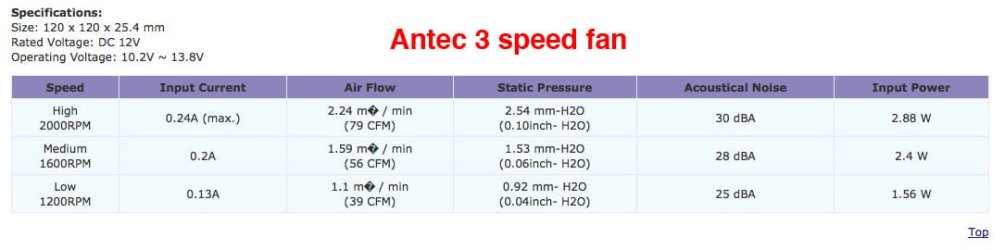
What is its alleged RPM and how does that compare to the alleged RPM of the Antec fan on high?

Are noise levels OK by you with the Antec on high? If so, that's your fan. If not, you can certainly get quieter fans that move at least as much air at a fixed unadjustable RPM. The Coolermaster may be such a fan, I don't know. If not, any of several Scythe or Noctua fans would suffice. But if the Antec is OK, ride with it and be done.

Is the Coolermaster supposedly a "PWM" fan??

Can you run a render test with the Coolermaster?
 

My Computer

Computer type
PC/Desktop
Computer Manufacturer/Model Number
Ignatz Special; 4 speed manual gearbox; factory air conditioning; one of one
OS
Windows 7 Home Premium SP1, 64-bit
CPU
Intel Skylake i5-6600K, not overclocked
Motherboard
AsRock Z170M Extreme 4, micro ATX
Memory
8 GB HyperX DDR4-2666 (2 x 4 GB)
Graphics Card(s)
none; graphics are integrated on CPU
Sound Card
onboard: Realtek ALC1150; external: USB Behringer UF0-202
Monitor(s) Displays
Dell S2340M 23 inch IPS
Screen Resolution
1600 x 900
Hard Drives
System: Crucial MX100 series SSD, 128 GB;
Data: Samsung Spinpoint 103SJ, 1 TB;
Backup: WD Caviar Green WD30EZRX-00D8PB0, 3 TB
PSU
Rosewill SilentNight 500 watt fanless, semi-modular
Case
Antec Solo II
Cooling
Noctua NH-U12S; Noctua F12 intake, Noctua S12A exhaust
Keyboard
Microsoft 200 6JH-00001 USB
Mouse
Dell or Microsoft optical wired; USB
Antivirus
Microsoft Security Essentials and Malwarebytes Premium
Browser
Pale Moon
Other Info
All fans PWM; speeds at idle: CPU circa 500 rpm; intake circa 600 rpm; exhaust circa 600 rpm; CPU temps 27 idle and 47 C load in a warm room (27 C/81 F) when running Intel Extreme Tuning Utility stress test.
It is a PWM fan & is also used with Cooler Master Hyper 212 HS. Model # R4-BMBS-20PK-R0. Max is the same as the Antec, 2000rpm. I'll swap them & re-test.
 

Attachments

  • CoolerMaster 120mm fan.jpg
    CoolerMaster 120mm fan.jpg
    117.9 KB · Views: 4
  • Antec 3 speed fan.jpg
    Antec 3 speed fan.jpg
    41.5 KB · Views: 3

My Computer

Computer type
PC/Desktop
Computer Manufacturer/Model Number
Custom built 2011
OS
Windows 7 64-bit
CPU
Intel Core i5-2500K 3300 Mhz
Motherboard
Gigabyte P67A-UD3-B3
Memory
16Gb Patriot PC3-12800 1600 Mhz
Graphics Card(s)
EVGA GeForce GTX 560 Ti (Fermi)
Sound Card
On Motherboard
Monitor(s) Displays
Dell U2412M & NEC EA232WMi
Screen Resolution
DELL 1920x1200 - NEC 1920x1080
Hard Drives
Crucial 128 Gb SSD
Hitachi Deskstar 2Tb 7200 RPM 32MB Cache
Seagate Barracuda 500Gb 7200 RPM
Hitachi GST Deskstar 1.5TB 7200 RPM 64MB Cache
PSU
Seasonic M1211-620 Bronze
Case
Antec Solo
Cooling
Tuniq Tower 120 Extreme Rev 1
Keyboard
Apple
Mouse
Microsoft
Internet Speed
5mbs
Other Info
Sunbeam PL-RS-3 Rheosmart 3 Fan Controller 3.5" Bay 3 Channel 30W Fan Controller Panel
I wouldn't expect significant differences in cooling between 2 fans of the same diameter spinning at the same RPM.

RE noise: When you get above 1000 rpm, you tend to hear a "whooshing" type noise from exhaust fans. That is not the fan, but rather air turbulence noise resulting from the air being blown through the grill structure. Any fan will do that, quiet fan or not. The only way to avoid that noise is to keep the rpm down to 800 or so or to remove that honeycomb grill structure that you probably have.

I haven't heard you recently comment on noise, so I'm guessing that the Coolermaster and Antec on high are both tolerable.

You might try a render with the Antec on medium or low to see if that makes much of a difference.

I'm not sure myself which fan headers should provide adjustable speeds on Gigabyte motherboards. I have read that PWM control on Gigabyte boards can be a bit shaky.

My intake and exhaust fans are fixed speed, not PWM, so I can't do any really do any PWM experimentation. My CPU fan does adjust speeds from circa 800 to circa 1500.
 

My Computer

Computer type
PC/Desktop
Computer Manufacturer/Model Number
Ignatz Special; 4 speed manual gearbox; factory air conditioning; one of one
OS
Windows 7 Home Premium SP1, 64-bit
CPU
Intel Skylake i5-6600K, not overclocked
Motherboard
AsRock Z170M Extreme 4, micro ATX
Memory
8 GB HyperX DDR4-2666 (2 x 4 GB)
Graphics Card(s)
none; graphics are integrated on CPU
Sound Card
onboard: Realtek ALC1150; external: USB Behringer UF0-202
Monitor(s) Displays
Dell S2340M 23 inch IPS
Screen Resolution
1600 x 900
Hard Drives
System: Crucial MX100 series SSD, 128 GB;
Data: Samsung Spinpoint 103SJ, 1 TB;
Backup: WD Caviar Green WD30EZRX-00D8PB0, 3 TB
PSU
Rosewill SilentNight 500 watt fanless, semi-modular
Case
Antec Solo II
Cooling
Noctua NH-U12S; Noctua F12 intake, Noctua S12A exhaust
Keyboard
Microsoft 200 6JH-00001 USB
Mouse
Dell or Microsoft optical wired; USB
Antivirus
Microsoft Security Essentials and Malwarebytes Premium
Browser
Pale Moon
Other Info
All fans PWM; speeds at idle: CPU circa 500 rpm; intake circa 600 rpm; exhaust circa 600 rpm; CPU temps 27 idle and 47 C load in a warm room (27 C/81 F) when running Intel Extreme Tuning Utility stress test.
I wouldn't expect significant differences in cooling between 2 fans of the same diameter spinning at the same RPM.

RE noise: When you get above 1000 rpm, you tend to hear a "whooshing" type noise from exhaust fans. That is not the fan, but rather air turbulence noise resulting from the air being blown through the grill structure. Any fan will do that, quiet fan or not. The only way to avoid that noise is to keep the rpm down to 800 or so or to remove that honeycomb grill structure that you probably have.

I haven't heard you recently comment on noise, so I'm guessing that the Coolermaster and Antec on high are both tolerable.

You might try a render with the Antec on medium or low to see if that makes much of a difference.

I'm not sure myself which fan headers should provide adjustable speeds on Gigabyte motherboards. I have read that PWM control on Gigabyte boards can be a bit shaky.

My intake and exhaust fans are fixed speed, not PWM, so I can't do any really do any PWM experimentation. My CPU fan does adjust speeds from circa 800 to circa 1500.

Just booted with CM fan installed & here's what's happening. It just flutters! :zip: I mean it turns about a quarter turn, pauses & repeats - never completing a full turn much less a constant speed. Can this be controlled manually with BIOS? It is a 4 pin that plugs in PWR_FAN2 on the MB which is set to AUTO in BIOS. There's a 3-pin nearby but I'm not sure if that would work with a 4-pin.

I did a short render test with all cores @ 100% & temps reached 63C without rear fan working.
 

My Computer

Computer type
PC/Desktop
Computer Manufacturer/Model Number
Custom built 2011
OS
Windows 7 64-bit
CPU
Intel Core i5-2500K 3300 Mhz
Motherboard
Gigabyte P67A-UD3-B3
Memory
16Gb Patriot PC3-12800 1600 Mhz
Graphics Card(s)
EVGA GeForce GTX 560 Ti (Fermi)
Sound Card
On Motherboard
Monitor(s) Displays
Dell U2412M & NEC EA232WMi
Screen Resolution
DELL 1920x1200 - NEC 1920x1080
Hard Drives
Crucial 128 Gb SSD
Hitachi Deskstar 2Tb 7200 RPM 32MB Cache
Seagate Barracuda 500Gb 7200 RPM
Hitachi GST Deskstar 1.5TB 7200 RPM 64MB Cache
PSU
Seasonic M1211-620 Bronze
Case
Antec Solo
Cooling
Tuniq Tower 120 Extreme Rev 1
Keyboard
Apple
Mouse
Microsoft
Internet Speed
5mbs
Other Info
Sunbeam PL-RS-3 Rheosmart 3 Fan Controller 3.5" Bay 3 Channel 30W Fan Controller Panel
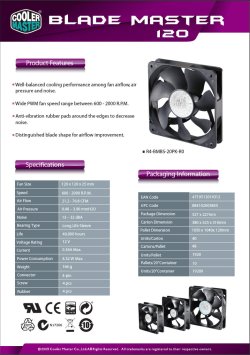
Just booted with CM fan installed & here's what's happening. It just flutters! :zip: I mean it turns about a quarter turn, pauses & repeats - never completing a full turn much less a constant speed. Can this be controlled manually with BIOS? It is a 4 pin that plugs in PWR_FAN2 on the MB which is set to AUTO in BIOS. There's a 3-pin nearby but I'm not sure if that would work with a 4-pin.

I did a short render test with all cores @ 100% & temps reached 63C without rear fan working.

I'm not sure. It may be outright defective or it may be because it is a PWM fan trying to operate on an incompatible header?

I bought fixed speed low noise fans to avoid complications like that. I had read of possible PWM issues and knew if I stuck with the right fan that I would have both low noise and adequate cooling.

In your shoes, I would avoid the Coolermaster if I couldn't get it adjusting speeds easily. I don't think you have any bad BIOS settings re fans, but you might try a "non-auto" setting as a trial. No reason to use the Coolermaster unless the Antec is either too loud or doesn't cool well enough. As I said, I would expect Antec on high and Coolemaster to cool about equally.

Your test without exhaust fan further implies that the choice of exhaust fan isn't critical.

Will the Coolermaster spin without stuttering on ANY header?
 

My Computer

Computer type
PC/Desktop
Computer Manufacturer/Model Number
Ignatz Special; 4 speed manual gearbox; factory air conditioning; one of one
OS
Windows 7 Home Premium SP1, 64-bit
CPU
Intel Skylake i5-6600K, not overclocked
Motherboard
AsRock Z170M Extreme 4, micro ATX
Memory
8 GB HyperX DDR4-2666 (2 x 4 GB)
Graphics Card(s)
none; graphics are integrated on CPU
Sound Card
onboard: Realtek ALC1150; external: USB Behringer UF0-202
Monitor(s) Displays
Dell S2340M 23 inch IPS
Screen Resolution
1600 x 900
Hard Drives
System: Crucial MX100 series SSD, 128 GB;
Data: Samsung Spinpoint 103SJ, 1 TB;
Backup: WD Caviar Green WD30EZRX-00D8PB0, 3 TB
PSU
Rosewill SilentNight 500 watt fanless, semi-modular
Case
Antec Solo II
Cooling
Noctua NH-U12S; Noctua F12 intake, Noctua S12A exhaust
Keyboard
Microsoft 200 6JH-00001 USB
Mouse
Dell or Microsoft optical wired; USB
Antivirus
Microsoft Security Essentials and Malwarebytes Premium
Browser
Pale Moon
Other Info
All fans PWM; speeds at idle: CPU circa 500 rpm; intake circa 600 rpm; exhaust circa 600 rpm; CPU temps 27 idle and 47 C load in a warm room (27 C/81 F) when running Intel Extreme Tuning Utility stress test.
Will the Coolermaster spin without stuttering on ANY header?

It's now spinning very slowly; I doubt if it's at the minimum of 600rpm. I'm reading up on MB manual settings.
 

My Computer

Computer type
PC/Desktop
Computer Manufacturer/Model Number
Custom built 2011
OS
Windows 7 64-bit
CPU
Intel Core i5-2500K 3300 Mhz
Motherboard
Gigabyte P67A-UD3-B3
Memory
16Gb Patriot PC3-12800 1600 Mhz
Graphics Card(s)
EVGA GeForce GTX 560 Ti (Fermi)
Sound Card
On Motherboard
Monitor(s) Displays
Dell U2412M & NEC EA232WMi
Screen Resolution
DELL 1920x1200 - NEC 1920x1080
Hard Drives
Crucial 128 Gb SSD
Hitachi Deskstar 2Tb 7200 RPM 32MB Cache
Seagate Barracuda 500Gb 7200 RPM
Hitachi GST Deskstar 1.5TB 7200 RPM 64MB Cache
PSU
Seasonic M1211-620 Bronze
Case
Antec Solo
Cooling
Tuniq Tower 120 Extreme Rev 1
Keyboard
Apple
Mouse
Microsoft
Internet Speed
5mbs
Other Info
Sunbeam PL-RS-3 Rheosmart 3 Fan Controller 3.5" Bay 3 Channel 30W Fan Controller Panel
I assumed if the rear case fan was plugged into SYS_FAN2, a 4-pin connector which the CM is, that it would have MB control of speed. Apparently that isn't the case. The MB manual only mentions the CPU_FAN having MB control. Can this 4-pin be plugged into a 3-pin?

This pic is from the Gigabyte manual. My SYS_FAN2 is @ 384RPM. But, how can this be changed manually? The manual mentions some software Easy Tune6 that can control fans but after install it wont even open. :eek:
 

Attachments

  • Capture3.JPG
    Capture3.JPG
    58.9 KB · Views: 13

My Computer

Computer type
PC/Desktop
Computer Manufacturer/Model Number
Custom built 2011
OS
Windows 7 64-bit
CPU
Intel Core i5-2500K 3300 Mhz
Motherboard
Gigabyte P67A-UD3-B3
Memory
16Gb Patriot PC3-12800 1600 Mhz
Graphics Card(s)
EVGA GeForce GTX 560 Ti (Fermi)
Sound Card
On Motherboard
Monitor(s) Displays
Dell U2412M & NEC EA232WMi
Screen Resolution
DELL 1920x1200 - NEC 1920x1080
Hard Drives
Crucial 128 Gb SSD
Hitachi Deskstar 2Tb 7200 RPM 32MB Cache
Seagate Barracuda 500Gb 7200 RPM
Hitachi GST Deskstar 1.5TB 7200 RPM 64MB Cache
PSU
Seasonic M1211-620 Bronze
Case
Antec Solo
Cooling
Tuniq Tower 120 Extreme Rev 1
Keyboard
Apple
Mouse
Microsoft
Internet Speed
5mbs
Other Info
Sunbeam PL-RS-3 Rheosmart 3 Fan Controller 3.5" Bay 3 Channel 30W Fan Controller Panel
I'd think that the option CPU Smart Fan Enable would have an option for Manual..if it does it may allow you to individually configure Fan speed.
Check for updates for easy Tune and check your Bios to see if it needs to be enabled..probably under a Tools Tab.

4pin to 3 pin..unsure..never tried it on so unable to comment :(...Only fan that has PPM ? or whatever is the CPU fan..case/sys fans are set at one speed unless changed in the BIOS.

lol pity there isn't a BIOS standard..mines Asus and slightly different
 

My Computer

Computer Manufacturer/Model Number
home built
OS
Windows 7 Professional 64 bit
CPU
930 i7 quad O/C 4ghz
Motherboard
Asus P6X58D premium
Memory
G Skill 3x2gb O/C to 1603mhz 1T timing
Graphics Card(s)
EVGA 570
Sound Card
creative titanium
Monitor(s) Displays
samsung s23a950d..120hz 3D
Screen Resolution
1920x1080
Hard Drives
Western Digital 3X150 Velocoraptors in Raid 5
PSU
Antec Quattro 1000 watt
Case
Xigmatek Elysium
Cooling
Custom Loop..Kryos block.360rad..BP comp fittings etc
Keyboard
Razor arcosa
Mouse
Razer Diamondback
Internet Speed
Wireless so w/e I get at the time
You should be able to get the 4 pin to at least spin on a 3 pin header, but the RPM monitoring function will likely be lost.

I'd avoid that Easy Tune app and anything else on the provided CD. Those apps are all known to be shaky or worse.
 

My Computer

Computer type
PC/Desktop
Computer Manufacturer/Model Number
Ignatz Special; 4 speed manual gearbox; factory air conditioning; one of one
OS
Windows 7 Home Premium SP1, 64-bit
CPU
Intel Skylake i5-6600K, not overclocked
Motherboard
AsRock Z170M Extreme 4, micro ATX
Memory
8 GB HyperX DDR4-2666 (2 x 4 GB)
Graphics Card(s)
none; graphics are integrated on CPU
Sound Card
onboard: Realtek ALC1150; external: USB Behringer UF0-202
Monitor(s) Displays
Dell S2340M 23 inch IPS
Screen Resolution
1600 x 900
Hard Drives
System: Crucial MX100 series SSD, 128 GB;
Data: Samsung Spinpoint 103SJ, 1 TB;
Backup: WD Caviar Green WD30EZRX-00D8PB0, 3 TB
PSU
Rosewill SilentNight 500 watt fanless, semi-modular
Case
Antec Solo II
Cooling
Noctua NH-U12S; Noctua F12 intake, Noctua S12A exhaust
Keyboard
Microsoft 200 6JH-00001 USB
Mouse
Dell or Microsoft optical wired; USB
Antivirus
Microsoft Security Essentials and Malwarebytes Premium
Browser
Pale Moon
Other Info
All fans PWM; speeds at idle: CPU circa 500 rpm; intake circa 600 rpm; exhaust circa 600 rpm; CPU temps 27 idle and 47 C load in a warm room (27 C/81 F) when running Intel Extreme Tuning Utility stress test.
Agree, ditch the Gigabyte apps.

Try Speed Fan, haven't used it for fan speed control, so can't confirm it will work.

My CM 212 CPU cooler fan works fine, variable speed.
I think simmo is right about the headers that control fan speed, check your manual.
 

My Computer

Computer type
PC/Desktop
Computer Manufacturer/Model Number
76~2.0
OS
Windows 7 Ult x64 - SP1/ Windows 8 Pro x64
CPU
Intel Core i5-3570K 4.6GHz
Motherboard
Gigabyte GA-Z77X UD3H, f18
Memory
8GB (2X4GB) DDR3 1600 Corsair Vengeance CL8 1.5v
Graphics Card(s)
Sapphire HD 7770 Vapor-X OC 1GB DDR5
Sound Card
Onboard VIA VT2021
Monitor(s) Displays
22" LCD Dell
Screen Resolution
1680x1050
Hard Drives
Samsung 840Pro 128GB SSD,
Seagate Barracuda 500GB SATA2 7200rpm 32MB cache, Seagate Barracuda 1TB SATA2 7200rpm 32MB cache,
PSU
Corsair HX650W
Case
Cooler Master Storm Scout
Cooling
Corsair H80 2x12cm Noctua NF P12 , 2x14cm case fans
Keyboard
Logitech Wave
Mouse
CM Sentinel
Internet Speed
Dismal
Antivirus
Avast
Browser
Opera Next
Other Info
Haswell laptop: HP Envy 17t-j, i7-4700MQ, GeForce 740M 2GB DDR3, 17.3" Full HD 1920x1080, 16GB RAM, Samsung 840 Pro 128GB, 1TB Hitachi 7200 HDD,
Desktop: eSATA ports,
External eSATA Seagate 500GB SATA2 7200rpm,
External WD USB 500GB
I'd avoid that Easy Tune app and anything else on the provided CD. Those apps are all known to be shaky or worse.

Agree, ditch the Gigabyte apps.

I tried Easy Tune6 & it didn't open. Then reading up on this I ran across a suggestion to check if BIOS has been updated. It could be that Easy Tune would only work with current BIOS, not an outdated one. Current BIOS is F2 & checking with Gigabyte, it was now up to F4. Well, tried to install F4 but it rejected 64-bit. So, I installed @BIOS from Gigabyte (I've used @BIOS with success before) & did an update. It did find F3 so I installed that. Rebooted only to find it wouldn't boot at ALL. :doh:
Now what!!!? Kinda panicked after that but wound up posting for suggestions elsewhere at this site. A suggestion was to check the BIOS settings as updates usually revert back to defaults. :what:I should of remembered that! Anyway, new BIOS defaulted Integrated Peripherals/PCH SATA Control Mode to [IDE] instead of AHCI, needed for SSDs. Made the change & it booted fine. Needless to say, no more using Gigabyte's HELPFUL apps. :sarc:
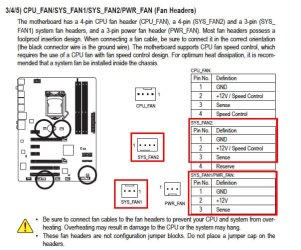
Back to fans. The only differences between CPU_FAN & SYS_FAN2 (see pic) is pin # 4. With CPU it's for speed control & for SYS it's for reserve. Doesn't sound like reserve has anything to do with speed control but could be wrong.

According to BIOS PWR_FAN is running @ about 1500rpms. I figure using the first 3 pins of the CM fans 4-pin connector to plug into SYS_FAN1 as the first 3 do match up properly (see pic).

I'll try Try Speed Fan 1st, then using as a 3-pin.
 

Attachments

  • Fans.jpg
    Fans.jpg
    87.3 KB · Views: 9

My Computer

Computer type
PC/Desktop
Computer Manufacturer/Model Number
Custom built 2011
OS
Windows 7 64-bit
CPU
Intel Core i5-2500K 3300 Mhz
Motherboard
Gigabyte P67A-UD3-B3
Memory
16Gb Patriot PC3-12800 1600 Mhz
Graphics Card(s)
EVGA GeForce GTX 560 Ti (Fermi)
Sound Card
On Motherboard
Monitor(s) Displays
Dell U2412M & NEC EA232WMi
Screen Resolution
DELL 1920x1200 - NEC 1920x1080
Hard Drives
Crucial 128 Gb SSD
Hitachi Deskstar 2Tb 7200 RPM 32MB Cache
Seagate Barracuda 500Gb 7200 RPM
Hitachi GST Deskstar 1.5TB 7200 RPM 64MB Cache
PSU
Seasonic M1211-620 Bronze
Case
Antec Solo
Cooling
Tuniq Tower 120 Extreme Rev 1
Keyboard
Apple
Mouse
Microsoft
Internet Speed
5mbs
Other Info
Sunbeam PL-RS-3 Rheosmart 3 Fan Controller 3.5" Bay 3 Channel 30W Fan Controller Panel
Reserved means not used, looks like the only variable speed fan is the CPU fan.

Glad your BIOS flash was successful, have never tried @BIOS due to the many warnings on various sites not to use it. The Gigabyte forum moderators say 'Don't use @BIOS'.

It wouldn't startup in IDE mode because the drivers aren't installed, good catch.
 

My Computer

Computer type
PC/Desktop
Computer Manufacturer/Model Number
76~2.0
OS
Windows 7 Ult x64 - SP1/ Windows 8 Pro x64
CPU
Intel Core i5-3570K 4.6GHz
Motherboard
Gigabyte GA-Z77X UD3H, f18
Memory
8GB (2X4GB) DDR3 1600 Corsair Vengeance CL8 1.5v
Graphics Card(s)
Sapphire HD 7770 Vapor-X OC 1GB DDR5
Sound Card
Onboard VIA VT2021
Monitor(s) Displays
22" LCD Dell
Screen Resolution
1680x1050
Hard Drives
Samsung 840Pro 128GB SSD,
Seagate Barracuda 500GB SATA2 7200rpm 32MB cache, Seagate Barracuda 1TB SATA2 7200rpm 32MB cache,
PSU
Corsair HX650W
Case
Cooler Master Storm Scout
Cooling
Corsair H80 2x12cm Noctua NF P12 , 2x14cm case fans
Keyboard
Logitech Wave
Mouse
CM Sentinel
Internet Speed
Dismal
Antivirus
Avast
Browser
Opera Next
Other Info
Haswell laptop: HP Envy 17t-j, i7-4700MQ, GeForce 740M 2GB DDR3, 17.3" Full HD 1920x1080, 16GB RAM, Samsung 840 Pro 128GB, 1TB Hitachi 7200 HDD,
Desktop: eSATA ports,
External eSATA Seagate 500GB SATA2 7200rpm,
External WD USB 500GB
I have my exhaust fan connected by Molex with the separate yellow RPM wire connected to the Sys Fan 1 sensor pin (second from right). The exhaust fan is shown in BIOS as “Sys Fan 1” and in HW Info as “Power” fan with a fixed speed of about 900.

If the mobo connector is used, the fan is shown as Power fan with only 490 rpm in HW Info. So it can be monitored with either connection, but the Molex method shows closer to true RPM.

My exhaust fan is NOT PWM. It's supposedly 800 rpm fixed.

If you connect a PWM fan by Molex, I don't know if you can still adjust fan speed with Speedfan. I tried Speedfan at one time on another motherboard and never got it to work.

What are your remaining problems?? Just getting the Coolermaster to change speeds? Worst case, you ditch it and run the Antec on high or medium?
 

My Computer

Computer type
PC/Desktop
Computer Manufacturer/Model Number
Ignatz Special; 4 speed manual gearbox; factory air conditioning; one of one
OS
Windows 7 Home Premium SP1, 64-bit
CPU
Intel Skylake i5-6600K, not overclocked
Motherboard
AsRock Z170M Extreme 4, micro ATX
Memory
8 GB HyperX DDR4-2666 (2 x 4 GB)
Graphics Card(s)
none; graphics are integrated on CPU
Sound Card
onboard: Realtek ALC1150; external: USB Behringer UF0-202
Monitor(s) Displays
Dell S2340M 23 inch IPS
Screen Resolution
1600 x 900
Hard Drives
System: Crucial MX100 series SSD, 128 GB;
Data: Samsung Spinpoint 103SJ, 1 TB;
Backup: WD Caviar Green WD30EZRX-00D8PB0, 3 TB
PSU
Rosewill SilentNight 500 watt fanless, semi-modular
Case
Antec Solo II
Cooling
Noctua NH-U12S; Noctua F12 intake, Noctua S12A exhaust
Keyboard
Microsoft 200 6JH-00001 USB
Mouse
Dell or Microsoft optical wired; USB
Antivirus
Microsoft Security Essentials and Malwarebytes Premium
Browser
Pale Moon
Other Info
All fans PWM; speeds at idle: CPU circa 500 rpm; intake circa 600 rpm; exhaust circa 600 rpm; CPU temps 27 idle and 47 C load in a warm room (27 C/81 F) when running Intel Extreme Tuning Utility stress test.
Staying under 65C under a full rendering load is, IMHO, perfect.
Especially if you plan on doing lots of encoding.
 

My Computer

Computer Manufacturer/Model Number
Custom (Self Build)
OS
Windows 7 Home Premium 64bit
CPU
Intel Core i7 2700k
Motherboard
eVGA P67 SLI
Memory
8GB Mushkin Redline Ridgebacks @1866
Graphics Card(s)
EVGA GTX570 SC
Sound Card
XiFi Titanium HD
Monitor(s) Displays
LG W2453V
Screen Resolution
1920x1080
Hard Drives
Intel 320 80GB -- Intel X25-V 40GB --WD Black 1TB x2 -- WD Blue 640GB
PSU
Seasonic x750
Case
Corsair 600T SE White
Cooling
eVGA Superclocked CPU Cooler
Keyboard
Saitek Cyborg
Antivirus
Kaspersky
Browser
IE
Other Info
LG BD/DVD
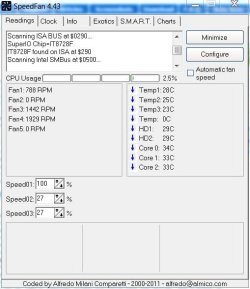
Downloaded & installed Speed Fan. Also plugged case fan into SYS_FAN1. Case fan is pumping out air - lots of it. Speed is over 1900rpm - constant. Front fans (2) are about 1400rpm. As far as noise goes it's definitely louder but not as loud with the Antec fan @ max of 2000rpm. I haven't tried Speed Fan to lower speeds.

One difference with the new BIOS is Hardware Info locks up the PC. Can't do anything until I manually reboot; even control/alt/delete wouldn't work. I uninstalled Hardware Info. I don't know if it's worth trying to revert back to BIOS F2. I'm not out of the woods yet! :eek:
 

Attachments

  • Fan speed.JPG
    Fan speed.JPG
    48.2 KB · Views: 5

My Computer

Computer type
PC/Desktop
Computer Manufacturer/Model Number
Custom built 2011
OS
Windows 7 64-bit
CPU
Intel Core i5-2500K 3300 Mhz
Motherboard
Gigabyte P67A-UD3-B3
Memory
16Gb Patriot PC3-12800 1600 Mhz
Graphics Card(s)
EVGA GeForce GTX 560 Ti (Fermi)
Sound Card
On Motherboard
Monitor(s) Displays
Dell U2412M & NEC EA232WMi
Screen Resolution
DELL 1920x1200 - NEC 1920x1080
Hard Drives
Crucial 128 Gb SSD
Hitachi Deskstar 2Tb 7200 RPM 32MB Cache
Seagate Barracuda 500Gb 7200 RPM
Hitachi GST Deskstar 1.5TB 7200 RPM 64MB Cache
PSU
Seasonic M1211-620 Bronze
Case
Antec Solo
Cooling
Tuniq Tower 120 Extreme Rev 1
Keyboard
Apple
Mouse
Microsoft
Internet Speed
5mbs
Other Info
Sunbeam PL-RS-3 Rheosmart 3 Fan Controller 3.5" Bay 3 Channel 30W Fan Controller Panel
I certainly wouldn't flash a BIOS just so I could run a utility program that has substitutes.

What version of HWInfo32 are you running??

I am using 3.7.1.0 dated March 22, 2011 with an F4 BIOS, without issues.

Have you tried to freshly install HWInfo32 after you last updated your BIOS?

Are you satisfied no further cooling issues?
 

My Computer

Computer type
PC/Desktop
Computer Manufacturer/Model Number
Ignatz Special; 4 speed manual gearbox; factory air conditioning; one of one
OS
Windows 7 Home Premium SP1, 64-bit
CPU
Intel Skylake i5-6600K, not overclocked
Motherboard
AsRock Z170M Extreme 4, micro ATX
Memory
8 GB HyperX DDR4-2666 (2 x 4 GB)
Graphics Card(s)
none; graphics are integrated on CPU
Sound Card
onboard: Realtek ALC1150; external: USB Behringer UF0-202
Monitor(s) Displays
Dell S2340M 23 inch IPS
Screen Resolution
1600 x 900
Hard Drives
System: Crucial MX100 series SSD, 128 GB;
Data: Samsung Spinpoint 103SJ, 1 TB;
Backup: WD Caviar Green WD30EZRX-00D8PB0, 3 TB
PSU
Rosewill SilentNight 500 watt fanless, semi-modular
Case
Antec Solo II
Cooling
Noctua NH-U12S; Noctua F12 intake, Noctua S12A exhaust
Keyboard
Microsoft 200 6JH-00001 USB
Mouse
Dell or Microsoft optical wired; USB
Antivirus
Microsoft Security Essentials and Malwarebytes Premium
Browser
Pale Moon
Other Info
All fans PWM; speeds at idle: CPU circa 500 rpm; intake circa 600 rpm; exhaust circa 600 rpm; CPU temps 27 idle and 47 C load in a warm room (27 C/81 F) when running Intel Extreme Tuning Utility stress test.
Back
Top