Overclocking help; your suggestions, please.

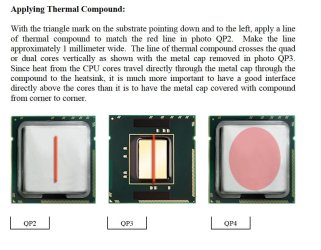
I used this guide from Arctic Silver to apply to CPU. 1mm line as shown. Hope I got it right! :eek:
 

Attachments

  • Arctic Silver 5.jpg
    Arctic Silver 5.jpg
    111.7 KB · Views: 13

My Computer

Computer type
PC/Desktop
Computer Manufacturer/Model Number
Custom built 2011
OS
Windows 7 64-bit
CPU
Intel Core i5-2500K 3300 Mhz
Motherboard
Gigabyte P67A-UD3-B3
Memory
16Gb Patriot PC3-12800 1600 Mhz
Graphics Card(s)
EVGA GeForce GTX 560 Ti (Fermi)
Sound Card
On Motherboard
Monitor(s) Displays
Dell U2412M & NEC EA232WMi
Screen Resolution
DELL 1920x1200 - NEC 1920x1080
Hard Drives
Crucial 128 Gb SSD
Hitachi Deskstar 2Tb 7200 RPM 32MB Cache
Seagate Barracuda 500Gb 7200 RPM
Hitachi GST Deskstar 1.5TB 7200 RPM 64MB Cache
PSU
Seasonic M1211-620 Bronze
Case
Antec Solo
Cooling
Tuniq Tower 120 Extreme Rev 1
Keyboard
Apple
Mouse
Microsoft
Internet Speed
5mbs
Other Info
Sunbeam PL-RS-3 Rheosmart 3 Fan Controller 3.5" Bay 3 Channel 30W Fan Controller Panel
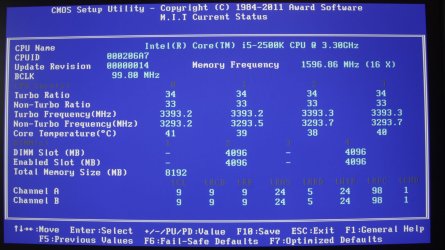
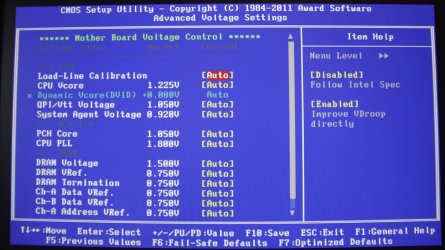
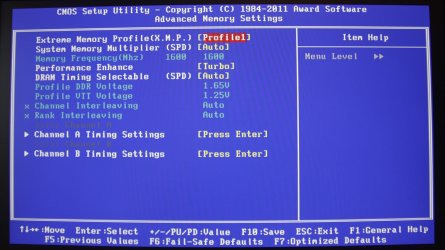
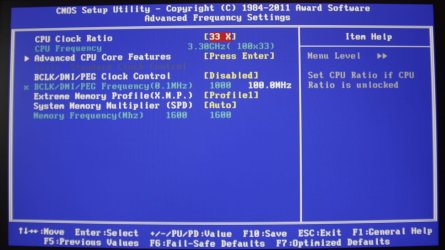
Here's pics of my current BIOS setting. OC is off. I'm not sure how to get Turbo Power Limit (Watts) back to (AUTO) so I set it near the default of 95 @ 96.

I decided to stay on the recommended conservative side when OCing & followed this guide Gigabyte Sandy Bridge Overclocking Guide. Doing so uses Intel's Turbo Boost Tech only. There wasn't any other configurations in memory or voltage. The author started @ 4.5Ghz whereas I started @4.0Ghz.

Room temperature is 72 F & core temps in idle are running 37-40C.
 

Attachments

  • Current MIT.jpg
    Current MIT.jpg
    157.4 KB · Views: 6
  • AVS.jpg
    AVS.jpg
    165.2 KB · Views: 6
  • AMS.jpg
    AMS.jpg
    157.1 KB · Views: 6
  • AFS.jpg
    AFS.jpg
    139.9 KB · Views: 6
  • ACPUCore.jpg
    ACPUCore.jpg
    186.8 KB · Views: 7

My Computer

Computer type
PC/Desktop
Computer Manufacturer/Model Number
Custom built 2011
OS
Windows 7 64-bit
CPU
Intel Core i5-2500K 3300 Mhz
Motherboard
Gigabyte P67A-UD3-B3
Memory
16Gb Patriot PC3-12800 1600 Mhz
Graphics Card(s)
EVGA GeForce GTX 560 Ti (Fermi)
Sound Card
On Motherboard
Monitor(s) Displays
Dell U2412M & NEC EA232WMi
Screen Resolution
DELL 1920x1200 - NEC 1920x1080
Hard Drives
Crucial 128 Gb SSD
Hitachi Deskstar 2Tb 7200 RPM 32MB Cache
Seagate Barracuda 500Gb 7200 RPM
Hitachi GST Deskstar 1.5TB 7200 RPM 64MB Cache
PSU
Seasonic M1211-620 Bronze
Case
Antec Solo
Cooling
Tuniq Tower 120 Extreme Rev 1
Keyboard
Apple
Mouse
Microsoft
Internet Speed
5mbs
Other Info
Sunbeam PL-RS-3 Rheosmart 3 Fan Controller 3.5" Bay 3 Channel 30W Fan Controller Panel
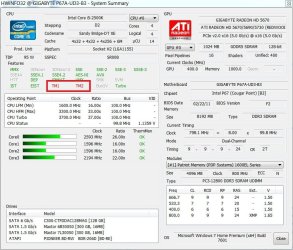
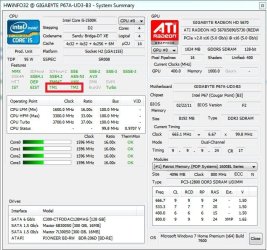
I'm not sure what TM1 & TM2 are & not seeing anything in HWiNFO32 to explain. On left is the 1st scan taken while testing new build. On right is now & TM1 & TM2 are red. I'm asking if this means anything?

One difference is I changed the rear case fan & also have tried OC'ing (pic on right is with no OC). Is this a concern?
 

Attachments

  • Capture-a.jpg
    Capture-a.jpg
    120.3 KB · Views: 12
  • Capture 3a.jpg
    Capture 3a.jpg
    84.9 KB · Views: 10

My Computer

Computer type
PC/Desktop
Computer Manufacturer/Model Number
Custom built 2011
OS
Windows 7 64-bit
CPU
Intel Core i5-2500K 3300 Mhz
Motherboard
Gigabyte P67A-UD3-B3
Memory
16Gb Patriot PC3-12800 1600 Mhz
Graphics Card(s)
EVGA GeForce GTX 560 Ti (Fermi)
Sound Card
On Motherboard
Monitor(s) Displays
Dell U2412M & NEC EA232WMi
Screen Resolution
DELL 1920x1200 - NEC 1920x1080
Hard Drives
Crucial 128 Gb SSD
Hitachi Deskstar 2Tb 7200 RPM 32MB Cache
Seagate Barracuda 500Gb 7200 RPM
Hitachi GST Deskstar 1.5TB 7200 RPM 64MB Cache
PSU
Seasonic M1211-620 Bronze
Case
Antec Solo
Cooling
Tuniq Tower 120 Extreme Rev 1
Keyboard
Apple
Mouse
Microsoft
Internet Speed
5mbs
Other Info
Sunbeam PL-RS-3 Rheosmart 3 Fan Controller 3.5" Bay 3 Channel 30W Fan Controller Panel
I nearly mentioned it , but hadn't heard of his cpu cooler.

I have had a quick look at it and it appears to be quite a poor cooler. On the list of approx 50 coolers it was in the bottom 5.

I know from reading certain reviews/comparisons that some coolers can perform worse than the stock cooler on the new sandybridge cpu's.

This could certainly be a possible cause of the high temps , its usually that and voltage to blame anyway.

It isn't a poor cooler.

It does exactly what it is designed to do: provide very low noise levels while cooling about as well or better than the stock retail fan--which has a bad noise profile.

It isn't intended to provide big overclocks.

My system is nearly the same. Stock clock Prime 95 temps with this cooler are about 6 or 8 degrees below the stock Intel cooler (high 60s versus mid 70s). Idle temps are about the same as retail (mid 30s).

The fan on the cooler can be easily replaced with a high RPM 120 mm fan if need be. Any 120 mm fan will fit. That would knock temps down a few degrees, but at the expenses of noise.

If you want cooling performance like a Cooler Master Hyper 212 (for instance), you would have to buy one.
 

My Computer

Computer type
PC/Desktop
Computer Manufacturer/Model Number
Ignatz Special; 4 speed manual gearbox; factory air conditioning; one of one
OS
Windows 7 Home Premium SP1, 64-bit
CPU
Intel Skylake i5-6600K, not overclocked
Motherboard
AsRock Z170M Extreme 4, micro ATX
Memory
8 GB HyperX DDR4-2666 (2 x 4 GB)
Graphics Card(s)
none; graphics are integrated on CPU
Sound Card
onboard: Realtek ALC1150; external: USB Behringer UF0-202
Monitor(s) Displays
Dell S2340M 23 inch IPS
Screen Resolution
1600 x 900
Hard Drives
System: Crucial MX100 series SSD, 128 GB;
Data: Samsung Spinpoint 103SJ, 1 TB;
Backup: WD Caviar Green WD30EZRX-00D8PB0, 3 TB
PSU
Rosewill SilentNight 500 watt fanless, semi-modular
Case
Antec Solo II
Cooling
Noctua NH-U12S; Noctua F12 intake, Noctua S12A exhaust
Keyboard
Microsoft 200 6JH-00001 USB
Mouse
Dell or Microsoft optical wired; USB
Antivirus
Microsoft Security Essentials and Malwarebytes Premium
Browser
Pale Moon
Other Info
All fans PWM; speeds at idle: CPU circa 500 rpm; intake circa 600 rpm; exhaust circa 600 rpm; CPU temps 27 idle and 47 C load in a warm room (27 C/81 F) when running Intel Extreme Tuning Utility stress test.
I'm not sure what TM1 & TM2 are & not seeing anything in HWiNFO32 to explain. On left is the 1st scan taken while testing new build. On right is now & TM1 & TM2 are red. I'm asking if this means anything?

One difference is I changed the rear case fan & also have tried OC'ing (pic on right is with no OC). Is this a concern?

TM stands for thermal monitoring. It should say that when you drag your mouse over TM1 and TM2.

Not sure what the red means. It could mean temps are high right now, or it could mean temps have been high in the past when you overclocked. Mine have always been green.

I doubt if your fan change matters significantly.
 

My Computer

Computer type
PC/Desktop
Computer Manufacturer/Model Number
Ignatz Special; 4 speed manual gearbox; factory air conditioning; one of one
OS
Windows 7 Home Premium SP1, 64-bit
CPU
Intel Skylake i5-6600K, not overclocked
Motherboard
AsRock Z170M Extreme 4, micro ATX
Memory
8 GB HyperX DDR4-2666 (2 x 4 GB)
Graphics Card(s)
none; graphics are integrated on CPU
Sound Card
onboard: Realtek ALC1150; external: USB Behringer UF0-202
Monitor(s) Displays
Dell S2340M 23 inch IPS
Screen Resolution
1600 x 900
Hard Drives
System: Crucial MX100 series SSD, 128 GB;
Data: Samsung Spinpoint 103SJ, 1 TB;
Backup: WD Caviar Green WD30EZRX-00D8PB0, 3 TB
PSU
Rosewill SilentNight 500 watt fanless, semi-modular
Case
Antec Solo II
Cooling
Noctua NH-U12S; Noctua F12 intake, Noctua S12A exhaust
Keyboard
Microsoft 200 6JH-00001 USB
Mouse
Dell or Microsoft optical wired; USB
Antivirus
Microsoft Security Essentials and Malwarebytes Premium
Browser
Pale Moon
Other Info
All fans PWM; speeds at idle: CPU circa 500 rpm; intake circa 600 rpm; exhaust circa 600 rpm; CPU temps 27 idle and 47 C load in a warm room (27 C/81 F) when running Intel Extreme Tuning Utility stress test.
I used this guide from Arctic Silver to apply to CPU. 1mm line as shown. Hope I got it right! :eek:
The idea of paste isn't to add another layer; rather, it's to fill in the microscopic holes left behind during the lapping process. How much paste you use is going to be determined by the quality of your heatsink; specifically, how well lapped the base is. Personally, I find that's a lot of paste. I use an amount that's almost about the size of a small grain of rice, then I rub it in with rubber gloves... or a handy piece of Saran Wrap. When done, the film of paste left is so thin that it's opaque... remember, it's only for filling holes you can't see.

If your heatsink isn't well lapped, and you can feel grooves on the base, then it's really time to consider another heatsink. The amount of paste you need to compensate for a piss poor lapping really isn't worth it... ends up being counter productive.
 

My Computer

OS
7 Ultimate x64
CPU
i5-2500k
Motherboard
Asus P8P67 Pro
Memory
8GB G.Skill Ripjaws X F3-12800CL7D-8GBXH 1866MHz 8-9-8-24
Graphics Card(s)
EVGA GTX 570 SC
Sound Card
X-Fi Titanium Fatality
Monitor(s) Displays
Samsung S27A550H 27" LED
Screen Resolution
1920x1080
Hard Drives
OCZ Vertex 3 120GB.
1TB Samsung F3.
2TB Samsung F4.
PSU
PC Power & Cooling Silencer 760
Case
Lian Li Lancool K62
Cooling
Thermalright Venomous X Black/Scythe S-Flex/Shin-Etsu X23
Keyboard
MS Natural Elite 4000 Ergonomic
Mouse
Logitech G500
Internet Speed
6MB/768
Other Info
Logitech Z-5500 505 watts.
D-Link DGL-4500.
Tripp-Lite Smart Pro 1500.
I used this guide from Arctic Silver to apply to CPU. 1mm line as shown. Hope I got it right! :eek:
The idea of paste isn't to add another layer; rather, it's to fill in the microscopic holes left behind during the lapping process. How much paste you use is going to be determined by the quality of your heatsink; specifically, how well lapped the base is. Personally, I find that's a lot of paste. I use an amount that's almost about the size of a small grain of rice, then I rub it in with rubber gloves... or a handy piece of Saran Wrap. When done, the film of paste left is so thin that it's opaque... remember, it's only for filling holes you can't see.

If your heatsink isn't well lapped, and you can feel grooves on the base, then it's really time to consider another heatsink. The amount of paste you need to compensate for a piss poor lapping really isn't worth it... ends up being counter productive.

The smooth surface of the heatsink was polished & mirror-like. I followed the instructions of the thermal paste manufacture, Arctic Silver. My reference of a 1mm line (see the illustration pic I attached in my earlier post) is also Arctic Silver's description of how much to use. Are you suggesting Arctic Silver's recommendation is wrong? :shock:
 

My Computer

Computer type
PC/Desktop
Computer Manufacturer/Model Number
Custom built 2011
OS
Windows 7 64-bit
CPU
Intel Core i5-2500K 3300 Mhz
Motherboard
Gigabyte P67A-UD3-B3
Memory
16Gb Patriot PC3-12800 1600 Mhz
Graphics Card(s)
EVGA GeForce GTX 560 Ti (Fermi)
Sound Card
On Motherboard
Monitor(s) Displays
Dell U2412M & NEC EA232WMi
Screen Resolution
DELL 1920x1200 - NEC 1920x1080
Hard Drives
Crucial 128 Gb SSD
Hitachi Deskstar 2Tb 7200 RPM 32MB Cache
Seagate Barracuda 500Gb 7200 RPM
Hitachi GST Deskstar 1.5TB 7200 RPM 64MB Cache
PSU
Seasonic M1211-620 Bronze
Case
Antec Solo
Cooling
Tuniq Tower 120 Extreme Rev 1
Keyboard
Apple
Mouse
Microsoft
Internet Speed
5mbs
Other Info
Sunbeam PL-RS-3 Rheosmart 3 Fan Controller 3.5" Bay 3 Channel 30W Fan Controller Panel
Are you suggesting Arctic Silver's recommendation is wrong? :shock:

No, something else altogether.

A poorly lapped base is going to require more paste; thus, Arctic Silver takes this into account. I once had a Thermaltake heatsink/fan assembly that not only sounded like an Apache gunship was in my living room, but the base was so pitted and grooved that it doubled as my wife's pedicure scraper.
smile.gif
When she put that bad boy to her heels, the flakes were flyin!

Arctic Silver fudges on the side of caution in order to account for all types of heatsinks... not just the good ones like yours. What they show should work on "any" heatsink. You don't need nearly as much as a crap heatsink.
 

My Computer

OS
7 Ultimate x64
CPU
i5-2500k
Motherboard
Asus P8P67 Pro
Memory
8GB G.Skill Ripjaws X F3-12800CL7D-8GBXH 1866MHz 8-9-8-24
Graphics Card(s)
EVGA GTX 570 SC
Sound Card
X-Fi Titanium Fatality
Monitor(s) Displays
Samsung S27A550H 27" LED
Screen Resolution
1920x1080
Hard Drives
OCZ Vertex 3 120GB.
1TB Samsung F3.
2TB Samsung F4.
PSU
PC Power & Cooling Silencer 760
Case
Lian Li Lancool K62
Cooling
Thermalright Venomous X Black/Scythe S-Flex/Shin-Etsu X23
Keyboard
MS Natural Elite 4000 Ergonomic
Mouse
Logitech G500
Internet Speed
6MB/768
Other Info
Logitech Z-5500 505 watts.
D-Link DGL-4500.
Tripp-Lite Smart Pro 1500.
I think the main issue here is that the idle temps are too high, the cause needs to be determined.

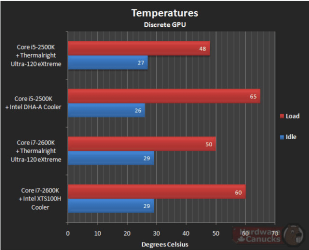
Here is what the idle temps should be.

Scroll down to temperature testing

i5 2500k temps 1.PNG

Idle temps should be around 27°C, 37-40°C is just too high.

The most common reasons for this, from my searching and experience, is:
1. Loose CPU cooler, be sure it is secure. Easy test is to try to rotate it, should not move easily.
2. Thermal paste application. The general consensus is less is better. Too much paste will increase temps, as will too little but, that is rarely the case.

I applied thermal paste like Fumz mentioned.
My CM Hyper 212+ gives me 27-30°C at idle, it is considered a good cooler but, there are much better ones available.
 

My Computer

Computer type
PC/Desktop
Computer Manufacturer/Model Number
76~2.0
OS
Windows 7 Ult x64 - SP1/ Windows 8 Pro x64
CPU
Intel Core i5-3570K 4.6GHz
Motherboard
Gigabyte GA-Z77X UD3H, f18
Memory
8GB (2X4GB) DDR3 1600 Corsair Vengeance CL8 1.5v
Graphics Card(s)
Sapphire HD 7770 Vapor-X OC 1GB DDR5
Sound Card
Onboard VIA VT2021
Monitor(s) Displays
22" LCD Dell
Screen Resolution
1680x1050
Hard Drives
Samsung 840Pro 128GB SSD,
Seagate Barracuda 500GB SATA2 7200rpm 32MB cache, Seagate Barracuda 1TB SATA2 7200rpm 32MB cache,
PSU
Corsair HX650W
Case
Cooler Master Storm Scout
Cooling
Corsair H80 2x12cm Noctua NF P12 , 2x14cm case fans
Keyboard
Logitech Wave
Mouse
CM Sentinel
Internet Speed
Dismal
Antivirus
Avast
Browser
Opera Next
Other Info
Haswell laptop: HP Envy 17t-j, i7-4700MQ, GeForce 740M 2GB DDR3, 17.3" Full HD 1920x1080, 16GB RAM, Samsung 840 Pro 128GB, 1TB Hitachi 7200 HDD,
Desktop: eSATA ports,
External eSATA Seagate 500GB SATA2 7200rpm,
External WD USB 500GB
A week ago I was proud of my new PC build accomplishment. Now I'm convinced I didn't get something right. :confused: But, I'm glad to have the support of this website. Thanks to all.

When I 1st booted this morning, temps were 30-32C idle. After 30 minutes they're 36-39C idle. I'm going to investigate this soon, but, if the fan isn't seated correctly I need to know what to do & what to do it with.

1st, this fan was tough to install (for me at least, a newbe). It overhangs the MB's #1 RAM slot & crowded #2 slot so badly I had to exchange my original RAM choice to a shorter, heatsink type. That being said, maybe a different fan is in order; one with a more positive mount that leaves no doubt if it's seated. This site has quit a list Top 5 Intel & AMD Heatsinks on Frostytech. No doubt louder but cooler.

If I re-install this fan, I'll need to clean both the CPU & heatsink with rubbing alcohol & what; any type cloth or only microfiber? Paper towel is a no-no?

This time use a rice-size amount of Arctic Silver? Should this be wiped evenly or let the heatsink do that?
 

My Computer

Computer type
PC/Desktop
Computer Manufacturer/Model Number
Custom built 2011
OS
Windows 7 64-bit
CPU
Intel Core i5-2500K 3300 Mhz
Motherboard
Gigabyte P67A-UD3-B3
Memory
16Gb Patriot PC3-12800 1600 Mhz
Graphics Card(s)
EVGA GeForce GTX 560 Ti (Fermi)
Sound Card
On Motherboard
Monitor(s) Displays
Dell U2412M & NEC EA232WMi
Screen Resolution
DELL 1920x1200 - NEC 1920x1080
Hard Drives
Crucial 128 Gb SSD
Hitachi Deskstar 2Tb 7200 RPM 32MB Cache
Seagate Barracuda 500Gb 7200 RPM
Hitachi GST Deskstar 1.5TB 7200 RPM 64MB Cache
PSU
Seasonic M1211-620 Bronze
Case
Antec Solo
Cooling
Tuniq Tower 120 Extreme Rev 1
Keyboard
Apple
Mouse
Microsoft
Internet Speed
5mbs
Other Info
Sunbeam PL-RS-3 Rheosmart 3 Fan Controller 3.5" Bay 3 Channel 30W Fan Controller Panel

My Computer

Computer type
PC/Desktop
Computer Manufacturer/Model Number
76~2.0
OS
Windows 7 Ult x64 - SP1/ Windows 8 Pro x64
CPU
Intel Core i5-3570K 4.6GHz
Motherboard
Gigabyte GA-Z77X UD3H, f18
Memory
8GB (2X4GB) DDR3 1600 Corsair Vengeance CL8 1.5v
Graphics Card(s)
Sapphire HD 7770 Vapor-X OC 1GB DDR5
Sound Card
Onboard VIA VT2021
Monitor(s) Displays
22" LCD Dell
Screen Resolution
1680x1050
Hard Drives
Samsung 840Pro 128GB SSD,
Seagate Barracuda 500GB SATA2 7200rpm 32MB cache, Seagate Barracuda 1TB SATA2 7200rpm 32MB cache,
PSU
Corsair HX650W
Case
Cooler Master Storm Scout
Cooling
Corsair H80 2x12cm Noctua NF P12 , 2x14cm case fans
Keyboard
Logitech Wave
Mouse
CM Sentinel
Internet Speed
Dismal
Antivirus
Avast
Browser
Opera Next
Other Info
Haswell laptop: HP Envy 17t-j, i7-4700MQ, GeForce 740M 2GB DDR3, 17.3" Full HD 1920x1080, 16GB RAM, Samsung 840 Pro 128GB, 1TB Hitachi 7200 HDD,
Desktop: eSATA ports,
External eSATA Seagate 500GB SATA2 7200rpm,
External WD USB 500GB
A week ago I was proud of my new PC build accomplishment. Now I'm convinced I didn't get something right. :confused: But, I'm glad to have the support of this website. Thanks to all.

When I 1st booted this morning, temps were 30-32C idle. After 30 minutes they're 36-39C idle. I'm going to investigate this soon, but, if the fan isn't seated correctly I need to know what to do & what to do it with.

1st, this fan was tough to install (for me at least, a newbe). It overhangs the MB's #1 RAM slot & crowded #2 slot so badly I had to exchange my original RAM choice to a shorter, heatsink type. That being said, maybe a different fan is in order; one with a more positive mount that leaves no doubt if it's seated. This site has quit a list Top 5 Intel & AMD Heatsinks on Frostytech. No doubt louder but cooler.

If I re-install this fan, I'll need to clean both the CPU & heatsink with rubbing alcohol & what; any type cloth or only microfiber? Paper towel is a no-no?

This time use a rice-size amount of Arctic Silver? Should this be wiped evenly or let the heatsink do that?

If the black pins in the mount all protruded the same length through the motherboard and you heard a click, then your heatsink is mounted correctly. I assume you mounted it outside the case and did a visible verification of the black pins.

I suspect the nuances between a rice size amount and the thin stripe per Arctic Silver instructions are within the margin of error. By that I mean that if it runs cooler or warmer after reapplication, you would be mistaken to draw any conclusions. Likewise on the question of wiping evenly or letting the heatsink do it.

FYI, I got idle temps in the low 30s with the stock cooler in a 72 F room, not in the 20s. My idle temps with the Big Shuriken are about the same. I have never idled in the 20s with any processor or heatsink in 70 plus rooms.

If you are going very far down the overclocking road, get a new heatsink that pays little attention to noise.

My offhand guess as to your current situation is that you have done nothing wrong--your temps are normal for your heatsink/ambient temp situation---and that any readjustment with this heatsink is pointless. I don't see any reason to be unhappy about the build. The only exception is if the heatsink is in fact NOT seated properly---which is a possibility. But your temps are NOT way out of line and don't vary much from mine.

Clean the heatsink with isopropyl and q tips or a clean white cotton cloth. A purist would tell you to use lintless coffee filters.

Most importantly, decide on your commitment to overclocking. If you get into it seriously, get a new heatsink and obsess over temps, voltages, etc. If you don't get into it seriously, I wouldn't change a thing--per the results of your already completed tests.

 

My Computer

Computer type
PC/Desktop
Computer Manufacturer/Model Number
Ignatz Special; 4 speed manual gearbox; factory air conditioning; one of one
OS
Windows 7 Home Premium SP1, 64-bit
CPU
Intel Skylake i5-6600K, not overclocked
Motherboard
AsRock Z170M Extreme 4, micro ATX
Memory
8 GB HyperX DDR4-2666 (2 x 4 GB)
Graphics Card(s)
none; graphics are integrated on CPU
Sound Card
onboard: Realtek ALC1150; external: USB Behringer UF0-202
Monitor(s) Displays
Dell S2340M 23 inch IPS
Screen Resolution
1600 x 900
Hard Drives
System: Crucial MX100 series SSD, 128 GB;
Data: Samsung Spinpoint 103SJ, 1 TB;
Backup: WD Caviar Green WD30EZRX-00D8PB0, 3 TB
PSU
Rosewill SilentNight 500 watt fanless, semi-modular
Case
Antec Solo II
Cooling
Noctua NH-U12S; Noctua F12 intake, Noctua S12A exhaust
Keyboard
Microsoft 200 6JH-00001 USB
Mouse
Dell or Microsoft optical wired; USB
Antivirus
Microsoft Security Essentials and Malwarebytes Premium
Browser
Pale Moon
Other Info
All fans PWM; speeds at idle: CPU circa 500 rpm; intake circa 600 rpm; exhaust circa 600 rpm; CPU temps 27 idle and 47 C load in a warm room (27 C/81 F) when running Intel Extreme Tuning Utility stress test.
If you re-apply the paste and your temps drop to normal ranges... and that's the only change you make, then you can draw a conclusion.

The problem with Arctic Silver is that it doesn't come with an adjustable nozzle, and that orange stuff they show in their demonstration is a thinner rail than one can make when using the actual product. It would have been better if Arctic Silver actually used their own product in their product demonstration. :sarc:

Heatsinks don't make noise, only the fans do. Because good heatsinks are so efficient you don't need loud fans like the days of yore. Like I said, at 4.5GHz my load temps are low to mid 50's, and the fan I'm using spins at 1200 rpm. It is, for all intents and purposes, silent.

Summer hasn't even begun... and if your machine is already approaching TM, then it's time to do something. I'm quite sure this will be a painless learning experience. :)
 

My Computer

OS
7 Ultimate x64
CPU
i5-2500k
Motherboard
Asus P8P67 Pro
Memory
8GB G.Skill Ripjaws X F3-12800CL7D-8GBXH 1866MHz 8-9-8-24
Graphics Card(s)
EVGA GTX 570 SC
Sound Card
X-Fi Titanium Fatality
Monitor(s) Displays
Samsung S27A550H 27" LED
Screen Resolution
1920x1080
Hard Drives
OCZ Vertex 3 120GB.
1TB Samsung F3.
2TB Samsung F4.
PSU
PC Power & Cooling Silencer 760
Case
Lian Li Lancool K62
Cooling
Thermalright Venomous X Black/Scythe S-Flex/Shin-Etsu X23
Keyboard
MS Natural Elite 4000 Ergonomic
Mouse
Logitech G500
Internet Speed
6MB/768
Other Info
Logitech Z-5500 505 watts.
D-Link DGL-4500.
Tripp-Lite Smart Pro 1500.
A week ago I was proud of my new PC build accomplishment. Now I'm convinced I didn't get something right. :confused: But, I'm glad to have the support of this website. Thanks to all.

When I 1st booted this morning, temps were 30-32C idle. After 30 minutes they're 36-39C idle. I'm going to investigate this soon, but, if the fan isn't seated correctly I need to know what to do & what to do it with.

1st, this fan was tough to install (for me at least, a newbe). It overhangs the MB's #1 RAM slot & crowded #2 slot so badly I had to exchange my original RAM choice to a shorter, heatsink type. That being said, maybe a different fan is in order; one with a more positive mount that leaves no doubt if it's seated. This site has quit a list Top 5 Intel & AMD Heatsinks on Frostytech. No doubt louder but cooler.

If I re-install this fan, I'll need to clean both the CPU & heatsink with rubbing alcohol & what; any type cloth or only microfiber? Paper towel is a no-no?

This time use a rice-size amount of Arctic Silver? Should this be wiped evenly or let the heatsink do that?

If the black pins in the mount all protruded the same length through the motherboard and you heard a click, then your heatsink is mounted correctly. I assume you mounted it outside the case and did a visible verification of the black pins.

I suspect the nuances between a rice size amount and the thin stripe per Arctic Silver instructions are within the margin of error. By that I mean that if it runs cooler or warmer after reapplication, you would be mistaken to draw any conclusions. Likewise on the question of wiping evenly or letting the heatsink do it.

FYI, I got idle temps in the low 30s with the stock cooler in a 72 F room, not in the 20s. My idle temps with the Big Shuriken are about the same. I have never idled in the 20s with any processor or heatsink in 70 plus rooms.

If you are going very far down the overclocking road, get a new heatsink that pays little attention to noise.

My offhand guess as to your current situation is that you have done nothing wrong--your temps are normal for your heatsink/ambient temp situation---and that any readjustment with this heatsink is pointless. I don't see any reason to be unhappy about the build. The only exception is if the heatsink is in fact NOT seated properly---which is a possibility. But your temps are NOT way out of line and don't vary much from mine.

Clean the heatsink with isopropyl and q tips or a clean white cotton cloth. A purist would tell you to use lintless coffee filters.

Most importantly, decide on your commitment to overclocking. If you get into it seriously, get a new heatsink and obsess over temps, voltages, etc. If you don't get into it seriously, I wouldn't change a thing--per the results of your already completed tests.

If you re-apply the paste and your temps drop to normal ranges... and that's the only change you make, then you can draw a conclusion.

The problem with Arctic Silver is that it doesn't come with an adjustable nozzle, and that orange stuff they show in their demonstration is a thinner rail than one can make when using the actual product. It would have been better if Arctic Silver actually used their own product in their product demonstration. :sarc:

Heatsinks don't make noise, only the fans do. Because good heatsinks are so efficient you don't need loud fans like the days of yore. Like I said, at 4.5GHz my load temps are low to mid 50's, and the fan I'm using spins at 1200 rpm. It is, for all intents and purposes, silent.

Summer hasn't even begun... and if your machine is already approaching TM, then it's time to do something. I'm quite sure this will be a painless learning experience. :)

You guys are great. I wish I had your knowledge in these matters. But, I've taken the first step & have learned lots. :)

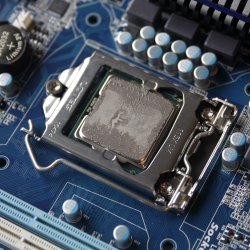
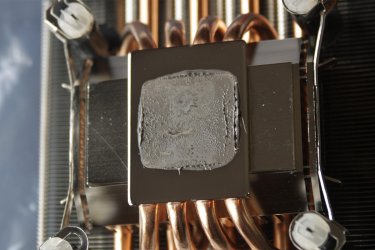
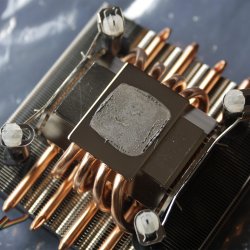
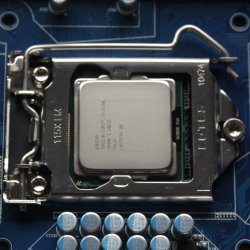
Here are some pics. The heatsink was fasten properly. Is that too much Arctic Silver?
 

Attachments

  • CPU-1.jpg
    CPU-1.jpg
    409.1 KB · Views: 5
  • CPU-2.jpg
    CPU-2.jpg
    276.6 KB · Views: 3
  • HS-1.jpg
    HS-1.jpg
    189 KB · Views: 4
  • HS-2.jpg
    HS-2.jpg
    332.5 KB · Views: 4

My Computer

Computer type
PC/Desktop
Computer Manufacturer/Model Number
Custom built 2011
OS
Windows 7 64-bit
CPU
Intel Core i5-2500K 3300 Mhz
Motherboard
Gigabyte P67A-UD3-B3
Memory
16Gb Patriot PC3-12800 1600 Mhz
Graphics Card(s)
EVGA GeForce GTX 560 Ti (Fermi)
Sound Card
On Motherboard
Monitor(s) Displays
Dell U2412M & NEC EA232WMi
Screen Resolution
DELL 1920x1200 - NEC 1920x1080
Hard Drives
Crucial 128 Gb SSD
Hitachi Deskstar 2Tb 7200 RPM 32MB Cache
Seagate Barracuda 500Gb 7200 RPM
Hitachi GST Deskstar 1.5TB 7200 RPM 64MB Cache
PSU
Seasonic M1211-620 Bronze
Case
Antec Solo
Cooling
Tuniq Tower 120 Extreme Rev 1
Keyboard
Apple
Mouse
Microsoft
Internet Speed
5mbs
Other Info
Sunbeam PL-RS-3 Rheosmart 3 Fan Controller 3.5" Bay 3 Channel 30W Fan Controller Panel
That is quite a bit of paste. With a quality heatsink like yours, you should not be seeing any "hills", nor should there be so much that it overlaps the side of the cpu. Try using a really small amount, then rubbing it in with a piece of Saran Wrap on your finger, or a rubber glove. There should just be a really thin film... not glops. Recall, it's only there to fill in microscopic holes, it's not there to act as another heatsink.
 

My Computer

OS
7 Ultimate x64
CPU
i5-2500k
Motherboard
Asus P8P67 Pro
Memory
8GB G.Skill Ripjaws X F3-12800CL7D-8GBXH 1866MHz 8-9-8-24
Graphics Card(s)
EVGA GTX 570 SC
Sound Card
X-Fi Titanium Fatality
Monitor(s) Displays
Samsung S27A550H 27" LED
Screen Resolution
1920x1080
Hard Drives
OCZ Vertex 3 120GB.
1TB Samsung F3.
2TB Samsung F4.
PSU
PC Power & Cooling Silencer 760
Case
Lian Li Lancool K62
Cooling
Thermalright Venomous X Black/Scythe S-Flex/Shin-Etsu X23
Keyboard
MS Natural Elite 4000 Ergonomic
Mouse
Logitech G500
Internet Speed
6MB/768
Other Info
Logitech Z-5500 505 watts.
D-Link DGL-4500.
Tripp-Lite Smart Pro 1500.
Thanks. I'm leaning towards a new heatsink but need one that isn't so tall; less than 150mm or about 6". Zalman makes some but I don't need LED lights but they seem good enough. The CM Hyper 212 is great but too tall. And, then they're the hydro-type cools. I only have one rear case fan so I'm not sure if that's doable as the radiator stacks to the back of it.
 

My Computer

Computer type
PC/Desktop
Computer Manufacturer/Model Number
Custom built 2011
OS
Windows 7 64-bit
CPU
Intel Core i5-2500K 3300 Mhz
Motherboard
Gigabyte P67A-UD3-B3
Memory
16Gb Patriot PC3-12800 1600 Mhz
Graphics Card(s)
EVGA GeForce GTX 560 Ti (Fermi)
Sound Card
On Motherboard
Monitor(s) Displays
Dell U2412M & NEC EA232WMi
Screen Resolution
DELL 1920x1200 - NEC 1920x1080
Hard Drives
Crucial 128 Gb SSD
Hitachi Deskstar 2Tb 7200 RPM 32MB Cache
Seagate Barracuda 500Gb 7200 RPM
Hitachi GST Deskstar 1.5TB 7200 RPM 64MB Cache
PSU
Seasonic M1211-620 Bronze
Case
Antec Solo
Cooling
Tuniq Tower 120 Extreme Rev 1
Keyboard
Apple
Mouse
Microsoft
Internet Speed
5mbs
Other Info
Sunbeam PL-RS-3 Rheosmart 3 Fan Controller 3.5" Bay 3 Channel 30W Fan Controller Panel
Agree with Fumz, small even thin layer with saran wrap or rubber glove on your finger.

Anytime you have excess on the sides like that means you have too much paste to start with, I would say half as much might still be too much.

Did you look at the link?
Some good pics of what it should look like.
In one of his tutorials he mentioned that he uses the finger with saran/rubber glove method.
Too much paste will impede the heat transfer, in a perfect world metal to metal contact is best but, not possible to get the perfectly flat, smooth finishes and correct pressure applied, so thermal paste is required.
 

My Computer

Computer type
PC/Desktop
Computer Manufacturer/Model Number
76~2.0
OS
Windows 7 Ult x64 - SP1/ Windows 8 Pro x64
CPU
Intel Core i5-3570K 4.6GHz
Motherboard
Gigabyte GA-Z77X UD3H, f18
Memory
8GB (2X4GB) DDR3 1600 Corsair Vengeance CL8 1.5v
Graphics Card(s)
Sapphire HD 7770 Vapor-X OC 1GB DDR5
Sound Card
Onboard VIA VT2021
Monitor(s) Displays
22" LCD Dell
Screen Resolution
1680x1050
Hard Drives
Samsung 840Pro 128GB SSD,
Seagate Barracuda 500GB SATA2 7200rpm 32MB cache, Seagate Barracuda 1TB SATA2 7200rpm 32MB cache,
PSU
Corsair HX650W
Case
Cooler Master Storm Scout
Cooling
Corsair H80 2x12cm Noctua NF P12 , 2x14cm case fans
Keyboard
Logitech Wave
Mouse
CM Sentinel
Internet Speed
Dismal
Antivirus
Avast
Browser
Opera Next
Other Info
Haswell laptop: HP Envy 17t-j, i7-4700MQ, GeForce 740M 2GB DDR3, 17.3" Full HD 1920x1080, 16GB RAM, Samsung 840 Pro 128GB, 1TB Hitachi 7200 HDD,
Desktop: eSATA ports,
External eSATA Seagate 500GB SATA2 7200rpm,
External WD USB 500GB
Agree with Fumz, small even thin layer with saran wrap or rubber glove on your finger.

Anytime you have excess on the sides like that means you have too much paste to start with, I would say half as much might still be too much.

Did you look at the link?
Some good pics of what it should look like.
In one of his tutorials he mentioned that he uses the finger with saran/rubber glove method.
Too much paste will impede the heat transfer, in a perfect world metal to metal contact is best but, not possible to get the perfectly flat, smooth finishes and correct pressure applied, so thermal paste is required.

Yes, I did read it. It seemed one method doesn't fit all types of HS. After illustrating several methods that worked well on some HS but not all, he explained why he felt his method assured full coverage & proper amount. Thin is good.

Actually, I was waiting for feedback but also considering purchasing a different heatsink. It's just a difficult install that I dread doing. I guess I should as least reinstall this heatsink to see if that helps temps before reinvesting in something different. If, for no other reason, it will answer the question if too much paste was the problem.
 

My Computer

Computer type
PC/Desktop
Computer Manufacturer/Model Number
Custom built 2011
OS
Windows 7 64-bit
CPU
Intel Core i5-2500K 3300 Mhz
Motherboard
Gigabyte P67A-UD3-B3
Memory
16Gb Patriot PC3-12800 1600 Mhz
Graphics Card(s)
EVGA GeForce GTX 560 Ti (Fermi)
Sound Card
On Motherboard
Monitor(s) Displays
Dell U2412M & NEC EA232WMi
Screen Resolution
DELL 1920x1200 - NEC 1920x1080
Hard Drives
Crucial 128 Gb SSD
Hitachi Deskstar 2Tb 7200 RPM 32MB Cache
Seagate Barracuda 500Gb 7200 RPM
Hitachi GST Deskstar 1.5TB 7200 RPM 64MB Cache
PSU
Seasonic M1211-620 Bronze
Case
Antec Solo
Cooling
Tuniq Tower 120 Extreme Rev 1
Keyboard
Apple
Mouse
Microsoft
Internet Speed
5mbs
Other Info
Sunbeam PL-RS-3 Rheosmart 3 Fan Controller 3.5" Bay 3 Channel 30W Fan Controller Panel
That's a good idea, re-install the CPU cooler with less thermal paste, you may find that the cooling is good.
 

My Computer

Computer type
PC/Desktop
Computer Manufacturer/Model Number
76~2.0
OS
Windows 7 Ult x64 - SP1/ Windows 8 Pro x64
CPU
Intel Core i5-3570K 4.6GHz
Motherboard
Gigabyte GA-Z77X UD3H, f18
Memory
8GB (2X4GB) DDR3 1600 Corsair Vengeance CL8 1.5v
Graphics Card(s)
Sapphire HD 7770 Vapor-X OC 1GB DDR5
Sound Card
Onboard VIA VT2021
Monitor(s) Displays
22" LCD Dell
Screen Resolution
1680x1050
Hard Drives
Samsung 840Pro 128GB SSD,
Seagate Barracuda 500GB SATA2 7200rpm 32MB cache, Seagate Barracuda 1TB SATA2 7200rpm 32MB cache,
PSU
Corsair HX650W
Case
Cooler Master Storm Scout
Cooling
Corsair H80 2x12cm Noctua NF P12 , 2x14cm case fans
Keyboard
Logitech Wave
Mouse
CM Sentinel
Internet Speed
Dismal
Antivirus
Avast
Browser
Opera Next
Other Info
Haswell laptop: HP Envy 17t-j, i7-4700MQ, GeForce 740M 2GB DDR3, 17.3" Full HD 1920x1080, 16GB RAM, Samsung 840 Pro 128GB, 1TB Hitachi 7200 HDD,
Desktop: eSATA ports,
External eSATA Seagate 500GB SATA2 7200rpm,
External WD USB 500GB
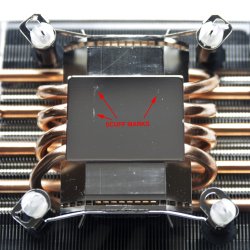
I thought I'd post these prior to paste & reinstall. Cleaning the HS has revealed some scuff marks (other speckles are dust); CPU looks OK. Scuff marks are no surprise as this HS was a bit of a wrestling match to install. Hope the paste fills that.
 

Attachments

  • CPU clean.jpg
    CPU clean.jpg
    181.2 KB · Views: 2
  • HS cleaned.jpg
    HS cleaned.jpg
    238.7 KB · Views: 6

My Computer

Computer type
PC/Desktop
Computer Manufacturer/Model Number
Custom built 2011
OS
Windows 7 64-bit
CPU
Intel Core i5-2500K 3300 Mhz
Motherboard
Gigabyte P67A-UD3-B3
Memory
16Gb Patriot PC3-12800 1600 Mhz
Graphics Card(s)
EVGA GeForce GTX 560 Ti (Fermi)
Sound Card
On Motherboard
Monitor(s) Displays
Dell U2412M & NEC EA232WMi
Screen Resolution
DELL 1920x1200 - NEC 1920x1080
Hard Drives
Crucial 128 Gb SSD
Hitachi Deskstar 2Tb 7200 RPM 32MB Cache
Seagate Barracuda 500Gb 7200 RPM
Hitachi GST Deskstar 1.5TB 7200 RPM 64MB Cache
PSU
Seasonic M1211-620 Bronze
Case
Antec Solo
Cooling
Tuniq Tower 120 Extreme Rev 1
Keyboard
Apple
Mouse
Microsoft
Internet Speed
5mbs
Other Info
Sunbeam PL-RS-3 Rheosmart 3 Fan Controller 3.5" Bay 3 Channel 30W Fan Controller Panel
Back
Top