Overheating and unusually high CPU usage

onex

New member
Local time
2:45 PM
Messages
7
I've been noticing for the past few months (or more, this has gone on for so long) that my PC has been consuming an unusually high amount of power despite the fact my usage hasn't changed much since buying this computer (web browsing, creating documents, absolutely nothing remotely intensive). Initially it would take up about 5-10% max of CPU now lately I'm seeing that this is the new norm:
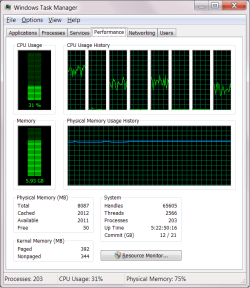
taskmgr screenshot.png

And the computer is always hot with the fans running loudly which didn't use to be the case. I make sure that the vents are never obstructed, I've run multiple virus and malware scans, nothing turns up. As I've had this laptop for two years now, I'd like to keep using it for at least another two years and I want to know if there are any underlying issues that I need to take immediate action for.

EDIT: Also forgot to mention that performance has slowed down significantly on my PC. I've no idea why either.
 

My Computer

Computer type
Laptop
Computer Manufacturer/Model Number
Samsung Series 5
OS
Windows 7 Home Premium 64 bit
CPU
Intel Core i7 3610QM 2.30 GHz
Memory
8 GB
Graphics Card(s)
Nvidia
Sound Card
RealTek High Definition Audio
Screen Resolution
1920 x 1080
Hard Drives
1 TB, 5400 RPM
Mouse
Synaptics touchpad/Logitech mouse
Antivirus
Avast/Malwarebytes' Anti-Malware
Browser
Chrome
Hi onex and welcome to SevenForums!

Great with a screenshot but we need one from the processes tab, sorted on the CPU column in descending order. Mask any private data from the screenshot if you want that.
 

My Computer

Computer type
Laptop
Computer Manufacturer/Model Number
HP Elitebook 8540p
OS
Windows 7 Pro 32
CPU
Intel(R) Core(TM) i5 CPU M 540 @ 2.53GHz
Motherboard
Hewlett-Packard 1521
Memory
4,00 GB (Usable 2,98)
Graphics Card(s)
NVIDIA NVS 5100M
Sound Card
NVIDIA High Definition Audio
Screen Resolution
1600x900
Hard Drives
INTEL SSDSA2CW120G3
Antivirus
F-Secure Internet Security
Browser
IE, Firefox, Opera
Other Info
Sandboxie,
SRP (Software Restriction Policy),
EMET (Enhanced Mitigation Experience Toolkit),
WFC (Windows Firewall Control by BiniSoft),
Malwarebytes Premium
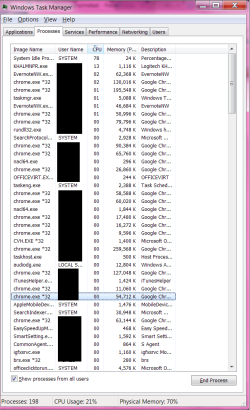
Hopefully this is informative enough (let me know if I also have to screenshot the processes that didn't show).

taskmgrscrnshot.png
 

My Computer

Computer type
Laptop
Computer Manufacturer/Model Number
Samsung Series 5
OS
Windows 7 Home Premium 64 bit
CPU
Intel Core i7 3610QM 2.30 GHz
Memory
8 GB
Graphics Card(s)
Nvidia
Sound Card
RealTek High Definition Audio
Screen Resolution
1920 x 1080
Hard Drives
1 TB, 5400 RPM
Mouse
Synaptics touchpad/Logitech mouse
Antivirus
Avast/Malwarebytes' Anti-Malware
Browser
Chrome
hi, whens the last time you cleaned out the laptop? might want to get some compressed air and clean out the vents and fan area.
 

My Computer

Computer type
PC/Desktop
Computer Manufacturer/Model Number
dell xps 9000
OS
win 10
That's better but you should probably watch that screen for a while to see if any other process comes up that takes much CPU. I mean the info from this screenshot could have changed the very next second already. Regarding the max one in this screenshot there's a thread here that maybe can help:
KHALMNPR.EXE is using 98% of CPU - Logitech Forums
 

My Computer

Computer type
Laptop
Computer Manufacturer/Model Number
HP Elitebook 8540p
OS
Windows 7 Pro 32
CPU
Intel(R) Core(TM) i5 CPU M 540 @ 2.53GHz
Motherboard
Hewlett-Packard 1521
Memory
4,00 GB (Usable 2,98)
Graphics Card(s)
NVIDIA NVS 5100M
Sound Card
NVIDIA High Definition Audio
Screen Resolution
1600x900
Hard Drives
INTEL SSDSA2CW120G3
Antivirus
F-Secure Internet Security
Browser
IE, Firefox, Opera
Other Info
Sandboxie,
SRP (Software Restriction Policy),
EMET (Enhanced Mitigation Experience Toolkit),
WFC (Windows Firewall Control by BiniSoft),
Malwarebytes Premium
hi, whens the last time you cleaned out the laptop? might want to get some compressed air and clean out the vents and fan area.

I'm rather lazy about that sort of thing, you're right. I'll clean out the fans and hope it helps.

That's better but you should probably watch that screen for a while to see if any other process comes up that takes much CPU. I mean the info from this screenshot could have changed the very next second already. Regarding the max one in this screenshot there's a thread here that maybe can help:
KHALMNPR.EXE is using 98% of CPU - Logitech Forums

I'm checking that out too, but the problem began long before I installed my Logitech mouse.

Oh and it's still at the top of the CPU usage. Hasn't faltered from the top spot at all.
 

My Computer

Computer type
Laptop
Computer Manufacturer/Model Number
Samsung Series 5
OS
Windows 7 Home Premium 64 bit
CPU
Intel Core i7 3610QM 2.30 GHz
Memory
8 GB
Graphics Card(s)
Nvidia
Sound Card
RealTek High Definition Audio
Screen Resolution
1920 x 1080
Hard Drives
1 TB, 5400 RPM
Mouse
Synaptics touchpad/Logitech mouse
Antivirus
Avast/Malwarebytes' Anti-Malware
Browser
Chrome

My Computer

Computer type
Laptop
Computer Manufacturer/Model Number
HP Elitebook 8540p
OS
Windows 7 Pro 32
CPU
Intel(R) Core(TM) i5 CPU M 540 @ 2.53GHz
Motherboard
Hewlett-Packard 1521
Memory
4,00 GB (Usable 2,98)
Graphics Card(s)
NVIDIA NVS 5100M
Sound Card
NVIDIA High Definition Audio
Screen Resolution
1600x900
Hard Drives
INTEL SSDSA2CW120G3
Antivirus
F-Secure Internet Security
Browser
IE, Firefox, Opera
Other Info
Sandboxie,
SRP (Software Restriction Policy),
EMET (Enhanced Mitigation Experience Toolkit),
WFC (Windows Firewall Control by BiniSoft),
Malwarebytes Premium
Thanks, I've installed and so far I see nothing that indicates I currently have malware. Although the only ones I see without signatures are preinstalled programs from Microsoft. And a couple from third party programs that state the signature has been revoked.

I have had malware in the past, but I caught them quickly and removed them. Is is possible that my system is still infected and I just can't see it?

Edit: I just enabled Virus Total, and it did find malware.

Trojan.Win32.Krap.1!O
Trojan/Win32.SGeneric
PE:Malware.XPACK-HIE/Heur!1.9C48

I have a hard time tracking down exactly which programs are hosting these viruses, but it appears to be attached to Bluetooth enabling programs... no idea how to take care of this (well I do, but removing viruses manually is a PITA for me).
 

My Computer

Computer type
Laptop
Computer Manufacturer/Model Number
Samsung Series 5
OS
Windows 7 Home Premium 64 bit
CPU
Intel Core i7 3610QM 2.30 GHz
Memory
8 GB
Graphics Card(s)
Nvidia
Sound Card
RealTek High Definition Audio
Screen Resolution
1920 x 1080
Hard Drives
1 TB, 5400 RPM
Mouse
Synaptics touchpad/Logitech mouse
Antivirus
Avast/Malwarebytes' Anti-Malware
Browser
Chrome
As I mentioned in the Tutorial, you should also look at how many anti-virus products detected anything. If it's only 1 or 2 there's a big chance that they are false positives (wrongly detected). If you ignore these and you still have detections left then I suggest you create a new thread in System Security to get help with malware cleaning. Include which products you have scanned with so far. There are lots of great tools to try and by posting in that forum other members can give you detailed instructions on how to use them and also how to interpret the scanning logs for every program they recommend.

Regarding Process Explorer I haven't noticed any unsigned Microsoft programs myself so I'm not sure if that's normal or not. If I discovered any revoked signatures I would investigate why they've been revoked. One reason could be that these companies once produced good programs but not anymore so they've lost their digital certificates.
 

My Computer

Computer type
Laptop
Computer Manufacturer/Model Number
HP Elitebook 8540p
OS
Windows 7 Pro 32
CPU
Intel(R) Core(TM) i5 CPU M 540 @ 2.53GHz
Motherboard
Hewlett-Packard 1521
Memory
4,00 GB (Usable 2,98)
Graphics Card(s)
NVIDIA NVS 5100M
Sound Card
NVIDIA High Definition Audio
Screen Resolution
1600x900
Hard Drives
INTEL SSDSA2CW120G3
Antivirus
F-Secure Internet Security
Browser
IE, Firefox, Opera
Other Info
Sandboxie,
SRP (Software Restriction Policy),
EMET (Enhanced Mitigation Experience Toolkit),
WFC (Windows Firewall Control by BiniSoft),
Malwarebytes Premium
Just a note:

Post #3 shows 198 processes running.
Normally that is 50 to 70 processes running.
 

My Computer

Computer type
PC/Desktop
Computer Manufacturer/Model Number
Home made Desktop
OS
Windows 10 Pro. 64/ version 1709 Windows 7 Pro/64
CPU
Intel i7-6800K @ 4.3
Motherboard
ASUS X-99 Deluxe II
Memory
Corsair Platinum 16 gig @2400
Graphics Card(s)
EVGA GTX 1070 OC
Monitor(s) Displays
Asus 27" LED LCD/VE278Q
Screen Resolution
1920-1080 or 1280-720 HDMI
Hard Drives
INTEL SSD 730-240 Gb Sata 3.0/
PSU
EVGA Platium 1200W
Case
Phanteks Luxe Tempered Glass 8 fans/ one radiator
Cooling
XSPC/ Water Cooled CPU
Keyboard
Das 4 Professional
Mouse
Logitech M705/MX Anywhere 2-S
Internet Speed
100 mbits
Antivirus
Microsoft Security Essentials/ Malwarebytes Premium 3.0/ SAS
Browser
I.E. 11 default/Firefox/ ISP Time Warner Cable/Spectrum
Other Info
LG BluRay Burner/
Sound system-KLipsch-THX/
Icy Dock ssd Hot Swap bays.
Just a note:

Post #3 shows 198 processes running.
Normally that is 50 to 70 processes running.
Observant, thanks! I hadn't noticed. Yes, only that fact would probably cause problems on many systems. I have 80 processes running ATM.
 

My Computer

Computer type
Laptop
Computer Manufacturer/Model Number
HP Elitebook 8540p
OS
Windows 7 Pro 32
CPU
Intel(R) Core(TM) i5 CPU M 540 @ 2.53GHz
Motherboard
Hewlett-Packard 1521
Memory
4,00 GB (Usable 2,98)
Graphics Card(s)
NVIDIA NVS 5100M
Sound Card
NVIDIA High Definition Audio
Screen Resolution
1600x900
Hard Drives
INTEL SSDSA2CW120G3
Antivirus
F-Secure Internet Security
Browser
IE, Firefox, Opera
Other Info
Sandboxie,
SRP (Software Restriction Policy),
EMET (Enhanced Mitigation Experience Toolkit),
WFC (Windows Firewall Control by BiniSoft),
Malwarebytes Premium
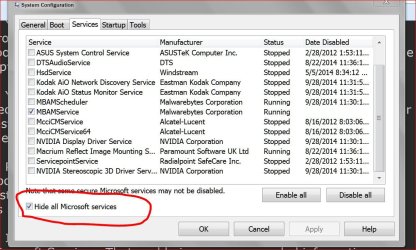
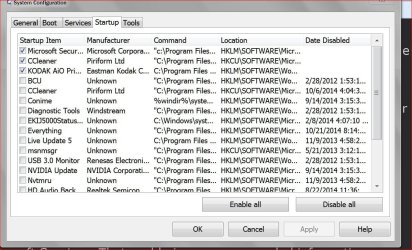
msconfic/Startup and Non Microsoft Services should be interesting.
 

My Computer

Computer type
PC/Desktop
Computer Manufacturer/Model Number
Home made Desktop
OS
Windows 10 Pro. 64/ version 1709 Windows 7 Pro/64
CPU
Intel i7-6800K @ 4.3
Motherboard
ASUS X-99 Deluxe II
Memory
Corsair Platinum 16 gig @2400
Graphics Card(s)
EVGA GTX 1070 OC
Monitor(s) Displays
Asus 27" LED LCD/VE278Q
Screen Resolution
1920-1080 or 1280-720 HDMI
Hard Drives
INTEL SSD 730-240 Gb Sata 3.0/
PSU
EVGA Platium 1200W
Case
Phanteks Luxe Tempered Glass 8 fans/ one radiator
Cooling
XSPC/ Water Cooled CPU
Keyboard
Das 4 Professional
Mouse
Logitech M705/MX Anywhere 2-S
Internet Speed
100 mbits
Antivirus
Microsoft Security Essentials/ Malwarebytes Premium 3.0/ SAS
Browser
I.E. 11 default/Firefox/ ISP Time Warner Cable/Spectrum
Other Info
LG BluRay Burner/
Sound system-KLipsch-THX/
Icy Dock ssd Hot Swap bays.
As I mentioned in the Tutorial, you should also look at how many anti-virus products detected anything. If it's only 1 or 2 there's a big chance that they are false positives (wrongly detected). If you ignore these and you still have detections left then I suggest you create a new thread in System Security to get help with malware cleaning. Include which products you have scanned with so far. There are lots of great tools to try and by posting in that forum other members can give you detailed instructions on how to use them and also how to interpret the scanning logs for every program they recommend.

Regarding Process Explorer I haven't noticed any unsigned Microsoft programs myself so I'm not sure if that's normal or not. If I discovered any revoked signatures I would investigate why they've been revoked. One reason could be that these companies once produced good programs but not anymore so they've lost their digital certificates.

I scanned for viruses with Malwarebytes and Microsoft Safety Scanner, they turned up nothing. Haven't scanned with Avast in a while, but nothing has alerted me of any threats. I haven't scanned in Safe Mode, though.

Just a note:

Post #3 shows 198 processes running.
Normally that is 50 to 70 processes running.

Probably because I had two user accounts logged on simultaneously. Today I had 270 processes running because of a third account being open.
 

My Computer

Computer type
Laptop
Computer Manufacturer/Model Number
Samsung Series 5
OS
Windows 7 Home Premium 64 bit
CPU
Intel Core i7 3610QM 2.30 GHz
Memory
8 GB
Graphics Card(s)
Nvidia
Sound Card
RealTek High Definition Audio
Screen Resolution
1920 x 1080
Hard Drives
1 TB, 5400 RPM
Mouse
Synaptics touchpad/Logitech mouse
Antivirus
Avast/Malwarebytes' Anti-Malware
Browser
Chrome
You should also consider using a different antivirus then Avast
 

My Computer

Computer type
PC/Desktop
Computer Manufacturer/Model Number
Home Made
OS
Windows 7 Ultimate x64
CPU
Q6600 3.1ghz
Motherboard
Gigabyte GA-P35-DS3L
Memory
Kingston DDR2 6400 8GB
Graphics Card(s)
Gigabyte Radeon HD 6850 1GB 256-Bit
Sound Card
On board
Monitor(s) Displays
Acer X243H
Screen Resolution
1920x1080
Hard Drives
Intel 330 120GB SSD
WD 2TB 7200
PSU
Thermaltake Toughpower 750W Semi Modular
Case
Modified Alienware
Keyboard
A4Tech
Mouse
Gigabyte ECO600
Antivirus
Comodo
Browser
Cyberfox
You should also consider using a different antivirus then Avast

Any particular reason why? And what would you recommend in lieu of it?
 

My Computer

Computer type
Laptop
Computer Manufacturer/Model Number
Samsung Series 5
OS
Windows 7 Home Premium 64 bit
CPU
Intel Core i7 3610QM 2.30 GHz
Memory
8 GB
Graphics Card(s)
Nvidia
Sound Card
RealTek High Definition Audio
Screen Resolution
1920 x 1080
Hard Drives
1 TB, 5400 RPM
Mouse
Synaptics touchpad/Logitech mouse
Antivirus
Avast/Malwarebytes' Anti-Malware
Browser
Chrome
Avast seems to have bloated itself beyond reason and MSE or Panda Cloud with the Windows Firewall or Comodo free Security Suite seem to be better propositions
 

My Computer

Computer type
PC/Desktop
Computer Manufacturer/Model Number
Home Made
OS
Windows 7 Ultimate x64
CPU
Q6600 3.1ghz
Motherboard
Gigabyte GA-P35-DS3L
Memory
Kingston DDR2 6400 8GB
Graphics Card(s)
Gigabyte Radeon HD 6850 1GB 256-Bit
Sound Card
On board
Monitor(s) Displays
Acer X243H
Screen Resolution
1920x1080
Hard Drives
Intel 330 120GB SSD
WD 2TB 7200
PSU
Thermaltake Toughpower 750W Semi Modular
Case
Modified Alienware
Keyboard
A4Tech
Mouse
Gigabyte ECO600
Antivirus
Comodo
Browser
Cyberfox
Is you system still overheating?
If it is have you done anything to solve that problem?
 

My Computer

Computer type
PC/Desktop
Computer Manufacturer/Model Number
Home made Desktop
OS
Windows 10 Pro. 64/ version 1709 Windows 7 Pro/64
CPU
Intel i7-6800K @ 4.3
Motherboard
ASUS X-99 Deluxe II
Memory
Corsair Platinum 16 gig @2400
Graphics Card(s)
EVGA GTX 1070 OC
Monitor(s) Displays
Asus 27" LED LCD/VE278Q
Screen Resolution
1920-1080 or 1280-720 HDMI
Hard Drives
INTEL SSD 730-240 Gb Sata 3.0/
PSU
EVGA Platium 1200W
Case
Phanteks Luxe Tempered Glass 8 fans/ one radiator
Cooling
XSPC/ Water Cooled CPU
Keyboard
Das 4 Professional
Mouse
Logitech M705/MX Anywhere 2-S
Internet Speed
100 mbits
Antivirus
Microsoft Security Essentials/ Malwarebytes Premium 3.0/ SAS
Browser
I.E. 11 default/Firefox/ ISP Time Warner Cable/Spectrum
Other Info
LG BluRay Burner/
Sound system-KLipsch-THX/
Icy Dock ssd Hot Swap bays.
The issue has not yet been resolved, and I'm at a loss as to what to do. None of my virus scans so far indicate any malware.
 

My Computer

Computer type
Laptop
Computer Manufacturer/Model Number
Samsung Series 5
OS
Windows 7 Home Premium 64 bit
CPU
Intel Core i7 3610QM 2.30 GHz
Memory
8 GB
Graphics Card(s)
Nvidia
Sound Card
RealTek High Definition Audio
Screen Resolution
1920 x 1080
Hard Drives
1 TB, 5400 RPM
Mouse
Synaptics touchpad/Logitech mouse
Antivirus
Avast/Malwarebytes' Anti-Malware
Browser
Chrome
There have been some suggestions from our members that you have either sloughed off or didn't mention the results when you tried.
So I will bring them up again.

1. Have you physically cleaned the inside of the the laptop?

2. You are running to many processes. Any laptop running that many processes at one time is going to get hot. Laptop have very poor cooling. You give excuses as more users. How many users can use one laptop at one time.

3. You may or may not be infected. You should consider using our Security section on this form to let them guide you through the proper testing. They will then when you follow instruction be able to analyze the logs from the security scans.

4. Please remember you are a new member and we know very little about your expertise so at times some of the questions and instructions might be a little noobe. We can only help those that help us help them.

5. I would like you to post pictures of msconfig/Startup and NON Microsoft Services. That could give us some needed information.

Examples:

Services.JPG

Start Ups.JPG
 

My Computer

Computer type
PC/Desktop
Computer Manufacturer/Model Number
Home made Desktop
OS
Windows 10 Pro. 64/ version 1709 Windows 7 Pro/64
CPU
Intel i7-6800K @ 4.3
Motherboard
ASUS X-99 Deluxe II
Memory
Corsair Platinum 16 gig @2400
Graphics Card(s)
EVGA GTX 1070 OC
Monitor(s) Displays
Asus 27" LED LCD/VE278Q
Screen Resolution
1920-1080 or 1280-720 HDMI
Hard Drives
INTEL SSD 730-240 Gb Sata 3.0/
PSU
EVGA Platium 1200W
Case
Phanteks Luxe Tempered Glass 8 fans/ one radiator
Cooling
XSPC/ Water Cooled CPU
Keyboard
Das 4 Professional
Mouse
Logitech M705/MX Anywhere 2-S
Internet Speed
100 mbits
Antivirus
Microsoft Security Essentials/ Malwarebytes Premium 3.0/ SAS
Browser
I.E. 11 default/Firefox/ ISP Time Warner Cable/Spectrum
Other Info
LG BluRay Burner/
Sound system-KLipsch-THX/
Icy Dock ssd Hot Swap bays.
Back
Top