Overheating laptop

misago

New member
Local time
1:47 AM
Messages
5
My laptop starts to overheat quickly when I begin browsing, but if I reboot, it cools down just as fast. Then work offline for awhile without any heat, but if I get back online and browse, it starts to heat up again. Reboot, cools back down. And so on. Cleared cache, browsing history over and over, shutdown, powerup. Lightly blew air around vents, etc. This just started couple days ago. Never a single problem with this laptop. Only happens when accessing internet. Use my own Jetpack for access. Newer model lenovo. Any theories?
 

My Computer

Computer type
PC/Desktop
Computer Manufacturer/Model Number
lenovo
OS
7 professional 64bit
CPU
?
Motherboard
?
Memory
?
Graphics Card(s)
?
Hard Drives
?
Antivirus
?
Browser
mozilla firefox
Hello misago mate follow this
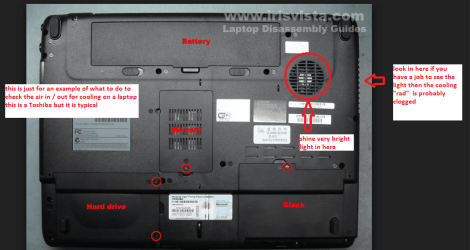
CLEANING A LAPTOP FAN & COOLER RAD
The thing you do is to turn over the laptop and shine a very bright light into the air intake aperture (you will see the fan there) and then while doing that look at the outlet vent on the end of the laptop you should see the light quite clearly shining through the cooling " radiator" if not - it is clogged and will need cleaning as will probably the fan opening.
You can do this by blowing it out using a compressed air can in short bursts.
BUT ONE WORD OF WARNING DO NOT blow the air into the fan opening without inserting say a plastic rod or large cable tie to stop the fan from spinning as the air blast will spin the fan at a very high speed that it is not designed to take and may wreck the bearing!!
To clean the slots in the radiator use a pipe cleaner or one of those craft covered wire sticks - they are referred to as chenille sticks - see pic. But do be very careful not to be overly heavy handed you will find it might take a second or two or a few minutes to clear the heavier build ups.
 

Attachments

  • LAPTOP VENTING.PNG
    LAPTOP VENTING.PNG
    171.1 KB · Views: 2
  • CHINELLE.PNG
    CHINELLE.PNG
    66.6 KB · Views: 44

My Computer

Computer type
PC/Desktop
Computer Manufacturer/Model Number
Own build (new) Desk1 / Asus ROG Win 7 / Desk2 1st build
OS
Desk1 7 Home Prem / Desk2 10 Pro / Main lap Asus ROG 10 Pro 2 laptop Toshiba 7 Pro Asus P2520 7 & 10
CPU
Desk1 i5 3750K / Laptop i7 GTX 860M / Desk2 i5 2500
Motherboard
Desk1 Asus P877-V / Desk2 Gigabyte H67 UD3H / Laptop ?
Memory
Desk1 8GB (1866) / Desk2 16GB (1333) / Laptop 8Gb DDR3
Graphics Card(s)
Desk 1& 2NVidia GTX 650 & Laptops on board Intel
Sound Card
Desk 1 & 2 -XONAR DG Realtek High Def audio Laptop
Monitor(s) Displays
Desk 1 Benq HD 2450 / Desk2 Philips 24" / Laptop 17.5"
Screen Resolution
1920x1080 D1 & D2 & Laptop 1
Hard Drives
Desk1 Samsung 120GB 830 SSD
Asus ROG 256GB 850 Pro SSD
Desk2 Samsung 840 256 SSD
Toshiba 120GB EVO
PSU
Desk 1 Corsair HX 1050/ Laptop ? / Desk 2 Corsair HX 650
Case
Desk 1 Cooler HAF XM ? Toshiba laptop / Desk2 Coolermaster
Cooling
Fans on all Desk1 -2 Desk2 - all Coolermasters 5 Laptop ?
Keyboard
Desk 1 MS Sidewinder X6 Desk 2 MS Sidewinder X 4
Mouse
Desk 1&2 - Gigabyte MS 900 gamer - laptop - Logitec wireless
Internet Speed
ADSL2+
Other Info
One other Desktop (tester) and spare Toshba laptop both with SSD's
Running Kaspersky 2016 ISS on all machines config'd identically
Logitec audio stereo systems on each machine (x3)
Canon MG5250MFC
Router/modem TP-Link running WPA2SK
ICIT2LOL,
Thanks for the suggestions. Unfortunately it must be something else. Bottom of my laptop does not have an obvious fan location as listed with your photo, but the vents I examined that were there don't look like they are clogged even a little. Even so, I lightly blew air thru the area vents and did not seem to help. Someone was telling me the battery is getting weak and that might be the cause. Just not sure yet. thanks again for the help.
 

My Computer

Computer type
PC/Desktop
Computer Manufacturer/Model Number
lenovo
OS
7 professional 64bit
CPU
?
Motherboard
?
Memory
?
Graphics Card(s)
?
Hard Drives
?
Antivirus
?
Browser
mozilla firefox
Ok mate yes it could be that too Lithium ion batteries do deteriorate over time but usually a lengthy time as my old Toshiba still has to original battery of six years.

Now having said that if that battery has been left to run absolutely flat quite a few times then that process can really age the battery ie shorten the working life.
There are plenty of reasonable priced batteries available EBay I know carries a lot.

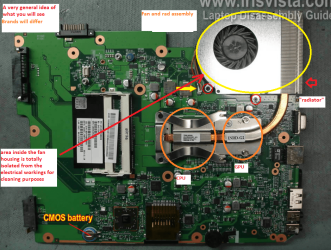
If it were me I would redo the thermal compound on the CPU and GPU chips because they are the two most likely components that will cause the machine to heat up that quickly.
Now I don't know if you are confident enough to do that but it is like I said where I would start.

To give you a rough idea where I mean I have attached two pics and this is a typical laptop setup the compound goes between the chips and the heat spreader.
 

Attachments

  • GPU22.PNG
    GPU22.PNG
    270.4 KB · Views: 0
  • LAPBOARD.PNG
    LAPBOARD.PNG
    372.4 KB · Views: 1

My Computer

Computer type
PC/Desktop
Computer Manufacturer/Model Number
Own build (new) Desk1 / Asus ROG Win 7 / Desk2 1st build
OS
Desk1 7 Home Prem / Desk2 10 Pro / Main lap Asus ROG 10 Pro 2 laptop Toshiba 7 Pro Asus P2520 7 & 10
CPU
Desk1 i5 3750K / Laptop i7 GTX 860M / Desk2 i5 2500
Motherboard
Desk1 Asus P877-V / Desk2 Gigabyte H67 UD3H / Laptop ?
Memory
Desk1 8GB (1866) / Desk2 16GB (1333) / Laptop 8Gb DDR3
Graphics Card(s)
Desk 1& 2NVidia GTX 650 & Laptops on board Intel
Sound Card
Desk 1 & 2 -XONAR DG Realtek High Def audio Laptop
Monitor(s) Displays
Desk 1 Benq HD 2450 / Desk2 Philips 24" / Laptop 17.5"
Screen Resolution
1920x1080 D1 & D2 & Laptop 1
Hard Drives
Desk1 Samsung 120GB 830 SSD
Asus ROG 256GB 850 Pro SSD
Desk2 Samsung 840 256 SSD
Toshiba 120GB EVO
PSU
Desk 1 Corsair HX 1050/ Laptop ? / Desk 2 Corsair HX 650
Case
Desk 1 Cooler HAF XM ? Toshiba laptop / Desk2 Coolermaster
Cooling
Fans on all Desk1 -2 Desk2 - all Coolermasters 5 Laptop ?
Keyboard
Desk 1 MS Sidewinder X6 Desk 2 MS Sidewinder X 4
Mouse
Desk 1&2 - Gigabyte MS 900 gamer - laptop - Logitec wireless
Internet Speed
ADSL2+
Other Info
One other Desktop (tester) and spare Toshba laptop both with SSD's
Running Kaspersky 2016 ISS on all machines config'd identically
Logitec audio stereo systems on each machine (x3)
Canon MG5250MFC
Router/modem TP-Link running WPA2SK
I purchased and have used for some time now for each laptop a usb-powered external cooling assembly [you can get these with one giant fan or twin fans]. In addition to what you do or decide not to do inside the laptop, having and using a cooling assembly really helps keep the temp down.
 

My Computer

Computer type
PC/Desktop
Computer Manufacturer/Model Number
Antec desktop; Acer Aspire laptops
OS
Windows 7 Professional 64-bit
CPU
Desktop i5; Acers i5 & i7
Memory
desktop 16GB; 1 Acer 8GB & 1 Acer 16GB
Hard Drives
1TB split into 2 equal partitions [OS and data] usable by RJS
Internet Speed
AT&T DSL
Browser
FF, GChrome, msIE
Other Info
Windows 7 Firewall, Emsisoft AM/AV, MSE [scan-only], SpywareBlaster, Ruiware/BillP combine
I purchased and have used for some time now for each laptop a usb-powered external cooling assembly [you can get these with one giant fan or twin fans]. In addition to what you do or decide not to do inside the laptop, having and using a cooling assembly really helps keep the temp down.
Yes now there is a god option.
 

My Computer

Computer type
PC/Desktop
Computer Manufacturer/Model Number
Own build (new) Desk1 / Asus ROG Win 7 / Desk2 1st build
OS
Desk1 7 Home Prem / Desk2 10 Pro / Main lap Asus ROG 10 Pro 2 laptop Toshiba 7 Pro Asus P2520 7 & 10
CPU
Desk1 i5 3750K / Laptop i7 GTX 860M / Desk2 i5 2500
Motherboard
Desk1 Asus P877-V / Desk2 Gigabyte H67 UD3H / Laptop ?
Memory
Desk1 8GB (1866) / Desk2 16GB (1333) / Laptop 8Gb DDR3
Graphics Card(s)
Desk 1& 2NVidia GTX 650 & Laptops on board Intel
Sound Card
Desk 1 & 2 -XONAR DG Realtek High Def audio Laptop
Monitor(s) Displays
Desk 1 Benq HD 2450 / Desk2 Philips 24" / Laptop 17.5"
Screen Resolution
1920x1080 D1 & D2 & Laptop 1
Hard Drives
Desk1 Samsung 120GB 830 SSD
Asus ROG 256GB 850 Pro SSD
Desk2 Samsung 840 256 SSD
Toshiba 120GB EVO
PSU
Desk 1 Corsair HX 1050/ Laptop ? / Desk 2 Corsair HX 650
Case
Desk 1 Cooler HAF XM ? Toshiba laptop / Desk2 Coolermaster
Cooling
Fans on all Desk1 -2 Desk2 - all Coolermasters 5 Laptop ?
Keyboard
Desk 1 MS Sidewinder X6 Desk 2 MS Sidewinder X 4
Mouse
Desk 1&2 - Gigabyte MS 900 gamer - laptop - Logitec wireless
Internet Speed
ADSL2+
Other Info
One other Desktop (tester) and spare Toshba laptop both with SSD's
Running Kaspersky 2016 ISS on all machines config'd identically
Logitec audio stereo systems on each machine (x3)
Canon MG5250MFC
Router/modem TP-Link running WPA2SK
ICIT & Roland, Thanks to you both for the information. ICIT I think that procedure you described is probably beyond my comfort level:D but perhaps I'll open up an older laptop I have just to get familiar with those kinds of steps. The puzzling part of this is that the bottom of my machine is not hot at all. Only the air exit location (about 2 sq. inches) gets hot. Then all I have to do is reboot to cool. I just have a feeling something (malware program) is running when I get on the internet causing my machine to begin working hard and heating up. But I've scanned and nothing shows up. I've ordered a new battery, and will use computer sparingly until it arrives.
 

My Computer

Computer type
PC/Desktop
Computer Manufacturer/Model Number
lenovo
OS
7 professional 64bit
CPU
?
Motherboard
?
Memory
?
Graphics Card(s)
?
Hard Drives
?
Antivirus
?
Browser
mozilla firefox
You might try to TEMPORARY set updates to 'never'. Reboot and see how it goes. CPU seems to run up around 50+% when stuck on looking for updates, then whatever else you have may be running hot.
Art.
 

My Computer

Computer type
PC/Desktop
Computer Manufacturer/Model Number
Home built
OS
Win7 sp1 Pro 64bit / XP sp2 Pro (games only)
CPU
Intel Core 2 Duo E8400 @ 3.00GHz
Motherboard
Intel Corporation DP35DP (CPU1)
Memory
8.00 GB Dual-Channel DDR2 @ 400MHz (5-5-5-18)
Graphics Card(s)
1024MB GeForce GTX 560
Sound Card
NVIDIA High Definition Audio
Monitor(s) Displays
SyncMaster (2048x1152@60Hz)
Hard Drives
240GB Sandisc Extreme Pro SSD
244GB Seagate ST3250410AS
488GB Seagate ST500DM002-1BD142
931GB Western Digital WDC WD1003FZEX
PSU
Corsair 720
Case
ATX
Keyboard
HID Keyboard Device Logitech
Mouse
HID-compliant mouse Microsoft
Other Info
TSSTcorp CDDVDW SH-S223L

HL-DT-ST BD-RE BH12LS35
ICIT & Roland, Thanks to you both for the information. ICIT I think that procedure you described is probably beyond my comfort level:D but perhaps I'll open up an older laptop I have just to get familiar with those kinds of steps. The puzzling part of this is that the bottom of my machine is not hot at all. Only the air exit location (about 2 sq. inches) gets hot. Then all I have to do is reboot to cool. I just have a feeling something (malware program) is running when I get on the internet causing my machine to begin working hard and heating up. But I've scanned and nothing shows up. I've ordered a new battery, and will use computer sparingly until it arrives.
No probs misago mate let me know when you are ready to try your hand at disassembly and I can send some stuff I have made up for general hints. There is as you might imagine some very small screws, ribbon cables, and connectors inside laptops that need very careful handling and other little things like for example I always do this on a large white bath towel stretched over the work top to stop dropped screws from bouncing usually onto the floor never to be found again and also they can be seen easily on a white surface;)

Good idea of yours though is to get hold of a defunct laptop and take it apart anyway. Having said that some laptops are taken apart in some really awkward ways and have screws that are tucked away from view and some that need a complete breakdown to get inside but for the time being that is enough info.

The heat where you say it is is actually not uncommon and I would not worry about it unless it actually burns to the touch or starts to melt the surrounding plastics.
 

My Computer

Computer type
PC/Desktop
Computer Manufacturer/Model Number
Own build (new) Desk1 / Asus ROG Win 7 / Desk2 1st build
OS
Desk1 7 Home Prem / Desk2 10 Pro / Main lap Asus ROG 10 Pro 2 laptop Toshiba 7 Pro Asus P2520 7 & 10
CPU
Desk1 i5 3750K / Laptop i7 GTX 860M / Desk2 i5 2500
Motherboard
Desk1 Asus P877-V / Desk2 Gigabyte H67 UD3H / Laptop ?
Memory
Desk1 8GB (1866) / Desk2 16GB (1333) / Laptop 8Gb DDR3
Graphics Card(s)
Desk 1& 2NVidia GTX 650 & Laptops on board Intel
Sound Card
Desk 1 & 2 -XONAR DG Realtek High Def audio Laptop
Monitor(s) Displays
Desk 1 Benq HD 2450 / Desk2 Philips 24" / Laptop 17.5"
Screen Resolution
1920x1080 D1 & D2 & Laptop 1
Hard Drives
Desk1 Samsung 120GB 830 SSD
Asus ROG 256GB 850 Pro SSD
Desk2 Samsung 840 256 SSD
Toshiba 120GB EVO
PSU
Desk 1 Corsair HX 1050/ Laptop ? / Desk 2 Corsair HX 650
Case
Desk 1 Cooler HAF XM ? Toshiba laptop / Desk2 Coolermaster
Cooling
Fans on all Desk1 -2 Desk2 - all Coolermasters 5 Laptop ?
Keyboard
Desk 1 MS Sidewinder X6 Desk 2 MS Sidewinder X 4
Mouse
Desk 1&2 - Gigabyte MS 900 gamer - laptop - Logitec wireless
Internet Speed
ADSL2+
Other Info
One other Desktop (tester) and spare Toshba laptop both with SSD's
Running Kaspersky 2016 ISS on all machines config'd identically
Logitec audio stereo systems on each machine (x3)
Canon MG5250MFC
Router/modem TP-Link running WPA2SK
And, please get into place a usb-powered external cooling assembly [one giant fan or twin fans] -- $25-20, monies very well spent.
 

My Computer

Computer type
PC/Desktop
Computer Manufacturer/Model Number
Antec desktop; Acer Aspire laptops
OS
Windows 7 Professional 64-bit
CPU
Desktop i5; Acers i5 & i7
Memory
desktop 16GB; 1 Acer 8GB & 1 Acer 16GB
Hard Drives
1TB split into 2 equal partitions [OS and data] usable by RJS
Internet Speed
AT&T DSL
Browser
FF, GChrome, msIE
Other Info
Windows 7 Firewall, Emsisoft AM/AV, MSE [scan-only], SpywareBlaster, Ruiware/BillP combine
Back
Top