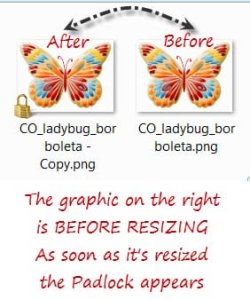
Padlock showing on Images after Graphic Resized.

JennB213

New member
Member
Local time
12:49 AM
Messages
82
Location
Tennessee
Hello,

Every time I resize a graphic on my C:\drive using a program called Image Resizer for Windows the following is what happens (for the record, this computer is a 64 bit and I used the 64 bit program to install Image Resizer) ::::

After resizing a small padlock appears in the left hand corner of the resized image.

I've played around checking properties and before the resize the Attribute is A
After the resize the Attribute is Al (I'm assuming that "l" is for LOCKED).

Now if I MOVE that folder with the locked images from my C:\drive to my EXTERNAL DRIVE those padlocks disappear from the images.

Also, I can resize other images in the folder now loaded on my EXTERNAL DRIVE using the Image Resizer program and NO PADLOCKS appear. ??????

I previously had a Windows 7 laptop (it died after the motherboard fried) and used this same program and it NEVER put that padlock on the image before.

Hmmmm come to think of it, that other computer had TWO (2) separate hard drives in it and I always stored stuff on the 2nd one, never on the one with the actual operating system.

What can I do to remove the padlock beside pulling it off the C:\drive ??

Also, is there a way to stop it from doing that in the future.

Thanks in advance to anybody that can figure this out.. I'm totally confused.

Huggs, Jenn
 

My Computer My Computer

At a glance

Microsoft Windows 7 Home Premium, Service Pac...Intel(R) Core(TM) CPU i7-3610QM CPU 2.30 GHz8 GB RamIntel(R) HD Graphics 4000
Computer type
Laptop
Computer Manufacturer/Model Number
HP Pavilion m7 Notebook PC
OS
Microsoft Windows 7 Home Premium, Service Pack 1 64-bit
CPU
Intel(R) Core(TM) CPU i7-3610QM CPU 2.30 GHz
Memory
8 GB Ram
Graphics Card(s)
Intel(R) HD Graphics 4000
Sound Card
IDT High Definition Audio CODEC
Hard Drives
Local Disk (C:) 697 GB Free of 909 GB
Recovery Disk (D:)
Antivirus
Webroot Secure/Anywhere 9.0.24.49
Browser
Firefox Quantum 65.0.2
Do you know how to take a screenshot?
Could you show an example of this padlock you are talking about?
(the paper clip icon in the reply box will allow you to attach images to your post here.)
 

My Computer My Computer

At a glance

Windows 7 x64Intel i7 2600kG.skill Ripjaw 16gigs @ 1866Nvidia gtx580 (evga)
Computer Manufacturer/Model Number
Insane hobo technologies. ;-)
OS
Windows 7 x64
CPU
Intel i7 2600k
Motherboard
Asrock z68 extreme 4 gen 3
Memory
G.skill Ripjaw 16gigs @ 1866
Graphics Card(s)
Nvidia gtx580 (evga)
Sound Card
Integrated HD audio + hdmi
Monitor(s) Displays
24" ASUS widescreen + 42" insignia
Screen Resolution
1080p (1920x1080)
Hard Drives
128 Samsung 830
256 Samsung 840
3 x 1tb storage drive (various)
1 western digital 1tb (eSATA)
1 Seagate 1tb (eSATA)
PSU
1 kilowatt SLI/Crossfire rated Silverstone modular
Case
NZXT Phantom + additional 220 fan
Cooling
Zalmann
Keyboard
Microsoft wireless 3000 (v2)
Mouse
MS - wireless 5000 (bluetrack)
Internet Speed
depends on if you ask me or my provider.
Other Info
The above information is provided as is, and the author assumes no responsibility for issues it may cause with your sanity or fanboyism.
The padlock means the file is private in a non private location, i.e. only a single user has access most likely your own account that is in a shared place.
 

My Computer My Computer

At a glance

Windows 10 Pro (x64)Intel Core i7-3930K (3.2GHz - 4.5GHz)4x Samsung 4GB PC3-12800 DDR3 (16GB 1600MHz)Nvidia Geforce GTX 690
Computer type
PC/Desktop
Computer Manufacturer/Model Number
Alienware Aurora ALX R4
OS
Windows 10 Pro (x64)
CPU
Intel Core i7-3930K (3.2GHz - 4.5GHz)
Motherboard
Alienware Aurora-R4 x79
Memory
4x Samsung 4GB PC3-12800 DDR3 (16GB 1600MHz)
Graphics Card(s)
Nvidia Geforce GTX 690
Sound Card
SteelSeries Siberia Elite
Monitor(s) Displays
Dell UltraSharp U3011
Screen Resolution
2560x1600
Hard Drives
Samsung 850 Pro 256 GB, Seagate 1TB Desktop Hybrid HDD, 2x Western Digital 4TB Green HDD
PSU
875W Some Dell PSU <.<
Case
Alienware Aurora ALX
Cooling
Custom Liquid Cooling (EK CPU & GPU blocks) dual EK 480RAD
Keyboard
Logitech G710+ Mechanical
Mouse
Logitech G700s
Internet Speed
Verizon Fios (50 mbps average)
Other Info
Server: Intel NUC D54250WYK: i5-4250U, 16GB, 256 GB mSATA, Windows Server 2012 R2
^^most likely this, though I have seen padlocks caused by over active AV's too.
Only reason I asked.
 

My Computer My Computer

At a glance

Windows 7 x64Intel i7 2600kG.skill Ripjaw 16gigs @ 1866Nvidia gtx580 (evga)
Computer Manufacturer/Model Number
Insane hobo technologies. ;-)
OS
Windows 7 x64
CPU
Intel i7 2600k
Motherboard
Asrock z68 extreme 4 gen 3
Memory
G.skill Ripjaw 16gigs @ 1866
Graphics Card(s)
Nvidia gtx580 (evga)
Sound Card
Integrated HD audio + hdmi
Monitor(s) Displays
24" ASUS widescreen + 42" insignia
Screen Resolution
1080p (1920x1080)
Hard Drives
128 Samsung 830
256 Samsung 840
3 x 1tb storage drive (various)
1 western digital 1tb (eSATA)
1 Seagate 1tb (eSATA)
PSU
1 kilowatt SLI/Crossfire rated Silverstone modular
Case
NZXT Phantom + additional 220 fan
Cooling
Zalmann
Keyboard
Microsoft wireless 3000 (v2)
Mouse
MS - wireless 5000 (bluetrack)
Internet Speed
depends on if you ask me or my provider.
Other Info
The above information is provided as is, and the author assumes no responsibility for issues it may cause with your sanity or fanboyism.
@ Maguscreed and Logicearth

First THANK YOU both for taking the time to read and evaluate this issue..
I very much appreciate the help.


I have both attached and inserted the screenshot requested...
Padlock.jpg


Also, This padlock only appears when I try and resize
ANYTHING on my C:\Drive ...

Once I moved the Original Folder to my External Drive,
the padlocks disappeared.

Plus, I could resize any graphic on the External Drive,
using the same program with NO PADLOCK appearing.

For the record the AntiVirus I'm using is ::
Webroot Secure Anywhere..
(It was a gift with the new Laptop)

Again, Thanks so much for any help.

Huggs,
gaah.gif
Jenn
 

Attachments

  • Padlock.jpg
    Padlock.jpg
    21 KB · Views: 4

My Computer My Computer

At a glance

Microsoft Windows 7 Home Premium, Service Pac...Intel(R) Core(TM) CPU i7-3610QM CPU 2.30 GHz8 GB RamIntel(R) HD Graphics 4000
Computer type
Laptop
Computer Manufacturer/Model Number
HP Pavilion m7 Notebook PC
OS
Microsoft Windows 7 Home Premium, Service Pack 1 64-bit
CPU
Intel(R) Core(TM) CPU i7-3610QM CPU 2.30 GHz
Memory
8 GB Ram
Graphics Card(s)
Intel(R) HD Graphics 4000
Sound Card
IDT High Definition Audio CODEC
Hard Drives
Local Disk (C:) 697 GB Free of 909 GB
Recovery Disk (D:)
Antivirus
Webroot Secure/Anywhere 9.0.24.49
Browser
Firefox Quantum 65.0.2
@ Logicearth

The padlock means the file is private in a non private location, i.e. only a single user has access most likely your own account that is in a shared place.


Hi LogicEarth,

I believe you might have something with that access idea..

I've been googling & reading on padlocked files.

When I go the the Files Properties > Details
I see my Laptop is the owner.


Locked1.jpg


I've been able to remove the padlock on the actual file
via the File Properties

>Security > Advanced > Change Permissions >
and put a tic in the Include Inheritable Permissions
from this object's parent .


locked2.jpg


However to do EVERY SINGLE file I resize
in a folder would take forever.


I tried that same procedure on the actual "PARENT" folder ...
but it doesn't work because I of course see different things
and there is already a tic in

the Include Inheritable Permissions box.
Locked3.jpg


I've tried reading all the Microsoft permission stuff
and am totally confused.


I'm sure the answer is in this mess somewhere
I just don't know how to read it.


Thank you in advance if you see something here
and can explain it or
....
I don't mind doing the work reading if you point me
somewhere that I can at least understand what is being said.


Huggs,:banghead: Jenn
 

My Computer My Computer

At a glance

Microsoft Windows 7 Home Premium, Service Pac...Intel(R) Core(TM) CPU i7-3610QM CPU 2.30 GHz8 GB RamIntel(R) HD Graphics 4000
Computer type
Laptop
Computer Manufacturer/Model Number
HP Pavilion m7 Notebook PC
OS
Microsoft Windows 7 Home Premium, Service Pack 1 64-bit
CPU
Intel(R) Core(TM) CPU i7-3610QM CPU 2.30 GHz
Memory
8 GB Ram
Graphics Card(s)
Intel(R) HD Graphics 4000
Sound Card
IDT High Definition Audio CODEC
Hard Drives
Local Disk (C:) 697 GB Free of 909 GB
Recovery Disk (D:)
Antivirus
Webroot Secure/Anywhere 9.0.24.49
Browser
Firefox Quantum 65.0.2
Can I ask...why does it matter if there is a padlock as long as you have access to the files in question?

If you were to remove "Authenticated Users" and "Users" from the parent folders permission and replaced them with your user account (Jenn) and giving full control to it. That would remove the padlock from the files.
 

My Computer My Computer

At a glance

Windows 10 Pro (x64)Intel Core i7-3930K (3.2GHz - 4.5GHz)4x Samsung 4GB PC3-12800 DDR3 (16GB 1600MHz)Nvidia Geforce GTX 690
Computer type
PC/Desktop
Computer Manufacturer/Model Number
Alienware Aurora ALX R4
OS
Windows 10 Pro (x64)
CPU
Intel Core i7-3930K (3.2GHz - 4.5GHz)
Motherboard
Alienware Aurora-R4 x79
Memory
4x Samsung 4GB PC3-12800 DDR3 (16GB 1600MHz)
Graphics Card(s)
Nvidia Geforce GTX 690
Sound Card
SteelSeries Siberia Elite
Monitor(s) Displays
Dell UltraSharp U3011
Screen Resolution
2560x1600
Hard Drives
Samsung 850 Pro 256 GB, Seagate 1TB Desktop Hybrid HDD, 2x Western Digital 4TB Green HDD
PSU
875W Some Dell PSU <.<
Case
Alienware Aurora ALX
Cooling
Custom Liquid Cooling (EK CPU & GPU blocks) dual EK 480RAD
Keyboard
Logitech G710+ Mechanical
Mouse
Logitech G700s
Internet Speed
Verizon Fios (50 mbps average)
Other Info
Server: Intel NUC D54250WYK: i5-4250U, 16GB, 256 GB mSATA, Windows Server 2012 R2
Can I ask...why does it matter if there is a padlock as long as you have access to the files in question?

If you were to remove "Authenticated Users" and "Users" from the parent folders permission and replaced them with your user account (Jenn) and giving full control to it. That would remove the padlock from the files.

Hi,

I'm laughing, I guess the only reason the Padlock bothers me is my OCD..
Just a foreign object that's never been there before and is now.

Well, I don't know what is up ... I tried your method of removing
"Authenticated Users" and Users" and replacing as you said ..
Must have screwed up somewhere, I manged to LOCK the PARENT FOLDER.
Had to do a System Restore .. couldn't get it to let me do anything.
After that, I'm not seeing what I was before.

When I go to the PARENT FOLDER > Properties> Security > Advanced
I'm seeing these Users ... OHHHH Well,

Locked4.jpg


If I click Change Permissions the tic is now NOT in the box.


I'm going to try and find something that will help me understand
Permission items, obviously it's not Microsoft's info,
but there's got to be something somewhere to help me.

Thank you for your time in reviewing and your input.

Huggs, Jenn
 

My Computer My Computer

At a glance

Microsoft Windows 7 Home Premium, Service Pac...Intel(R) Core(TM) CPU i7-3610QM CPU 2.30 GHz8 GB RamIntel(R) HD Graphics 4000
Computer type
Laptop
Computer Manufacturer/Model Number
HP Pavilion m7 Notebook PC
OS
Microsoft Windows 7 Home Premium, Service Pack 1 64-bit
CPU
Intel(R) Core(TM) CPU i7-3610QM CPU 2.30 GHz
Memory
8 GB Ram
Graphics Card(s)
Intel(R) HD Graphics 4000
Sound Card
IDT High Definition Audio CODEC
Hard Drives
Local Disk (C:) 697 GB Free of 909 GB
Recovery Disk (D:)
Antivirus
Webroot Secure/Anywhere 9.0.24.49
Browser
Firefox Quantum 65.0.2
Back
Top