Solved Page file?

Alexey2912

New member
Member
VIP
Local time
10:04 AM
Messages
1,351
Location
Honolulu
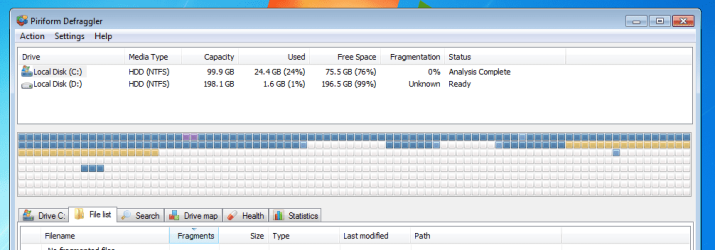
Is this pattern of drive distribution and page file fine on a fresh install of W7 Pro?

Thanks.
 

Attachments

  • PF.PNG
    PF.PNG
    53.5 KB · Views: 8

My Computers

System One System Two

  • Computer type
    Laptop
    Computer Manufacturer/Model Number
    Dell
    OS
    W7 Pro 32bit
    CPU
    Intel(R) Core(TM)2 CPU T7200 @ 2.00GHz
    Motherboard
    Dell Inc. 0CF456
    Memory
    4.00 GB
    Graphics Card(s)
    NVIDIA GTX 7980 512 MB
    Sound Card
    (1) HD Pro Webcam C910 (2) Bluetooth Stereo Audio (3) Si
    Hard Drives
    SSD
    Browser
    Brave
  • Computer type
    PC/Desktop
    System Manufacturer/Model Number
    Dell XPS Special Edition 8940
    OS
    W10 Pro
    CPU
    core i7 11th gen, 11700, 2.5-4.9 GHZ
    Memory
    32 GBB, 2 X16 GB @2933 MHz.
    Graphics Card(s)
    NVIDIA GeForce RTX 3070 8GB GDDR6
    Monitor(s) Displays
    Dell UltraSharp 32 4K monitor.
    Hard Drives
    1. 1TB M.2 PCIe NVMe SSD.

    2. 1TB 7200 rpm 3.5" SATA Hard Drive.
    PSU
    500W.
    Case
    Mineral White Bezel Chassis.
I see nothing unusual in the screenshot. It shows nothing of the pagefile.
 

My Computer

Computer type
PC/Desktop
Computer Manufacturer/Model Number
HP
OS
Windows 7 Pro 64 bit
CPU
Xeon W3520
Memory
8 GB
Graphics Card(s)
Nvidia Geforce 210
Thanks for your expert reply........you mean to say all looks fine?

The light brown blocks are the page file?
 

My Computers

System One System Two

  • Computer type
    Laptop
    Computer Manufacturer/Model Number
    Dell
    OS
    W7 Pro 32bit
    CPU
    Intel(R) Core(TM)2 CPU T7200 @ 2.00GHz
    Motherboard
    Dell Inc. 0CF456
    Memory
    4.00 GB
    Graphics Card(s)
    NVIDIA GTX 7980 512 MB
    Sound Card
    (1) HD Pro Webcam C910 (2) Bluetooth Stereo Audio (3) Si
    Hard Drives
    SSD
    Browser
    Brave
  • Computer type
    PC/Desktop
    System Manufacturer/Model Number
    Dell XPS Special Edition 8940
    OS
    W10 Pro
    CPU
    core i7 11th gen, 11700, 2.5-4.9 GHZ
    Memory
    32 GBB, 2 X16 GB @2933 MHz.
    Graphics Card(s)
    NVIDIA GeForce RTX 3070 8GB GDDR6
    Monitor(s) Displays
    Dell UltraSharp 32 4K monitor.
    Hard Drives
    1. 1TB M.2 PCIe NVMe SSD.

    2. 1TB 7200 rpm 3.5" SATA Hard Drive.
    PSU
    500W.
    Case
    Mineral White Bezel Chassis.
I have not used Defraggler for a long time so do not know what the colors mean. But there is nothing in the display that seems unusual. If you have a concern you need to explain what it is.
 

My Computer

Computer type
PC/Desktop
Computer Manufacturer/Model Number
HP
OS
Windows 7 Pro 64 bit
CPU
Xeon W3520
Memory
8 GB
Graphics Card(s)
Nvidia Geforce 210
page file normally does not get moved; only within WFW3.11 and earlier Windows, did Norton Utilities's SpeedDisk actually move the page file to the "top" of the hard-drive.
 

My Computer

Computer type
PC/Desktop
Computer Manufacturer/Model Number
Antec desktop; Acer Aspire laptops
OS
Windows 7 Professional 64-bit
CPU
Desktop i5; Acers i5 & i7
Memory
desktop 16GB; 1 Acer 8GB & 1 Acer 16GB
Hard Drives
1TB split into 2 equal partitions [OS and data] usable by RJS
Internet Speed
AT&T DSL
Browser
FF, GChrome, msIE
Other Info
Windows 7 Firewall, Emsisoft AM/AV, MSE [scan-only], SpywareBlaster, Ruiware/BillP combine
I have not used Defraggler for a long time so do not know what the colors mean. But there is nothing in the display that seems unusual. If you have a concern you need to explain what it is.


Just wanted your expert opinion if its placed correctly. W7 Pro is running fine none issues.

Thanks again.
 

My Computers

System One System Two

  • Computer type
    Laptop
    Computer Manufacturer/Model Number
    Dell
    OS
    W7 Pro 32bit
    CPU
    Intel(R) Core(TM)2 CPU T7200 @ 2.00GHz
    Motherboard
    Dell Inc. 0CF456
    Memory
    4.00 GB
    Graphics Card(s)
    NVIDIA GTX 7980 512 MB
    Sound Card
    (1) HD Pro Webcam C910 (2) Bluetooth Stereo Audio (3) Si
    Hard Drives
    SSD
    Browser
    Brave
  • Computer type
    PC/Desktop
    System Manufacturer/Model Number
    Dell XPS Special Edition 8940
    OS
    W10 Pro
    CPU
    core i7 11th gen, 11700, 2.5-4.9 GHZ
    Memory
    32 GBB, 2 X16 GB @2933 MHz.
    Graphics Card(s)
    NVIDIA GeForce RTX 3070 8GB GDDR6
    Monitor(s) Displays
    Dell UltraSharp 32 4K monitor.
    Hard Drives
    1. 1TB M.2 PCIe NVMe SSD.

    2. 1TB 7200 rpm 3.5" SATA Hard Drive.
    PSU
    500W.
    Case
    Mineral White Bezel Chassis.
page file normally does not get moved; only within WFW3.11 and earlier Windows, did Norton Utilities's SpeedDisk actually move the page file to the "top" of the hard-drive.

Is the position fine?

Thanks for your expert reply.
 

My Computers

System One System Two

  • Computer type
    Laptop
    Computer Manufacturer/Model Number
    Dell
    OS
    W7 Pro 32bit
    CPU
    Intel(R) Core(TM)2 CPU T7200 @ 2.00GHz
    Motherboard
    Dell Inc. 0CF456
    Memory
    4.00 GB
    Graphics Card(s)
    NVIDIA GTX 7980 512 MB
    Sound Card
    (1) HD Pro Webcam C910 (2) Bluetooth Stereo Audio (3) Si
    Hard Drives
    SSD
    Browser
    Brave
  • Computer type
    PC/Desktop
    System Manufacturer/Model Number
    Dell XPS Special Edition 8940
    OS
    W10 Pro
    CPU
    core i7 11th gen, 11700, 2.5-4.9 GHZ
    Memory
    32 GBB, 2 X16 GB @2933 MHz.
    Graphics Card(s)
    NVIDIA GeForce RTX 3070 8GB GDDR6
    Monitor(s) Displays
    Dell UltraSharp 32 4K monitor.
    Hard Drives
    1. 1TB M.2 PCIe NVMe SSD.

    2. 1TB 7200 rpm 3.5" SATA Hard Drive.
    PSU
    500W.
    Case
    Mineral White Bezel Chassis.
The location of the pagefile within the partition is of little importance. Technically the best location of the pagefile is not the beginning of the drive but close to your most accessed files. But in practice the benefits are minimal, usually unmeasurable let alone noticeable. Fragmentation of the pagefile is of no consequence except in extreme cases.

In any event Defraggler is unable to either move or defragment the pagefile. The same for most other utilities.
 

My Computer

Computer type
PC/Desktop
Computer Manufacturer/Model Number
HP
OS
Windows 7 Pro 64 bit
CPU
Xeon W3520
Memory
8 GB
Graphics Card(s)
Nvidia Geforce 210
In my machines's case its in the middle?

Doesn't Derfragler defrag page file on boot time defrag?

Thanks.
 

My Computers

System One System Two

  • Computer type
    Laptop
    Computer Manufacturer/Model Number
    Dell
    OS
    W7 Pro 32bit
    CPU
    Intel(R) Core(TM)2 CPU T7200 @ 2.00GHz
    Motherboard
    Dell Inc. 0CF456
    Memory
    4.00 GB
    Graphics Card(s)
    NVIDIA GTX 7980 512 MB
    Sound Card
    (1) HD Pro Webcam C910 (2) Bluetooth Stereo Audio (3) Si
    Hard Drives
    SSD
    Browser
    Brave
  • Computer type
    PC/Desktop
    System Manufacturer/Model Number
    Dell XPS Special Edition 8940
    OS
    W10 Pro
    CPU
    core i7 11th gen, 11700, 2.5-4.9 GHZ
    Memory
    32 GBB, 2 X16 GB @2933 MHz.
    Graphics Card(s)
    NVIDIA GeForce RTX 3070 8GB GDDR6
    Monitor(s) Displays
    Dell UltraSharp 32 4K monitor.
    Hard Drives
    1. 1TB M.2 PCIe NVMe SSD.

    2. 1TB 7200 rpm 3.5" SATA Hard Drive.
    PSU
    500W.
    Case
    Mineral White Bezel Chassis.
That pic looks exactly like several Win 7 installs on VMware that I have done over the years, I remember trying to defrag it and for some reason never quite getting rid of the last few blocks at the end of the drive , I think they were the folders with the $ sign in front of them after disabling file sharing I was left with 1 block I think. I remember using Windows defrag multiple time with little change then trying Defraggler several times and that changed it a bit more but it defiantly wasn't worth the time it took

Edit: Defraggler will tell you what is in those blocks at the end of the dive if you click or mouse over them ( can not remember which one )

 
Last edited:

My Computer

Computer type
PC/Desktop
Computer Manufacturer/Model Number
Compac
OS
Microsoft Windows 7 Ultimate 32-bit 7601
CPU
Intel(R) Pentium(R) Dual CPU E2160 @ 1.80GHz
Motherboard
MSI Boston
Memory
4.00 GB
Graphics Card(s)
(1) VNC Mirror Driver (2) Intel(R) G33/G31 Express Chipset
Sound Card
Disabled
Monitor(s) Displays
Headless
Screen Resolution
1280 x 960 x 32 bits (4294967296 colors) @ 60 Hz
Hard Drives
ST3320820AS ATA Device
Keyboard
Headless
Mouse
Headless
Antivirus
Malwarebytes pro
Other Info
Also
Windows 8.1 Laptop and Desktop both Acer
Drive indexing unchecked, Restore points returned off immediately after W7 install before updating.

Can it be fixed or should do another clean install?

Its not a VMware install.
 

My Computers

System One System Two

  • Computer type
    Laptop
    Computer Manufacturer/Model Number
    Dell
    OS
    W7 Pro 32bit
    CPU
    Intel(R) Core(TM)2 CPU T7200 @ 2.00GHz
    Motherboard
    Dell Inc. 0CF456
    Memory
    4.00 GB
    Graphics Card(s)
    NVIDIA GTX 7980 512 MB
    Sound Card
    (1) HD Pro Webcam C910 (2) Bluetooth Stereo Audio (3) Si
    Hard Drives
    SSD
    Browser
    Brave
  • Computer type
    PC/Desktop
    System Manufacturer/Model Number
    Dell XPS Special Edition 8940
    OS
    W10 Pro
    CPU
    core i7 11th gen, 11700, 2.5-4.9 GHZ
    Memory
    32 GBB, 2 X16 GB @2933 MHz.
    Graphics Card(s)
    NVIDIA GeForce RTX 3070 8GB GDDR6
    Monitor(s) Displays
    Dell UltraSharp 32 4K monitor.
    Hard Drives
    1. 1TB M.2 PCIe NVMe SSD.

    2. 1TB 7200 rpm 3.5" SATA Hard Drive.
    PSU
    500W.
    Case
    Mineral White Bezel Chassis.
Drive indexing unchecked, Restore points returned off immediately after W7 install before updating.

Can it be fixed or should do another clean install?

Its not a VMware install.

As I said I had several install's with the same result's a far as I know there is nothing you can do about it. One thing I did try was to disable Page file completely and then delete it then defrag several times again but those blue block's at the end are unmoveable

And again it was not worth the time it took to try to get the drive to look pretty
 
Last edited:

My Computer

Computer type
PC/Desktop
Computer Manufacturer/Model Number
Compac
OS
Microsoft Windows 7 Ultimate 32-bit 7601
CPU
Intel(R) Pentium(R) Dual CPU E2160 @ 1.80GHz
Motherboard
MSI Boston
Memory
4.00 GB
Graphics Card(s)
(1) VNC Mirror Driver (2) Intel(R) G33/G31 Express Chipset
Sound Card
Disabled
Monitor(s) Displays
Headless
Screen Resolution
1280 x 960 x 32 bits (4294967296 colors) @ 60 Hz
Hard Drives
ST3320820AS ATA Device
Keyboard
Headless
Mouse
Headless
Antivirus
Malwarebytes pro
Other Info
Also
Windows 8.1 Laptop and Desktop both Acer
So to sum up have to bear it since another clean install and updating would give similar results.
 

My Computers

System One System Two

  • Computer type
    Laptop
    Computer Manufacturer/Model Number
    Dell
    OS
    W7 Pro 32bit
    CPU
    Intel(R) Core(TM)2 CPU T7200 @ 2.00GHz
    Motherboard
    Dell Inc. 0CF456
    Memory
    4.00 GB
    Graphics Card(s)
    NVIDIA GTX 7980 512 MB
    Sound Card
    (1) HD Pro Webcam C910 (2) Bluetooth Stereo Audio (3) Si
    Hard Drives
    SSD
    Browser
    Brave
  • Computer type
    PC/Desktop
    System Manufacturer/Model Number
    Dell XPS Special Edition 8940
    OS
    W10 Pro
    CPU
    core i7 11th gen, 11700, 2.5-4.9 GHZ
    Memory
    32 GBB, 2 X16 GB @2933 MHz.
    Graphics Card(s)
    NVIDIA GeForce RTX 3070 8GB GDDR6
    Monitor(s) Displays
    Dell UltraSharp 32 4K monitor.
    Hard Drives
    1. 1TB M.2 PCIe NVMe SSD.

    2. 1TB 7200 rpm 3.5" SATA Hard Drive.
    PSU
    500W.
    Case
    Mineral White Bezel Chassis.
Yup there is probably some program capable of removing the spaces but they probably cost money, Oh also when I install a OS with VMware the results would be the same as installing the same way you did apart from a couple small files that VMware uses to run
 

My Computer

Computer type
PC/Desktop
Computer Manufacturer/Model Number
Compac
OS
Microsoft Windows 7 Ultimate 32-bit 7601
CPU
Intel(R) Pentium(R) Dual CPU E2160 @ 1.80GHz
Motherboard
MSI Boston
Memory
4.00 GB
Graphics Card(s)
(1) VNC Mirror Driver (2) Intel(R) G33/G31 Express Chipset
Sound Card
Disabled
Monitor(s) Displays
Headless
Screen Resolution
1280 x 960 x 32 bits (4294967296 colors) @ 60 Hz
Hard Drives
ST3320820AS ATA Device
Keyboard
Headless
Mouse
Headless
Antivirus
Malwarebytes pro
Other Info
Also
Windows 8.1 Laptop and Desktop both Acer
I see now that Defraggler can defrag the pagefile on bootup. But it will not move it in some vain attempt to optimize it's position. Determining that position would be very difficult and the gains inconsequential.

Fragmentation is of no consequence unless the files involved are frequently accessed. We have no evidence of that. Fragmentation is of less importance than many people believe. People have become obsessed by levels fragmentation that are totally inconsequential. Don't go down that road.
 

My Computer

Computer type
PC/Desktop
Computer Manufacturer/Model Number
HP
OS
Windows 7 Pro 64 bit
CPU
Xeon W3520
Memory
8 GB
Graphics Card(s)
Nvidia Geforce 210
Thanks for all your expert replies and suggestions. Appreciate them.

Would paid app are you referring to..care to name it.
 

My Computers

System One System Two

  • Computer type
    Laptop
    Computer Manufacturer/Model Number
    Dell
    OS
    W7 Pro 32bit
    CPU
    Intel(R) Core(TM)2 CPU T7200 @ 2.00GHz
    Motherboard
    Dell Inc. 0CF456
    Memory
    4.00 GB
    Graphics Card(s)
    NVIDIA GTX 7980 512 MB
    Sound Card
    (1) HD Pro Webcam C910 (2) Bluetooth Stereo Audio (3) Si
    Hard Drives
    SSD
    Browser
    Brave
  • Computer type
    PC/Desktop
    System Manufacturer/Model Number
    Dell XPS Special Edition 8940
    OS
    W10 Pro
    CPU
    core i7 11th gen, 11700, 2.5-4.9 GHZ
    Memory
    32 GBB, 2 X16 GB @2933 MHz.
    Graphics Card(s)
    NVIDIA GeForce RTX 3070 8GB GDDR6
    Monitor(s) Displays
    Dell UltraSharp 32 4K monitor.
    Hard Drives
    1. 1TB M.2 PCIe NVMe SSD.

    2. 1TB 7200 rpm 3.5" SATA Hard Drive.
    PSU
    500W.
    Case
    Mineral White Bezel Chassis.
Thanks for all your expert replies and suggestions. Appreciate them.

Would paid app are you referring to..care to name it.

Sorry I don't know I draw the line with my obsession to join the blue blocks together when it cost's money
 

My Computer

Computer type
PC/Desktop
Computer Manufacturer/Model Number
Compac
OS
Microsoft Windows 7 Ultimate 32-bit 7601
CPU
Intel(R) Pentium(R) Dual CPU E2160 @ 1.80GHz
Motherboard
MSI Boston
Memory
4.00 GB
Graphics Card(s)
(1) VNC Mirror Driver (2) Intel(R) G33/G31 Express Chipset
Sound Card
Disabled
Monitor(s) Displays
Headless
Screen Resolution
1280 x 960 x 32 bits (4294967296 colors) @ 60 Hz
Hard Drives
ST3320820AS ATA Device
Keyboard
Headless
Mouse
Headless
Antivirus
Malwarebytes pro
Other Info
Also
Windows 8.1 Laptop and Desktop both Acer
Here is a easy way to solve the problem you think you have.

Use Windows 7 built in defrag.
You don't get any little colored boxes to worry about.
All you get is a defrag that puts things where Windows 7 want things to be put and that is what is important.
Who cares where a 3rd party defrag programs wants things. The 3rd party defrag program doesn't have to find things at a later date; Windows 7 does.

When it comes to page files just let Windows 7 manage them.
Windows 7 will use page files as it is needed.
I don't try to out smart Windows 7. It's not like XP and I'm thankful for that.
 

My Computer

Computer type
PC/Desktop
Computer Manufacturer/Model Number
Home made Desktop
OS
Windows 10 Pro. 64/ version 1709 Windows 7 Pro/64
CPU
Intel i7-6800K @ 4.3
Motherboard
ASUS X-99 Deluxe II
Memory
Corsair Platinum 16 gig @2400
Graphics Card(s)
EVGA GTX 1070 OC
Monitor(s) Displays
Asus 27" LED LCD/VE278Q
Screen Resolution
1920-1080 or 1280-720 HDMI
Hard Drives
INTEL SSD 730-240 Gb Sata 3.0/
PSU
EVGA Platium 1200W
Case
Phanteks Luxe Tempered Glass 8 fans/ one radiator
Cooling
XSPC/ Water Cooled CPU
Keyboard
Das 4 Professional
Mouse
Logitech M705/MX Anywhere 2-S
Internet Speed
100 mbits
Antivirus
Microsoft Security Essentials/ Malwarebytes Premium 3.0/ SAS
Browser
I.E. 11 default/Firefox/ ISP Time Warner Cable/Spectrum
Other Info
LG BluRay Burner/
Sound system-KLipsch-THX/
Icy Dock ssd Hot Swap bays.
It is important to choose a defrag program and not switch between 2 or more. Each program has different ideas about what constitutes a fully defragmented hard drive. If you switch between them the last one run will consume considerable time undoing the work of the previous one. This won't do any real harm but it will waste a great deal of time.

I too use Windows defrag utility. I just set the schedule and spend no time on it. And isn't saving time what a defrag utility is all about?
 

My Computer

Computer type
PC/Desktop
Computer Manufacturer/Model Number
HP
OS
Windows 7 Pro 64 bit
CPU
Xeon W3520
Memory
8 GB
Graphics Card(s)
Nvidia Geforce 210
Thanks again for all your expert suggestions.

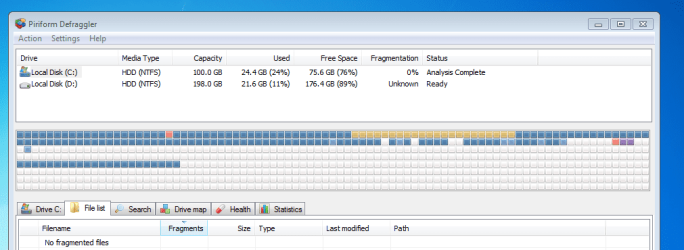
1. A screen shot of my other machine running W7 on which windows in built defrag never been used,always Defraggler.

2. Should page file be set as let Auto manage or custom min and max.......since Auto mange is less than recommended?

3. Should min and max values for it in MBs, be the same?

Thoughts about this?
 

Attachments

  • PF.PNG
    PF.PNG
    66.2 KB · Views: 1

My Computers

System One System Two

  • Computer type
    Laptop
    Computer Manufacturer/Model Number
    Dell
    OS
    W7 Pro 32bit
    CPU
    Intel(R) Core(TM)2 CPU T7200 @ 2.00GHz
    Motherboard
    Dell Inc. 0CF456
    Memory
    4.00 GB
    Graphics Card(s)
    NVIDIA GTX 7980 512 MB
    Sound Card
    (1) HD Pro Webcam C910 (2) Bluetooth Stereo Audio (3) Si
    Hard Drives
    SSD
    Browser
    Brave
  • Computer type
    PC/Desktop
    System Manufacturer/Model Number
    Dell XPS Special Edition 8940
    OS
    W10 Pro
    CPU
    core i7 11th gen, 11700, 2.5-4.9 GHZ
    Memory
    32 GBB, 2 X16 GB @2933 MHz.
    Graphics Card(s)
    NVIDIA GeForce RTX 3070 8GB GDDR6
    Monitor(s) Displays
    Dell UltraSharp 32 4K monitor.
    Hard Drives
    1. 1TB M.2 PCIe NVMe SSD.

    2. 1TB 7200 rpm 3.5" SATA Hard Drive.
    PSU
    500W.
    Case
    Mineral White Bezel Chassis.
Back
Top