
Pagefile constantly going crazy - please help

Is that motherboard Dual Channel (2 or 4 RAM slots, not 3 or 6), then yes you need a 4th stick and you are taking a performance hit using 3.

If it's triple channel (a dead technology) then the 3 1gig sticks are correct.

I suggest using 1024 min max page file.

If it was on another HD the OS is not on, not just partition, that is best, although I would avoid it on SSD due to finite # of writes.
 

My Computer

Computer type
PC/Desktop
Computer Manufacturer/Model Number
Self Built Custom
OS
Windows 7 Ultimate Retail Box (64-bit installed) + Service Pack 1
CPU
AMD FX-8350 CPU v1.15 (or 1.0F) BIOS was required!
Motherboard
MSI 890FXA-GD70
Memory
8G CAS-7 G-Skill DDR3 @1333 (2 fours) [mobo nonOC max rec'd]
Graphics Card(s)
Radeon HD 7950 [3 gigs of GDDR5] MSI Twin Frozr model
Sound Card
Realtek High Definition Audio (onboard mobo, ALC-889 chip)
Monitor(s) Displays
2 WS LED Monitors: One LG One Viewsonic
Screen Resolution
1920 by 1080
Hard Drives
SSD for OS: Samsung 840 Pro
SSD for VM and utilities: Adata SX900
7200 RPM SATA HDs for the rest: Hitachi and Seagate
PSU
Corsair TX850 - 850W max, in service since August 2010.
Case
Thermaltake Armor A90
Cooling
Thermaltake Spin Q CPU Cooler, in service since August 2010
Keyboard
Logitech G11
Mouse
Logitech M310 Wireless
Internet Speed
100 Megabit broadband supposedly upgraded from 50 (Cable)
Antivirus
Bitdefender Internet Security 2014 suite
Browser
Pale Moon 64-bit main, also IceDragon, Opera, and Maxthon.
Other Info
CompTIA A+ certified (220-800 series) in July 2013.
Asus P6T Deluxe v1 is triple channel
 

My Computer

Computer type
PC/Desktop
Computer Manufacturer/Model Number
Home made Desktop
OS
Windows 10 Pro. 64/ version 1709 Windows 7 Pro/64
CPU
Intel i7-6800K @ 4.3
Motherboard
ASUS X-99 Deluxe II
Memory
Corsair Platinum 16 gig @2400
Graphics Card(s)
EVGA GTX 1070 OC
Monitor(s) Displays
Asus 27" LED LCD/VE278Q
Screen Resolution
1920-1080 or 1280-720 HDMI
Hard Drives
INTEL SSD 730-240 Gb Sata 3.0/
PSU
EVGA Platium 1200W
Case
Phanteks Luxe Tempered Glass 8 fans/ one radiator
Cooling
XSPC/ Water Cooled CPU
Keyboard
Das 4 Professional
Mouse
Logitech M705/MX Anywhere 2-S
Internet Speed
100 mbits
Antivirus
Microsoft Security Essentials/ Malwarebytes Premium 3.0/ SAS
Browser
I.E. 11 default/Firefox/ ISP Time Warner Cable/Spectrum
Other Info
LG BluRay Burner/
Sound system-KLipsch-THX/
Icy Dock ssd Hot Swap bays.
Is that motherboard Dual Channel (2 or 4 RAM slots, not 3 or 6), then yes you need a 4th stick and you are taking a performance hit using 3.

If it's triple channel (a dead technology) then the 3 1gig sticks are correct.

I suggest using 1024 min max page file.

If it was on another HD the OS is not on, not just partition, that is best, although I would avoid it on SSD due to finite # of writes.

Yup - triple channel.

Wow - the 1024 number is much smaller than the ~4500 that was mentioned earlier in the thread (1.5 times the amount of RAM). may I ask why I should set it lower, to 1024? Does a smaller pagefile offer a benefit over a larger one?
 

My Computer

Computer type
PC/Desktop
Computer Manufacturer/Model Number
custom build
OS
Windows 7 32bit Home Premium
CPU
Intel Core I7 920 Bloomfield
Motherboard
Asus P6T Deluxe v1
Memory
3 GB Corsair DDR3 (3x1GB)
Graphics Card(s)
NVidia GTX 570 (1 GB RAM)
Sound Card
on board
Monitor(s) Displays
Dell P2314H
Screen Resolution
1920x1080
Hard Drives
Western Digital Black 1TB (main OS)
PSU
XION Supernova XON-800R14N 800W
Case
Antec 1200
Cooling
Arctic Freezer 7 Pro Rev. 2
Keyboard
AZIO Prism
Mouse
Logitech G700S
Internet Speed
Verizon FiOS 85/85
Antivirus
Avast
Browser
Firefox/Chrome
Other Info
SansDigital rr622 RocketRaid (with non-raid Driver)
Renesas USB 3.0 card
The smaller the better, you want windows using actual RAM as RAM, not much slower hard drive space as RAM.

I start at 1024 and if that works fine (expected) I'd not change it.

Letting Windows decide the virtual memory size could result in an often re-sized file, and fragmentation, 1024 should be plenty for most.

I suggest 0/0 min max, reboot, defragment the HD it's going on, and then 1024/1024 min max it and reboot again.

That was a much more critical helper with older windows versions with less RAM.

I also knew that the Intel 9xx CPU series was the last one using triple channel, it was a possible A+ exam fact.... muhahaha!
 

My Computer

Computer type
PC/Desktop
Computer Manufacturer/Model Number
Self Built Custom
OS
Windows 7 Ultimate Retail Box (64-bit installed) + Service Pack 1
CPU
AMD FX-8350 CPU v1.15 (or 1.0F) BIOS was required!
Motherboard
MSI 890FXA-GD70
Memory
8G CAS-7 G-Skill DDR3 @1333 (2 fours) [mobo nonOC max rec'd]
Graphics Card(s)
Radeon HD 7950 [3 gigs of GDDR5] MSI Twin Frozr model
Sound Card
Realtek High Definition Audio (onboard mobo, ALC-889 chip)
Monitor(s) Displays
2 WS LED Monitors: One LG One Viewsonic
Screen Resolution
1920 by 1080
Hard Drives
SSD for OS: Samsung 840 Pro
SSD for VM and utilities: Adata SX900
7200 RPM SATA HDs for the rest: Hitachi and Seagate
PSU
Corsair TX850 - 850W max, in service since August 2010.
Case
Thermaltake Armor A90
Cooling
Thermaltake Spin Q CPU Cooler, in service since August 2010
Keyboard
Logitech G11
Mouse
Logitech M310 Wireless
Internet Speed
100 Megabit broadband supposedly upgraded from 50 (Cable)
Antivirus
Bitdefender Internet Security 2014 suite
Browser
Pale Moon 64-bit main, also IceDragon, Opera, and Maxthon.
Other Info
CompTIA A+ certified (220-800 series) in July 2013.
The smaller the better, you want windows using actual RAM as RAM, not much slower hard drive space as RAM.

I start at 1024 and if that works fine (expected) I'd not change it.

Letting Windows decide the virtual memory size could result in an often re-sized file, and fragmentation, 1024 should be plenty for most.

I suggest 0/0 min max, reboot, defragment the HD it's going on, and then 1024/1024 min max it and reboot again.

That was a much more critical helper with older windows versions with less RAM.

Okay, thanks. That makes sense - that's what I wanted - for Windows to use my available memory instead of paging everything back and forth like it does. I'll give that a shot.
 

My Computer

Computer type
PC/Desktop
Computer Manufacturer/Model Number
custom build
OS
Windows 7 32bit Home Premium
CPU
Intel Core I7 920 Bloomfield
Motherboard
Asus P6T Deluxe v1
Memory
3 GB Corsair DDR3 (3x1GB)
Graphics Card(s)
NVidia GTX 570 (1 GB RAM)
Sound Card
on board
Monitor(s) Displays
Dell P2314H
Screen Resolution
1920x1080
Hard Drives
Western Digital Black 1TB (main OS)
PSU
XION Supernova XON-800R14N 800W
Case
Antec 1200
Cooling
Arctic Freezer 7 Pro Rev. 2
Keyboard
AZIO Prism
Mouse
Logitech G700S
Internet Speed
Verizon FiOS 85/85
Antivirus
Avast
Browser
Firefox/Chrome
Other Info
SansDigital rr622 RocketRaid (with non-raid Driver)
Renesas USB 3.0 card
RAM gets confusing but it is very important, Video RAM is the fastest of all.
 

My Computer

Computer type
PC/Desktop
Computer Manufacturer/Model Number
Self Built Custom
OS
Windows 7 Ultimate Retail Box (64-bit installed) + Service Pack 1
CPU
AMD FX-8350 CPU v1.15 (or 1.0F) BIOS was required!
Motherboard
MSI 890FXA-GD70
Memory
8G CAS-7 G-Skill DDR3 @1333 (2 fours) [mobo nonOC max rec'd]
Graphics Card(s)
Radeon HD 7950 [3 gigs of GDDR5] MSI Twin Frozr model
Sound Card
Realtek High Definition Audio (onboard mobo, ALC-889 chip)
Monitor(s) Displays
2 WS LED Monitors: One LG One Viewsonic
Screen Resolution
1920 by 1080
Hard Drives
SSD for OS: Samsung 840 Pro
SSD for VM and utilities: Adata SX900
7200 RPM SATA HDs for the rest: Hitachi and Seagate
PSU
Corsair TX850 - 850W max, in service since August 2010.
Case
Thermaltake Armor A90
Cooling
Thermaltake Spin Q CPU Cooler, in service since August 2010
Keyboard
Logitech G11
Mouse
Logitech M310 Wireless
Internet Speed
100 Megabit broadband supposedly upgraded from 50 (Cable)
Antivirus
Bitdefender Internet Security 2014 suite
Browser
Pale Moon 64-bit main, also IceDragon, Opera, and Maxthon.
Other Info
CompTIA A+ certified (220-800 series) in July 2013.
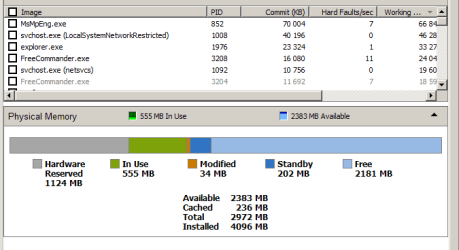
Wow - the 1024 number is much smaller than the ~4500 that was mentioned earlier in the thread (1.5 times the amount of RAM). may I ask why I should set it lower, to 1024? Does a smaller pagefile offer a benefit over a larger one?
A smaller Page File uses less HDD/SSD space.

The "1.5x RAM size" recommendation dates back many years (probably pre-XP).
RAM was a lot more expensive in the past.

That said, my W2K8 server book also recommends "1.5x RAM size".

As a rule, W7 only uses a few hundred MB (on my PC).
Since I have mine set to 2048 MB minimum, it uses slighty more than that amount of space on my HDD.
 

My Computer

Computer type
PC/Desktop
Computer Manufacturer/Model Number
n/a
OS
W7 Ultimate SP1, LM19.2 MATE, W10 Home 1703, W10 Pro 1703 VM, #All 64 bit
CPU
AMD Phenom II x6 1100T, 3.3 GHz
Motherboard
ASUS M4A88T-M/USB3 (AM3)
Memory
12GB DDR3 1333 G-Skill (4GB x 2), G-Skill (2GB x 2)
Graphics Card(s)
NVIDIA GeForce GTX 660
Sound Card
Realtek?
Monitor(s) Displays
Samsung S23B350
Screen Resolution
1920x1080
Hard Drives
WD Green 2TB (SATA), WD Green 3TB (SATA), WD Blue 4TB (SATA), WD Blue 6TB (SATA)
PSU
Cooler Master
Case
Antec GX300 Tower
Cooling
3x Antec TRICOOL 120mm Fans
Mouse
Wired Optical
Internet Speed
DSL
Antivirus
Avast
Browser
Pale Moon (64 bit)
Other Info
2018-12-27 Upgraded HDDs
2015-12-10 Upgraded case, graphics card, storage
2015-08-15 Upgraded motherboard & RAM
2015-07-15 Upgraded LM17.1 to LM17.2
tgfyhre, what does resource monitor > memory look like immediately after boot? Lots of things loading or some special program specifically addressing the pagefile?

My trusty old HP laptop got w7 32bit 4mb, 450mb fixed pagefile, and always have lots of memory available under all normal\daily use conditions, even with the 1gb+ set as reserved, & it's a fast, good machine. See attach.
 

Attachments

  • w732.PNG
    w732.PNG
    17.9 KB · Views: 12

My Computer

Computer type
Laptop
Computer Manufacturer/Model Number
Dell \ Lenovo\ HP \ Toshiba
OS
W7, W8.1
Antivirus
MSE, Malwarebytes
Browser
FF
Okay, well setting my pagefile to 1024 isn't working very well for me. I set it last night, and this morning I ran phpar (a multi-threaded par2 parity program) to create some parity backup for some files while I was surfing using Firefox, and several times Windows popped up a message that I was low on memory, and my browser became sluggish and unresponsive. I never got that message once before I switched my pagefile over to 1024. So I guess I'll just switch my pagefile back to where I had it initially (1.5x my RAM).

@4WD, I'll check my resource monitor the next time I reboot.
 

My Computer

Computer type
PC/Desktop
Computer Manufacturer/Model Number
custom build
OS
Windows 7 32bit Home Premium
CPU
Intel Core I7 920 Bloomfield
Motherboard
Asus P6T Deluxe v1
Memory
3 GB Corsair DDR3 (3x1GB)
Graphics Card(s)
NVidia GTX 570 (1 GB RAM)
Sound Card
on board
Monitor(s) Displays
Dell P2314H
Screen Resolution
1920x1080
Hard Drives
Western Digital Black 1TB (main OS)
PSU
XION Supernova XON-800R14N 800W
Case
Antec 1200
Cooling
Arctic Freezer 7 Pro Rev. 2
Keyboard
AZIO Prism
Mouse
Logitech G700S
Internet Speed
Verizon FiOS 85/85
Antivirus
Avast
Browser
Firefox/Chrome
Other Info
SansDigital rr622 RocketRaid (with non-raid Driver)
Renesas USB 3.0 card
A good rules of thumbs is to star using the same amount of real storage as paging... Then you can tune it depending on your particular usage...
 

My Computer

Computer type
PC/Desktop
Computer Manufacturer/Model Number
Custom Build
OS
Windows 7 Profesional x64
CPU
AMD Phenom II 965 X4 BE
Motherboard
ASUS M5A87
Memory
8GB - 4x2GB @ 1600 Mhz
Graphics Card(s)
ATI Radeon 6870 HD
Sound Card
On Board
Monitor(s) Displays
Syncmaster BX2250
Screen Resolution
1080p
Hard Drives
Internal Caviar Blue - 500GB | External WD MyBook - 3TB USB3 | External WD MyPassport - 320GB USB2
PSU
CoolMaster 600W
Cooling
Stock
Mouse
A very old and used Genius
Internet Speed
6Mbps Cable
Antivirus
Kaspersky
Browser
Firefox as 1st Option
Back
Top