Solved pagefile.sys

stereo

New member
Member
VIP
Local time
1:39 PM
Messages
541
Hello. I have 2 x WD6400 AAKS. I have the pagefile.sys on my second hdd.
With 3 GB DDR3 triple channel is it safe to disable the pagefile.sys ?
What's the best settings ? Please give me some advices. Thanks.
 

My Computer

Computer type
PC/Desktop
OS
Windows 7 Ultimate x64
CPU
Intel7 4790K
Motherboard
Gigabyte GA-Z97X UD5H
Memory
8 GB DDR3
Graphics Card(s)
GTX 980Ti G1
Sound Card
SoundBlaster X-FI XtremeGamer
Monitor(s) Displays
Samsung UE40JU6550 UHD
Screen Resolution
3840 X 2160
Hard Drives
1 SSD Intel 330
2 x Western Digital 6400 AAKS
1 x Western Digital 3200 AAKS
PSU
Corsair 750W
Case
Cooler Master HAF 922
Better to just let Windows manage it.
 

My Computer

Computer type
PC/Desktop
Computer Manufacturer/Model Number
Alienware Aurora ALX R4
OS
Windows 10 Pro (x64)
CPU
Intel Core i7-3930K (3.2GHz - 4.5GHz)
Motherboard
Alienware Aurora-R4 x79
Memory
4x Samsung 4GB PC3-12800 DDR3 (16GB 1600MHz)
Graphics Card(s)
Nvidia Geforce GTX 690
Sound Card
SteelSeries Siberia Elite
Monitor(s) Displays
Dell UltraSharp U3011
Screen Resolution
2560x1600
Hard Drives
Samsung 850 Pro 256 GB, Seagate 1TB Desktop Hybrid HDD, 2x Western Digital 4TB Green HDD
PSU
875W Some Dell PSU <.<
Case
Alienware Aurora ALX
Cooling
Custom Liquid Cooling (EK CPU & GPU blocks) dual EK 480RAD
Keyboard
Logitech G710+ Mechanical
Mouse
Logitech G700s
Internet Speed
Verizon Fios (50 mbps average)
Other Info
Server: Intel NUC D54250WYK: i5-4250U, 16GB, 256 GB mSATA, Windows Server 2012 R2

My Computer

Computer type
PC/Desktop
OS
Windows 7 Ultimate x64
CPU
Intel7 4790K
Motherboard
Gigabyte GA-Z97X UD5H
Memory
8 GB DDR3
Graphics Card(s)
GTX 980Ti G1
Sound Card
SoundBlaster X-FI XtremeGamer
Monitor(s) Displays
Samsung UE40JU6550 UHD
Screen Resolution
3840 X 2160
Hard Drives
1 SSD Intel 330
2 x Western Digital 6400 AAKS
1 x Western Digital 3200 AAKS
PSU
Corsair 750W
Case
Cooler Master HAF 922
Hi stereo :)

I use two HDDs, C. holds my OS and D. holds all my programs, and as logicearth said let Windows manage it :)
 

My Computer

Computer Manufacturer/Model Number
Home Built
OS
Windows 7 Professional 64-bit SP1
CPU
Intel E8400
Motherboard
MSI P35 Neo
Memory
4GB Crucial Ballistix
Graphics Card(s)
ATI ASUS Radeon HD 4830
Sound Card
Realtek ALC888 on Board
Monitor(s) Displays
Asus 22-inch VH226H Widescreen
Screen Resolution
1920 x 1080
Hard Drives
Two Western Digital 500GB
PSU
Hiper HPU-4M 530W
Case
Thermaltake Tsunami Dream Black
Cooling
Air/Fans
Keyboard
Saitek Eclipse
Mouse
Razer
Internet Speed
Sky Broadband
Other Info
USB Hub/Card Reader - 2 Pen Drives, 1 Phone Dock
Hi,

I would advise the following...

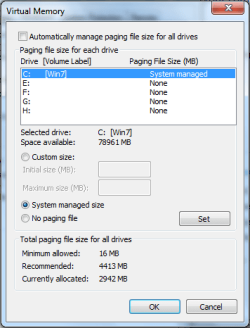
1, Disable the page file setup on all drives, reboot machine
2, Set C: as the only drive with a page file setup

Page File.PNG

   Note
If you want to use a manual pagefile setup then I'd suggest setting it to 1.5x your physical memory ;)


This will remove all pagefile.sys files and reset a dedicated pagefile to C: only.


OS
 
Last edited:

My Computer

Computer Manufacturer/Model Number
Compaq Desktop
OS
Windows 7 Ultimate x64
CPU
AMD Sempron Dual Core
Memory
3GB
Graphics Card(s)
NVIDIA GeForce 6150SE nForce 430
Screen Resolution
1024x768
Hard Drives
150GB Sata
Hello. I have 2 x WD6400 AAKS. I have the pagefile.sys on my second hdd.
With 3 GB DDR3 triple channel is it safe to disable the pagefile.sys ?
What's the best settings ? Please give me some advices. Thanks.

I have always used two drives for my systems with a fixed pagefile on the first partition of the second drive. Currently on the Win 7 system I have 4 GB of memory and a fixed pagefile of 4 GB also. It is rarely used it seems and when I ran without a pagefile there was little difference. Having a pagefile or not and letting Windows manage it is not just about performance but also a security issue. If your computer is stolen then there is the possibility of sensitive data being retrieved from the pagefile. The likelihood of this happening can be minimised by clearing the pagefile on shutdown and by having one of fixed size. I must add that I do not do intensive memory hungry tasks or gaming which might necessitate letting Windows manage the pagefile but if I did then I would still follow my philosophy but with a suitably sized pagefile that showed my system could cope.

I think that the benefits of two drives for a system cannot be stressed highly enough together with suitable partitions. It takes nearly half the time to image to a separate drive and then copy this to the imaged drive than image to a partition on the same drive. Of course it is always better too from the aspect of drive failure having two drives. Having two drives then provides the perfect place to have the pagefile located. This setup works for me and many others I think which doesn't just assume performance is the sole issue.
 

My Computer

Computer Manufacturer/Model Number
Compaq desktop
OS
Windows 7 Home Premium 64bit
CPU
Athlon II x2 215 2.7 GHz
Motherboard
Foxconn
Memory
4 GB DDR3
Graphics Card(s)
ATI Radeon 3000 integrated
Monitor(s) Displays
20" Compaq
Screen Resolution
1600 x 900
Hard Drives
2x 320 GB 7200 rpm, various USB backup drives
PSU
400w Zalman (quiet)
I would Put it on C:\ Drive only and let windows Manage it because if you remove the other Drive it could cause problems...
 

My Computer

Computer type
PC/Desktop
Computer Manufacturer/Model Number
Custom Built
OS
Windows 7 Professional x64 SP1 ; Windows Server 2012 R2 Standard
CPU
Intel Core i5 2400 @ 3.10GHz
Motherboard
Foxconn H67MP-S/-V/H67MP
Memory
8.0GB DDR3 @ 665MHz (2GBx4)
Graphics Card(s)
AMD Radeon HD 6870
Sound Card
Realtek High Definition Audio
Monitor(s) Displays
AOC 2243W & SMB1930NW
Screen Resolution
1440x900 & 1920x1080
Hard Drives
977GB Seagate ST31000524AS ATA Drive (SATA)
250GB WD iSCSI attached Drive
PSU
750W Gaming PSU
Case
Novatech Night
Cooling
Fan
Keyboard
Dell Standard PS/2 Keyboard
Mouse
R.A.T 07 Gaming Mouse
Internet Speed
Download: 10 Mbps Ping: 30ms Upload: 0.81 Mbps
Browser
Google Chrome
Other Info
Optiarc DVD RW AD-5260S ATA Device
I would Put it on C:\ Drive only and let windows Manage it because if you remove the other Drive it could cause problems...
So i did. Thanks a lot.
 

My Computer

Computer type
PC/Desktop
OS
Windows 7 Ultimate x64
CPU
Intel7 4790K
Motherboard
Gigabyte GA-Z97X UD5H
Memory
8 GB DDR3
Graphics Card(s)
GTX 980Ti G1
Sound Card
SoundBlaster X-FI XtremeGamer
Monitor(s) Displays
Samsung UE40JU6550 UHD
Screen Resolution
3840 X 2160
Hard Drives
1 SSD Intel 330
2 x Western Digital 6400 AAKS
1 x Western Digital 3200 AAKS
PSU
Corsair 750W
Case
Cooler Master HAF 922
No Problem , I will now mark this thread as Solved...
 

My Computer

Computer type
PC/Desktop
Computer Manufacturer/Model Number
Custom Built
OS
Windows 7 Professional x64 SP1 ; Windows Server 2012 R2 Standard
CPU
Intel Core i5 2400 @ 3.10GHz
Motherboard
Foxconn H67MP-S/-V/H67MP
Memory
8.0GB DDR3 @ 665MHz (2GBx4)
Graphics Card(s)
AMD Radeon HD 6870
Sound Card
Realtek High Definition Audio
Monitor(s) Displays
AOC 2243W & SMB1930NW
Screen Resolution
1440x900 & 1920x1080
Hard Drives
977GB Seagate ST31000524AS ATA Drive (SATA)
250GB WD iSCSI attached Drive
PSU
750W Gaming PSU
Case
Novatech Night
Cooling
Fan
Keyboard
Dell Standard PS/2 Keyboard
Mouse
R.A.T 07 Gaming Mouse
Internet Speed
Download: 10 Mbps Ping: 30ms Upload: 0.81 Mbps
Browser
Google Chrome
Other Info
Optiarc DVD RW AD-5260S ATA Device
I always beleived it was better to have the pagefile on a separate hard drive if possible as it can reduce hard drive head contention. By this I mean if you are running a program that is reading from or writing to the hard drive and a page fault occurs, the head has to be moved from where it is to the pagefile area, do it's thing, then move back to where it was. If the pagefile is on a 2nd hard drive then no additional head movement occurs on the 1st drive. I've not read anything anywhere that indicates this is different for Windows 7.

Also, if you have the pagefile on a 2nd drive and remove that drive, Windows (any version) will then create one on the boot drive. I believe it's worked that way since Win 95. You will probably get an error message but Windows will still boot and run okay.
 

My Computer

Computer type
PC/Desktop
Computer Manufacturer/Model Number
Lenovo IdeaCenter 450
OS
Windows 10 Pro X64
CPU
Intel Quad Core i7-4770 @ 3.4Ghz
Memory
16.0GB PC3-12800 DDR3 SDRAM 1600 MHz
Graphics Card(s)
Intel Integrated HD Graphics
Sound Card
Realtek HD Audio
Monitor(s) Displays
HP 22" LCD
Screen Resolution
1680 x 1050
Hard Drives
250GB Samsung EVO SATA-3 SSD
2TB Seagate ST2000DM001 SATA-2
1.5TB Seagate ST3150041AS SATA
Keyboard
Dell USB
Mouse
Lenovo USB
Internet Speed
Cable via Road Runner 3MB Upload, 30MB Download
Antivirus
Windows Defender, MBAM Pro, MBAE
Browser
Seamonkey
Other Info
UEFI/GPT
PLDS DVD-RW DH16AERSH
I always beleived it was better to have the pagefile on a separate hard drive if possible as it can reduce hard drive head contention. By this I mean if you are running a program that is reading from or writing to the hard drive and a page fault occurs, the head has to be moved from where it is to the pagefile area, do it's thing, then move back to where it was. If the pagefile is on a 2nd hard drive then no additional head movement occurs on the 1st drive. I've not read anything anywhere that indicates this is different for Windows 7.

I have been doing the same since I went to more than a single drive a long time ago.

This sums it up pretty well as to how to set the pagefile,

TweakHound - Tweaking Windows 7, Page 7
 

My Computer

Computer type
PC/Desktop
Computer Manufacturer/Model Number
Me
OS
Win 7 Ultimate x64
CPU
FX-8350 @ 4.6 GHz so far
Motherboard
Asus M5A97 EVO
Memory
ADATA XPG V1 Series Black 8GB DDR3 1600
Graphics Card(s)
Sapphire R9 270x Dual-X
Sound Card
Xonar DGX w/ Corsair Vengence 1300
Monitor(s) Displays
Acer S232HL Abid
Screen Resolution
1920x1080
Hard Drives
120 GB OCZ Vertex 3
500 GB Seagate 7200.12
PSU
Antec Earthwatts 650W Green
Case
Antec Three Hundred
Cooling
Cooler Master 212 EVO
Keyboard
Logitech G510
Mouse
Logitech G500s
Internet Speed
35000/3000
You only need to actually fault data from disk to memory is if it's a hard fault. If you have sufficient RAM, you should rarely see hard faults compared to soft faults.
 

My Computer

Computer type
PC/Desktop
Computer Manufacturer/Model Number
Custom
OS
Windows 10 Pro x64
CPU
Intel Core i7 4790K @ 4.5GHz
Motherboard
Asus Maximus Hero VII
Memory
32GB DDR3
Graphics Card(s)
Nvidia GeForce GTX970
Sound Card
Realtek HD Audio
Screen Resolution
1920x1200
Hard Drives
1x Samsung 250GB SSD
4x WD RE 2TB (RAIDZ)
PSU
Corsair AX760i
Case
Fractal Design Define R4
Cooling
Noctua NH-D15
Thank you stormy13. That website tells it like it is. It's hard to outsmart Windows 7. In my opinion Windows 7 handles page filing and ram just great. Just a note. It's hard to break the habit of tinkering with these things like we use to with older systems.
 

My Computer

Computer type
PC/Desktop
Computer Manufacturer/Model Number
Home made Desktop
OS
Windows 10 Pro. 64/ version 1709 Windows 7 Pro/64
CPU
Intel i7-6800K @ 4.3
Motherboard
ASUS X-99 Deluxe II
Memory
Corsair Platinum 16 gig @2400
Graphics Card(s)
EVGA GTX 1070 OC
Monitor(s) Displays
Asus 27" LED LCD/VE278Q
Screen Resolution
1920-1080 or 1280-720 HDMI
Hard Drives
INTEL SSD 730-240 Gb Sata 3.0/
PSU
EVGA Platium 1200W
Case
Phanteks Luxe Tempered Glass 8 fans/ one radiator
Cooling
XSPC/ Water Cooled CPU
Keyboard
Das 4 Professional
Mouse
Logitech M705/MX Anywhere 2-S
Internet Speed
100 mbits
Antivirus
Microsoft Security Essentials/ Malwarebytes Premium 3.0/ SAS
Browser
I.E. 11 default/Firefox/ ISP Time Warner Cable/Spectrum
Other Info
LG BluRay Burner/
Sound system-KLipsch-THX/
Icy Dock ssd Hot Swap bays.
Also, if you have the pagefile on a 2nd drive and remove that drive, Windows (any version) will then create one on the boot drive. I believe it's worked that way since Win 95. You will probably get an error message but Windows will still boot and run okay.

That is what I've found will happen if there are problems whilst having the pagefile on a different disk than the OS.
 

My Computer

Computer Manufacturer/Model Number
Compaq desktop
OS
Windows 7 Home Premium 64bit
CPU
Athlon II x2 215 2.7 GHz
Motherboard
Foxconn
Memory
4 GB DDR3
Graphics Card(s)
ATI Radeon 3000 integrated
Monitor(s) Displays
20" Compaq
Screen Resolution
1600 x 900
Hard Drives
2x 320 GB 7200 rpm, various USB backup drives
PSU
400w Zalman (quiet)
I have now the pagefile on the C partition. I don't see any difference. Nothing :)
 

My Computer

Computer type
PC/Desktop
OS
Windows 7 Ultimate x64
CPU
Intel7 4790K
Motherboard
Gigabyte GA-Z97X UD5H
Memory
8 GB DDR3
Graphics Card(s)
GTX 980Ti G1
Sound Card
SoundBlaster X-FI XtremeGamer
Monitor(s) Displays
Samsung UE40JU6550 UHD
Screen Resolution
3840 X 2160
Hard Drives
1 SSD Intel 330
2 x Western Digital 6400 AAKS
1 x Western Digital 3200 AAKS
PSU
Corsair 750W
Case
Cooler Master HAF 922
Considering the paging file is mostly read from, and not written to, you usually would not.
 

My Computer

Computer type
PC/Desktop
Computer Manufacturer/Model Number
Custom
OS
Windows 10 Pro x64
CPU
Intel Core i7 4790K @ 4.5GHz
Motherboard
Asus Maximus Hero VII
Memory
32GB DDR3
Graphics Card(s)
Nvidia GeForce GTX970
Sound Card
Realtek HD Audio
Screen Resolution
1920x1200
Hard Drives
1x Samsung 250GB SSD
4x WD RE 2TB (RAIDZ)
PSU
Corsair AX760i
Case
Fractal Design Define R4
Cooling
Noctua NH-D15
Back
Top