Pagefile.sys

Let me quote him from his Windows Internals book:

Because Windows can run with no paging file, page-file-backed sections might in fact be
“backed” only by physical memory.
And those sections are used everywhere. No applications would work without the page file, if your statement was true.
 

My Computer

OS
Windows
As we are all ware, a 32 bit application only gets 2GB of address space.

I too was under the assumption that that consisted of Physical and Virtual memory.

But through the course of this, I too am left questioning:
Why do some applications crash, or refuse to run if a PF is not present?
Even if theres plenty of physical memory?


Perhaps, when a application (such as in my example) starts hitting its 2GB limit in physical memory, it starts paging it out. Effectively giving the app more space.

This was just a thought, and Im looking for a definitive answer myself.
I did think address space was Physical + Virtual.

For the record, I too have experimented with no PF at all. And for the most part, everything seemed OK. But I did run into a few issues, and have since just left it on. IMHO, there as really nothing gained from it being off.

Windows has a memory manager that handles the memory requests from the applications. Since the physical memory can be limited and ran out of rather quickly depending the size of the memory, the page file has become a necessity for multitasking. This has been more of a concern in the past; however, application people with their appetite for more virtual memory, they ensure that this is always an issue... :shock:

The sum of the physical memory and the pagefile is the virtual memory. This can be large in the case of the 64-bit OS, but applications can receive 4 GBs of that if they can use the Address Windowing Extensions, or AWE API. Otherwise apps are getting 2 GBs as you've mentioned.

Quote from the link above:

"The size of the virtual address space is not changed. 32 bit addresses are still used. What is done is that different RAM pages are mapped into application specified virtual addresses. Although exercising this mapping has an overhead, since the mapped pages are in RAM, the overhead is considerably less than reading and writing to a disk file."

That sounds to me that there is some performance benefit for disabling the page file that forces using the physical memory only. While it may sound so, there's no guarantee that it is so. And certainly, some applications that call for more virtual memory than windows has available will tank, no question about that.

On an individual level and non-critical systems, such as home workstation, disabling the pagefile is a personal preference. I certainly would not do it for any servers, or even for my work desktop/laptop. On my home machine the worst thing can happen is one reboot, if the out of memory error shows up...
 

My Computer

Computer type
PC/Desktop
Computer Manufacturer/Model Number
Custom built at Home
OS
Windows 7 64-bit, Windows 8.1 64-bit, OSX El Capitan, Windows 10 (VMware)
CPU
Intel i5-3350P 3.1 GHz
Motherboard
Gigabyte GA-Z77X-UP5 TH
Memory
16 GBs GSkill Sniper
Graphics Card(s)
Radeon HD 7850
Sound Card
VIA HD Audio
Monitor(s) Displays
Dell U2410 24"
Screen Resolution
1920x1200
Hard Drives
1 x Intel 520 240 GBs
1 x Seagate 1TBs SATA 2.0,
1 x Seagate 1TBs eSATA 2.0
PSU
Thermaltake 850W
Case
Antec P183
Cooling
Noctua NH-D14 Heatsink 2 x 120mm fans, 4 x 120mm case fans
Keyboard
Dell Multimedia keyboard
Mouse
Logitech Trackball
Internet Speed
28.5 Mb/s
Because, as mentioned previously, there *are* allocation function flags that will physically back a page in memory with a page in the paging file (mapping views of files, for example, come to mind right away). If the application makes one of these API calls, and there's no PF, you get a failed allocation. If the app doesn't handle this / allow this properly or at all, then you get a second chance exception, and an app crash (and that may actually be the desired behavior as well).
Not true. There are no such flags. This again are just rumours floating around.

If you read carefully what Mark Russinovich has to say about the allocation functions, he too will telll you that it is not true. Those page file-backed sections do NOT need a page file. The name just confuses many people.
Well, not necessarily - if an applications maps a file section and tracks it, and then said application gets a return value that it doesn't like (or calls to grab that section from a paging file that doesn't exist, etc), the application can still crash. That's the whole point - why some apps "do not like running with no paging file". I didn't mention it's the memory manager's fault, did I? ;). No, it's poor coding, usually, but that doesn't mean it's not possible. It's not a rumor, otherwise it wouldn't be possible. Poor design can sometimes mean you run with a paging file to satisfy a poorly-written app that makes assumptions, because it's easier (usually) than getting the vendor to rewrite portions of the application, especially when those applications are old and decrepit, no longer supported/maintained, etc.

I'm not confused, just a realist (I know how the memory manager works pretty well). Mark is right, but he also speaks about a perfect world where application developers don't do stupid things. You and I should both know that isn't where some of these applications live ;).
 

My Computer

Computer type
PC/Desktop
Computer Manufacturer/Model Number
Custom
OS
Windows 10 Pro x64
CPU
Intel Core i7 4790K @ 4.5GHz
Motherboard
Asus Maximus Hero VII
Memory
32GB DDR3
Graphics Card(s)
Nvidia GeForce GTX970
Sound Card
Realtek HD Audio
Screen Resolution
1920x1200
Hard Drives
1x Samsung 250GB SSD
4x WD RE 2TB (RAIDZ)
PSU
Corsair AX760i
Case
Fractal Design Define R4
Cooling
Noctua NH-D15
cluberti, you argued that an application could pass a flag to a memory allocation function and fail if there is no page file.

That is the argument that is not true. You cannot call any allocation function and have it fail just because there is no page file. If it fails because you are low on memory then that is another matter and is irrelevant to this discussion.

I say irrelevant, because we have already made it clear that if your commit limit is not enough to accommodate your needs - then of course you need a xxx MB large page file.
 

My Computer

OS
Windows
OK, fail is a bad word without context, although that ultimately is what happens. Note that it's not the memory manager failing, it's the app making the API call and then being stupid based on the return - I suppose I could make it clearer next time.
 

My Computer

Computer type
PC/Desktop
Computer Manufacturer/Model Number
Custom
OS
Windows 10 Pro x64
CPU
Intel Core i7 4790K @ 4.5GHz
Motherboard
Asus Maximus Hero VII
Memory
32GB DDR3
Graphics Card(s)
Nvidia GeForce GTX970
Sound Card
Realtek HD Audio
Screen Resolution
1920x1200
Hard Drives
1x Samsung 250GB SSD
4x WD RE 2TB (RAIDZ)
PSU
Corsair AX760i
Case
Fractal Design Define R4
Cooling
Noctua NH-D15
I have it set to default, I have more than enough disk space. Soo, it takes 6054 MB.

I look at the page file usage in SIW. I've seen it go to 0. Yes, zero, not capital O. :D Usually it's in the vicinity of 100 MB.
Therefore I say - leave it alone. Windows does a good job managing it. What's the point of 'tweaking' it other than empty enjoyment of looking at your UNUSED free space.
 

My Computer

Computer Manufacturer/Model Number
Asus N73SV
OS
Windows 7 x64 Ultimate SP1
CPU
Core i7-2630QM
Motherboard
Intel HM 65
Memory
6 GB DDR3
Graphics Card(s)
Nvidia GT 540M / Intel HD 3000 - Optimus switching
Sound Card
HD Audio (Intel Azalia/Realtek) ALC269
Monitor(s) Displays
LED flat panel
Screen Resolution
1920 x 1080
Hard Drives
2x Seagate Momentus 640 GB - 1,28 TB in total
Internet Speed
4 MB/256 kbps
Other Info
External HDs

WD Elements 1,5 TB
WD MyBook 500 GB
That sounds to me that there is some performance benefit for disabling the page file that forces using the physical memory only.

The link and quote is about AWE. AWE is not about the page file, but about addressing physical memory in chunks (a chunk is a "window" that points to your physical ram). It is an API that can be used to address huge amount of physical ram - even if your virtual address space is limited. It is not used much.
 

My Computer

OS
Windows
I think I'm going to buy a Revo drive and dedicate my 80GB Intel SSD to a page file drive.;)
 

My Computer

Computer Manufacturer/Model Number
Self-Built in July 2009
OS
Windows 7 Ultimate x64
CPU
Intel Q9550 2.83Ghz OC'd to 3.40Ghz
Motherboard
Gigabyte GA-EP45-UD3R rev. 1.1, F12 BIOS
Memory
8GB G.Skill PI DDR2-800, 4-4-4-12 timings
Graphics Card(s)
EVGA 1280MB Nvidia GeForce GTX570
Sound Card
Realtek ALC899A 8 channel onboard audio
Monitor(s) Displays
23" Acer x233H
Screen Resolution
1920x1080
Hard Drives
Intel X25-M 80GB Gen 2 SSD
Western Digital 1TB Caviar Black, 32MB cache. WD1001FALS
PSU
Corsair 620HX modular
Case
Antec P182
Cooling
stock
Keyboard
ABS M1 Mechanical
Mouse
Logitech G9 Laser Mouse
Internet Speed
15/2 cable modem
Other Info
Windows and Linux enthusiast. Logitech G35 Headset.
I believe, unless I'm forgetting something really old, that the only Microsoft server product to use AWE is/was SQL server, and given Win2008 R2 no longer has a 32bit variant available this won't continue once older OSes are dropped. Oracle used to have versions of their server products that used this as well (and I assume there are of course others), but it is indeed pretty rare.

Running with no paging file on a large system is fine, as long as you're sure your usage patterns will never try to commit more VA to RAM than you actually have available. For home use, go for it - for servers, be really careful. For any sort of production use, don't do it. It's not worth the possible BSOD, at least in my opinion. You don't want that to be the reason some really important machine crashes in the middle of something that absolutely can't be lost, etc. ;)
 

My Computer

Computer type
PC/Desktop
Computer Manufacturer/Model Number
Custom
OS
Windows 10 Pro x64
CPU
Intel Core i7 4790K @ 4.5GHz
Motherboard
Asus Maximus Hero VII
Memory
32GB DDR3
Graphics Card(s)
Nvidia GeForce GTX970
Sound Card
Realtek HD Audio
Screen Resolution
1920x1200
Hard Drives
1x Samsung 250GB SSD
4x WD RE 2TB (RAIDZ)
PSU
Corsair AX760i
Case
Fractal Design Define R4
Cooling
Noctua NH-D15
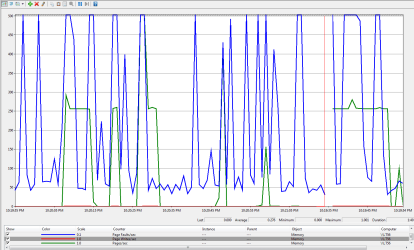
One interesting note that best described by pictures...

Just a short test with the pagefile disabled shows this for page faults monitoring:

no_pf.png

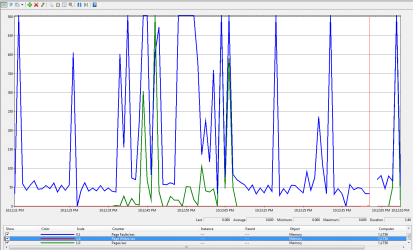
There are still page faults and pages per second, both can max out the 500 chart limit, but no writes. Enabling the pagefile, system manage, for two of my HDD's shows this:

pf.png

Granted the period had been short, but there was a write even if the memory utilization has never reached 50% with most of my programs running.

Anyone knows why Windows keep "paging" if there's no pagefile? Unless it uses the "cashed memory" for this purpose, but shouldn't it show writes as well?

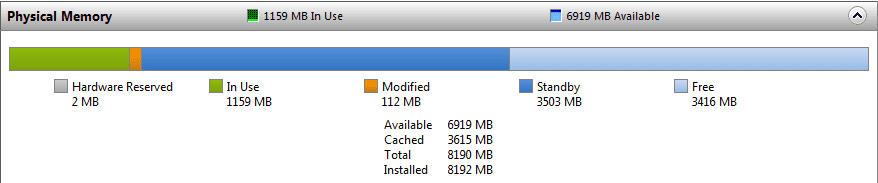
At idle, my system has this physical memory utilization:

ram use.png

Since I don't use many programs at once, the available memory seemed more than enough for programs. I still believe that, but need to look at what are these pages for, if there is no write...
 

My Computer

Computer type
PC/Desktop
Computer Manufacturer/Model Number
Custom built at Home
OS
Windows 7 64-bit, Windows 8.1 64-bit, OSX El Capitan, Windows 10 (VMware)
CPU
Intel i5-3350P 3.1 GHz
Motherboard
Gigabyte GA-Z77X-UP5 TH
Memory
16 GBs GSkill Sniper
Graphics Card(s)
Radeon HD 7850
Sound Card
VIA HD Audio
Monitor(s) Displays
Dell U2410 24"
Screen Resolution
1920x1200
Hard Drives
1 x Intel 520 240 GBs
1 x Seagate 1TBs SATA 2.0,
1 x Seagate 1TBs eSATA 2.0
PSU
Thermaltake 850W
Case
Antec P183
Cooling
Noctua NH-D14 Heatsink 2 x 120mm fans, 4 x 120mm case fans
Keyboard
Dell Multimedia keyboard
Mouse
Logitech Trackball
Internet Speed
28.5 Mb/s
Nor did I advocate disabling the page file.

True.

Demanding to leave the page file enabled

That wasn't a demand - that was the voice of common sense ;)


and calling people names (implied or otherwise) who does not comply is, well silly...;)

One could say that if one were inclined - luckily for me, I'm not that inclined :p


In all seriousness though - the ultimate object of the exercise is to try to separate fact from fiction so that anyone who stumbles across this thread in the future can decide for themselves.

What's good for the goose is not always good for the gander. We're just trying to avoid J.Citizen from seeing a post "Disable Pagefile = Good" and them following suit only to discover that app x,y or z that the goose does not use suddenly stops working properly for the gander.

Forewarned is forearmed. Not everyone is savvy enough discern the causality between 'disable A = Error A".

(Especially 'mass changes in one sitting' tinkering. That never ends well :) )
 

My Computer

Computer type
PC/Desktop
Computer Manufacturer/Model Number
Systems by SmartEyeball
OS
8 Pro x64
CPU
i7 3770K 4.6GHz
Motherboard
ASUS P8Z77 WS
Memory
16GB G.Skill Trident X 2666mhz
Graphics Card(s)
x2 EVGA 780 Ti Superclocked SLI
Sound Card
SB X-FI Surround 5.1 PRO USB / ATH-AD900 Headphones
Monitor(s) Displays
x3 Dell U2410 / 58" Samsung
Screen Resolution
5760*1200/ 1920*1200
Hard Drives
2x Intel 520 240GB (RAID 0) * 2x WD Caviar Blacks 2TB (RAID 0) * 2TB WD Caviar Black * Sony Optirac DVD
PSU
Silverstone Strider Evolution 1200W
Case
Thermaltake Level 10 GT Snow Edition
Cooling
Noctua NH-D14
Keyboard
Topre Realforce // Ducky Shine MX Black // Filco Ninja TKL
Mouse
Thermaltake Theron (Highly Recommended) + Razer Imperator
Antivirus
MSE
Browser
IE, FF, WaterFox
Other Info
GT Extreme V2 Sim Racing Cockpit + 40" LCD and K/B Mouse stand ▼
Fanatec CSR Elite Wheel + Clubsport V1 Pedals + CSR shifter/7G-H ▼Saitek X52 Pro ▼ TrackIR 5 Pro
Buttkicker v2 Seat Rumbler with Dedicated 5.1 and Sub Woofer attached to frame ▼
=
Bloody Big Grin
Anyone knows why Windows keep "paging" if there's no pagefile? Unless it uses the "cashed memory" for this purpose, but shouldn't it show writes as well?

Other things generate page faults. Memory mapped files. Your exe and dll files will be memory mapped when executed. So if you launch an application then you will see them.
 

My Computer

OS
Windows
In all seriousness though - the ultimate object of the exercise is to try to separate fact from fiction so that anyone who stumbles across this thread in the future can decide for themselves.

What's good for the goose is not always good for the gander. We're just trying to avoid J.Citizen from seeing a post "Disable Pagefile = Good" and them following suit only to discover that app x,y or z that the goose does not use suddenly stops working properly for the gander.

Forewarned is forearmed. Not everyone is savvy enough discern the causality between 'disable A = Error A".

(Especially 'mass changes in one sitting' tinkering. That never ends well :) )
In another word, it's quite alright to disable the page file if one can do some algebra; you've just stated nicer than I did :o...

People who venture to make mass tinkering with the system tends to be savvy enough to reverse the changes. The masses on the other hand wouldn't even know what the page file is, much less changing it. From this perspective, this is pretty much a techy, or wanna be techy discussion on the subject at hand...
 

My Computer

Computer type
PC/Desktop
Computer Manufacturer/Model Number
Custom built at Home
OS
Windows 7 64-bit, Windows 8.1 64-bit, OSX El Capitan, Windows 10 (VMware)
CPU
Intel i5-3350P 3.1 GHz
Motherboard
Gigabyte GA-Z77X-UP5 TH
Memory
16 GBs GSkill Sniper
Graphics Card(s)
Radeon HD 7850
Sound Card
VIA HD Audio
Monitor(s) Displays
Dell U2410 24"
Screen Resolution
1920x1200
Hard Drives
1 x Intel 520 240 GBs
1 x Seagate 1TBs SATA 2.0,
1 x Seagate 1TBs eSATA 2.0
PSU
Thermaltake 850W
Case
Antec P183
Cooling
Noctua NH-D14 Heatsink 2 x 120mm fans, 4 x 120mm case fans
Keyboard
Dell Multimedia keyboard
Mouse
Logitech Trackball
Internet Speed
28.5 Mb/s
Anyone knows why Windows keep "paging" if there's no pagefile? Unless it uses the "cashed memory" for this purpose, but shouldn't it show writes as well?

Other things generate page faults. Memory mapped files. Your exe and dll files will be memory mapped when executed. So if you launch an application then you will see them.
So, it is actually page fault when the program loads into the memory. The page counter in itself is writing/moving program from the memory to the disk, right?
 

My Computer

Computer type
PC/Desktop
Computer Manufacturer/Model Number
Custom built at Home
OS
Windows 7 64-bit, Windows 8.1 64-bit, OSX El Capitan, Windows 10 (VMware)
CPU
Intel i5-3350P 3.1 GHz
Motherboard
Gigabyte GA-Z77X-UP5 TH
Memory
16 GBs GSkill Sniper
Graphics Card(s)
Radeon HD 7850
Sound Card
VIA HD Audio
Monitor(s) Displays
Dell U2410 24"
Screen Resolution
1920x1200
Hard Drives
1 x Intel 520 240 GBs
1 x Seagate 1TBs SATA 2.0,
1 x Seagate 1TBs eSATA 2.0
PSU
Thermaltake 850W
Case
Antec P183
Cooling
Noctua NH-D14 Heatsink 2 x 120mm fans, 4 x 120mm case fans
Keyboard
Dell Multimedia keyboard
Mouse
Logitech Trackball
Internet Speed
28.5 Mb/s
Cr00zng said:
Nor did I advocate disabling the page file.
Oh?
Cr00zng said:
Running with no paging file on a large system is fine

In another word, it's quite alright to disable the page file if one can do some algebra
It is a pretty thin, and very fuzzy line between "nor did I advocate disabling" and "it's quite alright to disable". :sarc:

But in any case, you are wrong! NOTHING presented thus far says running without a page file is fine, and there is NOTHING that says it is alright to disable the page file. So now, I am challenging you, Cr00zng. Show us one, just one link to one white paper, research report, a review site, a RAM maker!!!!, any one, just one link that backs up your TOTALLY UNFOUNDED claims.

You guys are NOTHING but anonymous names on a forum making illogical leaps to conclusions based on ZERO, none, nil evidence to support your FALSE claims. You have failed to find even one expert to back you up. Not one.

GET REAL PEOPLE! Not needed does NOT mean disable. And not needed during 5 minutes of casual, unscientific observation (no actual measuring or benchmarking) is NOT a valid test, and certainly such an observation on this machine is no indication of what should be on that machine.

If you think otherwise - SHOWS US - stop just flapping your gums! SHOW US!!!! This is a technical forum and you have presented zero technical facts that defend your position. None! :(

Conversely, several of us have provided many links to reputable sources that say YOU ARE WRONG. Want another?

Windows 7 Inside Out by Ed Bott, Carl Siechert, Craig Stinson, Copyright 2010, Page 743,

Page File Confusion

By far the most common instances of performance-related misinformation revolve around the subject of page files, sometimes incorrectly called swap files. We routinely run across two widely published myths about the proper configuration of virtual memory in Windows:

Myth #1: If your computer has a large amount of memory installed, you should eliminate your page file completely. This is bad advice. Although you can configure Windows so that it does not set aside any virtual memory, no reputable source has ever published benchmarks establishing any performance gains from doing so, and Windows simply wasn't designed to run without a page file.

Myth #2: Creating a page file of a fixed size improves performance. This is also potentially bad advice. On 1990s-vintage hardware, dynamically resizing the swap file caused noticeable delays in system response and also resulted in excessive fragmentation. The memory management subsystems in modern Windows versions have been tuned to minimize the likelihood of performance problems

Key points Ed makes about disabling the page file:
  • This is bad advice.
  • No reputable source has ever published benchmarks establishing any performance gains from doing so
  • Windows simply wasn't designed to run without a page file

People who venture to make mass tinkering with the system tends to be savvy enough to reverse the changes.
Yeah, right! :(
 

My Computer

Computer Manufacturer/Model Number
BrightWorks Systems B4
OS
Windows 7 Profession 64-bit
CPU
Intel Core i7-860 Quad
Motherboard
Gigabyte P55-UD4P
Memory
Mushkin 4x2Gb PC12800
Graphics Card(s)
Gigabyte GTX260 896Mb
Sound Card
Integrated 7.1 HD Dolby
Monitor(s) Displays
2 Samsung 2220wm-HAS 22"
Screen Resolution
1680 x 1050 | 1680 x 1050
Hard Drives
WD HE 1Tb
PSU
Corsair TX-750W
Case
Ultra M998
Cooling
OEM
Keyboard
MS Wireless Comfort 5000
Mouse
MS Wireless 5000
Internet Speed
Cable and pretty darn fast
Look, the whole point here is Pagefile is needed when Ram is limited and in case you run out of Ram, virtual memory kicks in. Right? Well, If you have well over 8GB and ALL your programs do not take up more than let's say 5GB....than what's the point of having a Pagefile????

I am proof, with my VMware server, VirtualBox with Ubuntu, OpenOffice, Firefox with 10+ tabs, Chrome, IE9, PCTools running a scan, Lenovo updates going and security webcam....ALL of these apps running with Win7's Resource Monitor app open and verifying only 4.5GB used up. The other 3.5 is free or in standby in case more Ram is required.
You want me to write a paper on that? You want me to post a YouTube video to prove that?

Obviously there's no paper AS OF YET to suggest that Pagefile will eventually be a thing of the past. But mark my words it will happen and as we progress with Technology and we will find a way to accomplish that.

There's no question by setting a Pagefile it increases disk activity BUT it does slow performance, especially on an SSD. That was the original question before this huge debate and the question was "Should I set a Pagefile on an SSD?" My answer was no simply because based on my specs (read my very first post) I don't believe you need Pagefile on SSD running 64bit with a large sum of Ram.

However, do what you feel is necessary to accomplish your needs. Good day, good night and thank you!
 

My Computer

OS
Windows 7
CPU
2 Duo core
Seriously, flap your gums all YOU want but the reality is I have no Pagefile on my SSD and everything works for me. It works for ME! So I must be doing something right.
 

My Computer

OS
Windows 7
CPU
2 Duo core
I am proof
No you're not. You are nobody. You are just some anonymous poster on a website, making a bunch of unsubstantiated claims expecting everyone to automatically believe you - in spite of the fact there have been more than a dozen recognized experts here at SevenForums, and posted links to multiple reliable sources across the Internet - ALL OF WHOM say you are WRONG!

There's no question by setting a Pagefile it increases disk activity BUT it does slow performance, especially on an SSD.
NO! When you tried to slip that by us before, I showed where the SSD makers YOU MENTIONED don't agree with you.

STOP MAKING FALSE CLAIMS YOU CANNOT DEFEND!

Steven Sinofsky, President, Microsoft Windows and Windows Live Division, from his blog, Support and Q&A for Solid-State Drives - Engineering Windows 7 reports,
Should the pagefile be placed on SSDs?

Yes. Most pagefile operations are small random reads or larger sequential writes, both of which are types of operations that SSDs handle well.

In looking at telemetry data from thousands of traces and focusing on pagefile reads and writes, we find that

•Pagefile.sys reads outnumber pagefile.sys writes by about 40 to 1,
•Pagefile.sys read sizes are typically quite small, with 67% less than or equal to 4 KB, and 88% less than 16 KB.
•Pagefile.sys writes are relatively large, with 62% greater than or equal to 128 KB and 45% being exactly 1 MB in size.​

In fact, given typical pagefile reference patterns and the favorable performance characteristics SSDs have on those patterns, there are few files better than the pagefile to place on an SSD.

Seriously, flap your gums all YOU want but the reality is I have no Pagefile on my SSD and everything works for me. It works for ME! So I must be doing something right.
It just means it did not break - it does not mean it is the correct thing to do. And it certainly does not mean you should be advising others to follow you.
 

My Computer

Computer Manufacturer/Model Number
BrightWorks Systems B4
OS
Windows 7 Profession 64-bit
CPU
Intel Core i7-860 Quad
Motherboard
Gigabyte P55-UD4P
Memory
Mushkin 4x2Gb PC12800
Graphics Card(s)
Gigabyte GTX260 896Mb
Sound Card
Integrated 7.1 HD Dolby
Monitor(s) Displays
2 Samsung 2220wm-HAS 22"
Screen Resolution
1680 x 1050 | 1680 x 1050
Hard Drives
WD HE 1Tb
PSU
Corsair TX-750W
Case
Ultra M998
Cooling
OEM
Keyboard
MS Wireless Comfort 5000
Mouse
MS Wireless 5000
Internet Speed
Cable and pretty darn fast
Cr00zng said:
Nor did I advocate disabling the page file.
Oh?
Cr00zng said:
Running with no paging file on a large system is fine

In another word, it's quite alright to disable the page file if one can do some algebra
It is a pretty thin, and very fuzzy line between "nor did I advocate disabling" and "it's quite alright to disable". :sarc:
That was a response/agreement to the comment by Smarteye... Your other selective quotes takes my postings out of context.

The fact remains that machine with extended size of memory can run without the pagefile just fine in certain cases that depends on the hardware/software mix at hand. Is that advisable for everyone? No...

Advising these people to turn on the pagefile is pretty much useless, why should they listen? It's not like the expert has never been wrong, right?:sarc:

People drawing conclusion from forum postings, make changes to their machines without understanding the impact of the change; they deserve it, if they break their machine and cannot fix it.
 

My Computer

Computer type
PC/Desktop
Computer Manufacturer/Model Number
Custom built at Home
OS
Windows 7 64-bit, Windows 8.1 64-bit, OSX El Capitan, Windows 10 (VMware)
CPU
Intel i5-3350P 3.1 GHz
Motherboard
Gigabyte GA-Z77X-UP5 TH
Memory
16 GBs GSkill Sniper
Graphics Card(s)
Radeon HD 7850
Sound Card
VIA HD Audio
Monitor(s) Displays
Dell U2410 24"
Screen Resolution
1920x1200
Hard Drives
1 x Intel 520 240 GBs
1 x Seagate 1TBs SATA 2.0,
1 x Seagate 1TBs eSATA 2.0
PSU
Thermaltake 850W
Case
Antec P183
Cooling
Noctua NH-D14 Heatsink 2 x 120mm fans, 4 x 120mm case fans
Keyboard
Dell Multimedia keyboard
Mouse
Logitech Trackball
Internet Speed
28.5 Mb/s
People drawing conclusion from forum postings, make changes to their machines without understanding the impact of the change; they deserve it, if they break their machine and cannot fix it.

They deserve it??? Oh wow!

Not on my watch! If someone comes to this forum, or any other forum I "work", seeking technical advice, they deserve quality, truthful advice based on substantiated facts and established standards!

But to your comment - you prove my point. So where are your links to "reliable sources"? Do I need to keep adding more and more? You've provided none!

I am a nobody (though not an anonymous nobody) and I still provided multiple links to substantiate my facts. You've provided nothing.

If I see anyone telling one of our posters to disable their page file, I will be all over it just as I have been all over it in this thread.

People come here to get advise because computers are more than just another household appliance. Repair shops are expensive and sadly, not all are reputable. Our job is to help and teach these folks to have a safe and enjoyable computing experience.

The fact remains that machine with extended size of memory can run without the pagefile just fine
Not the point!

Does it run better without a page file?
No! No reputable source has ever published benchmarks establishing any performance gains deleting the page file.

Is there any advantage to disabling the page file?
No! There is no documented evidence to suggest there is any advantage to disabling the page file.

Are there any downsides to disabling the page file?
Yes! There is much documented evidence that shows disabling the PF affects memory dumps and some programs.
 

My Computer

Computer Manufacturer/Model Number
BrightWorks Systems B4
OS
Windows 7 Profession 64-bit
CPU
Intel Core i7-860 Quad
Motherboard
Gigabyte P55-UD4P
Memory
Mushkin 4x2Gb PC12800
Graphics Card(s)
Gigabyte GTX260 896Mb
Sound Card
Integrated 7.1 HD Dolby
Monitor(s) Displays
2 Samsung 2220wm-HAS 22"
Screen Resolution
1680 x 1050 | 1680 x 1050
Hard Drives
WD HE 1Tb
PSU
Corsair TX-750W
Case
Ultra M998
Cooling
OEM
Keyboard
MS Wireless Comfort 5000
Mouse
MS Wireless 5000
Internet Speed
Cable and pretty darn fast
Back
Top