Pagefile.sys

Oh god,, are we really still talking about the Page File?

Seriously,,, get it through your heads...... A PAGE FILE IS NECESSARY TO THE STABLE AND PROPER WORKINGS OF WINDOWS..... PERIOD.

This has been discussed and tried and worked through since the dawning of XP.
That and Static vs Dynamic Page File sizes as well as min/max sizes.

MS recommends... as do I...

Amount of Ram x 1.5 = Min
Amount of Ram x 3 = Max

If you have more than 4G of memory,,
then I do recommend setting Min and Max size to 4096
This really is about all that you need and on 32Bit is the max size file you can have anyway.

1. Disabling the pagefile does not disable virtual memory.
Yes, It Does. I would avoid whoever told you that as a teacher.

Virtual memory - Wikipedia, the free encyclopedia


And note the PF is rebuilt EVERY time the system reboots.
I will have to look into this further,,, but I think the only time this happens is when you have the registry key set to delete the pagefile on shutdown enabled. Then it will delete and rebuild the pagefile on every reboot. This can slow things down a bit for shutdown and restart. Good security practice does say to set this bit as the pagefile does hold data that can be accessed.

No where in that article does it say that disabling the pagefile disables virtual memory. There is a section of that article to deals with paged virtual memory which is how virtual memory is broken up and allocated but that has nothing to do with the pagefile. A pagefile is just a overflow that virtual memory uses when physical ram is running out and also a place holder for inactive data. I think you need to go re-read those books you keep reccomending to everyone. Also... a wiki link? Really? You call that proof?

Virtual memory as is explain in your link is simply a virtual address space assigned to applications. The OS then determines from that virtual space where things are actually located in physcial RAM. This is what allows multiple programs to share the same physical memory space. The pagefile is just a component that is used in the situation that there is no more availible physical space (and to store inactive or infrequently used data). If you run out out of physical space... bad things happen.

And no, the page file is not rebuilt everytime windows restarts. Unless, however, you have it set to do so with a registry tweak.

And if a system is so unstable without a pagefile how come I have been running for 4 years with XP, Vista, and now Win 7 without any issues and no page files?
 

My Computer

Computer Manufacturer/Model Number
Custom
OS
Windows 7 Ultimate x64
CPU
QX6700 @ 3.2Ghz (temporarily till I get the drive to tweak)
Motherboard
Asus Maximus Formula
Memory
8gb (4x2gb) OCZ PC2-8500
Graphics Card(s)
GTX280
Sound Card
Auzentech Prelude
Monitor(s) Displays
Samsung 244T & 940BF
Screen Resolution
1920x1200 & 1280x1024
Hard Drives
2 x Hitatchi 7K500 500GB in raid 0
PSU
Seasonic M-12 700w
Case
Lian Li PC-6077B
Cooling
Liquid (D-tek Fuzion 2/DDC+/240GTX)
Keyboard
Saitech Eclipse II
Mouse
Logitech G9
Internet Speed
22Mbit burst - 15 Mbit typical down / 500Kbit up
Other Info
http://pics.livejournal.com/bun_bun/pic/001c64ww
Virtual Memory is the swap file, page file, it resides on disk, end of story.
Disable Page file you disable virtual memory.

Extending memory to disk is a normal consequence of using virtual memory techniques, but could be done by other means such as overlays or swapping programs and their data completely out to disk while they are inactive. The definition of "virtual memory" is based on redefining the address space with a contiguous virtual memory addresses to "trick" programs into thinking they are using large blocks of contiguous addresses.
Paging - Wikipedia, the free encyclopedia

Paging is an important part of virtual memory implementation in most contemporary general-purpose operating systems, allowing them to use disk storage for data that does not fit into physical Random-access memory (RAM). Paging is usually implemented as architecture-specific code built into the kernel of the operating system.
When swapping is utilised a problem called "thrashing" can occur, where the computer spends too much time shuffling blocks of virtual memory between real memory and disks, and therefore appears to work slower. Better design of application programs can help, but ultimately the only cure is to install more real memory.
That last quote does not mean that you should install a ton of memory and disable Virtual Memory.

Also note..

It is required, however, for the boot partition (i.e. the drive containing the Windows directory) to have a pagefile on it if the system is configured to write either kernel or full memory dumps after a crash. Windows uses the paging file as temporary storage for the memory dump. When the system is rebooted, Windows copies the memory dump from the pagefile to a separate file and frees the space that was used in the pagefile.
And...

While this is true,,,

Windows 2000, XP, and Vista offer the DisablePagingExecutive registry setting, which controls whether kernel-mode code and data can be eligible for paging out.
This is also true....

It is not uncommon to find 32 bit computers with 4 GiB of RAM, the maximum amount addressable without the use of PAE.
Swap space can be used beyond this 4 GiB limit, due to it being addressed in terms of pages rather than individual bytes.
While 32 bit programs will continue to be limited to the 4 GiB they're capable of addressing, because they each exist in their own virtual address space, a group of programs can together grow beyond this limit and into any available swap space.
Meaning that not everyone can run without a page file and it is not always wise to turn it off. It is there when and if needed and by turning it off you can actually limit a program from using what it is coded to need. Some apps require a page file (swap file) (ie. Virtual Memory). Becasue....

Developed for multitasking kernels, virtual memory provides two primary functions:

  1. Each process has its own address space, thereby not required to be relocated nor required to use relative addressing mode.
  2. Each process sees one contiguous block of free memory upon launch. Fragmentation is hidden.
All implementations (excluding emulators) require hardware support. This is typically in the form of a memory management unit built into the CPU.
Systems that use this technique make programming of large applications easier and use real physical memory (e.g. RAM) more efficiently than those without virtual memory.
What that means is,,, it will utilize RAM more efficiently with Virtual Memory than without.

In other words,, they work together, not independently.

Yes, you can run a system without a page file, but in real world examples, it really is better to have one than not. I have been through this with many, and I have debated this and tested this since 2000. I have seen systems that appear to run fine without a pagefile, but have minor constant problems. I have seen systems with an improper pagefile set and run like crap, then you set the page file proper, and it runs great. I am not just saying these things to talk out my ass. I have done it, seen it, tested it, lived it.

My recommendation is to NOT disable the pagefile and effectively disable Virtual Memory.
Some apps do require it. And no, I can't name them specifically, But my bet is Excel and Access would be 2.


And actually,, here it is,.,....

The simplest page table systems often maintain a frame table and a page table.
The frame table holds information about which frames are mapped. In more advanced systems, the frame table can also hold information about which address space a page belongs to, statistics information, or other background information.
The page table holds the mapping between a virtual address of a page and the address of a physical frame. There is also auxiliary information about the page such as a present bit, a dirty or modified bit, address space or process ID information, amongst others.
Secondary storage, such as a hard disk, can be used to augment physical memory. Pages can be swapped in and out of physical memory and the disk. The present bit can indicate what pages are currently present in physical memory or are on disk, and can indicate how to treat these different pages, ie. whether to load a page from disk and swap another page in physical memory out.
The dirty bit allows for a performance optimization. A page on disk that is swapped in to physical memory, then read from, and subsequently paged out again does not need to be written back to disk, since the page hasn't changed. (However, if the page was written to, its dirty bit would need to be set as additional work). This strategy requires that the swap file retain a copy of the page after it is swapped in to memory; therefore, in strictly literal terms, the operation isn't actually a "swap". When a dirty bit is not used, the swap file need only be as large as the instantaneous total size of all swapped-out pages at any moment. When a dirty bit is used, at all times some pages will exist in both physical memory and the swap file, and the simplest strategy is to make the swap file as large as the total virtual memory size, i.e. making room for every page regardless of whether it is in virtual memory. With large hard disks being relatively inexpensive today, it can be expected that most modern operating systems will do this and will make the swap file permanent in order to ensure that it is always available and contiguous (for optimal speed of access).
http://en.wikipedia.org/wiki/Page_table
 

My Computer

Computer Manufacturer/Model Number
Self Built
OS
Win 7 Ultimate 32bit
CPU
C2D E6600 2.4Ghz
Motherboard
Intel D965WH
Memory
4G Kingston KHX5400D2
Graphics Card(s)
EVGA GTX 570 HD SC (012-P3-1573-KR)
Sound Card
On-Board
Monitor(s) Displays
Samsung 226BW
Screen Resolution
1680 x 1050
Hard Drives
2 x 250 Seagate Barracuda
2 x 500 Seagate Barracuda (Raid1)
PSU
Corsair TX750W
Case
In-Win C589
Cooling
Stock Intel Cooling
a comprehensive reply there, Tepid..

- deserves maximum rep points..:geek:
 

My Computer

Computer type
PC/Desktop
Computer Manufacturer/Model Number
benchtec, built to personal specs
OS
Windows10 Pro - 64Bit vs.10547
CPU
i7-965 Extreme Edition (8 Cores) at 3.3GHz (no OC)
Motherboard
BloodRageX58 (Socket1366)
Memory
12G Corsair Dominator DDR3 - tripled
Graphics Card(s)
2xAMD SapphireNITRO R9 380(4G) crossfire
Sound Card
Sonar(SB)X-Fi onboard
Monitor(s) Displays
SyncMaster P2050 20"
Screen Resolution
1600x900 (widescreen)
Hard Drives
480G\OCZSolid3SSD, 64G\OCZVertex3SSD,60G\OCZVertex2SSD, 1TB\spinpointF1SATAHDD
PSU
1200w Power Station Gold
Case
ANTEC 900/2 all blue lights, etc..
Cooling
Noctua SE1366 NH-U12P - a tight fit, but a monster cooler!!
Keyboard
Logitech G19 (wired)
Mouse
Logitech G9 Laser (wired)
Internet Speed
150mb unlimited
Browser
IE11(RP)
Other Info
Xbox One, Nokia735 Windows10 mobile, LG HD/DVD/Blu-Ray r/w, CyberlinkPowerDVD15, LogitechZ5500-SS(5.1), LogitechG35Phones-SS(7.1),MSOffice 2007,CorelDrawX7,Painter2016, Wacom Intuos Pro-SE
You are wasting your time. The only thing in all that that even refered to the pagefile itself is swapping and memory dumps. Both of which I have already discussed.

I would be interested in knowing what these "minor constant problems" are that you talk about. As in the past 4 years I have had no issues related to not having a page file on my main rig.

I repeat. Pageing is refering to how virtual memory breaks up the allocated data. Pageing does not mean the explicit use of the pagefile, that is called swapping.

Everything in that post is true about virtual memory. However turning off the pagefile does not turn off virtual memory and no where in your post does it explicitly say that turning off the pagefile turns off virtual memory.

It even states in your post virtual memory is nothing other then code (a tool) for a multi task kernel to use to allow multiple programs to function in the same memory space. Pageing is how this allocated memory is broken up and swapping is the act of swaping pages to and from the pagefile. Disabling the pagefile only disables swapping. Virtual memory is still active. Otherwise the system would fail and there are plenty of people running without pagefiles perfectly fine including myself. All it means is that if I run out of memory programs are going to crash and if I get a BSOD I will not have a memory dump to analyze.

And please stop useing wiki to prove a point. Wiki is nothing other then information collected by people like you or me and is no more substantial then the posts we are writing.

I do agree however that for the typical user the pagefile should be set to managed by the OS and left alone. Although that could be furthered a bit and said you should have a page file thats at least big enough for memory dumps (so phyiscal RAM + 300mb) but not so big as to cause the pagefile to perform worse due to greater area of random read/writes to disk and/or taking up more of the faster area of the drive that other applications could utilize. If it is too big, afterall, it is mostly wasted anyway. So for the majority of situations physical ram + 300mb should suffice. Also there used to be talk about setting min and max the same for performance reasons which I can see the point in but not sure if there is any merit in doing so.
 
Last edited:

My Computer

Computer Manufacturer/Model Number
Custom
OS
Windows 7 Ultimate x64
CPU
QX6700 @ 3.2Ghz (temporarily till I get the drive to tweak)
Motherboard
Asus Maximus Formula
Memory
8gb (4x2gb) OCZ PC2-8500
Graphics Card(s)
GTX280
Sound Card
Auzentech Prelude
Monitor(s) Displays
Samsung 244T & 940BF
Screen Resolution
1920x1200 & 1280x1024
Hard Drives
2 x Hitatchi 7K500 500GB in raid 0
PSU
Seasonic M-12 700w
Case
Lian Li PC-6077B
Cooling
Liquid (D-tek Fuzion 2/DDC+/240GTX)
Keyboard
Saitech Eclipse II
Mouse
Logitech G9
Internet Speed
22Mbit burst - 15 Mbit typical down / 500Kbit up
Other Info
http://pics.livejournal.com/bun_bun/pic/001c64ww
Over 4GB = you don't need a pagefile under 2GB = You need a pagefile and it should be set to double your RAM.


I totally agree!
 

My Computer

OS
Windows 7
CPU
2 Duo core
I've been running 64bit 7 ultimate on this machine with no pagefile for the past couple days with no trouble. Even removed 4 GB of memory. Still no trouble. Tried putting a movie on an external display while COD 4 MW is loaded.. guess what... it works just fine.
 
Virtual Address Space is not the same as Virtual Memory.
Virtual Memory uses Virtual Address Space, but they are not the same.
Disable the Pagefile, you disable Virtual Memory

And I am done debating this issue.
 

My Computer

Computer Manufacturer/Model Number
Self Built
OS
Win 7 Ultimate 32bit
CPU
C2D E6600 2.4Ghz
Motherboard
Intel D965WH
Memory
4G Kingston KHX5400D2
Graphics Card(s)
EVGA GTX 570 HD SC (012-P3-1573-KR)
Sound Card
On-Board
Monitor(s) Displays
Samsung 226BW
Screen Resolution
1680 x 1050
Hard Drives
2 x 250 Seagate Barracuda
2 x 500 Seagate Barracuda (Raid1)
PSU
Corsair TX750W
Case
In-Win C589
Cooling
Stock Intel Cooling
Virtual Address Space is not the same as Virtual Memory.
Virtual Memory uses Virtual Address Space, but they are not the same.
Disable the Pagefile, you disable Virtual Memory

And I am done debating this issue.

Honestly, all you need to do is let windows adjust it. You run out of RAM, windows will swap it. Otherwise, LEAVE IT ALONE.
 
Last edited:

My Computer

Computer Manufacturer/Model Number
Sony Vaio Z46GDU
OS
Windows 7 Ultimate x86-64
CPU
[email protected] 1066MHz FSB
Motherboard
Sony branded
Memory
6GB DDR3 1066MHz
Graphics Card(s)
9300M GS 256MB Dedicated (Speed) + Intel4500MHD (Stamina)
Sound Card
Realtek HD Audio
Monitor(s) Displays
13.1' WXGA
Screen Resolution
1600x900
Hard Drives
320GB 7200RPM w/ 16MB cache
Internet Speed
1MB/s
I do have one more thing to add....


A properly set pagefile is better than no page file.
However, it may be necessary and even recommended that from time to time, you set the "Clear Pagefile on Shutdown" and reboot, to allow the page file to Delete and be recreated.

It is ok to leave this set and have it delete the pagefile every time you shutdown and reboot.
The only thing you might notice is a very slightly slower shutdown and start up.

This does 3 things,....

A. Defrags the page file , however you will want to fully defrag your system before and/or after doing this

B. If there is any corruption (bad data in the pagefile) it will correct it.

C. Gets rid of the old data that may be sitting in there, that you may not want people to be able to access. (ie. personal info)

Which some will argue is a reason to not have a pagefile..... that's not a good reason.

Now I am done with this debate.
 

My Computer

Computer Manufacturer/Model Number
Self Built
OS
Win 7 Ultimate 32bit
CPU
C2D E6600 2.4Ghz
Motherboard
Intel D965WH
Memory
4G Kingston KHX5400D2
Graphics Card(s)
EVGA GTX 570 HD SC (012-P3-1573-KR)
Sound Card
On-Board
Monitor(s) Displays
Samsung 226BW
Screen Resolution
1680 x 1050
Hard Drives
2 x 250 Seagate Barracuda
2 x 500 Seagate Barracuda (Raid1)
PSU
Corsair TX750W
Case
In-Win C589
Cooling
Stock Intel Cooling
Virtual Address Space is not the same as Virtual Memory.
Virtual Memory uses Virtual Address Space, but they are not the same.
Disable the Pagefile, you disable Virtual Memory

And I am done debating this issue.

Virtual Memory encompasses many things including Virtual Address Space.

I think this little debate stems for the issue of a loosely defined term. When I think virtual memory I think:

"Logically-assigned memory that may or may not exist physically. Through the use of paging and the swap area, more memory can be referenced and allocated than actually exists on the system."

Disabling the pagefile changes how the OS deals with memory, slightly, however does not change how applications address memory. And only under certain circumstances will not having a pagefile ever be an issue.

That said, for the typical user in a typical setting the pagefile is left managed by the OS. I beleive I read Windows 7 now automatically sets the pagefile to just big enough for a memory dump if need be (physical RAM + ~300mb) and only makes it larger if absolutely neccessary.
 

My Computer

Computer Manufacturer/Model Number
Custom
OS
Windows 7 Ultimate x64
CPU
QX6700 @ 3.2Ghz (temporarily till I get the drive to tweak)
Motherboard
Asus Maximus Formula
Memory
8gb (4x2gb) OCZ PC2-8500
Graphics Card(s)
GTX280
Sound Card
Auzentech Prelude
Monitor(s) Displays
Samsung 244T & 940BF
Screen Resolution
1920x1200 & 1280x1024
Hard Drives
2 x Hitatchi 7K500 500GB in raid 0
PSU
Seasonic M-12 700w
Case
Lian Li PC-6077B
Cooling
Liquid (D-tek Fuzion 2/DDC+/240GTX)
Keyboard
Saitech Eclipse II
Mouse
Logitech G9
Internet Speed
22Mbit burst - 15 Mbit typical down / 500Kbit up
Other Info
http://pics.livejournal.com/bun_bun/pic/001c64ww
Virtual Address Space is not the same as Virtual Memory.
Virtual Memory uses Virtual Address Space, but they are not the same.
Disable the Pagefile, you disable Virtual Memory

And I am done debating this issue.

Virtual Memory encompasses many things including Virtual Address Space.

I think this little debate stems for the issue of a loosely defined term. When I think virtual memory I think:

"Logically-assigned memory that may or may not exist physically. Through the use of paging and the swap area, more memory can be referenced and allocated than actually exists on the system."

Disabling the pagefile changes how the OS deals with memory, slightly, however does not change how applications address memory. And only under certain circumstances will not having a pagefile ever be an issue.

That said, for the typical user in a typical setting the pagefile is left managed by the OS. I beleive I read Windows 7 now automatically sets the pagefile to just big enough for a memory dump if need be (physical RAM + ~300mb) and only makes it larger if absolutely neccessary.

You should download Process Explorer and check out your commit charge over a day.
 

My Computer

Computer Manufacturer/Model Number
Sony Vaio Z46GDU
OS
Windows 7 Ultimate x86-64
CPU
[email protected] 1066MHz FSB
Motherboard
Sony branded
Memory
6GB DDR3 1066MHz
Graphics Card(s)
9300M GS 256MB Dedicated (Speed) + Intel4500MHD (Stamina)
Sound Card
Realtek HD Audio
Monitor(s) Displays
13.1' WXGA
Screen Resolution
1600x900
Hard Drives
320GB 7200RPM w/ 16MB cache
Internet Speed
1MB/s
Since the dust is settling, I will just toss this into the fray
"Contrary to popular opinion, disabling the pagefile will NOT disable virtual memory. Virtual memory is not the pagefile. It is an essential component of the Windows system and it can never be disabled. Virtual memory is not an extension to physical memory but a system that combines physical RAM and many files on the hard disk into a unit that combines the best features of both and minimizing the limitations.

WikiAnswers - How do you turn off virtual memory in windows xp

This was in XP, but I haven't seen anything that indicates that this has changed since.

Here is a set of definitions from Black Viper:

Some definitions need to be explained:

Physical RAM ~ The amount of Memory (RAM) installed on a system. Physical RAM is "way" faster than a "paging file."

Paging File ~ The file that is located on your hard drive that "acts" like Physical RAM but is way slower.

Virtual Memory ~ The name used for the sum of Physical RAM and the Paging File. In other words: Physical RAM + Paging File = Virtual Memory. You cannot "disable" Virtual Memory even if you disable the Paging File. Meaning, 2 GB RAM + 0 MB Paging File = 2 GB Virtual Memory.

http://www.blackviper.com/WinXP/supertweaks.htm

Thus, it would seem that to say that some program is designed to use virtual memory is a misleading. More accurately it should be said that it is designed to use the pagefile.
 

My Computer

Computer Manufacturer/Model Number
DIY
OS
W7x64 Pro, SuSe 12.1/** W7 x64 Pro, XP MCE
CPU
Phenom II 1090T w/Noctua NH-D14 /**4400+ X2 w/CM Hyper TX 3
Motherboard
ASRock 890FX Deluxe 4/**A8N-SLI
Memory
2 x 2GB Patriot PGS34g1600LLKA/**4x1GB Corsair VS
Graphics Card(s)
EVGA GTX460 SC/**EVGA 8800GTS
Sound Card
Asus Xonar D2X/**Xonar D1
Monitor(s) Displays
Acer X233H, Dell E152FPc /**LG M237-WD
Screen Resolution
1920x1080 & 1024x768/**1980x1080
Hard Drives
WDC 2TB, 1.5TB, 1TB, 500GB,Seagate 500GB , Maxtor 80GB /**500GB Seagate & WDC 1TB Black
PSU
CM RS600 w/ APC BX1000G/**Antec 500 TP w/ APC BX1000
Case
HAF922/**Antec 1040IIB
Cooling
3x200mm, 1x140 and 1x120mm/**5x80mm fans
Keyboard
Logitech Media USB/**Saitek Eclipse
Mouse
Cordless Trackman Wheel/**Ditto
Internet Speed
3.3Mbps
Other Info
SB 560 5.1 w/ Sennheiser RS140/**Creative T20 speakers, Dvico FusionHDTV7 Gold RT, Cisco E3000, HP 5510V AIO, Linksys E3000, Belkin F5U237 hub and **F5D8055 adapter
(** = 2nd rig)
You should download Process Explorer and check out your commit charge over a day.

And your point being???


@seeker

Exactly. Biggest problem in this thread I think is confusing on definitions of terms. I know I am guilty of that, ive had to go back and change some things because I used the wrong terminology.
 

My Computer

Computer Manufacturer/Model Number
Custom
OS
Windows 7 Ultimate x64
CPU
QX6700 @ 3.2Ghz (temporarily till I get the drive to tweak)
Motherboard
Asus Maximus Formula
Memory
8gb (4x2gb) OCZ PC2-8500
Graphics Card(s)
GTX280
Sound Card
Auzentech Prelude
Monitor(s) Displays
Samsung 244T & 940BF
Screen Resolution
1920x1200 & 1280x1024
Hard Drives
2 x Hitatchi 7K500 500GB in raid 0
PSU
Seasonic M-12 700w
Case
Lian Li PC-6077B
Cooling
Liquid (D-tek Fuzion 2/DDC+/240GTX)
Keyboard
Saitech Eclipse II
Mouse
Logitech G9
Internet Speed
22Mbit burst - 15 Mbit typical down / 500Kbit up
Other Info
http://pics.livejournal.com/bun_bun/pic/001c64ww
Since the dust is settling, I will just toss this into the fray
"Contrary to popular opinion, disabling the pagefile will NOT disable virtual memory. Virtual memory is not the pagefile. It is an essential component of the Windows system and it can never be disabled. Virtual memory is not an extension to physical memory but a system that combines physical RAM and many files on the hard disk into a unit that combines the best features of both and minimizing the limitations.
WikiAnswers - How do you turn off virtual memory in windows xp

This was in XP, but I haven't seen anything that indicates that this has changed since.

Here is a set of definitions from Black Viper:

Some definitions need to be explained:

Physical RAM ~ The amount of Memory (RAM) installed on a system. Physical RAM is "way" faster than a "paging file."

Paging File ~ The file that is located on your hard drive that "acts" like Physical RAM but is way slower.

Virtual Memory ~ The name used for the sum of Physical RAM and the Paging File. In other words: Physical RAM + Paging File = Virtual Memory. You cannot "disable" Virtual Memory even if you disable the Paging File. Meaning, 2 GB RAM + 0 MB Paging File = 2 GB Virtual Memory.
Super Tweaks for Windows XP by Black Viper

Thus, it would seem that to say that some program is designed to use virtual memory is a misleading. More accurately it should be said that it is designed to use the pagefile.

I agree with 95% of this except the last statement. I don't believe the program knows what physical memory (pagefile or ram) is being used as this is handled by the Virtual Memory function and is transparent to the program. Here is a link to Microsoft information on Memory Management and how Virtual Address, Virtual Memory and paging is handled.
Memory Management (Windows)

Jim :cool:
 

My Computer

Computer type
PC/Desktop
Computer Manufacturer/Model Number
Home Built
OS
Windows 8.1 Pro w/Media Center 64bit, Windows 7 HP 64bit
CPU
Phenom II X6 1100T
Motherboard
ASUS M5A99X EVO
Memory
Crucial Balistic 8gb DDR3-1866 CL9
Graphics Card(s)
MSI R6850 Cyclone IGD5 PE
Sound Card
On Board
Monitor(s) Displays
ASUS VE258Q 25" LED with DVI-HDMI-DisplayPort
Screen Resolution
1920 x 1080
Hard Drives
Two WD Cavier Black 2TB Sata III, WD My Book Essential 2TB USB 3.0
PSU
Seasonic X650 80 Plus GOLD Modular
Case
Corsair 400R
Cooling
Antec Kuhler H2O 620, Two 120mm and four 140mm
Keyboard
Logitech K120
Mouse
Logitech Marble Mouse USB, Logitech Precision Game Pad
Internet Speed
15MB
Antivirus
Norton IS 2013, Malwarebytes Pro Beta 2
Browser
IE-11, FF-27
Other Info
APC UPS ES 750, Netgear WNR3500L Gigabit & Wireless N Router with SamKnows Test Program, Motorola SB6120 Gigabit Cable Modem. Brother HL-2170W Laser Printer, Epson V300 Scanner
I agree with 95% of this except the last statement. I don't believe the program knows what physical memory (pagefile or ram) is being used as this is handled by the Virtual Memory function and is transparent to the program. Here is a link to Microsoft information on Memory Management and how Virtual Address, Virtual Memory and paging is handled.
Memory Management (Windows)

Jim :cool:
I'm not a programmer, so I have no idea of what a program can or cannot be designed to do, but from another portion of the same Black Viper page, the author says:

Can you get rid of the paging file? Yes and no. If you have a boat load of memory (greater than 2GB) you may be able to function just fine. Some games require a certain amount of swap space to be created to even run, no matter how much RAM is available. Also, under certain conditions, my sound card goes crazy (or does not function) in some games with no paging file (oddly enough, Age of Empires 2). If you decide to test your luck with no paging file, you are on your own. :) Please do not E-Mail me with your war stories about no paging file. Every system is different and each persons requirement of how many applications are open at a time is different.. I usually do not have one "unless something requires it that I am running that day."
This seems to indicate that a page file is sometimes necessary, depending on what a person is running at the time. Some people may never run into a problem, while others will. I'm the kind that prefers to cover all bases, even if they may not apply to me.

It also seems clear that Virtual Memory is a function of the OS, completely apart from either the RAM or page file. The latter two items only occupying it.

EDIT: It appears that you include both RAM and page file within the definition of physical memory. To my knowledge, the term physical memory only applies to RAM.
 

My Computer

Computer Manufacturer/Model Number
DIY
OS
W7x64 Pro, SuSe 12.1/** W7 x64 Pro, XP MCE
CPU
Phenom II 1090T w/Noctua NH-D14 /**4400+ X2 w/CM Hyper TX 3
Motherboard
ASRock 890FX Deluxe 4/**A8N-SLI
Memory
2 x 2GB Patriot PGS34g1600LLKA/**4x1GB Corsair VS
Graphics Card(s)
EVGA GTX460 SC/**EVGA 8800GTS
Sound Card
Asus Xonar D2X/**Xonar D1
Monitor(s) Displays
Acer X233H, Dell E152FPc /**LG M237-WD
Screen Resolution
1920x1080 & 1024x768/**1980x1080
Hard Drives
WDC 2TB, 1.5TB, 1TB, 500GB,Seagate 500GB , Maxtor 80GB /**500GB Seagate & WDC 1TB Black
PSU
CM RS600 w/ APC BX1000G/**Antec 500 TP w/ APC BX1000
Case
HAF922/**Antec 1040IIB
Cooling
3x200mm, 1x140 and 1x120mm/**5x80mm fans
Keyboard
Logitech Media USB/**Saitek Eclipse
Mouse
Cordless Trackman Wheel/**Ditto
Internet Speed
3.3Mbps
Other Info
SB 560 5.1 w/ Sennheiser RS140/**Creative T20 speakers, Dvico FusionHDTV7 Gold RT, Cisco E3000, HP 5510V AIO, Linksys E3000, Belkin F5U237 hub and **F5D8055 adapter
(** = 2nd rig)
The way I understand it is physical memory is actual stored memory (RAM, pagefile, whatever) and virtual memory is just what the application sees. What happens to it after that is up to the OS and VMM.
 

My Computer

Computer Manufacturer/Model Number
Custom
OS
Windows 7 Ultimate x64
CPU
QX6700 @ 3.2Ghz (temporarily till I get the drive to tweak)
Motherboard
Asus Maximus Formula
Memory
8gb (4x2gb) OCZ PC2-8500
Graphics Card(s)
GTX280
Sound Card
Auzentech Prelude
Monitor(s) Displays
Samsung 244T & 940BF
Screen Resolution
1920x1200 & 1280x1024
Hard Drives
2 x Hitatchi 7K500 500GB in raid 0
PSU
Seasonic M-12 700w
Case
Lian Li PC-6077B
Cooling
Liquid (D-tek Fuzion 2/DDC+/240GTX)
Keyboard
Saitech Eclipse II
Mouse
Logitech G9
Internet Speed
22Mbit burst - 15 Mbit typical down / 500Kbit up
Other Info
http://pics.livejournal.com/bun_bun/pic/001c64ww
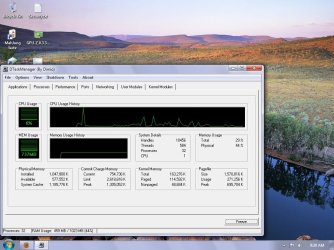
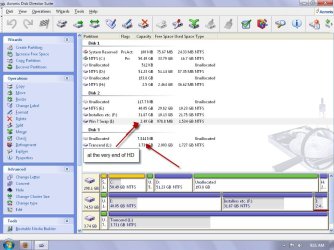
puzzled over this question for years.
finally settled on this config after heaps of research from russonavich et.al.

all conflicting as with this thread.:) hope my pics go here.(first try) :p
 

Attachments

  • Untitled2.jpg
    Untitled2.jpg
    259 KB · Views: 81
  • Untitled.jpg
    Untitled.jpg
    161.2 KB · Views: 116

My Computer

Computer Manufacturer/Model Number
Self
OS
W7, Xp Pro
CPU
AMD Sempron 2600+
Motherboard
K8V-MX
Memory
1GB
Graphics Card(s)
Radeon HD3650
Sound Card
Soundmax
Monitor(s) Displays
17" HP CRT
Screen Resolution
1024x768
Hard Drives
1x WDC WD800BB
1x HDS728080
PSU
? 460W
Case
Coolermaster
Cooling
enough
Keyboard
M$S
Mouse
Optical
Internet Speed
1500kbs
Other Info
OLD!!! does the job i need.
oops. the trancend is readyboost. i always leave page file with 16% free.

i'm not really :geek:ee enough to know what dtaskmanager tells me.
perhaps someone here could ??
 

My Computer

Computer Manufacturer/Model Number
Self
OS
W7, Xp Pro
CPU
AMD Sempron 2600+
Motherboard
K8V-MX
Memory
1GB
Graphics Card(s)
Radeon HD3650
Sound Card
Soundmax
Monitor(s) Displays
17" HP CRT
Screen Resolution
1024x768
Hard Drives
1x WDC WD800BB
1x HDS728080
PSU
? 460W
Case
Coolermaster
Cooling
enough
Keyboard
M$S
Mouse
Optical
Internet Speed
1500kbs
Other Info
OLD!!! does the job i need.
I'm not certain what the point was in the post with the attachments, but the only thing that I might question is the placement of the pagefile...being at the end of the drive, where the access time is longest. Since the pagefile is already slow by nature, I don't see any point in adding to that trait.
 

My Computer

Computer Manufacturer/Model Number
DIY
OS
W7x64 Pro, SuSe 12.1/** W7 x64 Pro, XP MCE
CPU
Phenom II 1090T w/Noctua NH-D14 /**4400+ X2 w/CM Hyper TX 3
Motherboard
ASRock 890FX Deluxe 4/**A8N-SLI
Memory
2 x 2GB Patriot PGS34g1600LLKA/**4x1GB Corsair VS
Graphics Card(s)
EVGA GTX460 SC/**EVGA 8800GTS
Sound Card
Asus Xonar D2X/**Xonar D1
Monitor(s) Displays
Acer X233H, Dell E152FPc /**LG M237-WD
Screen Resolution
1920x1080 & 1024x768/**1980x1080
Hard Drives
WDC 2TB, 1.5TB, 1TB, 500GB,Seagate 500GB , Maxtor 80GB /**500GB Seagate & WDC 1TB Black
PSU
CM RS600 w/ APC BX1000G/**Antec 500 TP w/ APC BX1000
Case
HAF922/**Antec 1040IIB
Cooling
3x200mm, 1x140 and 1x120mm/**5x80mm fans
Keyboard
Logitech Media USB/**Saitek Eclipse
Mouse
Cordless Trackman Wheel/**Ditto
Internet Speed
3.3Mbps
Other Info
SB 560 5.1 w/ Sennheiser RS140/**Creative T20 speakers, Dvico FusionHDTV7 Gold RT, Cisco E3000, HP 5510V AIO, Linksys E3000, Belkin F5U237 hub and **F5D8055 adapter
(** = 2nd rig)
I'm not certain what the point was in the post with the attachments, but the only thing that I might question is the placement of the pagefile...being at the end of the drive, where the access time is longest. Since the pagefile is already slow by nature, I don't see any point in adding to that trait.
you could have just done me a favour by pointing out i should move page to start of drive on the second hd . ?
 

My Computer

Computer Manufacturer/Model Number
Self
OS
W7, Xp Pro
CPU
AMD Sempron 2600+
Motherboard
K8V-MX
Memory
1GB
Graphics Card(s)
Radeon HD3650
Sound Card
Soundmax
Monitor(s) Displays
17" HP CRT
Screen Resolution
1024x768
Hard Drives
1x WDC WD800BB
1x HDS728080
PSU
? 460W
Case
Coolermaster
Cooling
enough
Keyboard
M$S
Mouse
Optical
Internet Speed
1500kbs
Other Info
OLD!!! does the job i need.
Back
Top