
paint shop pro stopped working error

subana

New member
Local time
8:25 AM
Messages
12
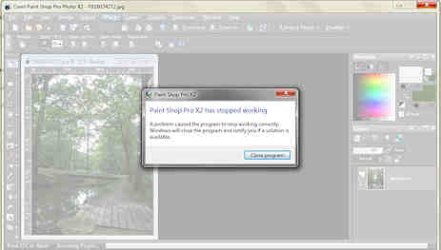
sometimes when I use a filter in PSP, the program freezes. The workspace turns into a pale, white-ish color & then it gives me a message that says:

Paint Shop Pro X2 has stopped working
A problem has caused the program to stop working correctly. Windows will close the program and notify you if a solution is available.

It looks like this...
psp-not-working.jpg

Do you know how I can fix this? Thanks.
 

My Computer

Computer Manufacturer/Model Number
dell inspiron one 19
OS
windows 7 (64 bit)
CPU
amd athlon II (dual core)
Motherboard
asus
Memory
6 gb
Graphics Card(s)
1024 mb ati radeon
Sound Card
thx tru studio pc
Monitor(s) Displays
19" lcd
Hard Drives
1000 gb sata hard drive (7200 rpm)
Case
all in one
I see others complaining of this on Corel's forums, with no fixes suggested. Is this a recent problem that may be fixed with a system restore? If not, an uninstall/reinstall is usually suggested. A Guy
 

My Computer

Computer type
PC/Desktop
OS
Windows 10 Home x64
CPU
INTEL Core i5-750 Quad-Core 3.37GHz
Motherboard
ASUS P7P55D
Memory
HyperX Fury Black Series 8GB (2 x 4GB) 1866Mhz
Graphics Card(s)
EVGA GeForce GTX 750 Superclocked 1GB 128-Bit GDDR5
Monitor(s) Displays
LG 32MA68HY 32" IPS
Screen Resolution
1920 x 1080
Hard Drives
Samsung 840 Evo 120GB, SEAGATE 500GB Barracuda® 7200.12, SATA 3 Gb/s, 7200 RPM, 16MB cache
PSU
ANTEC TruePower New TP-550, 80 PLUS, 550W
Case
ANTEC Three Hundred Illusion
Cooling
COOLER MASTER Hyper 212 Plus, 4 x 120mm 1 x 140mm Noctua's
Internet Speed
85 + Mbps
Antivirus
Avast
Browser
Vivaldi
it's not really a recent thing. There are some filters that haven't worked ever since it was originally installed. Sometimes if it doesn't work in PSP, I can go to PhotoShop & get the filter to work. But recently, even that doesn't work on some filters.

I just updated PSP....hopefully that will help.

Thanks

*********

I've found a solution!! I have another computer that has Vista. I also remembered I didn't have this problem when I used PSP 8 or PSP 9....so I installed my PSP 9 on the Vista computer & it works beautifully!!

I just wanted a way to use the filters. yeah, it's a little more trouble but at least now I know I can use it!

Thanks A Guy...
 
Last edited:

My Computer

Computer Manufacturer/Model Number
dell inspiron one 19
OS
windows 7 (64 bit)
CPU
amd athlon II (dual core)
Motherboard
asus
Memory
6 gb
Graphics Card(s)
1024 mb ati radeon
Sound Card
thx tru studio pc
Monitor(s) Displays
19" lcd
Hard Drives
1000 gb sata hard drive (7200 rpm)
Case
all in one
By hook or by crook ;) Good you found a work around :thumbsup:

A Guy
 

My Computer

Computer type
PC/Desktop
OS
Windows 10 Home x64
CPU
INTEL Core i5-750 Quad-Core 3.37GHz
Motherboard
ASUS P7P55D
Memory
HyperX Fury Black Series 8GB (2 x 4GB) 1866Mhz
Graphics Card(s)
EVGA GeForce GTX 750 Superclocked 1GB 128-Bit GDDR5
Monitor(s) Displays
LG 32MA68HY 32" IPS
Screen Resolution
1920 x 1080
Hard Drives
Samsung 840 Evo 120GB, SEAGATE 500GB Barracuda® 7200.12, SATA 3 Gb/s, 7200 RPM, 16MB cache
PSU
ANTEC TruePower New TP-550, 80 PLUS, 550W
Case
ANTEC Three Hundred Illusion
Cooling
COOLER MASTER Hyper 212 Plus, 4 x 120mm 1 x 140mm Noctua's
Internet Speed
85 + Mbps
Antivirus
Avast
Browser
Vivaldi
thanks again!

at least I know what to do if it happens again....thanks!
 

My Computer

Computer Manufacturer/Model Number
dell inspiron one 19
OS
windows 7 (64 bit)
CPU
amd athlon II (dual core)
Motherboard
asus
Memory
6 gb
Graphics Card(s)
1024 mb ati radeon
Sound Card
thx tru studio pc
Monitor(s) Displays
19" lcd
Hard Drives
1000 gb sata hard drive (7200 rpm)
Case
all in one
Back
Top