Solved Parameter for file is incorrect, along with inability to read Security

Tankruds

New member
Local time
7:47 PM
Messages
4
Hello, I am new here, so I apologize if I am putting this in the wrong area, but I have a virus on my computer, that I have tried to use several Anti Virus programs to remove, they have all failed, and I have even tried to remove it by myself. The file is located under C:\ProgramData\ and is a file called eazyzoom, and I cannot gain access to this file no matter what I do, I have used takeown in the command prompt to no avail. When I right click this file and go to properties, and go to the security tab it states "The requested security information is either unavailable, or can't be displayed." And I have no way to access the files. As every time I attempt to, I am told that the parameter is incorrect. I have also attempted to delete the file, and it wouldn't let me because the file was apparently too large, so I modified my recycling bin to delete files rather than to move them there first. And it says that the file is deleted, but it is still there. The file say that it has 0 bytes in it. However I can tell that the file is not empty because if I type the location of the files in Google Chrome, I can access them and see whats in them. That is the only way I have been able to access the files, and I have no way to delete these. If any of you know how to help me, please tell me what to do, this virus is rather frustrating as it keeps creating pop ups that sometimes cannot be closed, and I lose whatever work I was doing. Thanks in advance.
 

My Computer My Computer

Computer type
PC/Desktop
Computer Manufacturer/Model Number
Toshiba
OS
Windows 7 32 Bit
Antivirus
Avast
Browser
Google Chrome
If you want to download UVK and create a scan log I'll try writing a script to delete Easyzoom on boot.

UVK - Ultra Virus Killer - free version UVK Installer exe

Once installed - right click the desktop icon and choose run as admin.

From the welcome screen choose "Scan and create log"

Settings required:

Settings.jpg

Save the results to your desktop then upload the text file here.
 

My Computer My Computer

Computer type
Laptop
Computer Manufacturer/Model Number
ASUS
OS
Microsoft Windows 7 Home Premium 64-bit 7601 Multiprocessor Free Service Pack 1
CPU
AMD C-60 APU with Radeon(tm) HD Graphics
Motherboard
ASUSTeK COMPUTER INC. X501U
Memory
4.00 GB
Graphics Card(s)
AMD Radeon HD 6290 Graphics
Sound Card
(1) AMD High Definition Audio Device (2) Realtek High Defi
Screen Resolution
1366 x 768 x 32 bits (4294967296 colors) @ 60 Hz
Hard Drives
Hitachi HTS545050A7E380 SATA Disk Device
Antivirus
Comodo CIS & FW, SecureAplus App Whitelisting, Threatfire
Browser
Cyberfox 64bit, Opera 64bit, Airfox
Other Info
Spy-The-Spy, HitmanPro.Alert, Norton Connect Safe, MJRegWatcher, BitDefender TrafficLight, Voodoo Shield, Zemana AntiMalware
Here you go, and thank you.
 

Attachments

My Computer My Computer

Computer type
PC/Desktop
Computer Manufacturer/Model Number
Toshiba
OS
Windows 7 32 Bit
Antivirus
Avast
Browser
Google Chrome
Okay here's the script:

View attachment Fix List.txt

Instructions:

Download the file to your desktop and rename it to Fix List.uvk - change .txt extension to .uvk extension

Run UVK as admin - right click.

On the welcome screen choose "Run Scripts" then "Import commands from file"

Browse to your renamed Fix List.txt file and open it.

Run the Fix. Reboot if requested when finished. If there's no request for a reboot check the log - Welcome Screen > Delete Files and Folders > Log. Scroll to the bottom and check if there's a reboot request.

Reboot.
 
Last edited:

My Computer My Computer

Computer type
Laptop
Computer Manufacturer/Model Number
ASUS
OS
Microsoft Windows 7 Home Premium 64-bit 7601 Multiprocessor Free Service Pack 1
CPU
AMD C-60 APU with Radeon(tm) HD Graphics
Motherboard
ASUSTeK COMPUTER INC. X501U
Memory
4.00 GB
Graphics Card(s)
AMD Radeon HD 6290 Graphics
Sound Card
(1) AMD High Definition Audio Device (2) Realtek High Defi
Screen Resolution
1366 x 768 x 32 bits (4294967296 colors) @ 60 Hz
Hard Drives
Hitachi HTS545050A7E380 SATA Disk Device
Antivirus
Comodo CIS & FW, SecureAplus App Whitelisting, Threatfire
Browser
Cyberfox 64bit, Opera 64bit, Airfox
Other Info
Spy-The-Spy, HitmanPro.Alert, Norton Connect Safe, MJRegWatcher, BitDefender TrafficLight, Voodoo Shield, Zemana AntiMalware
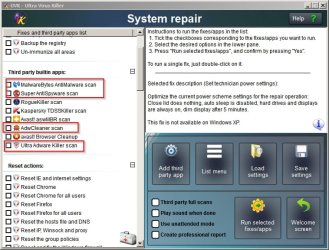
I'd suggest running the following scans after the reboot just to be on the safe side. You'll find them built into the "system repair" section and will auto update anything that you've already got installed from the list and download and run scans for anything that you don't have already.

Ultra Virus Killer Scans.jpg

Note: If the problem folder remains there are other ways to remove it!
 

My Computer My Computer

Computer type
Laptop
Computer Manufacturer/Model Number
ASUS
OS
Microsoft Windows 7 Home Premium 64-bit 7601 Multiprocessor Free Service Pack 1
CPU
AMD C-60 APU with Radeon(tm) HD Graphics
Motherboard
ASUSTeK COMPUTER INC. X501U
Memory
4.00 GB
Graphics Card(s)
AMD Radeon HD 6290 Graphics
Sound Card
(1) AMD High Definition Audio Device (2) Realtek High Defi
Screen Resolution
1366 x 768 x 32 bits (4294967296 colors) @ 60 Hz
Hard Drives
Hitachi HTS545050A7E380 SATA Disk Device
Antivirus
Comodo CIS & FW, SecureAplus App Whitelisting, Threatfire
Browser
Cyberfox 64bit, Opera 64bit, Airfox
Other Info
Spy-The-Spy, HitmanPro.Alert, Norton Connect Safe, MJRegWatcher, BitDefender TrafficLight, Voodoo Shield, Zemana AntiMalware
eazyzoom and the popups are still here sadly :( I don't know if it matters, but the only exe file running in eazyzoom is a file called uosu3gu.exe and is running on startup. I don't believe any of the other files are actually running. I'll attempt using the scans like you recommended, and will let you know after I finish running them. Thank you for your time.
 

My Computer My Computer

Computer type
PC/Desktop
Computer Manufacturer/Model Number
Toshiba
OS
Windows 7 32 Bit
Antivirus
Avast
Browser
Google Chrome
You rebooted? Try using the UVK process manager and right click uosu3gu.exe then choose "kill process and delete file"

Let us know how you get on. If it can't be killed and deleted navigate to the C:\ProgramData\eazyzoom folder and right click it. Choose the "force delete file" option. A reboot will be required. If it still persists:

Get PowerTool x86 V4.6 (en).zip and run it. Use the file tab and navigate to the C:\ProgramData\eazyzoom directory - right click it and delete it.

Edit: Download link for PowerTool removed by poster

Other than that you'd need to boot into Safe Mode and delete it manually.
 
Last edited:

My Computer My Computer

Computer type
Laptop
Computer Manufacturer/Model Number
ASUS
OS
Microsoft Windows 7 Home Premium 64-bit 7601 Multiprocessor Free Service Pack 1
CPU
AMD C-60 APU with Radeon(tm) HD Graphics
Motherboard
ASUSTeK COMPUTER INC. X501U
Memory
4.00 GB
Graphics Card(s)
AMD Radeon HD 6290 Graphics
Sound Card
(1) AMD High Definition Audio Device (2) Realtek High Defi
Screen Resolution
1366 x 768 x 32 bits (4294967296 colors) @ 60 Hz
Hard Drives
Hitachi HTS545050A7E380 SATA Disk Device
Antivirus
Comodo CIS & FW, SecureAplus App Whitelisting, Threatfire
Browser
Cyberfox 64bit, Opera 64bit, Airfox
Other Info
Spy-The-Spy, HitmanPro.Alert, Norton Connect Safe, MJRegWatcher, BitDefender TrafficLight, Voodoo Shield, Zemana AntiMalware
Will check this thread again tomorrow. It's also possible that you might need to reset your browser(s) after removal.
 

My Computer My Computer

Computer type
Laptop
Computer Manufacturer/Model Number
ASUS
OS
Microsoft Windows 7 Home Premium 64-bit 7601 Multiprocessor Free Service Pack 1
CPU
AMD C-60 APU with Radeon(tm) HD Graphics
Motherboard
ASUSTeK COMPUTER INC. X501U
Memory
4.00 GB
Graphics Card(s)
AMD Radeon HD 6290 Graphics
Sound Card
(1) AMD High Definition Audio Device (2) Realtek High Defi
Screen Resolution
1366 x 768 x 32 bits (4294967296 colors) @ 60 Hz
Hard Drives
Hitachi HTS545050A7E380 SATA Disk Device
Antivirus
Comodo CIS & FW, SecureAplus App Whitelisting, Threatfire
Browser
Cyberfox 64bit, Opera 64bit, Airfox
Other Info
Spy-The-Spy, HitmanPro.Alert, Norton Connect Safe, MJRegWatcher, BitDefender TrafficLight, Voodoo Shield, Zemana AntiMalware
Sorry for the wait, I was out on a bit of business, however what you recommended has worked! Thank you so much for your time.
 

My Computer My Computer

Computer type
PC/Desktop
Computer Manufacturer/Model Number
Toshiba
OS
Windows 7 32 Bit
Antivirus
Avast
Browser
Google Chrome
Back
Top