[FONT=Arial, sans-serif]Hi[/FONT]
[FONT=Arial, sans-serif]I have set up standard user account on my PC for grandson but I am having problems applying parental controls.[/FONT]
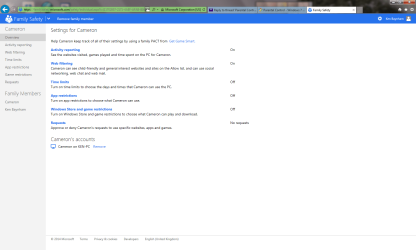
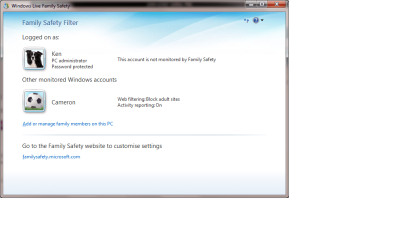
[FONT=Arial, sans-serif]I have downloaded “Windows Live Family Safety” and selected the items I think are appropriate but when I log into my grandson account I am able access very adult sites very easily. When the account boots up a pop-up appears at the lower right of the screen advising that adult sites are blocked and monitoring is on but clearly this is not so.[/FONT]
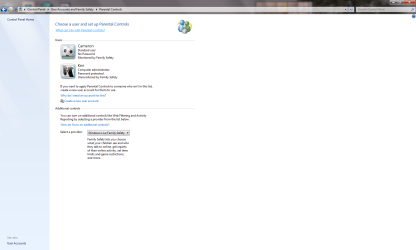
[FONT=Arial, sans-serif]I have read the tutorial supplied by this site “Parental Controls – Setup and Use” and what happens to me differs from that described. When I select my grandsons account at “Control Panel – All Control Panel Items – Parental Controls” – I am taken the “Windows Live Family Safety” site and not to “User Controls” as described. I am never presented with opportunity to enforce current settings.[/FONT]
[FONT=Arial, sans-serif]I have really run out of ideas and would greatly appreciate some help please.[/FONT]
[FONT=Arial, sans-serif]Best regards Ken [/FONT]
[FONT=Arial, sans-serif]I have set up standard user account on my PC for grandson but I am having problems applying parental controls.[/FONT]
[FONT=Arial, sans-serif]I have downloaded “Windows Live Family Safety” and selected the items I think are appropriate but when I log into my grandson account I am able access very adult sites very easily. When the account boots up a pop-up appears at the lower right of the screen advising that adult sites are blocked and monitoring is on but clearly this is not so.[/FONT]
[FONT=Arial, sans-serif]I have read the tutorial supplied by this site “Parental Controls – Setup and Use” and what happens to me differs from that described. When I select my grandsons account at “Control Panel – All Control Panel Items – Parental Controls” – I am taken the “Windows Live Family Safety” site and not to “User Controls” as described. I am never presented with opportunity to enforce current settings.[/FONT]
[FONT=Arial, sans-serif]I have really run out of ideas and would greatly appreciate some help please.[/FONT]
[FONT=Arial, sans-serif]Best regards Ken [/FONT]
My Computer
At a glance
Windows 7 Home PremiumIntel(R) Core(TM) i5-4670K CPU @ 3.40GHz8GB Corsair PC3-12800 1600MHz DDR3 Memory (2 ...NVIDIA GeForce GTX 650 Ti BOOST
- Computer type
- PC/Desktop
- Computer Manufacturer/Model Number
- custom build
- OS
- Windows 7 Home Premium
- CPU
- Intel(R) Core(TM) i5-4670K CPU @ 3.40GHz
- Motherboard
- ASUSTeK COMPUTER INC. Z87-K
- Memory
- 8GB Corsair PC3-12800 1600MHz DDR3 Memory (2 x 4GB sticks)
- Graphics Card(s)
- NVIDIA GeForce GTX 650 Ti BOOST
- Sound Card
- 1) NVIDIA Virtual Audio Device (Wave Extensible) (WDM) (2)
- Screen Resolution
- 1680x1050
- Hard Drives
- (1) ST1000DM ST1000DM003-1CH1 SCSI Disk Device (2) Hitachi HDS721010CLA332 USB Device
- Keyboard
- USB
- Mouse
- Wireless
- Internet Speed
- 36 M
- Antivirus
- Bulldog
- Browser
- Internet Explorer