Solved Parental Control

KenBaynham

Ken
Member
Local time
6:09 PM
Messages
89
Location
Hereford
[FONT=Arial, sans-serif]Hi[/FONT]


[FONT=Arial, sans-serif]I have set up standard user account on my PC for grandson but I am having problems applying parental controls.[/FONT]


[FONT=Arial, sans-serif]I have downloaded “Windows Live Family Safety” and selected the items I think are appropriate but when I log into my grandson account I am able access very adult sites very easily. When the account boots up a pop-up appears at the lower right of the screen advising that adult sites are blocked and monitoring is on but clearly this is not so.[/FONT]


[FONT=Arial, sans-serif]I have read the tutorial supplied by this site “Parental Controls – Setup and Use” and what happens to me differs from that described. When I select my grandsons account at “Control Panel – All Control Panel Items – Parental Controls” – I am taken the “Windows Live Family Safety” site and not to “User Controls” as described. I am never presented with opportunity to enforce current settings.[/FONT]


[FONT=Arial, sans-serif]I have really run out of ideas and would greatly appreciate some help please.[/FONT]


[FONT=Arial, sans-serif]Best regards Ken [/FONT]
 

My Computer

Computer type
PC/Desktop
Computer Manufacturer/Model Number
custom build
OS
Windows 7 Home Premium
CPU
Intel(R) Core(TM) i5-4670K CPU @ 3.40GHz
Motherboard
ASUSTeK COMPUTER INC. Z87-K
Memory
8GB Corsair PC3-12800 1600MHz DDR3 Memory (2 x 4GB sticks)
Graphics Card(s)
NVIDIA GeForce GTX 650 Ti BOOST
Sound Card
1) NVIDIA Virtual Audio Device (Wave Extensible) (WDM) (2)
Screen Resolution
1680x1050
Hard Drives
(1) ST1000DM ST1000DM003-1CH1 SCSI Disk Device (2) Hitachi HDS721010CLA332 USB Device
Keyboard
USB
Mouse
Wireless
Internet Speed
36 M
Antivirus
Bulldog
Browser
Internet Explorer
Thanks for reply Cyanna


The controls set so far are:


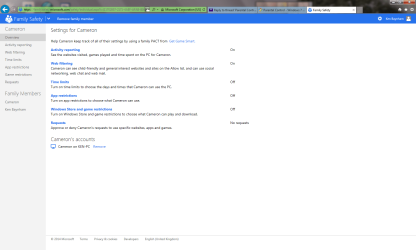
Active Reporting - (See the websites visited, games played and time spent on the PC.)
Web Filtering - (See child-friendly and general interest websites and sites on the Allow list, and can use social networking, web chat and web mail). Both set to on in Microsoft Live Family Safety.


I have also set IE security to medium high. If I try to set to high all sites are blocked even the ones on the allow list.


I hope this information is as you require and look forward to your thoughts.


Best regards Ken.
 

My Computer

Computer type
PC/Desktop
Computer Manufacturer/Model Number
custom build
OS
Windows 7 Home Premium
CPU
Intel(R) Core(TM) i5-4670K CPU @ 3.40GHz
Motherboard
ASUSTeK COMPUTER INC. Z87-K
Memory
8GB Corsair PC3-12800 1600MHz DDR3 Memory (2 x 4GB sticks)
Graphics Card(s)
NVIDIA GeForce GTX 650 Ti BOOST
Sound Card
1) NVIDIA Virtual Audio Device (Wave Extensible) (WDM) (2)
Screen Resolution
1680x1050
Hard Drives
(1) ST1000DM ST1000DM003-1CH1 SCSI Disk Device (2) Hitachi HDS721010CLA332 USB Device
Keyboard
USB
Mouse
Wireless
Internet Speed
36 M
Antivirus
Bulldog
Browser
Internet Explorer
All I can think of is this: log out od the child account (don't just switch users). Log back into your own account and refresh the settings on Family Safety (there should be a refresh icon in the upper right corner). Log back into the child account and test....
 

My Computer

Computer type
PC/Desktop
OS
windows 7 ultimate x64
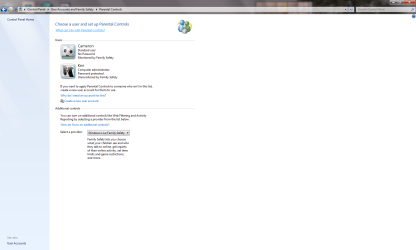
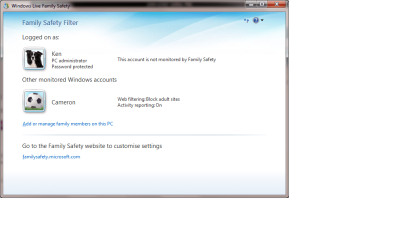
I can't see the refresh button Cyanna. I'm going to try and attach screen shots.

Hope it works please let me know.

Regards Ken
 

Attachments

  • Control Panel Parental Control Screen Shot.png
    Control Panel Parental Control Screen Shot.png
    187.3 KB · Views: 3
  • Family Safety Screen shot.png
    Family Safety Screen shot.png
    149.3 KB · Views: 3

My Computer

Computer type
PC/Desktop
Computer Manufacturer/Model Number
custom build
OS
Windows 7 Home Premium
CPU
Intel(R) Core(TM) i5-4670K CPU @ 3.40GHz
Motherboard
ASUSTeK COMPUTER INC. Z87-K
Memory
8GB Corsair PC3-12800 1600MHz DDR3 Memory (2 x 4GB sticks)
Graphics Card(s)
NVIDIA GeForce GTX 650 Ti BOOST
Sound Card
1) NVIDIA Virtual Audio Device (Wave Extensible) (WDM) (2)
Screen Resolution
1680x1050
Hard Drives
(1) ST1000DM ST1000DM003-1CH1 SCSI Disk Device (2) Hitachi HDS721010CLA332 USB Device
Keyboard
USB
Mouse
Wireless
Internet Speed
36 M
Antivirus
Bulldog
Browser
Internet Explorer
from your account open Family Safety by clicking the Start button
4f6cbd09-148c-4dd8-b1f2-48f232a2fd33_0.jpg
. In the search box, type Family Safety, and then, in the list of results, click Family Safety
 

My Computer

Computer type
PC/Desktop
OS
windows 7 ultimate x64
I still don't see a reset option Cyanna.

I think I have resolved the problem by using the Norton Family safety which worked fine first time but I would still very like to know what I am doing wrong with the Microsoft version.
 

Attachments

  • Start Button Panel Parental Control Screen Shot.png
    Start Button Panel Parental Control Screen Shot.png
    119.1 KB · Views: 3

My Computer

Computer type
PC/Desktop
Computer Manufacturer/Model Number
custom build
OS
Windows 7 Home Premium
CPU
Intel(R) Core(TM) i5-4670K CPU @ 3.40GHz
Motherboard
ASUSTeK COMPUTER INC. Z87-K
Memory
8GB Corsair PC3-12800 1600MHz DDR3 Memory (2 x 4GB sticks)
Graphics Card(s)
NVIDIA GeForce GTX 650 Ti BOOST
Sound Card
1) NVIDIA Virtual Audio Device (Wave Extensible) (WDM) (2)
Screen Resolution
1680x1050
Hard Drives
(1) ST1000DM ST1000DM003-1CH1 SCSI Disk Device (2) Hitachi HDS721010CLA332 USB Device
Keyboard
USB
Mouse
Wireless
Internet Speed
36 M
Antivirus
Bulldog
Browser
Internet Explorer
the refresh is the icon with two arrows on the top right, just by the ?
 

My Computer

Computer type
PC/Desktop
OS
windows 7 ultimate x64

My Computer

Computer type
Laptop
Computer Manufacturer/Model Number
HP Elitebook 8540p
OS
Windows 7 Pro 32
CPU
Intel(R) Core(TM) i5 CPU M 540 @ 2.53GHz
Motherboard
Hewlett-Packard 1521
Memory
4,00 GB (Usable 2,98)
Graphics Card(s)
NVIDIA NVS 5100M
Sound Card
NVIDIA High Definition Audio
Screen Resolution
1600x900
Hard Drives
INTEL SSDSA2CW120G3
Antivirus
F-Secure Internet Security
Browser
IE, Firefox, Opera
Other Info
Sandboxie,
SRP (Software Restriction Policy),
EMET (Enhanced Mitigation Experience Toolkit),
WFC (Windows Firewall Control by BiniSoft),
Malwarebytes Premium
When I click the two arrows I get a popup in the bottom right corner of the screen telling me my I have the latest settings. Everything seems to be working fine with Norton Family and it was so simple. Still frustrated that I found Microsoft so difficult to set up but I have decided to use well enough alone. Thanks a lot for all your patience and help.

Best regards Ken
 

My Computer

Computer type
PC/Desktop
Computer Manufacturer/Model Number
custom build
OS
Windows 7 Home Premium
CPU
Intel(R) Core(TM) i5-4670K CPU @ 3.40GHz
Motherboard
ASUSTeK COMPUTER INC. Z87-K
Memory
8GB Corsair PC3-12800 1600MHz DDR3 Memory (2 x 4GB sticks)
Graphics Card(s)
NVIDIA GeForce GTX 650 Ti BOOST
Sound Card
1) NVIDIA Virtual Audio Device (Wave Extensible) (WDM) (2)
Screen Resolution
1680x1050
Hard Drives
(1) ST1000DM ST1000DM003-1CH1 SCSI Disk Device (2) Hitachi HDS721010CLA332 USB Device
Keyboard
USB
Mouse
Wireless
Internet Speed
36 M
Antivirus
Bulldog
Browser
Internet Explorer
Back
Top