Parental Controls - Set Time Limits

How to Set Time Limits in Windows 7 Parental Controls

   Information
Using Parental Controls, you can set time limits to control when standard user accounts are allowed to log on to the computer. Time limits prevent them from logging on during specified hours for every day of the week. If they're logged on when their allotted time ends, they'll be automatically logged off.


Here's How:
1. Open the Control Panel (icons view), and click on Parental Controls.

2. If prompted by UAC, then click on Yes.

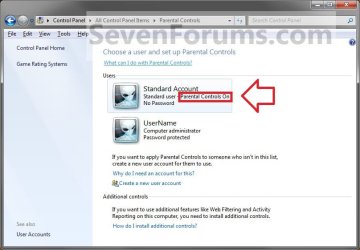
3. Select and click on the listed standard user account that you want to use Parental Controls to set time limits on. (see screenshot below)
Step3.jpg
4. Turn on Parental Controls for this standard user account if it is not already turned on for it.

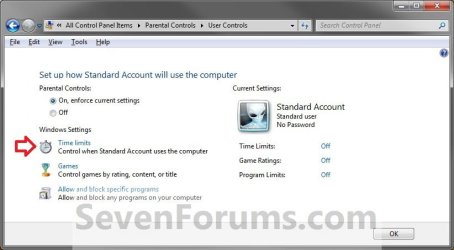
5. Under Windows Settings, click on the Time limits link. (see screenshot below)
Step2.jpg
6. To Block Hours
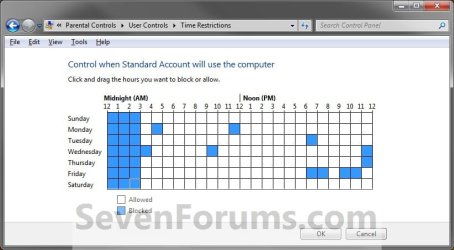
A) Click on a white box, or left click and hold and drag over a group of white boxes and release, to mark it blue for each hour of each day that you want to block. (see screenshot below)
Time_Restrictions.jpg
7. To Unblock Hours
A) Click on a blue box, or left click and hold and drag over a group of blue boxes and release, to mark it white for each hour of each day that you want to unblock. (see screenshot above)
8. When done, click on OK. (see screenshot below step 6A)

9. Click on OK. (see screenshot below step 5)

10. Close the Parental Controls window. (see screenshot below step 3)
That's it,
Shawn


Last edited:
All works fine in my daughters PCs but close ;-)
Looks like the kids can change the time seting without any restriction ... so if I block the time from 10PM till 12PM they manage to modify the PC real time as it approaches towards 10PM. So my clever girls can keep playing with the PC although the "Time Limit" feature is set.
I have tried to block the time change feature in a standard account but this is not allowed in Win7 Home Premium version :-0
Right now this Time Limit Parental Control does not work at home. Anyone has an easy option?
Regards
Xavier
 

My Computer My Computer

Computer Manufacturer/Model Number
HP/Pavilion
OS
win XP and 7
CPU
Pentium 4 CPU
Motherboard
Do not know
Memory
1 GB
Graphics Card(s)
Do not know
Sound Card
Do not know
Monitor(s) Displays
19" LCD
Hard Drives
Do not know
PSU
Do not know
Case
Do not know
Cooling
Do not know
Hello Xavier, and welcome to Seven Forums.

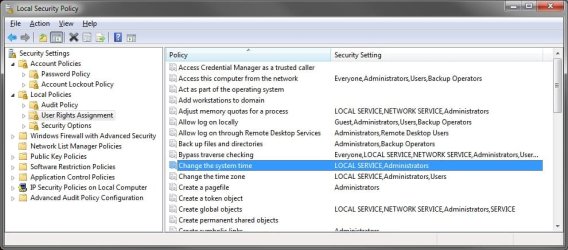
You might change your administrator account password to be safe. By default in Windows 7, a Standard user cannot change the system time without having to enter the administrator's password first. Be sure that you also have the built-in Administrator account password protected as well in case they are using it.

secpol.msc.jpg
 

My Computer My Computer

Computer type
PC/Desktop
Computer Manufacturer/Model Number
Self built custom
OS
64-bit Windows 11 Pro for Workstations
CPU
Intel i7-8700K OC'd to 5 GHz
Motherboard
ASUS ROG Maximus XI Formula Z390
Memory
64 GB (4x16GB) G.SKILL TridentZ RGB DDR4 3600 MHz
Graphics Card(s)
ASUS ROG-STRIX-GTX1080TI-O11G-GAMING
Sound Card
Integrated
Monitor(s) Displays
2 x Samsung Odyssey G7 27"
Screen Resolution
2560x1440
Hard Drives
1TB Samsung 990 PRO M.2,
4TB Samsung 990 PRO PRO M.2,
TerraMaster F8 SSD Plus NAS
PSU
Seasonic Prime Titanium 850W
Case
Thermaltake Core P3
Cooling
Corsair Hydro H115i
Keyboard
Logitech wireless K800
Mouse
Logitech MX Master 4
Internet Speed
2 Gb/s Download and 100 Mb/s Upload
Antivirus
Malwarebyte Anti-Malware Premium
Browser
Google Chrome
Other Info
Logitech Z625 speaker system,
Logitech BRIO 4K Pro webcam,
HP Color LaserJet Pro MFP M477fdn,
APC SMART-UPS RT 1000 XL - SURT1000XLI,
Galaxy S23 Plus phone
You are right, It was my fault. Thanks for the assessment!

That "clever girls" did stolen the administrator password, I feel embarrassed :confused: but now is fixed.

Next time I will be more cautious.
Regards
Xavier
 

My Computer My Computer

Computer Manufacturer/Model Number
HP/Pavilion
OS
win XP and 7
CPU
Pentium 4 CPU
Motherboard
Do not know
Memory
1 GB
Graphics Card(s)
Do not know
Sound Card
Do not know
Monitor(s) Displays
19" LCD
Hard Drives
Do not know
PSU
Do not know
Case
Do not know
Cooling
Do not know
It's no problem at all Xavier. They can be sneaky and clever little :devil:'s. I'm happy that you got it sorted out. :)
 

My Computer My Computer

Computer type
PC/Desktop
Computer Manufacturer/Model Number
Self built custom
OS
64-bit Windows 11 Pro for Workstations
CPU
Intel i7-8700K OC'd to 5 GHz
Motherboard
ASUS ROG Maximus XI Formula Z390
Memory
64 GB (4x16GB) G.SKILL TridentZ RGB DDR4 3600 MHz
Graphics Card(s)
ASUS ROG-STRIX-GTX1080TI-O11G-GAMING
Sound Card
Integrated
Monitor(s) Displays
2 x Samsung Odyssey G7 27"
Screen Resolution
2560x1440
Hard Drives
1TB Samsung 990 PRO M.2,
4TB Samsung 990 PRO PRO M.2,
TerraMaster F8 SSD Plus NAS
PSU
Seasonic Prime Titanium 850W
Case
Thermaltake Core P3
Cooling
Corsair Hydro H115i
Keyboard
Logitech wireless K800
Mouse
Logitech MX Master 4
Internet Speed
2 Gb/s Download and 100 Mb/s Upload
Antivirus
Malwarebyte Anti-Malware Premium
Browser
Google Chrome
Other Info
Logitech Z625 speaker system,
Logitech BRIO 4K Pro webcam,
HP Color LaserJet Pro MFP M477fdn,
APC SMART-UPS RT 1000 XL - SURT1000XLI,
Galaxy S23 Plus phone
hello Brink,whats the source of time counting?I mean if I pick up the motherboards battery does it work yet?in other words,the time of the system depends on this battery or am i wrong? 10x
 

My Computer My Computer

Computer type
PC/Desktop
OS
Windows 7 Ultimate 64bit
CPU
Intel Corei7
Memory
4GB
Graphics Card(s)
nVIDIA GeForce
Hello Sali,

It's based on the system clock's time. Whatever time it has, it what Parental Control goes by.

You have to be logged in as an administrator to be able to change the time normally, but resetting BIOS/CMOS and the time in it by yanking the battery for a bit may or may not affect the system clock in Windows 7 much.
 

My Computer My Computer

Computer type
PC/Desktop
Computer Manufacturer/Model Number
Self built custom
OS
64-bit Windows 11 Pro for Workstations
CPU
Intel i7-8700K OC'd to 5 GHz
Motherboard
ASUS ROG Maximus XI Formula Z390
Memory
64 GB (4x16GB) G.SKILL TridentZ RGB DDR4 3600 MHz
Graphics Card(s)
ASUS ROG-STRIX-GTX1080TI-O11G-GAMING
Sound Card
Integrated
Monitor(s) Displays
2 x Samsung Odyssey G7 27"
Screen Resolution
2560x1440
Hard Drives
1TB Samsung 990 PRO M.2,
4TB Samsung 990 PRO PRO M.2,
TerraMaster F8 SSD Plus NAS
PSU
Seasonic Prime Titanium 850W
Case
Thermaltake Core P3
Cooling
Corsair Hydro H115i
Keyboard
Logitech wireless K800
Mouse
Logitech MX Master 4
Internet Speed
2 Gb/s Download and 100 Mb/s Upload
Antivirus
Malwarebyte Anti-Malware Premium
Browser
Google Chrome
Other Info
Logitech Z625 speaker system,
Logitech BRIO 4K Pro webcam,
HP Color LaserJet Pro MFP M477fdn,
APC SMART-UPS RT 1000 XL - SURT1000XLI,
Galaxy S23 Plus phone
i know about the admin privileges,but when we turn off the computer the next that we turn it on,the system time is correct,so if we yanking the battery,system wont have any power source for the time...is it right?
 

My Computer My Computer

Computer type
PC/Desktop
OS
Windows 7 Ultimate 64bit
CPU
Intel Corei7
Memory
4GB
Graphics Card(s)
nVIDIA GeForce
Wrong. The battery only affects the BIOS on the motherboard to keep accurate time and it's settings while the computer is turned off. If you yank the battery, Windows 7 will still keep the time, but may be off a bit after powering the computer back up until it checks in automatically every so often with internet time synchronization.

In other words, you're not going to bypass Parental Controls as a standard user.
 
Last edited:

My Computer My Computer

Computer type
PC/Desktop
Computer Manufacturer/Model Number
Self built custom
OS
64-bit Windows 11 Pro for Workstations
CPU
Intel i7-8700K OC'd to 5 GHz
Motherboard
ASUS ROG Maximus XI Formula Z390
Memory
64 GB (4x16GB) G.SKILL TridentZ RGB DDR4 3600 MHz
Graphics Card(s)
ASUS ROG-STRIX-GTX1080TI-O11G-GAMING
Sound Card
Integrated
Monitor(s) Displays
2 x Samsung Odyssey G7 27"
Screen Resolution
2560x1440
Hard Drives
1TB Samsung 990 PRO M.2,
4TB Samsung 990 PRO PRO M.2,
TerraMaster F8 SSD Plus NAS
PSU
Seasonic Prime Titanium 850W
Case
Thermaltake Core P3
Cooling
Corsair Hydro H115i
Keyboard
Logitech wireless K800
Mouse
Logitech MX Master 4
Internet Speed
2 Gb/s Download and 100 Mb/s Upload
Antivirus
Malwarebyte Anti-Malware Premium
Browser
Google Chrome
Other Info
Logitech Z625 speaker system,
Logitech BRIO 4K Pro webcam,
HP Color LaserJet Pro MFP M477fdn,
APC SMART-UPS RT 1000 XL - SURT1000XLI,
Galaxy S23 Plus phone
10x Brink for this gr8 description,i didnt know this,thank u.
 

My Computer My Computer

Computer type
PC/Desktop
OS
Windows 7 Ultimate 64bit
CPU
Intel Corei7
Memory
4GB
Graphics Card(s)
nVIDIA GeForce
You're most welcome. :)
 

My Computer My Computer

Computer type
PC/Desktop
Computer Manufacturer/Model Number
Self built custom
OS
64-bit Windows 11 Pro for Workstations
CPU
Intel i7-8700K OC'd to 5 GHz
Motherboard
ASUS ROG Maximus XI Formula Z390
Memory
64 GB (4x16GB) G.SKILL TridentZ RGB DDR4 3600 MHz
Graphics Card(s)
ASUS ROG-STRIX-GTX1080TI-O11G-GAMING
Sound Card
Integrated
Monitor(s) Displays
2 x Samsung Odyssey G7 27"
Screen Resolution
2560x1440
Hard Drives
1TB Samsung 990 PRO M.2,
4TB Samsung 990 PRO PRO M.2,
TerraMaster F8 SSD Plus NAS
PSU
Seasonic Prime Titanium 850W
Case
Thermaltake Core P3
Cooling
Corsair Hydro H115i
Keyboard
Logitech wireless K800
Mouse
Logitech MX Master 4
Internet Speed
2 Gb/s Download and 100 Mb/s Upload
Antivirus
Malwarebyte Anti-Malware Premium
Browser
Google Chrome
Other Info
Logitech Z625 speaker system,
Logitech BRIO 4K Pro webcam,
HP Color LaserJet Pro MFP M477fdn,
APC SMART-UPS RT 1000 XL - SURT1000XLI,
Galaxy S23 Plus phone
Cannot login during "Allowed" hours limit when time limit is set

Hi,

I have set parental control for my 2 kids on my PC, running Windows 7 Home Premium 32bit. Have set different "allowed" time slots for them - 10-11 am and 3-4 pm. The first one in AM never works. The system always throws an error message and the second one in PM works for almost 1.5 hours or so.

The system clock and time zone has been set correctly in administrator account.

Please suggest where I probably could go wrong, but my kids are too much annoyed with thie new time-limit system and I had to forcegully disable it for the time being. Any help is highly appreciated.

Thanks,
Saurabh
 

My Computer My Computer

OS
Windows 7 Home Premium 32bit
Hello Saurabh, and welcome to Seven Forums.

I'm not sure what may be causing this for you. You might double check to make sure that the BIOS time is also set correctly.

In addition, you might give the free Windows Live Family Safety a try to see how it's time limit feature work.

Hope this helps,
Shawn
 

My Computer My Computer

Computer type
PC/Desktop
Computer Manufacturer/Model Number
Self built custom
OS
64-bit Windows 11 Pro for Workstations
CPU
Intel i7-8700K OC'd to 5 GHz
Motherboard
ASUS ROG Maximus XI Formula Z390
Memory
64 GB (4x16GB) G.SKILL TridentZ RGB DDR4 3600 MHz
Graphics Card(s)
ASUS ROG-STRIX-GTX1080TI-O11G-GAMING
Sound Card
Integrated
Monitor(s) Displays
2 x Samsung Odyssey G7 27"
Screen Resolution
2560x1440
Hard Drives
1TB Samsung 990 PRO M.2,
4TB Samsung 990 PRO PRO M.2,
TerraMaster F8 SSD Plus NAS
PSU
Seasonic Prime Titanium 850W
Case
Thermaltake Core P3
Cooling
Corsair Hydro H115i
Keyboard
Logitech wireless K800
Mouse
Logitech MX Master 4
Internet Speed
2 Gb/s Download and 100 Mb/s Upload
Antivirus
Malwarebyte Anti-Malware Premium
Browser
Google Chrome
Other Info
Logitech Z625 speaker system,
Logitech BRIO 4K Pro webcam,
HP Color LaserJet Pro MFP M477fdn,
APC SMART-UPS RT 1000 XL - SURT1000XLI,
Galaxy S23 Plus phone
Is there anyway to set time limits on internet usage? I have tried the parental controls but they stop all computer usage. I would like to be able to allow access to the internet for specified hours and after that is over still have access to the computer. That way I can let my son surf for a short time and afterwards he still has access to be able to use the machine.
Maybe I'm missing something in parental controls?
Thanks in advance for any assistance with this, and for letting me join the forum!
 

My Computer My Computer

Computer type
Laptop
Computer Manufacturer/Model Number
Asus
OS
Windows 7
CPU
AMD
Hello Crtzlow, and welcome to Seven Forums.

No. You didn't miss anything. Parental Controls in Windows 7 only let's you restrict computer usage and not just internet usage.

For that you'll need a 3rd party program. I found the free GroundHog program at the link below that looks like it may be good for what you are wanting. You'll have to register there to get it, but it's 100% free.

Limit internet time, Limit computer time, Parental control software to enforce screen time control; application for parenting of teens and young internet users

Hope this helps, :)
Shawn
 

My Computer My Computer

Computer type
PC/Desktop
Computer Manufacturer/Model Number
Self built custom
OS
64-bit Windows 11 Pro for Workstations
CPU
Intel i7-8700K OC'd to 5 GHz
Motherboard
ASUS ROG Maximus XI Formula Z390
Memory
64 GB (4x16GB) G.SKILL TridentZ RGB DDR4 3600 MHz
Graphics Card(s)
ASUS ROG-STRIX-GTX1080TI-O11G-GAMING
Sound Card
Integrated
Monitor(s) Displays
2 x Samsung Odyssey G7 27"
Screen Resolution
2560x1440
Hard Drives
1TB Samsung 990 PRO M.2,
4TB Samsung 990 PRO PRO M.2,
TerraMaster F8 SSD Plus NAS
PSU
Seasonic Prime Titanium 850W
Case
Thermaltake Core P3
Cooling
Corsair Hydro H115i
Keyboard
Logitech wireless K800
Mouse
Logitech MX Master 4
Internet Speed
2 Gb/s Download and 100 Mb/s Upload
Antivirus
Malwarebyte Anti-Malware Premium
Browser
Google Chrome
Other Info
Logitech Z625 speaker system,
Logitech BRIO 4K Pro webcam,
HP Color LaserJet Pro MFP M477fdn,
APC SMART-UPS RT 1000 XL - SURT1000XLI,
Galaxy S23 Plus phone
Thanks Shawn! I'll check that out. I've got the machine pretty much secured as far as questionable websites are concerned so this ought to get everything else in order.

Thanks again for the fast reply....I'm sure I'll have others as time passes by.

Don
 

My Computer My Computer

Computer type
Laptop
Computer Manufacturer/Model Number
Asus
OS
Windows 7
CPU
AMD
You're welcome Don. Please let us know how the programs works out for you.
 

My Computer My Computer

Computer type
PC/Desktop
Computer Manufacturer/Model Number
Self built custom
OS
64-bit Windows 11 Pro for Workstations
CPU
Intel i7-8700K OC'd to 5 GHz
Motherboard
ASUS ROG Maximus XI Formula Z390
Memory
64 GB (4x16GB) G.SKILL TridentZ RGB DDR4 3600 MHz
Graphics Card(s)
ASUS ROG-STRIX-GTX1080TI-O11G-GAMING
Sound Card
Integrated
Monitor(s) Displays
2 x Samsung Odyssey G7 27"
Screen Resolution
2560x1440
Hard Drives
1TB Samsung 990 PRO M.2,
4TB Samsung 990 PRO PRO M.2,
TerraMaster F8 SSD Plus NAS
PSU
Seasonic Prime Titanium 850W
Case
Thermaltake Core P3
Cooling
Corsair Hydro H115i
Keyboard
Logitech wireless K800
Mouse
Logitech MX Master 4
Internet Speed
2 Gb/s Download and 100 Mb/s Upload
Antivirus
Malwarebyte Anti-Malware Premium
Browser
Google Chrome
Other Info
Logitech Z625 speaker system,
Logitech BRIO 4K Pro webcam,
HP Color LaserJet Pro MFP M477fdn,
APC SMART-UPS RT 1000 XL - SURT1000XLI,
Galaxy S23 Plus phone
Back
Top